
Interaction
Information targets the latest supported release. For legacy (older) versions and bug fixes, read the changelogs.
Introduction
Horses can be tamed, cared for, equipped with tack and ridden.
Interactions
Restrictions may limit certain interactions to the owner or trusted players of each horse.
You can only perform the following interactions on a tamed horse:
- Access the Horse Inventory GUI
- Use a brush
- Use desensitization items
- Equip tack
- Ride and control the horse
- Breed the horse
Taming
Fatal "buck offs" can occur if one horse kicks another, who kicks back etc. It's not an "intentional" risk but it can happen!
It is recommended to tame horses in safely enclosed area, away from other players, pets or animals.
Right Click any untamed horse with an empty hand to mount it.
- Taming attempts will prompt the horse to buck or rear.
- Horses will dismount the rider and emit gray particles if unsuccessful.
- Horses may harm nearby entities and players with bucks - back up quickly to avoid taking damage!
- Every attempt reduces the (random) "temper" variable until it reaches 0.
Successful taming is indicated by heart particles and this time the rider remains mounted.
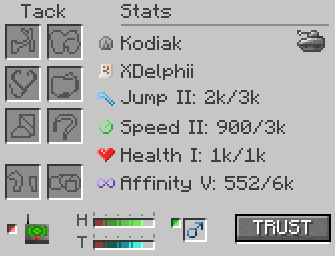
Trust Status
It is recommended to keep horses on Trust or None for Multiplayer servers.
Left Click the button in the horse inventory to toggle trust status.
Tacking Up
Specific items have requirements in order to be equipped.
Shift + Right Click a tamed horse with an empty hand to access the horse inventory.
- Equip a tack item by placing a compatible item into the appropriate slot.
- "Hot swap" tack for a different item of the same type using
Shift+Right Clickon the horse with the item in hand.
Tack Requirements
Requirements for certain tack items can be configured (or disabled entirely) in the server configs.
Leading
Right Click a horse with a lead in hand.
Shift + Left Click a bridled horse to use the reins as an inbuilt lead. This visually unrenders (hides) the reins.
Ground Ties
Right Click a solid block surface (ground, wall or ceiling) while leading an entity (any) to hitch them to the ground - no fence required!
Cross Ties
Connect a lead to a surface, fence, hitching post or ring hitch to tether them. Repeat with a second lead or reins to "cross tie".
The horse will be positioned between both connection points. When one lead is disconnected, both will drop (lead item) or break (reins).
Care
View section here.
Riding
View section here.
Known Issues
You can report any mod issues to our bugs forum on Discord - please check for duplicate reports first!
1.21.1Cross ties are broken pending a future rewrite. Bug Report- Cross tied horses may "slide" slowly until they are positioned between both connection points.
Changelog
View Changes
This is not a complete list of changes or features. It is a log of wiki-related version information and may be outdated.
| MC Version | Release | Notes |
1.21.1 |
1.6.12 |
Page established - Information prior to 1.6.12 is not specifically included and may differ significantly. |
1.6.3 |
Bug Fix: Lead connections disconnect (snap) after a few seconds. | |
| Bug Fix: Unable to use ground tie (ring hitch anywhere) function. | ||
1.20.1 |
1.6.5 |
Bug Fix: Cannot lead a horse that has a mounted entity. |
1.18.2 |
1.3.0 |
Bug Fix: Cross ties do not render both leads. |
1.2.8 |
Player must be the owner of the horse to add or remove trusted players via commands. |