
Cowboy Hat
Introduction
Cowboy helmets are a helmet slot accessory that offers a small amount of armor. It supports dye coloring.
| Amethyst Helmet | |
| Armor | +1 |
| Armor Toughness | 0 |
| Durability | 88 |
| Stackable | No |
Crafting
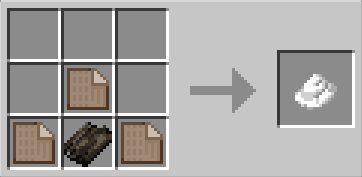
Customization
Cowboy hats can be recolored like leather armor for a huge range of color options. The two color "layers" for hat and trim can be dyed separately, which makes the dye process slightly different to normal leather items. Dye must be placed in valid crafting table slots.
Left (Top, Middle +/- Bottom)Dyes the main body of the hat.Right (Top, Middle +/- Bottom)Dyes the trim of the hat.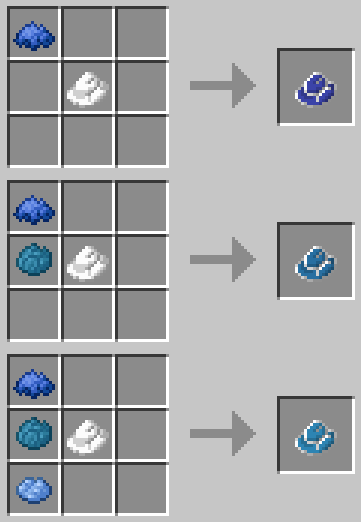
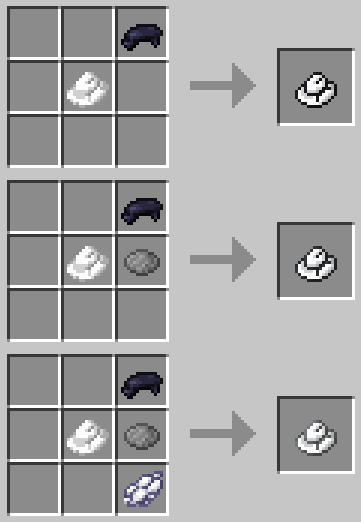
Right-click a cowboy hat on a filled cauldron to clear dye and reset its default (white) color, ready to be re-dyed!
Usage
Cowboy hats offer a minimal amount of armor protection and can be equipped in the helmet slot.
Cowboy hats can be placed using shift + right click on:
- Armor stands
- Horizontal blocks (surfaces)
- Vertical blocks (walls)
Placed hats retain data including color, custom name and durability. Retrieve with left click, or right click for armor stands.
Enchanting
Cowboy hats can be enchanted like all Minecraft helmets.
Repair
Cowboy hats can be repaired using:
- Mending Enchantment
- Combine with another cowboy hat in an anvil
Known Issues
You can report any mod issues to our bugs forum on Discord - please check for duplicate reports first!
Changelog
View Changes
This is not a complete list of changes or features. It is a log of wiki-related version information and may be outdated.
| MC Version | Release | Notes |
1.20.1 |
1.1.1 |
Page established - Information prior to 1.1.1 is not specifically included but is likely the same. |