
Riding
Information targets the latest supported release. For legacy (older) versions and bug fixes, read the changelogs.
Introduction
Horses can be tamed, equipped with a range of cosmetics and ridden with expanded functionality.
Taming
Fatal "buck offs" can occur if one horse kicks another, who kicks back etc. It's not an "intentional" risk but it can happen!
It is recommended to tame horses in safely enclosed area, away from other players, pets or animals.
Right Click any untamed horse with an empty hand to mount it.
- Taming attempts will prompt the horse to buck or rear.
- Horses will dismount the rider and emit gray particles if unsuccessful.
- Horses may harm nearby entities and players with bucks - back up quickly to avoid taking damage!
- Every attempt reduces the (random) "temper" variable until it reaches 0.
Successful taming is indicated by heart particles and this time the rider remains mounted.
Tacking
Shift + Right Click a tamed horse with an empty hand to access the horse inventory.
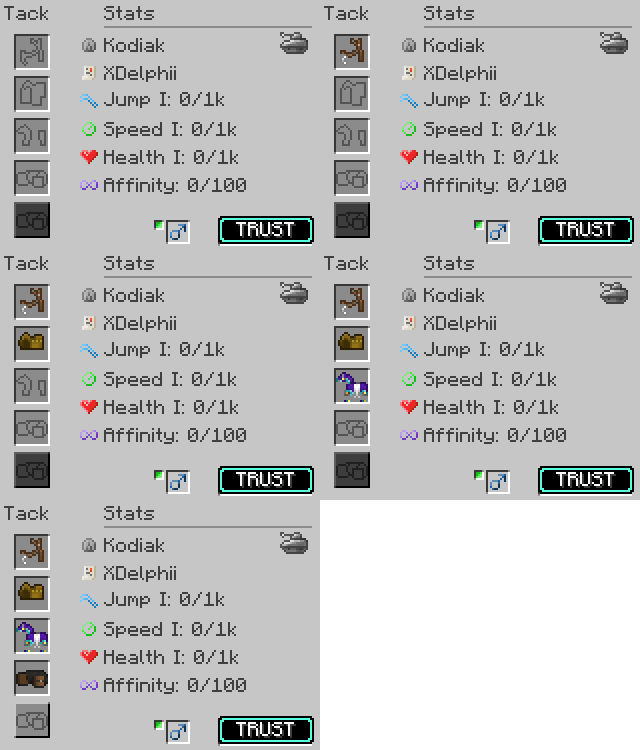
Tack can be equipped in any order by dropping a compatible item into the slot. If an item is already equipped, it can be removed from the slot in the same menu, or "hot swapped" using Shift + Right Click on the horse while holding a replacement tack item.
Riding
Keybinds can conflict with other functions or mods. If you experience issues controlling a horse, check your controls.
Horses require both bridle and saddle to control direction and speed. There are two control types - standard or tank controls.
Standard (Default)
W to move forward and mouse controls direction. A/D keys control lateral left and right movement without affecting camera angle. S resets the gait to walk.
Tank Controls N TO TOGGLE
W to move forward, and A/D to turn smoothly left or right. If held, the horse will make a perfect circle movement - the size depends on the current gait (faster gait, wider circle). Camera angle can be freely controlled using the mouse without affecting horse movement. Tank controls are great for precision riding with dressage or coordinated group routines.
Enabling tank controls notifies the player over the hotbar, and highlights a small tank symbol in the horse inventory menu.
Gait (Speed)
Horse speed is determined by their current "gait" and their speed skill. Use G to decrease (slower), and H to increase (faster).
- Walk
- Trot
- Canter
- Extended Canter
- Gallop
Current gait displays next to hotbar if gaitHudEnabled = true in configs. Gait resets to walk if S is used, or W released.
Jumping
Horse jump height is determined by jump skill, and the jump "charge". Hold space to charge the meter, and release it to jump.
Flight
Horses must be equipped with a bridle, saddle and amethyst tier armor (any with wings) to allow flight.
| Default Key | Action | Description |
J |
Launch | Initiate flight and launch horse 7B into the air. |
| Glide | Default state with no controls active - slow forward and downward motion towards the ground. | |
W |
Accelerate | Increases speed (up to max) without increasing altitude. |
A |
Bank Left | Rotates the horse in a gradual left turn - altitude is decreased unless moving forward W |
D |
Bank Right | Rotates the horse in a gradual right turn - altitude is decreased unless moving forward W |
Space |
Elevate | Increases the altitude without forward movement. |
Space + W |
Rise | Increases the altitude while moving forward. |
LShift |
Flutter | Decreases the altitude without moving forward - useful for precise landings. |
LShift + W |
Dive | Decreases the altitude while moving forward. |
S |
Float | Decreases speed to a stop and holds position without losing altitude (hover). |
| Land | Landing occurs when a horse touches a block. This includes collision with blocks (terrain). | |
|
Summary: |
||
Combat Commands
Horses equipped with Adventure saddle and bridle can use special combat moves if their affinity skill is high enough.
| Default Key | Action | Affinity Level | Description | Area Of Effect | Damage |
| TBC | Bite | Affinity VII | Horse bites out in front of them | TBC | 2  |
X |
Kick | Affinity VIII | Horse kicks out behind them | TBC | 4 |
C |
Stomp | Affinity IX | Horse rears up and stomps with front legs | TBC | 1 |
|
|
|||||
Known Issues
You can report any mod issues to our bugs forum on Discord - please check for duplicate reports first!
- Pressing
Saccidentally will bring the horse to a sudden stop from any gait.
Changelog
View Changes
This is not a complete list of changes or features. It is a log of wiki-related version information and may be outdated.
| MC Version | Release | Notes |
1.21.1 |
1.1.3 |
Bug Fix: Crash on collision with any blocks in flight. |
1.20.1 |
1.1.1 |
Page established - Information prior to 1.1.1 is not specifically included but is likely the same. |