
General Information
General Information
This feature is available in 1.20.1-1.5+ and will NOT be added to outdated versions.
Community Packs is a feature that allows players to add NEW assets to the mod without the use of an add-on mod.
Important- Update Changes
Existing worlds should be safe to update but always take a backup in case you encounter an issue!
To support community packs, some changes have been made. See additional pages for feature-specific changes.
config/swem
Changes for current and future features may break any add-ons that require SWEM codePLEASE BE PATIENT AND ALLOW CREATOR'S TIME TO UPDATE THEIR MODS
Supported Features
COMING SOON!
Animations TBCCOMING SOON!
Frequently Asked Questions
[1] Community & Content Packs
⮞ WHAT IS A COMMUNITY PACK?
Community Packs are folders that include all the files necessary to add NEW assets such as custom coats to SWEM.
⮞ WHAT IS A CONTENT PACK?
Content Packs is also a Community Pack, but usually with less content. It will merge into any Community Packs with the same name. This allows:
Creators to easily provide updated file (ie fixes or improved) that override their original files
Players to have fewer individual Community Packs to sort
Players to have fewer Community Packs listed in game, and easier results by Creator
Example:
artist_kofi:Example:
artist_fantasy: or artist_bays:
⮞ HOW DO I KNOW IF A PACK IS READY TO USE (PREMADE)?
This depends on the source, most creators should clearly state if their content is files only or a read to use pack.
✅ Must be a folder, not a ZIP (or any other)file
✅ Must have a lowercase name with no spaces. ✅
artist_packname ❌ Artist Pack Name✅ Must have two folders inside it:
json and textures✅ Must have
coats inside json and coats > legacy inside textures folder✅ Must have at least one file inside each folder - only jsons (text file) and png (texture file) in relevant folders
❌ Individual files in a single folder
❌ PNG files in
json > coats or JSON files in textures > coats > legacy ❌ Files or folders with spaces, symbols or capital letters
There can still be other errors that prevent a pack working, but this criteria means the pack is structured correctly!
⮞ WHAT IF PACKS HAVE AN IDENTICAL NAME?
Community Packs that do not use recommended format could have a duplicate name like free_coats or kofi_coats.
Creators
coatname_artist in all files and packs
Avoid content 'options' with the same name - if you offer variants (ie braids vs roached) give them a unique name
Avoid creating packs with 'old' files that may override new versions (ie fixed or improved textures)
Update or remove old packs that may have any such files.
Always check that merged files maintain the correct folder structure and file names are valid (ie not coat_name_copy)
⮞ WHAT IF IT ASKS ME TO REPLACE FILES?
There is no correct answer to this:
If you replace a file with a broken texture or non-functional json, you will need to fix it or re-download the original!
⮞ CAN I HAVE MULTIPLE COMMUNITY PACKS?
Yes. You can install multiple Community Packs, but you should read [4] Performance if adding a lot of additional content.
[2] Modifying Community Packs
Always read the Creator's Terms Of Use (TOU) as significant non-private alterations or reupload may be prohibited!
⮞ CAN I REUPLOAD A COMMUNITY PACK +/- MODIFIED?
✅JSON FILES You can edit and distribute json files or overrides freely.
❌PNG FILES You should not modify, re-upload, distribute or monetize Creator's work without explicit consent.
PNG FILES Creators have the right to set and enforce appropriate use of their content.
JSON FILES Creators can set reasonable requests on json modification, but do not own this asset.
✅ You can provide FREE override files or packs.
❌ You must not create and distribute files that violate platform (ie Discord) or Community (ie SWEM) rules.
❌ You must not monetize file edits to profit off the original Creator(s) work without consent.
❌You must not provide premade packs that include the content (pngs) of Creator(s) without consent.
❌ You must not remove artist credits, or add false credits.
❌ You must not remove artist reference, excluding reasonable modification.Esperanza from Spirit -> ✅ Palomino (Dreamwork's Spirit: "Esperanza") ❌ N/A
⮞ CAN I RENAME A PACK (AS A PLAYER / CLIENT)?
Multiplayer No. This may prevent you from seeing any custom coats, even if you have all the correct files.
Singleplayer Yes. This can sometimes help you organize custom content or shorten pack IDs.
⮞ CAN I RENAME A COAT / TACK ITEM?
Multiplayer No. This may prevent you from seeing any custom coats or tack, even if you have all the correct files.
Singleplayer Yes, though this is not recommended.
json, png, and the texture path inside the json file.
You should not edit information in use by an existing save (will need to change coats / tack affected).
You should use standard naming format coatname_artist with appropriate artist credit by name!
⮞ CAN I EDIT CUSTOM CONTENT INFORMATION (JSON)?
Multiplayer Yes. Important information:
Texture Path Players must use the same path to avoid black horses (missing texture)Singleplayer Yes, depending on type:
✅ Inspiration *
✅
lapis_cyclable✅
obtainable_by_breeding✅
base_colors❌ Model
Can include capital letters, spaces and symbols inside the "" entry.
Can include capital letters, spaces and symbols inside the "" entry.
Effect will apply to future lapis/redstone changes. Must be true/false.
Effect will apply to future breeding. Must be true/false.
Effect will apply to future breeding. Must use valid tags.
Must use Legacy until additional models are supported.
Tack TBCYou must not remove or (unreasonably) modify Artist credits +/- reference and inspiration comments.
[3] Multiplayer Use
⮞ HOW TO ADD COMMUNITY PACKS TO A SERVER?
Multiplayer Paste the community pack(s) into the server's config > swem > communitypacks folder as normal.
Clients can have additional community packs installed for SP use.
See individual pages for troubleshooting common issues for each feature.
⮞ CAN I USE THE OFFICIAL SWEM COMMUNITY PACK ON A SERVER?
Yes. You can use this on a multiplayer server provided it is free to all players, not re-uploaded externally or monetized.
You should not modify the contents, except to remove unwanted files or edit obtaining information (tags, breeding etc).
⮞ CAN I USE CREATOR'S COMMUNITY PACK ON A SERVER?
Always read the Creator's Terms Of Use (TOU) as public multiplayer use, alterations or reupload may be prohibited!
[4] Performance
⮞ WILL COMMUNITY PACKS MAKE MY GAME LAG?
Performance loss with the community pack features has not been reported, but individual results may vary.
Community Packs
PCs with limited resources or low performance may have a completedlimit on how much custom content it can realistically support.
Using Community Packs
This section explains how to use PREMADE Community Packs [1] - see [PAGE HERE FOR CREATING / INDIVIDUAL FILES]
Read [2] Modifying Community Packs before you edit any Community Pack files to avoid significant issues!
To install your custom content, you need to download or create a Community Pack or Content Pack.
STEP ONE: GENERATE THE CONFIG FOLDER (FIRST TIME ONLY)
STEP TWO: INSTALL THE COMMUNITY PACK
→ Free Official Community Pack can be found here!
→ Free and Paid Community Packs can be found on many creators pages here!
Check the file is ready to install
→ See [1] Community & Content Packs above (FAQ)
Copy the Community Pack Go to
config > swem > community-packs
Paste the Community Pack file→ It should look like:
config > swem > community-packs > artist_pack_name
STEP THREE: VIEW THE CONTENT IN-GAME
→ Coats
→ Tack
→ Animations
Title
OLD INFORMATION [TO SORT]
Creating & Modifying Custom Community Packs
To create a new community pack:
OPTION A: DOWNLOAD THE TEMPLATES (DISCORD)
OPTION B: CREATE A COMMUNITY PACK
config > swem > community-packs:→ Create a folder with the pack name ✅
kofi_coats ❌ Kofi Coats Inside
pack_name:→ Create a folder called
jsons→ Create a folder called
textures
Inside jsons:→ Create a folder called
coats
Inside textures:→ Create a folder called
coatsInside
textures > coats:→ Create a folder called
legacy
To add content to a new or existing community pack:
→ Name it using
coat_artist_model format ✅ hidalgo_arishant_legacy ❌ Hidalgo Arishant-legacy → Put this in
community-packs > pack_name > textures > coats > legacy
Create or download a .json file with the coat credits and information→ Name it the same as the coat .png!
→ Put this in
community-packs > pack_name > jsons > coats
📂swem
📂community-packs
📂pack_1
📂jsons
📂coats
🗒️coat1_artist.json📂textures 📂coats
📂legacy
🖼️coat1_artist.png
📂pack_2📂jsons
📂coats
🗒️coat2_artist.json 🗒️coat3_artist.json 📂textures
📂coats
📂legacy 🖼️coat2_artist.png 🖼️coat3_artist.png
Shown: The file structure for community packs, this example shows 2 packs (1 + 2) with 3 total coats.
config > swem > community-packs > textures > coats > legacy
Texture to be used for the custom coat.
🗒️ .json
config > swem > community-packs > jsons > coats
Information on artist(s) and obtaining.
JSON files
JSON is a file that contains the important information SWEM needs to integrate a custom asset into the game and systems such as coat cycling or breeding. This is essentially code and needs to be filled out carefully to avoid causing errors!
" " unless directed to do otherwise.
Keep all ( ) { } [ ]
Separate coat tags by a comma (delete as applicable) until the final variable.✅
["white","chestnut"] ❌ ["white","chestnut",]
lapis_cyclable and obtainable_by_breeding must be true or false
base_colors must use valid color tags options✅
["black","gray","white","creamy","brown","dark_brown","chestnut"] ❌ ["buckskin","dun"]
ContentSet Packstags you would expect to get a coat from (IE: black foal -> Setsblack horse) and NOT the genetics the horse might pass on. Color tags and breeding outcomes are very basic and realism (IE: bay = red + black will result in unrealistic breeding and coat selection outcomes such as chestnut foal -> bay horse).
Default JSON
{
"credits": "Artist(s)",
"inspiration": "N/A",
"models": {
"legacy": "default:coats/legacy/coatname_artist_legacy.png",
"destrier": "",
"heavy_draft": "",
"western_sport": "",
"english_sport": "",
"riding_pony": ""
},
"lapis_cyclable": true,
"obtainable_by_breeding": true,
"base_colors": ["black","gray","white","creamy","brown","dark_brown","chestnut"]
}
Example JSON
{
"credits": "Bob Jones, Jon Bobs",
"inspiration": "Inspired by Valegro (Dressage Horse)",
"models": {
"legacy": "default:coats/legacy/valegro_bobjones_legacy.png",
"destrier": "",
"heavy_draft": "",
"western_sport": "",
"english_sport": "",
"riding_pony": ""
},
"lapis_cyclable": false,
"obtainable_by_breeding": true,
"base_colors": ["brown","dark_brown"]
}
PNG files
To create a new coat, or edit and existing one for the SWEM horse model you will need to use a program like Blockbench. The resources for this are pinned in our blockbench channel on Discord.
Overriding Default Coats
You will still need to use a texture pack to override default SWEM coats. This has not changed with this update.
Texturepack: Coat Overrides
📂 assets 📂 swem
📂 textures
📂 entity
📂 horse
📂 coats
🖼️ coat_name.png 🖼️ pack.png 🖼️ coat_name.png 🗒️ pack.mcmeta 📂 foal (optional)
Shown: The file structure for texture packs overriding default horse +/- foal coats.
🖼️ pack.png PNG image for your pack - displayed in game. This must remain named
pack.png
🗒️ pack.mcmeta
Info on your pack's credits, description and version(s)
This is a text-type document (ie notepad)
🖼️ coat_name.png
PNG for the coat to override.
This must be named as in swem files
Coat names in SWEM files might not accurately align to in-game values. Example: swem:sweetboi = 13_m_sweetboi
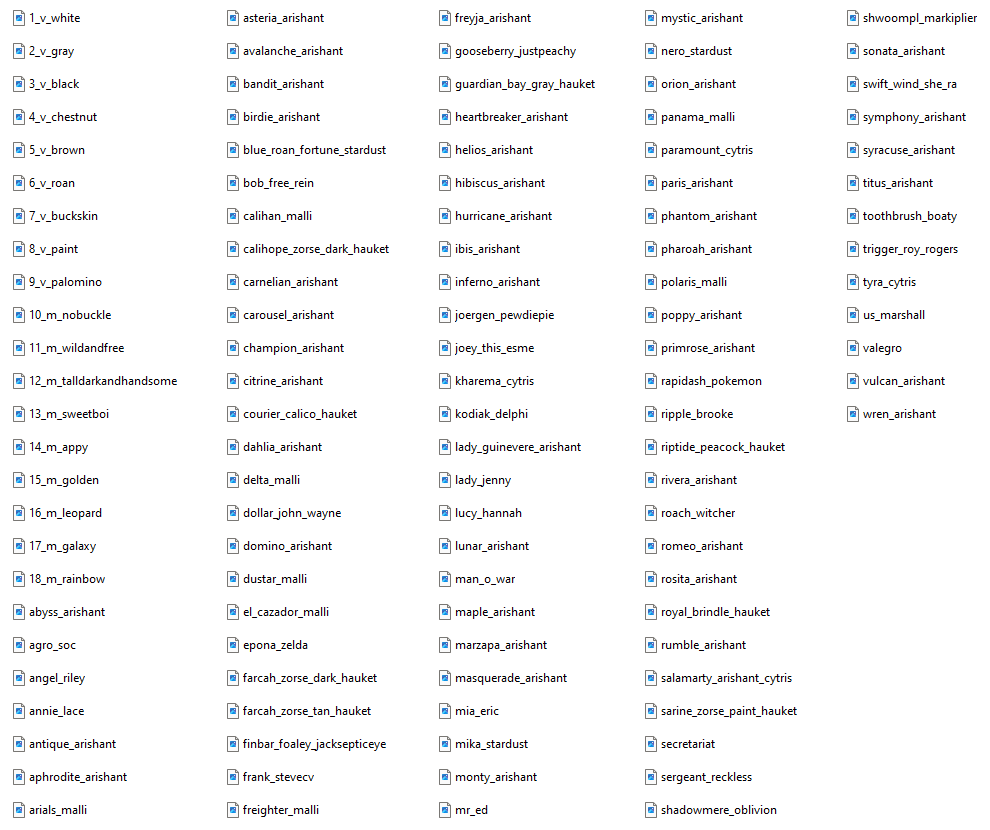
Shown: Coat file names for all default SWEM coats in 1.20.1-1.5.0
Note To Content Creators
This update will support you in sharing your content to a wider audience, as players no longer have to carefully pick and choose for a limited number of coats to override, and your coats can integrated into breeding and coat cycling (if enabled). To transition properly away from texture packs, we recommend:
→ Continuing to provide texture packs is up to you! Set simple, clear and easy to follow terms of use (TOU) or fair-use guidelines.
TOU Info + Example
WARNING
By sharing your content publicly, you should acknowledge that there is very limited legal recourse to enforce appropriate use of your content, license or not. Using a highly restrictive terms of use is setting yourself up for frustration when it is inevitably violated, so for your sake and enjoyment of players we encourage sharing in a similar way to mods; allow anyone to use it for public or private use provided downloads or support goes directly to the creator (ie via Kofi).
RECOMMENDATIONS
Avoid editing an agreement or expecting users to remain informed of any minor (or major) alterations.
Post your agreement where it can be easily referenced when browsing or downloading your content.
→ It is ideal to have a public reference (ie Kofi post) and provide it with files or included in descriptions.
→ It is not recommended to require access to an external source (ie Discord server) unless you host files there!
Avoid requiring credit for use in media; it should be encouraged but no credits does not equal insult!
→ It is not standard practice to credit every creation (ie mods!) in images you upload; nice if you do, but optional!
→ It should only be "required" that users credit where appropriate (inspiration or reference), and not falsely claim.
Avoid prohibiting inspiration or reference; similarity is not proof of plagiarism!
→ It is possible for users to have the same idea, share the same reference, or take respectful inspiration!
→ It should be expected that any work clearly and directly referenced or inspired by your creation is credited.
Avoid restrictive use policies that are difficult to monitor and enforce.
→ It is an unfortunate reality that players +/- servers will violate agreements, especially if they are restrictive.
→ There is limited legal recourse to address this; so state what you are willing and able to action if necessary!
Consider providing content in a compact format with minimal individual downloads!
→ It is your choice, but players and servers will be putless intolikely to distribute (or more likely to use) easily accessible files.
→ It is suggested to provide creator pack(s) in bundles such as 'Bays', 'Pintos', '2023 Coats'
Avoid uploading to unsafe file hosting sites or encouraging users to engage in unsafe internet habits.
→ It is recommended to use popular sites such as Kofi, Google Drive.
EXAMPLE TERMS OF USE (NOT A LEGAL CONTRACT OR LICENSE)
OWNERSHIP & AGREEMENT→ The creator (name) retains all rights of ownership to this content
→ The right to use this content is granted to you (player) in accordance with this agreement
USE→ This creation
can/not be used in content (images, videos) - credits are optional but appreciated.→ This creation
can/not be used privately in singleplayer or a small private group.→ This creation
can/not be used publicly in multiplayer.→ This creation
can/not be used in reasonable commercial services with/without consent.✅🚫 Offered as part of a service (ie random / selected coat change) requiring real money
✅🚫 Offered as a prize or reward for activity or events requiring real money
✅🚫 Offered as an unlock via crowdfunding or engagement (ie server cost covered -> unlock)
NOTE: Commercial services must abide by Minecraft's EULA
DISTRIBUTION→ This creation
can/not be reuploaded with/without consent and/or credits and/or payment.✅🚫 Limited private use by friends or small groups
✅🚫 Custom Community Packs (
✅🚫 Custom Modpacks (zip)
✅🚫 Exceptions: Paid vs Free, Commissions (paid) or Gifts (prizes)
✅🚫 Other: File Hosting Sites, Discord Servers etc
ALTERATIONS→ This creation
can/not be altered with/without consent and with/without credits for public/private use.✅🚫 Texture
✅🚫 Information (json: name, description, color tags etc)
✅🚫 Other conditions
Known Issues
If you find an issue, please report it to our bugs channel on Discord. We ask that you look to see if your issue was reported first!
Changelog
View Changes
This is not a fewcomplete peiceslist of tackversion textureschanges with/ theirfixes. matchingIt jsons)is a changelog of relevant wiki-related version information.