
Riding
Information targets the latest supported release. For legacy (older) versions and bug fixes, read the changelogs.
This page is a WORK IN PROGRESS and may contain inaccurate or placeholder information or links.
Tacking UpIntroduction
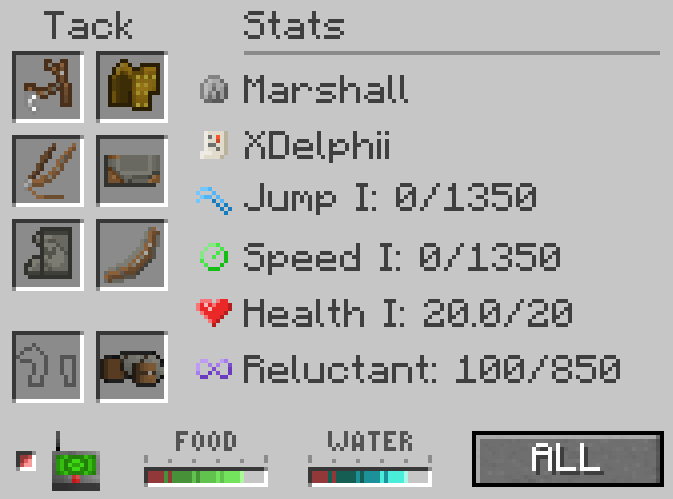
Horses have anexpanded inventoryriding (GUI)functionality forincluding equippinggaits, tackswimming and viewingdual their current needs and skills. Access a horse's inventory by shift + right-clicking the horse - ideally with an empty hand as some items have a shift + right click functionality.riding.
The
Requirements
Without a bridle and saddle a rider will not be able to steer (control) the horseTamedWithoutTrustastatusgirthallowsbothinteraction
Much like in real life, tack needs to be equipped in a logical order; bridle first, blanket, saddle then girth. Breastcollar and wraps are optional. If the horse is already wearing one of these item types, you can 'hotswap' it out with another version by shift + right-clicking the horse with that item in hand without having to open the GUI.
A horse's inventory cannot be accessed while they are sleeping. Right-click with a bridle in hand (or shift + right-click if they are wearing a halter) to equip it; this will wake the horse up if you need to interact with them overnight.
Tack dependencies (such as saddles requiring blankets) are a configurable value and can be adjusted in the server config.
Shown: A Horse wearing adventure tack and a saddlebag.
Riding
Right-clickKeybinds can conflict with other functions or mods. If you experience issues controlling a tackedhorse, horsecheck your controls.
Horses require both bridle and saddle to mountcontrol it.direction and speed (configurable). There are two control types - standard or tank controls.
Standard (Default)
W to move forward and mouse controls direction. A/D keys control lateral left and right movement without affecting camera angle. S resets the gait to walk.
Tank Controls N TO TOGGLE
W to move forward, and A/D to turn smoothly left or right. If properly equipped, you can steerheld, the horse withwill make a perfect circle movement - the standardsize directionaldepends controls (WASD) and mouse, jump with spacebar or dismount by pressing shift.
Horses have a gaits which are patterns of movement that occur at different speeds and rhythms. In SWEM, horses have 5 different gaits; walk, trot, canter, extended canter and gallop. On first mounting the horse, they will always start at a walk. To increase the gait, press H. To decrease once more, press G. Each use will changeon the current gait by(faster onegait, levelwider up,circle). Camera angle can be freely controlled using the mouse without affecting horse movement. Tank controls are great for precision riding with dressage or onecoordinated levelgroup down.routines.
TheEnabling tank controls notifies the player over the hotbar, and highlights a small tank symbol in the horse inventory menu.
Gait (Speed)
Horse speed is determined by their current "gait" and speed skill. Use G to decrease (slower), and H to increase (faster).
Current gait willdisplays resetnext to Walkhotbar if gaitHudEnabled = true in configs. Gait resets to walk if S is used, or W released.
Gait increase restrictions ("debuffs") may occur when a riderhorse nois longerin movespoor condition due to low hunger or thirst.
Jumping
Horse jump height is determined by jump skill, and the horsejump forward"charge". (pressing W)Hold orspace followingto acharge refusal.the meter, and release it to jump.
Swimming
Horses
Gallop can be used for a set amount of time, dependent on speed level.
ItSwimming has a cooldownsingle after use, during which time the horse cannot gallop.
Horses will swim when the water depth is greater than 1 Block
Universal speed refers to a gait that is unaffected by the speed level. This is implemented to allow players to ride together (trails, team sports) on servers regardless of their horse's skills.
Dual RidingTwo players can ride a horse if the horse settings are set to all or trusted, which requires the player to be set as trusted via commands. When the primary rider dismounts, the secondary rider will take control of the horse.
Carrying Entities
Ctrl + Right Click is the default keybind, if you set a different key for sprinting you would use [sprint key] + right click.
A player can place a single passive entity, such as livestock or villagers, on the back of their horse. To place an entity on a horse, the rider must be mountedspeed, and lookinguses atnormal theWASD entityriding - press (default) Ctrl + Right-click to mount the animal on the back of a horse. To dismount an entity from your horse, stand on the ground, hold Ctrl + Right-click the horse (remount) which will remove the entity. Alternatively, use a lead on the mounted entity to remove them. You can safely mount and dismount normally without ejecting the carried entity.
Frost & Lava Walk
Lag and chunkloading can delay ice/magma spreading and drop the horse into water/lava. Moving slower may help.
Horses can safely be ridden across water and even lava if wearing horse armor of a specific tier or higher. For Frost Walker, gold tier horse armor must be used, which creates a layer of ice underneath them at the same y-level they were on if water is present. For Lava Walk, diamond tier horse armor must be used, which creates a layer of magma underneath them at the same y-level they were on if lava is present. Horses wearing diamond tier armor will take no damage from lava even if submerged, and the armor does not deteriorate in condition.controls.
Flight (1.20.1-1.3.0+)
FlightHorses is not steered by mouse direction as with normal riding, the player will need to carefully give WASD commands.
Flight requires a horse tomust be equipped with a Amethyst-bridle, saddle and amethyst tier armor - this includes the special variant armors (anythingany with wings). To initiate flight, mount an armored horse and press J to toggle flight.
Flight Controls (Default)Flight is simpler than it might seem, however different combinations of keys or different movement can result in different flight actions. These display to theallow rightflight. of the hotbar, telling the rider what action and animation the horse is currently doing.
| Default Key | Action | Description |
J |
7B into the air. |
|
| Glide | Default state |
|
W |
Accelerate | Increases |
A |
Bank Left | Rotates the horse in a gradual left turn - W |
D |
Bank Right | Rotates the horse in a gradual right turn - W |
Space |
Elevate | Increases the altitude without |
Space + W |
Rise | Increases the altitude while moving |
LShift |
Flutter | Decreases the altitude without moving forward |
LShift |
Dive | Decreases the altitude |
S |
Float | Decreases |
Summary: J Launch W Move A/D Steer Space Up Shift Down S Hover. Think creative flying but no mouse steering!
Simple Summary:J to start flying, W to move forward, A/D to move left and right, Shift to decrease height, Space to increase height. It's similar to creative flying but without the mouse movement to steer.
LeadingCombat Commands
Horses equipped with Adventure tack can beuse ledspecial combat moves if their affinity skill is high enough.

XKick Affinity VIII Horse kicks out behind them TBC 4
CStomp Affinity IX Horse rears up and stomps with front legs TBC 1
"You can't do that right now" means wrong or partial equipment, inadequate level or using a lead,gait above halt or leadwalk.
Additional
Dual Riding
If a player cannot mount your horse, check the sameTrust asstatus Minecraftallows - SWEM plansthem to overhaulinteract. leadrope
Horses andsupport leadingtwo AIriders, inwith future.Crossthe TiesHorsesprimary rider (front) controlling the horse. If the primary dismounts, the secondary becomes primary rider.
Mounted Entities
Mounting entities can be crossa tiedbit betweentemperamental, twoparticularly hitchingentities posts,with fencessmall hitboxes.
[Sprint Key] + Right Click a passive or ringneutral hitches.entity Attachwhile riding to mount it on your horse.
Ctrl is the default key, but this depends on your individual keybinding.
Entities occupy the spot of a second rider behind the primary rider.
Entities move into primary position when a rider dismounts, but automatically adjust when you remount.
Shift + Right Click an entity while dismounted to remove them from a horse, or use a lead on them.
Refusals
Horses may buck or rear when requesting gait changes or jumps. The frequency of refusals is determined by their affinity skill.
Frost Walk
Gold tier Horse Armor grants a horse "Frost Walk", turning nearby water to ice blocks, unless toggled with Middle Mouse Button
Lava Walk
Diamond tier Horse Armor grants "Lava Walk", turning nearby lava sources to magma blocks.
Gait betweenRestrictions
1/5 +30% 2/5 -20% +20% refusals.
Horses with 3/5 -10% speed and +10% Gallery
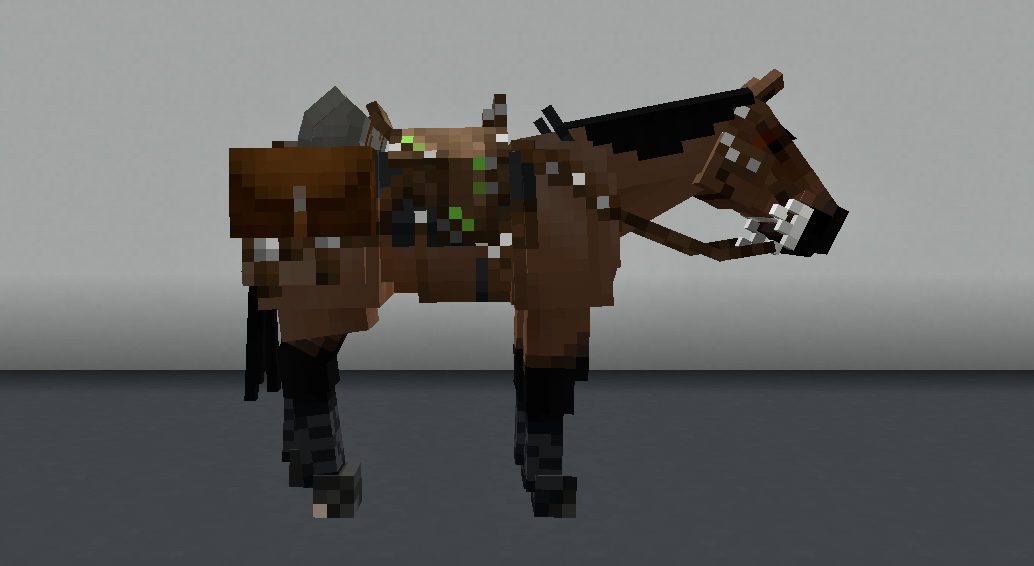
Shown: A Horse wearing adventure tack and a saddlebag.
Known Issues
IfYou you find an issue, pleasecan report itany mod issues to our bugs channelforum on Discord. We- askplease thatcheck youfor lookduplicate to see if your issue was reportedreports first!
1.21.1Crossthetieskickarecombatbroken pending a future rewrite.Bug Report
1.181.201.181.16-1.18entities. Bug Report
S accidentally will bring the horse to a Changelog
View Changes
This is not a complete list of version changes /or fixes.features. It is a changeloglog of relevant wiki-related version information.information and may be outdated.
| MC Version | Release | Notes |
1.21.1 |
1.6.12 |
1.6.12 is not specifically included and may differ significantly.
1.6.8
Bug Fix: Crash on collision with any blocks in flight. 1.6.31.20.11.6.5Bug Fix: Cannot lead a horse that has a mounted entity. Bug Fix: Cannot increase gait (speed) while in 1b water.
1.20.11.4.0Tweak: Flight launch height reduced from 11b to 7b. Bug Fix: Speedy reversing (back up) no longer occurs when pressing S.
Bug Fix: Cannot dismount mid-air in flight as either primary or second rider.
1.3.2
Bug Fix: Gait changes cannot be used in flight - no in-air refusal animations.1.3.0Feature: Added Flight. Feature: Added swimming when in lava, protection requires Diamond+ armor. Bug Fix: Horses get stuck in swimming animation.
1.18.21.3.0-15
Tweak: Horses cannot suffocate in blocks. Resolves lag suffocation and foal deaths.
1.3.0Other Information
Continue reading this chapter to learn more about our Horses!