
Commands
Information targets the latest latest supported release. For legacy (older) versions and bug fixes, read the changelogs.
This page is a a WORK IN PROGRESS PROGRESS and may contain inaccurate or placeholder information or links.
Introduction
Multiplayer: Command access may be restricted by permission level (OP), in-built permission nodes, or external mods (ie Luckperms).
Read Me
Most /swem commands require a player to mount the target entity (horse), and may have further restrictions on who can use them.
Check out "Minecraft Commands" dropdowns if you need an alternative format, useful for some MP server systems or command block setups.
Horse Management
Ownership & Access
|
Restrictions |
Command |
Description |
| OP, Mod | /swem horse tame |
Instantly tame a horse to the mounted player. |
| Owner, OP, Mod | /swem horse transfer <playername> |
Transfer a horse to another player (new owner). |
| Owner, OP, Mod | /swem horse addfriend <playername> |
Add a player to the horse interaction "whitelist" |
| Owner, OP, Mod | /swem horse removefriend <playername> |
Remove a player from the horse interaction "whitelist" |
| TBC | /swem horse dismount <target> |
Force dismount a rider or passenger. |
Minecraft Commands
The following commands are Minecraft alternatives or additional options.
|
Restrictions |
Command |
Description |
| OP | /data modify entity @e[type=swem:swem_horse,sort=nearest,limit=1] Owner set value PLAYERSFULLUUIDHERE |
Modify the owner of the nearest horse. You can find the full UUID on MCUUID |
| OP | /data modify entity @e[type=swem:swem_horse,sort=nearest,limit=1] ownerName set value PlayerName |
Modify the owner name as shown in the horse GUI. Useful to set "Server owned" horses. |
|
|
||
Breeding
|
Restrictions |
Command |
Description |
| TBC | /swem horse breeding advance |
Decrease remaining pregnancy duration to near 0. |
| TBC | /swem horse breeding change |
Change a Stallion ⇔ Mare / Gelding ⇔ Infertile Mare |
| TBC | /swem horse breeding fertile |
Change a Gelding ⇔ Stallion / Infertile Mare ⇔ Mare |
| TBC | /swem horse breeding infertile |
Change a Stallion ⇔ Gelding / Mare ⇔ Infertile Mare |
| TBC | /swem horse breeding reset cooldown |
Decrease remaining breeding cooldown timer to 0. |
| TBC | /swem horse breeding reset pregnancy |
Reset (remove) pregnancy from a gestating mare. |
Needs
|
Restrictions |
Command |
Description |
| OP, Mod | /swem set allNeeds <1-5> |
Set health, hunger, thirst status 1 Min - 5 Max |
| OP, Mod | /swem set health <1-5> |
Set health status1-5: 6 / 10 / 20 / 30 / 40 HP |
| OP, Mod | /swem set hunger <1-5> |
Set hunger status1 Starving -5 Fully Fed |
| OP, Mod | /swem set thirst <1-5> |
Set thirst status1 Exsiccosis - 5 Quenched |
Skills
|
Restrictions |
Command |
Description |
| OP, Admin | /swem set level all <1-12> |
Set all skill levels from 1 to 12 (12 = All Maxed) |
| OP, Admin | /swem set speed <1-5> |
Set speed skill 1 Min - 5 Max |
| OP, Admin | /swem set jump <1-5> |
Set jump skill 1 Min - 5 Max |
| OP, Admin | /swem set health <1-5> |
Set health skill 1 Min - 5 Max |
| OP, Admin | /swem set affinity <1-12> |
Set affinity skill 1 Min - 12 Max |
Special
|
Restrictions |
Command |
Description |
| TBC | /swem horse immortal |
Enable or disable immortality for a horse. |
|
Immortal horses do not have needs (hunger, thirst), cannot gain or lose skills and cannot be harmed. |
||
Visuals
Coat
|
Restrictions |
Command |
Description |
| OP, Admin | /swem set coat <id:coat> |
Set a horse to use a specific default or custom coat ID. |
Minecraft Commands
The following commands are Minecraft alternatives or additional options.
|
Restrictions |
Command |
Description |
| OP |
TBC |
Get data of the coat ID for a nearby horse. |
/data merge entity @e[type=swem:swem_horse,limit=1,sort=nearest] {Behaviors: [{Id: "swem:coat", Coat: "swem:ID"}]} |
Modify the nearest horse to use a |
|
|
|
||
Tack
|
Restrictions |
Command |
Description |
| Owner, Trust, OP | /swem render bridle |
Toggle visibility of the bridle. |
| Owner, Trust, OP | /swem render blanket |
Toggle visibility of the blanket. |
| Owner, Trust, OP | /swem render saddle |
Toggle visibility of the saddle. |
| Owner, Trust, OP | /swem render girth_strap |
Toggle visibility of the girth strap. |
| Owner, Trust, OP | /swem render all |
Toggle visibility of all core tack slots. |
|
Run the command once to hide it, and again to render it. Changes can be seen by all players, and may automatically revert on reload. |
||
Roleplay
Animations
|
Restrictions |
Command |
Description |
| OP, Film | /swem rrp <animation> |
|
| OP, Film | /swem rrp anim <animation> |
More Information
Animations are purely visual and have no interaction or griefing effect on blocks (ie grazing) or mobs (ie attacks).
Horses may still be able to move around unless they have no AI set via commands.
Animations Animations may may support compatible player animations in some instances, if one exists.
Singleanimations play one full animation cycle, and do not repeat.Loopanimations play a continuous animation cycle +/- entry and exit animations.REPEAT COMMAND TO TOGGLE ON/OFF
The original original swem rrp command contains a small selection of useful animations intended for content creation.
| Animation Name | Effect | Supports Player | Description |
bite |
Single | Horse lunges forward to bite. | |
buck |
Single | Yes | Horse bucks, as with taming and refusals. |
eat |
Loop | Horse lowers their head and grazes. | |
kick |
Single | Horse kicks out with a rear leg. | |
lay |
Loop | No | Horse lowers themselves down into a resting position. |
rear |
Single | Yes | Horse rears, as with taming and refusals. |
sad |
Loop | Yes | Horse lowers its head, as if sick or injured. Supports "sad walk" (ridden). |
stomp |
Single | Horse half rears and brings their front hooves down in a stomp. |
The newer swem rrp anim command can support support any any animations included in the mod mod OR added as custom content via Resource Packs.
Statueanimations are posed, with no dynamic movement or idles. This is useful for photos and "decorative" statues.
| Animation Name | Effect | Supports Player | Description |
StatueBuck |
Statue | No | Horse poses mid-buck. |
StatueCanter |
Statue | No | Horse poses mid canter stride. |
StatueFloat |
Statue | No | Horse poses mid flight (wing flap). |
StatueGallop |
Statue | No | Horse poses mid gallop stride. |
StatueGallop2 |
Statue | No | Horse poses mid gallop stride (suspended stride version). |
StatueLaunch |
Statue | No | Horse poses mid flight launch. |
StatueLayingDown |
Statue | No | Horse poses in a laying position. |
StatuePiaffe |
Statue | No | Horse poses mid piaffe manoeuvre. |
StatueRear |
Statue | No | Horse poses mid rear. |
StatueSit |
Statue | No | Horse poses in a "seated" position (back end dropped down). |
StatueStandIdle |
Statue | No | Horse poses in a casual standing idle. |
StatueTrot |
Statue | No | Horse poses mid trot stride. |
StatueWalk |
Statue | No | Horse poses mid walk stride. |
| ... | Loop | Variable | swem rrp anim to show an autofill list of any other valid poses. |
|
Many other animations exist in the default files. Some are "incomplete" animations used as transitions, or unused poses. |
|||
Minecraft Commands
The following commands are Minecraft alternatives or additional options.
|
Restrictions |
Command |
Description |
| TBC | /data merge entity @e[type=swem:swem_horse,limit=1,sort=nearest] {NoAI:1} |
Modify the nearest horse to have No AI. |
/data merge entity @e[type=swem:swem_horse,limit=1,sort=nearest] {NoAI:0} |
Modify the nearest horse to have AI. | |
|
|
||
Summon
|
Restrictions |
Command |
Description |
| TBC | /swem summon LEGACY <id:coat> |
Summon a specific default or custom coat via coat ID. |
| TBC | /swem summon random LEGACY |
Summon a random default or custom coat. |
| OP | /summon swem:wormieboi |
Summon a Worm on a String entity (Easter Egg) |
|
SW horses currently support one Random coats only select from adult, non-secret, non-blacklisted default coats or custom coats with |
||
Minecraft Commands
The following commands are Minecraft alternatives or additional options.
|
Restrictions |
Command |
Description |
| OP | /summon swem:swem_horse |
Summon a random SW horse. |
/summon swem:swem_horse ~ ~ ~ {Behaviors: [{Id: "swem:coat", Coat: "swem:ID"}]} |
Summon a SW horse with a specific coat ID. | |
/summon swem:swem_horse ~ ~ ~ {NoAI: 1} |
Summon a random SW horse with No AI. |
|
/summon swem:swem_horse ~ ~ ~ {Age: -#} |
Summon a random SW foal. | |
/summon swem:swem_horse ~ ~ ~ {Age: -#, Behaviors: [{Id: "swem:coat", Coat: "swem:foal_TYPE"}]} |
Summon a SW foal with a specific coat ID. | |
|
|
||
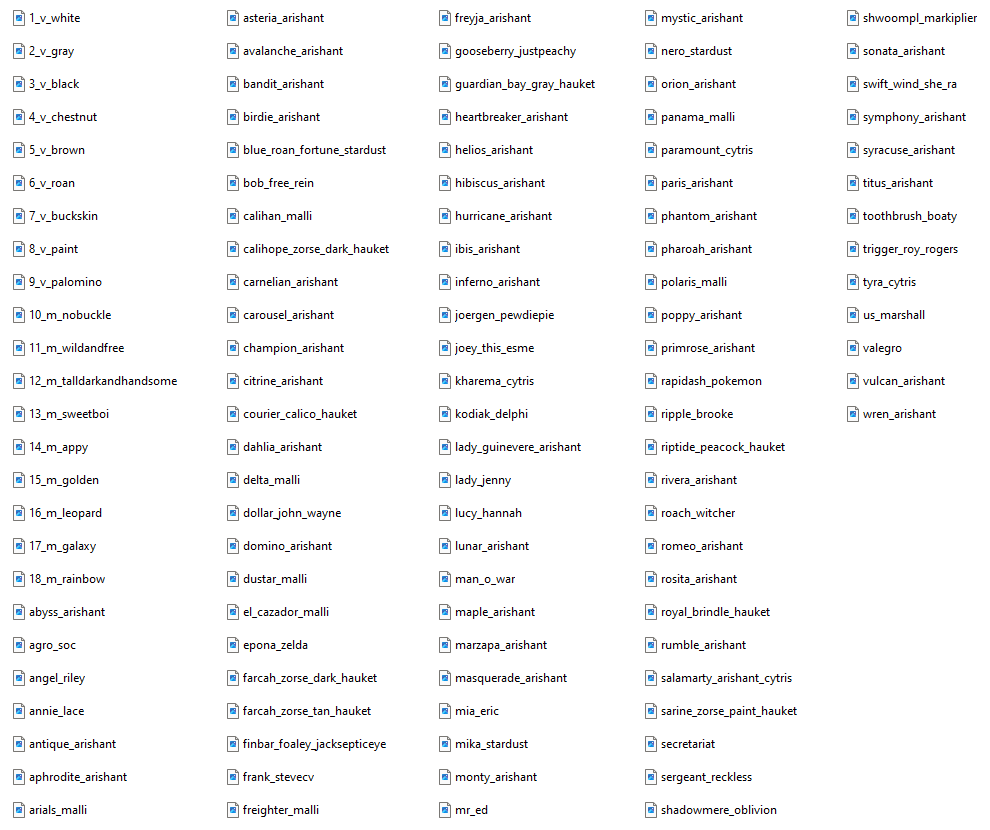
Default Coat Names (Adults)
Other
Multiplayer: Access to these command should always be restricted in balanced (economy driven, skill-based) servers.
Content Creation or Testing
|
Restrictions |
Command |
Description |
| OP, Film | /swem rrp maxgallop |
Increase gallop duration to 120s and reset cooldown. |
| OP, Mod | /swem rrp tackup |
Instantly equip a default gray western tack set. |
| OP, Film | /swem rrp wild |
Modify the taming, tack and skills for a horse. |
Wild Mode Mode READ INFORMATION CAREFULLY
This command sets horses to a specific skill level and tack setup intended for quick filming-ready horses.
Wild Mode cannot be reversed - Skill changes are permanent unless retrained / reset via commands. Tack visibility is temporary.
| Taming | Tack | Tack Render | Speed | Jump | Affinity |
| ✅ Set Tamed | ✅ Gray Western | ✅ Hide All | Set to Level 1 | Set to Level 1 | Set to Level 12 |
Server Management
Permission Nodes
Permission Keys are only relevant to command restrictions if enableKeyPermission = true is set in the Server Config file.
Keys override the permissions of OPs (even if OP, need the correct key) and do not inherit access to commands from other keys.
Permission keys define "preset" groups of commands for various roles and functions useful in Multiplayer servers.
SingleplayerThere is not usually a reason to enable permission keys in singleplayer.MultiplayerIt is strongly recommended to use permission keys OR external system (ie LuckPerms) to manage command access.
|
Restrictions |
Command |
Description |
| Admin | /swem key assign <playername> swem:film |
Assign the film key to a player. |
| Admin | /swem key assign <playername> swem:mod |
Assign the mod key to a player. |
| TBC - Console | /swem key assign <playername> swem:admin |
Assign the admin key to a player. |
| Admin | /swem key revoke <playername> swem:film |
Revoke the film key from a player. |
| Admin | /swem key revoke <playername> swem:mod |
Revoke the mod key from a player. |
| TBC - Console | /swem key revoke <playername> swem:admin |
Revoke the admin key from a player. |
| N/A | /swem key list |
List the keys you currently hold. |
Ownership Limits
|
Restrictions |
Command |
Description |
| OP, Mod | /swem horse owned list <playername> |
List the total # and names of horses a player owns. |
| OP, Mod | /swem horse owned search <limit> |
Lists players that exceed the stated ownership limit. |
Help
|
Restrictions |
Command |
Description |
| N/A | /swem wiki |
Outputs a clickable tellraw with link to this wiki. |
Miscellaneous
The following are "custom" commands provided by the community to help users get the most out of the mod, or workaround limitations.
Modifying Data
GUIDE CREDITS: Delphi
Execute Commands
Execute commands allow you to affect multiple entities and data variables in a single command, useful if you want to:
- Modify data of all horses (if in a loaded chunk)
- Modify data of nearby horses within a certain radius (distance)
- Modify data of horses within a defined area (coordinates)
- Modify data of horses up to a defined target range (limit)
- Expand into more advanced command block, datapack or NPC systems that affect entities in the world in bigger ways.
Warnings
Data modifications make a lot of things possible, but it is not without risk and you should exercise caution. Note:
Value TypesData variables support a specific "type" of data, ie whole numbers (integers), decimals (floats), text (string)Value RangesData variables usually have a supported range (ie 0-10) and finding out that range is not always straightforward!Invalid DataData modification can potentially cause crashes or even corruption if set outside of its normal range or format.SystemsData may be affected by other systems in a way that overwrites or alters your edits.NestingData sometimes exists "inside" other variables/groups; if so, you need to know the name AND the "path" to modify it!ExceptionsData may not affect things in the way you would think, and might be linked into other variables.
If you're going to play around with data, try it in a safe environment first (backup, temp save) and test extensively!
Data
NBT data defines underlying information that affects entities in many ways. For example:
OwnerPlayer considered the owner to that entity, usually the one that tamed themJumpLevel: 0Current level of the jumpskillskillJumpXP: 0.0fCurrent XP gained towards the jump skillFemale: 0bGender status as female true (1b) or false (0b)BreedCooldown: 0Ticks remaining on a breeding cooldown (if any)MissedMeals: 0Number of missed mealsState: "fed"Hunger status
Example Data (1.21.1)
swem:swem_horse 39.82 -60.00 33.44 {Brain: {memories: {}}, HurtByTimestamp: 0, Owner: [I; -1741751226, -1712698391, -1627171552, -593853929], AffinityXP: 100.0f, Needs: {Hunger: {MissedMeals: 0, Points: 0, FillTime: 0L, State: "fed", TimesFed: {}, TotalTimesFed: 0, AteGrain: 0b}, Updated: 0b, Thirst: {State: "satisfied", MissedDrinks: 0, Drinks: 0}}, Invulnerable: 0b, HealthLevel: 0, AbsorptionAmount: 0.0f, currentSwipes: 0, Bred: 0b, FallDistance: 0.0f, InLove: 0, HandDropChances: [0.085f, 0.085f], PersistenceRequired: 0b, AffinityLevel: 1, Air: 300s, JumpXP: 0.0f, HealthXP: 0.0f, HandItems: [{}, {}], ArmorDropChances: [0.085f, 0.085f, 0.085f, 0.085f], permissionState: 1b, Temper: 5, CanPickUpLoot: 0b, HurtTime: 0s, toggleIce: 1b, Tame: 1b, IsBridleLeashed: 0b, FallFlying: 0b, ForcedAge: 0, tracked: 0b, PortalCooldown: 0, desensiztingItem: {}, allowedList: {}, EatingHaystack: 0b, ownerName: "XDelphii", DeathTime: 0s, SpeedXP: 0.0f, TimesBrushed: 0, Age: 0, JumpLevel: 0, Motion: [0.0d, -0.0784000015258789d, 0.0d], Health: 20.0f, LeftHanded: 0b, OnGround: 1b, Rotation: [295.50632f, 0.0f], SpeedLevel: 0, Fire: -1s, ArmorItems: [{}, {}, {}, {}], daysSwiped: [I; 0, 0, 0, 0, 0], SpecialFeeds: [], Behaviors: [{Data: {Offsprings: []}, Id: "swem:lineage"}, {LastPeeTime: 0L, Id: "swem:pee"}, {Id: "swem:coat", Coat: "swem:kodiak_delphi"}, {Animation: "", Id: "swem:rrp_anim"}, {Id: "swem:eating", EatingType: 0}, {TiredTicks: 0, Id: "swem:sleeping", SetToSleep: 0b, SleepCooldown: 0}, {Id: "swem:action"}, {LastPooTime: 73840L, Id: "swem:poop"}, {Id: "swem:laying"}, {Id: "swem:flight"}, {GodMode: 0b, Id: "swem:god"}, {IsFussy: 1b, Id: "swem:fussy"}, {TotalOffsprings: 0, Female: 0b, Infertile: 0b, Id: "swem:breeding", InLoveTimer: 0, BreedCooldown: 0}], attributes: [{id: "minecraft:generic.movement_speed", base: 0.04169562195969423d}, {id: "minecraft:generic.jump_strength", base: 0.41999998688697815d}, {id: "minecraft:generic.oxygen_bonus", base: 0.0d}, {id: "minecraft:generic.armor", base: 0.0d}]}
Useful Data Types
Data values change can change over time. The variables shown here are accurate to 1.21 and may not reflect older versions!
This guide will not cover every variable. There are too many, and most of them will never be of any use to you.
IntegerWhole numberFloatDecimal numberBooleanTrue (1b) or False (0b)StringTextvaluevalue
| Path | Type | Range | Description |
| Skills | |||
SpeedLevel |
Integer | 0-4 | Current skill level for Speed. 0 Level 1 4 Level 5 |
SpeedXP |
Float | Variable | XP towards the |
JumpLevel |
Integer | 0-4 | Current skill level for Jump. 0 Level 1 4 Level 5 |
JumpXP |
Float | Variable | XP towards the |
HealthLevel |
Integer | 0-4 | Current skill level for Health. 0 Level 1 4 Level 5 |
HealthXP |
Float | Variable | XP towards the |
AffinityLevel |
Integer | 0-11 | Current skill level for Affinity. 0 Level 1 11 Level 12 |
AffinityXP |
Float | Variable | XP towards the |
Needs.Hunger.MissedMeals |
|||
Needs.Hunger.Points |
|||
Modifying
Storing + Incrementing
Other
- Many variables do NOT start at
11 - You often cannot know the limits of its supported radius (ie AffinityLevel = 0-11)
The base command is as follows:
/execute as @e[type=swem:swem_horse] run data modify entity @s <data> set value <value>
This says, run this command (data modify) as any swem:swem_horse entity.
This only affects the the default default SW horse. For Addendum use use #forge:horse_types (1.20) or #swemaddendum:horse_types (1.21) tag.
These commands have been known to "break" between versions due to changes in Minecraft's command formatting, and modded entity data.
/execute as @e[type=swem:swem_horse,distance=..5] run data modify entity @s Needs.Hunger.MissedMeals set value <#> |
Execute commands are a good choice for 'fixing' multiple horses at once, in a larger radius and as a workaround to horse limitations such as owner/mod key or OP status. /execute as @e[type=swem:swem_horse,distance=..5] run data modify entity @s Needs.Hunger.MissedMeals set value 0 /execute as @e[type=swem:swem_horse,distance=..5] run data modify entity @s Needs.Thirst.MissedDrinks set value 0
Resets the missed meals or drinks to 0.Unless state is also modified, hunger / thirst debuffs (ie no trot+) and low bars do not update until meals recalculated (8PM daily in game).
/execute as @e[type=swem:swem_horse,distance=..5] run data modify entity @s Needs.Hunger.State set value fed /execute as @e[type=swem:swem_horse,distance=..5] run data modify entity @s Needs.Thirst.State set value quenched
Resets the hunger and thirst state, which determines any buffs/debuffs and the GUI bars.
- Add
limit=1in @e[] to limit to a single horse - Edit
distance=..#in @e[] info to change the command radius, higher # = bigger radius. Limited to loaded chunks.
Known Issues
You can report any mod issues to our bugs forum on Discord - please check for duplicate reports first!
Changelog
View Changes
This is not a complete list of changes or features. It is a log of wiki-related version information and may be outdated.
| MC Version | Release | Notes |
1.21.1 |
1.6.12 |
Page established - Information prior to 1.6.12 is not specifically included and may differ significantly. |
|
The following command no longer works in 1.21.1:
|
||
1.20.1 |
1.5.0 |
Added /swem rrp anim to support all loaded animations, including resource packs. |
Added /swem summon LEGACY <id:coat> to support all default and custom coat options. |
||
Added /swem summon random LEGACY to support random coat selection (alternative to /summon). |
||
Added /swem set coat <namespace:id> to allow coat selection from default and custom options. |
||
|
The following commands no longer work in the
|
||
1.4.0 |
Added /swem horse breeding fertile / /swem horse breeding infertile + infertile mare support. |
|
Removed /swem horse breeding geld - use infertility potions instead. |
||
1.18.2 |
1.4.0 |
Added /swem horse breeding commands for new gender related features. |
1.3.0-15 |
Added /swem horse owned for Multiplayer horse ownership management. |
|
1.2.8 |
Player must be the owner of the horse to add or remove trusted players via commands. | |
1.2.2 |
Added /swem horse set commands for needs |
|
1.0.0 |
Added /swem rrp filming commands <animation> / wild / maxgallop |
|
/swem horse setgalloptime /swem horse resetgallop (merged into new command) |
||
Changed /swem setlevel commands to /swem set |
||
/dev commands /swem horse tame and /swem horse tackup |