
Pasture Gates
Introduction
Pasture Gates are functional multi-block doors.
Crafting
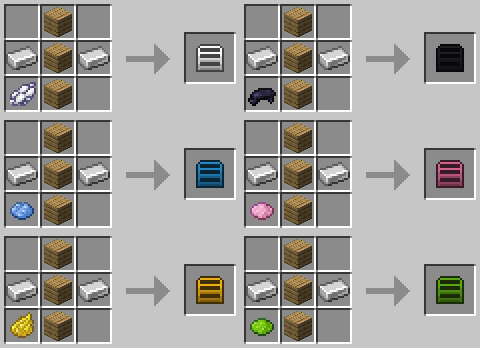
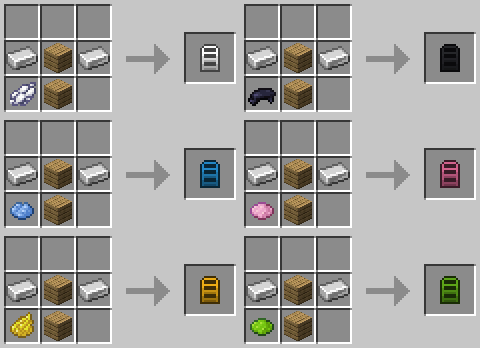
Usage
Right Click with a pasture gate in hand to place it.
- "Care" needs
3bwidth. - "Horse" needs
2bwidth. - Both variants need 2 blocks height.
Right Click a pasture gate to open it.
More Information: Placement (Hinge, Swing)
Hinge Placement
The easiest way to get gate placement perfect every time is to build it off the side of another block (connection point).
If you need to place off the ground:
- Choose the block at the far edge of the door space, where you want the hinge to be.
- Click on the far edge of that block.
Example: If a door should swing to the left, click the far left edge of the left-most block.
Swing Direction
Face the direction you want the gate to swing away from.
Known Issues
You can report any mod issues to our bugs forum on Discord - please check for duplicate reports first!
- Gates may not render properly on (some) servers. Install Connectivity to fix "ghost block" issues.
- Gates may fail to place in "clear" space - fill the area with blocks, mine (remove) them and retry.
Changelog
View Changes
This is not a complete list of changes or features. It is a log of wiki-related version information and may be outdated.
| MC Version | Release | Notes |
1.20.1 |
1.1.1 |
Page established - Information prior to 1.1.1 is not specifically included but is likely the same. |