# Star Worm Plus
Learn more about Star Worm Plus Mod (SWPM).
# Getting Started
# About SWPM
#### **Why the Mod Started**
SWE/M has grown into a collection of mods where some features, recipes, or items/blocks may seem out of place as there was no better place to put them however we really wanted them. SWPM began as a 'kitchen sink mod' where we dumped all the unfitting bits into one place to clean up the other mods we develop. This mod is mainly for the use in our own servers with our preferences, however its public if others want to use it too.
---
#### **What does SWPM Include?**
This mod aims to add a collective of Moderation Tools and Quality of Life Additives.
---
#### **Disclaimer**
Several recipes can be found in other small standalone mods, some of which are now outdated. The Star Worm team hoped to have a consolidated mod offering a collection of QOL additions to improve gameplay and minimize the number of individual mods required for SW server modlists and community members. Where possible, all credits for the recipes themselves have been given to those who created the original recipes, or to members of the community who suggested new recipes. Additionally, all features added in are proudly credited to those who aided in their development.
# Credits
Credits for development on SWPM are listed below!
---
#### **Version - Neo/Forge 1.20+**
*Owner and Production Lead - AlaharranHonor*
Programming
Primary: Quarris
Secondary: Legenden
Mentions: Silverwolf, Umpaz
Textures
Primary: AlaharranHonor
Secondary: Cytris
Mentions: Silverwolf
Wiki
Primary: Delphi
Mentions: AlaharranHonor
Programming
Primary: Silverwolf
Secondary: Legenden
Mentions: Umpaz
Textures
Primary: AlaharranHonor
Secondary: Cytris
Mentions: Silverwolf
Wiki
Primary: Delphi
Mentions: AlaharranHonor
| **Rarity color:** | -- |
| **Renewable:** | -- |
| **Stackable:** | -- |
| **Durability:** | -- |
---
#### **Obtaining**
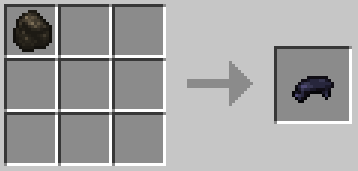
**Crafting** 1 black dye can be crafted with 1 Charcoal.
---
#### **Usage**
(Black) Dye is a vanilla item. See: [Minecraft Wiki](https://minecraft.fandom.com/wiki/Dye)
---
#### **Known Issues**
---
#### **Data values**
# Chests (Bulk Craft)
**Description:** Craft chests in bulk.
---
**Details:**
| **Rarity color:** | -- |
| **Renewable:** | -- |
| **Stackable:** | -- |
| **Durability:** | -- |
---
#### **Obtaining**
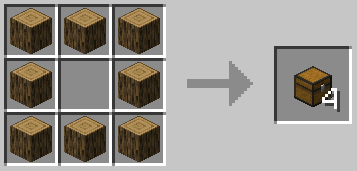
**Crafting** 4 chests can be crafted with 8 Logs.
**[](https://wiki.swequestrian.com/uploads/images/gallery/2023-01/image-1673727674042.png)**
---
#### **Usage**
Chests are a vanilla item. See: [Minecraft Wiki](https://minecraft.fandom.com/wiki/Chest)
---
#### **Known Issues**
---
#### **Data values**
# Dirt
**Description:** Create dirt from leaves and rotten flesh.
---
**Details:**
| **Rarity color:** | -- |
| **Renewable:** | -- |
| **Stackable:** | -- |
| **Durability:** | -- |
---
#### **Obtaining**
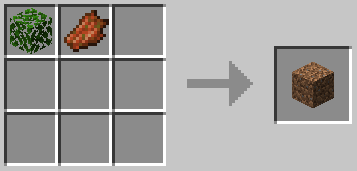
**Crafting** Dirt can be crafted with 1 Leaf Block and 1 Rotten Flesh.
****
Credits for the crafting recipe go to **RandomGuy32**.
---
#### **Usage**
Dirt is a vanilla item. See: [Minecraft Wiki](https://minecraft.fandom.com/wiki/Dirt)
---
#### **Known Issues**
---
#### **Data values**
# Flint
**Description:** Create flint with a crafting recipe, or by smelting.
---
**Details:**
| **Rarity color:** | -- |
| **Renewable:** | -- |
| **Stackable:** | -- |
| **Durability:** | -- |
---
#### **Obtaining**
**Crafting** 1 flint can be crafted with 3 Gravel.
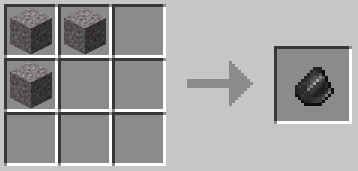
**Smelting** Quartz can be smelted down into 1 flint.
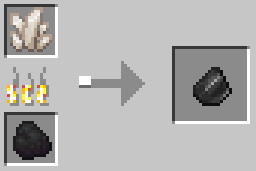
Credits for the crafting recipe (gravel > flint) go to **celester**.
---
#### **Usage**
Flint is a vanilla item. See: [Minecraft Wiki](https://minecraft.fandom.com/wiki/Flint)
---
#### **Known Issues**
---
#### **Data values**
# Flowers
**Description:** Duplicate flowers with seeds.
---
**Details:**
| **Rarity color:** | -- |
| **Renewable:** | -- |
| **Stackable:** | -- |
| **Durability:** | -- |
---
#### **Obtaining**
**Crafting** 4 flowers can be crafted with 1 Flower (any vanilla) and 3 Seeds (wheat).
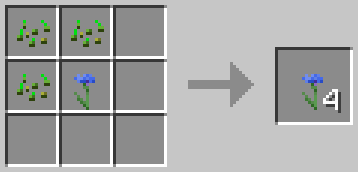
Credits for the crafting recipe go to **Rhea**.
---
#### **Usage**
Flowers are vanilla items. See: [Minecraft Wiki](https://minecraft.fandom.com/wiki/Flower)
---
#### **Known Issues**
---
#### **Data values**
# Grass Block
**Description:** Create grass blocks from dirt and seeds or grass.
---
**Details:**
| **Rarity color:** | -- |
| **Renewable:** | -- |
| **Stackable:** | -- |
| **Durability:** | -- |
---
#### **Obtaining**
**Crafting** A grass block can be crafted with 1 Dirt Block and 1 Seed (wheat).
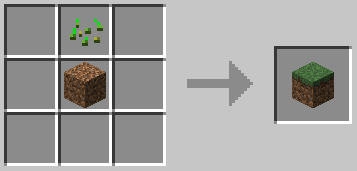
A grass block can be crafted with 1 Dirt Block and 1 Grass.
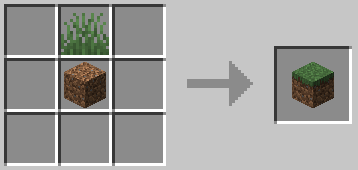
Credits for the crafting recipe go to **RandomGuy32**.
---
#### **Usage**
Grass block is a vanilla item. See: [Minecraft Wiki](https://minecraft.fandom.com/wiki/Grass_Block)
---
#### **Known Issues**
---
#### **Data values**
# Saddle
**Description:** Craft vanilla horse saddles.
---
**Details:**
| **Rarity color:** | -- |
| **Renewable:** | -- |
| **Stackable:** | -- |
| **Durability:** | -- |
---
#### **Obtaining**
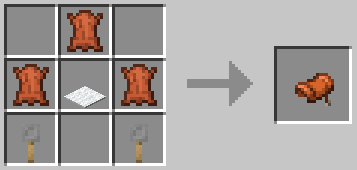
**Crafting** A horse saddle can be crafted with 3 Leather, 2 Tripwire Hooks and 1 Carpet.
---
#### **Usage**
Horse saddles (as shown) are a vanilla item. See: [Minecraft Wiki](https://minecraft.fandom.com/wiki/Horse_Saddle)
---
#### **Known Issues**
---
#### **Data values**
# Horse Armor (UnCraft)
**Description:** Craft vanilla horse armor.
---
**Details:**
| **Rarity color:** | -- |
| **Renewable:** | -- |
| **Stackable:** | -- |
| **Durability:** | -- |
---
#### **Obtaining**
Iron
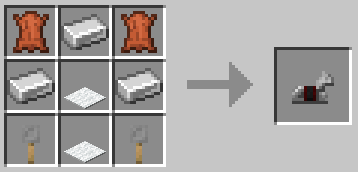
An iron horse armor (vanilla) can be crafted with 3 Carpet, 3 Iron, 2 Tripwire Hooks and 2 Leather.
Gold
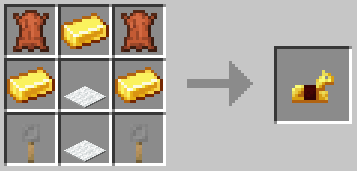
A gold horse armor (vanilla) can be crafted with 3 Carpet, 3 Gold Ingots, 2 Tripwire Hooks and 2 Leather.
Diamond
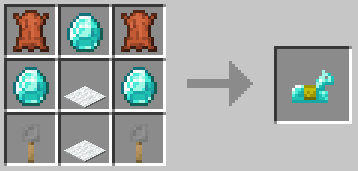
A diamond horse armor (vanilla) can be crafted with 3 Carpet, 3 Diamonds, 2 Tripwire Hooks and 2 Leather.
| **Rarity color:** | -- |
| **Renewable:** | -- |
| **Stackable:** | -- |
| **Durability:** | -- |
---
#### **Obtaining**
Minecarts can be smelted down into 1 Iron Ingot.
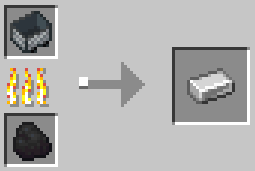
Credits for the crafting recipe go to **BjossiAlfreds.**
---
#### **Usage**
Iron is a vanilla item. See: [Minecraft Wiki](https://minecraft.fandom.com/wiki/Iron_Ingot)
---
#### **Known Issues**
---
#### **Data values**
# Saddle (UnCraft)
**Description:** Leather can be uncrafted from vanilla Minecraft saddles.
---
**Details:**
| **Rarity color:** | -- |
| **Renewable:** | -- |
| **Stackable:** | -- |
| **Durability:** | -- |
---
#### **Obtaining**
**Crafting** 3 leather can be crafted with 1 Saddle (Vanilla) **or** 1 Leather Horse Armor (Vanilla).
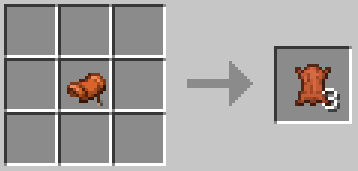
Credits for the crafting recipe go to **BjossiAlfreds**.
---
#### **Usage**
Leather is a vanilla item. See: [Minecraft Wiki](https://minecraft.fandom.com/wiki/Leather)
---
#### **Known Issues**
---
#### **Data values**
# Name Tag
**Description:** Create name tags without needing to find loot chests.
---
**Details:**
| **Rarity color:** | -- |
| **Renewable:** | -- |
| **Stackable:** | -- |
| **Durability:** | -- |
---
#### **Obtaining**
**Crafting** 4 name tags can be crafted with 1 Sign (any vanilla), 1 Gold Nugget and 1 String.
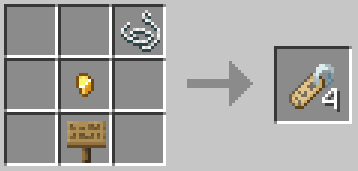
Credits for the crafting recipe go to **Rhea**.
---
#### **Usage**
Name tags are a vanilla item. See: [Minecraft Wiki](https://minecraft.fandom.com/wiki/Name_Tag)
---
#### **Known Issues**
---
#### **Data values**
# Podzol
**Description:** Create podzol from dirt and spruce leaves.
---
**Details:**
| **Rarity color:** | -- |
| **Renewable:** | -- |
| **Stackable:** | -- |
| **Durability:** | -- |
---
#### **Obtaining**
**Crafting** 1 podzol can be crafted with 1 Spruce Leaf Block and 1 Dirt Block.
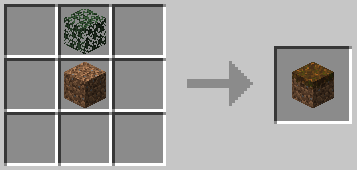
Credits for the crafting recipe go to **Yindee8191**.
---
#### **Usage**
Podzol is a vanilla item. See: [Minecraft Wiki](https://minecraft.fandom.com/wiki/Podzol)
---
#### **Known Issues**
---
#### **Data values**
# Quartz Block (UnCraft)
**Description:** Quartz can be uncrafted from a Quartz block.
---
**Details:**
| **Rarity color:** | -- |
| **Renewable:** | -- |
| **Stackable:** | -- |
| **Durability:** | -- |
---
#### **Obtaining**
**Crafting** 4 quartz can be crafted with 1 Quartz Block.
**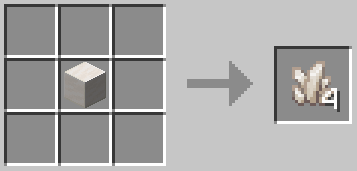**
Credits for the crafting recipe go to **Kybo50**.
---
#### **Usage**
Quartz is a vanilla item. See: [Minecraft Wiki](https://minecraft.fandom.com/wiki/Quartz)
---
#### **Known Issues**
---
#### **Data values**
# Sapling
**Description:** Create saplings from logs and leaves.
---
**Details:**
| **Rarity color:** | -- |
| **Renewable:** | -- |
| **Stackable:** | -- |
| **Durability:** | -- |
---
#### **Obtaining**
**Crafting** A sapling can be created using 1 Log and 1 Leaf Block of a **corresponding** type - all vanilla wood and leaf types can be crafted into their corresponding sapling.
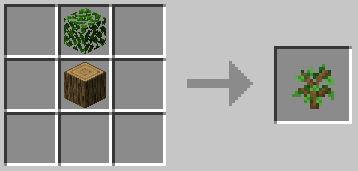
Credits for the crafting recipe go to **MrBrobot**.
---
#### **Usage**
Saplings are a vanilla item. See: [Minecraft Wiki](https://minecraft.fandom.com/wiki/Sapling)
---
#### **Known Issues**
---
#### **Data values**
# Slimeball
**Description:** Create slimeballs with water and rotten flesh.
---
**Details:**
| **Rarity color:** | -- |
| **Renewable:** | -- |
| **Stackable:** | -- |
| **Durability:** | -- |
---
#### **Obtaining**
**Crafting** 1 slimeball can be crafted with 1 Bucket of Water and 1 Rotten Flesh.
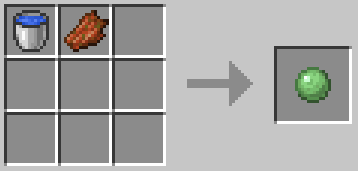
Credits for the crafting recipe go to **Flyboiz**.
---
#### **Usage**
Slimeballs are a vanilla item. See: [Minecraft Wiki](https://minecraft.fandom.com/wiki/Slimeball)
---
#### **Known Issues**
---
#### **Data values**
# Stick (Craft and Bulk Craft)
**Description:** Create sticks from logs and saplings.
---
**Details:**
| **Rarity color:** | -- |
| **Renewable:** | -- |
| **Stackable:** | -- |
| **Durability:** | -- |
---
#### **Obtaining**
**Crafting** A stick can be crafted with 1 Sapling.
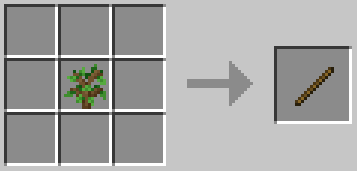
16 sticks can be crafted with 1 Logs.
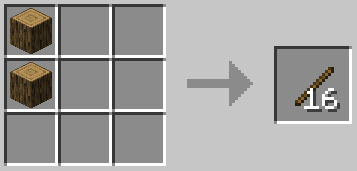
Credits for the crafting recipe (logs > stick) go to **celester**.
Credits for the crafting recipe (sapling > stick) go to **Seb\_Romu**.
---
#### **Usage**
Sticks are a vanilla item. See: [Minecraft Wiki](https://minecraft.fandom.com/wiki/Stick)
---
#### **Known Issues**
---
#### **Data values**
# String
**Description:** String can be uncrafted from wool blocks.
---
**Details:**
| **Rarity color:** | -- |
| **Renewable:** | -- |
| **Stackable:** | -- |
| **Durability:** | -- |
---
#### **Obtaining**
**Crafting** 4 string can be crafted with 1 wool.
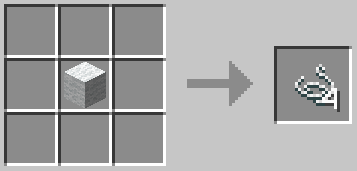
Credits for the crafting recipe go to **epharian**.
---
#### **Usage**
String is a vanilla item. See: [Minecraft Wiki](https://minecraft.fandom.com/wiki/String)
---
#### **Known Issues**
---
#### **Data values**
# Torches (Bulk Craft)
**Description:** Craft torches in bulk.
---
**Details:**
| **Rarity color:** | -- |
| **Renewable:** | -- |
| **Stackable:** | -- |
| **Durability:** | -- |
---
#### **Obtaining**
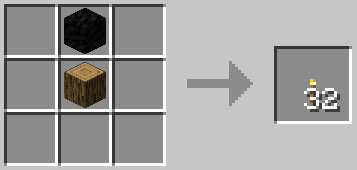
**Crafting** 32 torches can be crafted with 1 Coal Block and 1 Log (any vanilla).
---
#### **Usage**
Torches are a vanilla lighting item. See: [Minecraft Wiki](https://minecraft.fandom.com/wiki/Torch)
---
#### **Known Issues**
- **\[-\]** Not possible to substitute a coal block for a SWPM charcoal block (will be added later).
---
#### **Data values**
minecraft:torch
# Tripwire Hook
**Description:** Create tripwire hooks in bulk.
---
**Details:**
| **Rarity color:** | -- |
| **Renewable:** | -- |
| **Stackable:** | -- |
| **Durability:** | -- |
---
#### **Obtaining**
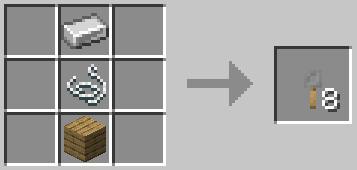
**Crafting** 8 tripwire hooks can be crafted with 1 Iron Ingot, 1 String and 1 Wood Plank (any vanilla).
---
#### **Usage**
Tripwire hooks are a vanilla item. See: [Minecraft Wiki](https://minecraft.fandom.com/wiki/Tripwire_Hook)
---
#### **Known Issues**
---
#### **Data values**
# Wool (Bulk ReDye)
**Description:** Recolor wool with dye.
---
**Details:**
| **Rarity color:** | -- |
| **Renewable:** | -- |
| **Stackable:** | -- |
| **Durability:** | -- |
---
#### **Obtaining**
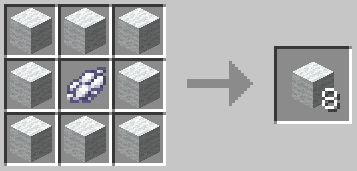
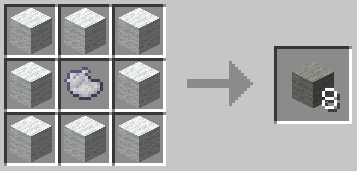
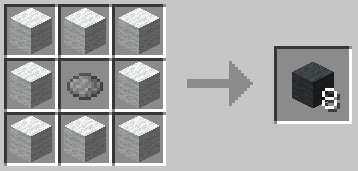
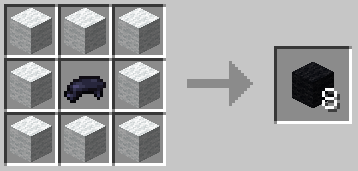
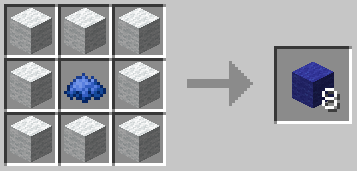
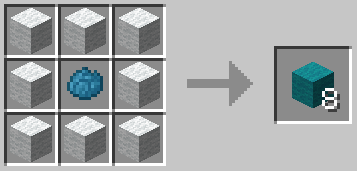
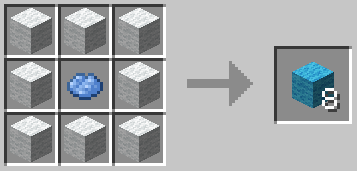
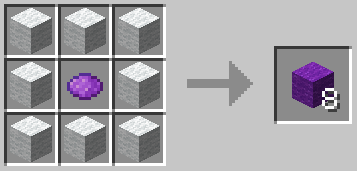
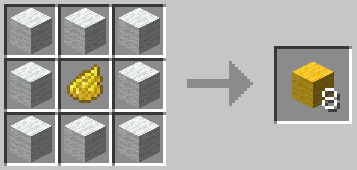
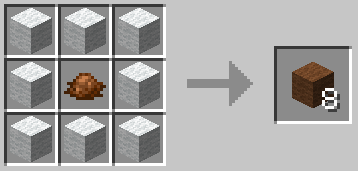
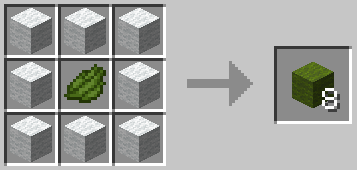
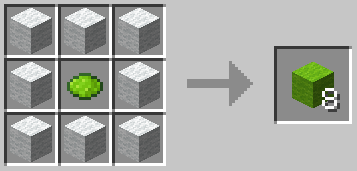
**Crafting** You can recolor wool to a new color using 8 Wool and 1 Dye.
Recipes
[](https://wiki.swequestrian.com/uploads/images/gallery/2023-01/image-1673724210637.png)
[](https://wiki.swequestrian.com/uploads/images/gallery/2023-01/image-1673724222275.png)
[](https://wiki.swequestrian.com/uploads/images/gallery/2023-01/image-1673724235994.png)
[](https://wiki.swequestrian.com/uploads/images/gallery/2023-01/image-1673724248473.png)
[](https://wiki.swequestrian.com/uploads/images/gallery/2023-01/image-1673724284089.png)
[](https://wiki.swequestrian.com/uploads/images/gallery/2023-01/image-1673724262782.png)
[](https://wiki.swequestrian.com/uploads/images/gallery/2023-01/image-1673724308226.png)
[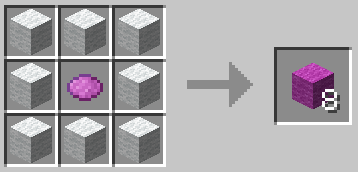](https://wiki.swequestrian.com/uploads/images/gallery/2023-01/image-1673724321593.png)
[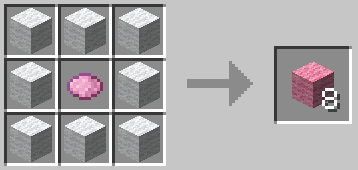](https://wiki.swequestrian.com/uploads/images/gallery/2023-01/image-1673724390073.png)
[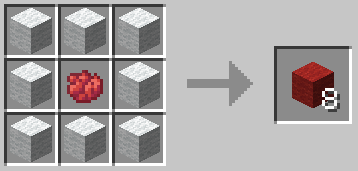](https://wiki.swequestrian.com/uploads/images/gallery/2023-01/image-1673724404567.png)
[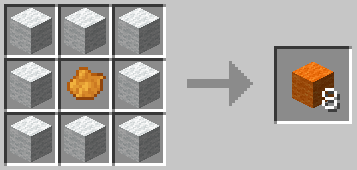](https://wiki.swequestrian.com/uploads/images/gallery/2023-01/image-1673724420660.png)
[](https://wiki.swequestrian.com/uploads/images/gallery/2023-01/image-1673724442515.png)
[](https://wiki.swequestrian.com/uploads/images/gallery/2023-01/image-1673724456996.png)
[](https://wiki.swequestrian.com/uploads/images/gallery/2023-01/image-1673724469656.png)
[](https://wiki.swequestrian.com/uploads/images/gallery/2023-01/image-1673724481838.png)
Credits for the crafting recipe go to **acemccrank**.
---
#### **Usage**
Wool blocks are a vanilla item. See: [Minecraft Wiki](https://minecraft.fandom.com/wiki/Wool)
---
#### **Known Issues**
---
#### **Data values**
# Items
The items section outlines unique (new) items added by the SWPM mod.
# Healing Items
**Description:** Healing Items are a group of items that can heal passive mobs and the player.
---
**Details:**
| **Rarity color:** | Common |
| **Renewable:** | Yes |
| **Stackable:** | Yes (64) |
| **Durability:** | Yes (Single Use) |
---
#### **Obtaining**
**Loot Spawn** Healing items can spawn in loot containers around the world; villages, dungeons, and loot containers provided by other mods. **Crafting**
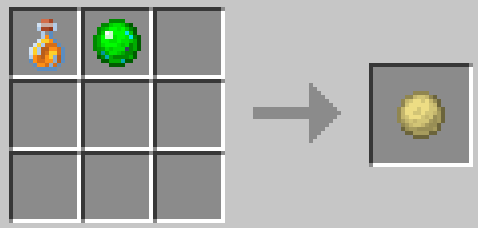
Salve
Salve is crafted with Honey Bottle and Slime. It can be used with a Bandage to make a Medicated Bandage.
It heals 2 full Hearts (4 Health).
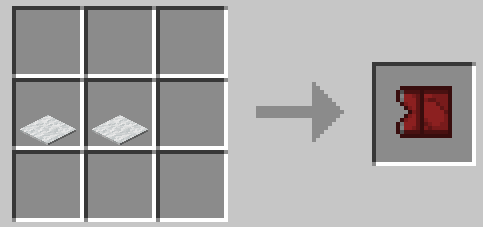
Bandage
A Bandage is made by using 2 White Carpets. Salve can be added to the Bandage to make a Medicated Bandage.
It heals 1 full Heart (2 Health).
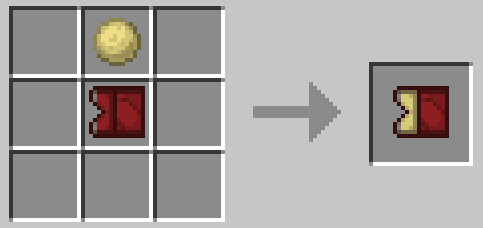
Medicated Bandage
A Medicated Bandage is made with a Bandage and Salve.
It heals 3 full Hearts (6 Health).
| **Rarity color:** | Common |
| **Renewable:** | Yes |
| **Stackable:** | Yes (64) |
---
#### **Obtaining**
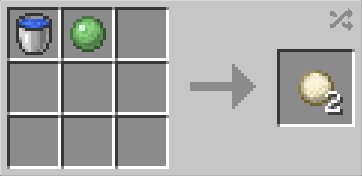
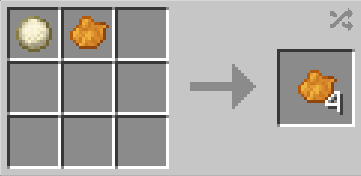
**Crafting** Paint Filler can be crafted with 1 Water Bucket and 1 Slime
Paint Filler can also be crafted with Star Worm Goop from SWLM and SWEM.
[](https://wiki.swequestrian.com/uploads/images/gallery/2023-01/paint-filler.png)
---
#### **Usage**
**Crafting ingredient** Paint Filler can be combined with any dye to produce 4 dyes of that color.
[](https://wiki.swequestrian.com/uploads/images/gallery/2023-01/paint-filler-use.png)
---
#### **Data values**
# Mercy Blade
**Description:** Mercy Blade offers a humane one-hit kill to passive entities.
---
**Details:**
| **Rarity color:** | -- |
| **Renewable:** | -- |
| **Stackable:** | -- |
| **Durability:** | -- |
---
#### **Obtaining**
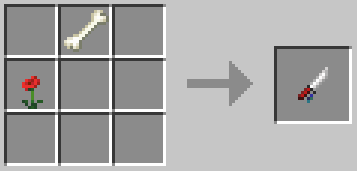
**Crafting** A mercy blade can be crafted with 1 Bone and 1 Poppy.
---
#### **Usage**
Left click a passive mob with a mercy blade in hand to use it. This offers a one-hit kill and the animal will not make any sound that is usually produced when harmed. Normal mob loot will be dropped.
Mercy blades can be enchanted with Looting in an enchanting table, or combined with an enchanted book in an anvil.
This item effects PASSIVE mobs ONLY. This item does not affect any mob classified as Aggressive.
---
#### **Known Issues**
- `1.21.1` Mercy blades do not one-hit kill pigs. [**Bug Report**](https://discord.com/channels/715626418893095012/1484648916476625117/1484648916476625117)
---
#### **Data values**
# Knapsack
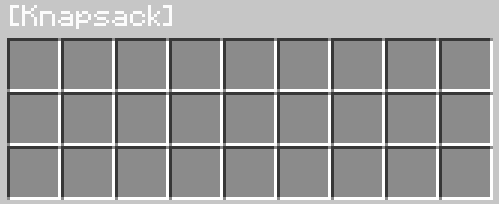
**Description:** A dyeable backpack with one chest worth of inventory slots. Designed to be cheap for beginning game, perfect for starter equipment. There are currently no upgrades for the knapsack so there are no effects to gameplay besides moderate convenience.
---
**Details:**
| **Rarity color:** | Common |
| **Renewable:** | Yes |
| **Stackable:** | No |
| **Durability:** | None |
---
#### **Obtaining**
Knapsacks come in a single Brown color variant but can be dyed.
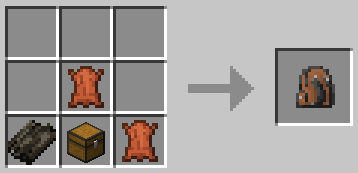
1 Knapsack can be crafted with 1 Dried Kelp, 2 Leather, and 1 Chest.
[](https://wiki.swequestrian.com/uploads/images/gallery/2026-01/qw1image.png)
---
#### **Usage**
Open via right click when in hand.
Currently no curios compatibility or model for wearing on one's back.
[](https://wiki.swequestrian.com/uploads/images/gallery/2026-01/EhGimage.png)
---
#### **Additional**
N/A
# Blocks
The blocks section outlines unique (new) blocks added by the SWPM mod.
# Charcoal Block
**Description:** A condensed charcoal block.
---
**Details:**
| **Rarity color:** | Common |
| **Renewable:** | Yes |
| **Stackable:** | Yes (64) |
| **Durability:** | None |
---
#### **Obtaining**
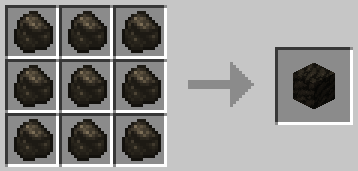
**Crafting** A charcoal block can be crafted with 9 [Charcoal](https://minecraft.fandom.com/wiki/Charcoal).
---
#### **Usage**
They can also be placed in furnaces, blast furnaces or smokers to power them. They are equal to 10 coal or charcoal (800 seconds) - the same as [coal blocks](https://minecraft.fandom.com/wiki/Block_of_Coal). As charcoal can be easily produced with logs, charcoal blocks represent a relatively cheap and easy alternative to coal for smelting.
Charcoal Blocks can sustain a permanent fire, similar to netherack, when lit with a flint and steel. They can fire-spread.
---
#### **Known Issues**
---
#### **Data values**
# Fuel Block
**Description:** A Fuel Block can be used as a source of fuel for Furnaces.
---
**Details:**
| **Renewable:** | Yes |
| **Stackable:**
| Yes (64) |
| **Tool:** | Pickaxe (Any) |
| **Blast Resistance:** | N/A |
| **Hardness:** | N/A |
| **Luminant:** | No |
| **Transparent:** | No |
| **Flammable:** | No (See Usage) |
| **Flammable (Lava):** | No |
---
#### **Obtaining**
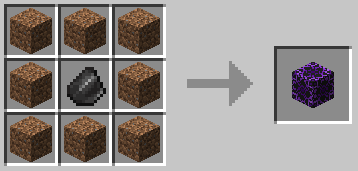
**Crafting** A Fuel Block can be crafted with 8 Dirt and 1 Flint.
---
#### **Usage**
Fuel Blocks can be placed in furnaces, blast furnaces, or smokers to power them. They are equal to coal or charcoal (80 seconds) but 1/10th as long-lasting as coal or charcoal blocks (800 seconds).
Fuel Blocks can sustain a permanent fire, similar to netherack, when lit with a flint and steel. They do not fire-spread.
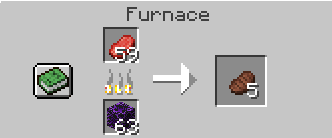
These blocks are best used as a fuel for fire-fueled blocks like Kilns without requiring netherrack. Or feature walls. Whichever.
---
#### **Data Values**
# Functions
The functions section outlines unique (new) QOL functions and features added by the SWPM mod.
# Gamemode Locks
Gamemode Locks are a feature added by SWPM that allows hosts to designate specific areas/dimensions with a set gamemode.
- This gamemode will override the default setting of the world or server.
- This gamemode lock will automatically change the gamemode of any player that crosses into the area/dimension.
- This gamemode lock will not effect those with the correct keys to bypass. Please see [Role Permission Keys](https://wiki.swequestrian.com/books/star-worm-plus/page/role-permission-keys).
- This gamemode can be set to apply to a specific dimension, or even a specific area within a dimension.
- This gamemode can "nest". A Region Gamemode Lock will override a Dimension Gamemode Lock.
---
#### **View Gamemode Locks**
Gamemode Locks can only be viewed/edited by players with the Admin Key (SWPM) and within the applicable dimension.
`/swpm gamemode list` List all Gamemode Locks in the current dimension.
---
#### **Create a Gamemode Lock (Basic)**
Gamemode Locks can only be set by players with the Admin Key (SWPM).
\[DIMENSION\] /swpm gamemode \[gamemode\] \[@/player\] dimension <true/false>
**Action:** Creates a gamemode lock in the current dimension, dis/allowing the /swpm fly command for the effected players.
**Example:** Puts all players (@a) into adventure mode when in the current dimension, disallowing /swpm fly.
```
/swpm gamemode set adventure @a dimension false
```
**Note:** N/A
\[REGION\] /swpm gamemode set \[gamemode\] \[@/player\] <gamemode lock name> \[coords\] <true/false>
**Action:** Creates a gamemode lock within a set coordinates, with a specific name, dis/allowing the /swpm fly command for the effected players.
**Example:** Puts all players (@a) into survival mode within the set coordinates (cube) of the Region Lock named 'Woot', disallowing the /swpm fly command.
```
/swpm gamemode set survival @a region Woot -377 78 -18 -415 75 40 false
```
**Note:** N/A
\[ADVANCED: EXAMPLE\] /swpm gamemode set adventure @a\[key=!swpm:admin\] dimension
**Action:** Creates a Gamemode Lock that affects all players (@a) EXCEPT those specified.
**Example:** Puts all players (@a) that do NOT have the Admin Key into survival mode when in the current dimension.
```
/swpm gamemode set adventure @a[key=!swpm:admin] dimension
```
**Note:** This was used extensively to allow staff members access to the gamemodes they required to complete their work. This was also used in conjunction with command blocks to create 'staff-only' spaces.
**Note:** Currently, only one Key can be selected at a time, otherwise it works as an AND statement. Meaning "/swpm gamemode set adventure @a\[key=!swpm:admin,!swpm:mod\] dimension" will affect all players that don't have BOTH the Admin Key and Mod Key. All players with only one or neither will be affected.
If you prefer to use Minecraft Teams - Teams needs to be set up separately (Minecraft feature) and players manually added to the team. Read more **[here](https://minecraft.fandom.com/wiki/Commands/team).**
---
#### **Options (Explained)**
**Gamemode**
| [**Adventure**](https://minecraft.fandom.com/wiki/Adventure)
| The player is mortal (can be killed), can explore the world but cannot place or destroy blocks. |
| **[Survival](https://minecraft.fandom.com/wiki/Survival)** | The player is mortal (can be killed) and may explore the world, place and destroy blocks. |
| **[Creative](https://minecraft.fandom.com/wiki/Creative)** | The player is immortal, has free access to any block in the game, instant destruction of blocks, creative flight. |
| **[Spectator](https://minecraft.fandom.com/wiki/Spectator)** | The player is immortal, can fly through objects or the world, cannot interact with any items or entities. |
**Target**
| [**Target Selector**](https://minecraft.fandom.com/wiki/Target_selectors)
| A selector such as @a (all players) |
| **Player UN** | A specific player's username |
| **Player [UUID](https://minecraft.fandom.com/wiki/UUID)** | A specific player's user ID (UUID) |
**Range / Area**
| **Dimension**
| A selector such as @a (all players) |
| [Region](https://minecraft.fandom.com/wiki/Argument_types#block_pos "Region") | Determine a cube selection of the desired area (selection) including **height** and **depth**. Specify the coordinates of two opposing corner blocks. |
---
#### **Edit or Remove a Gamemode Lock**
Gamemode Locks can only be removed by players with the Admin Key (SWPM) who are located within the region/dimension Lock.
`/swpm gamemode remove ` Removes a gamemode lock in the current region (position).
`/swpm gamemode remove dimension` Removes a gamemode lock in the current dimension.
`/swpm gamemode rename` Renames the specified region Gamemode Lock.
It's recommended to keep track of the full commands used to create multiple Gamemode Locks. If your server uses a Region Lock per plot like ours did, then editing them can be tedious unless you have the full commands (including coordinates) in a copy/paste list for easy editing.
---
#### **Troubleshooting**
**Command fails**
- Player has incorrect permissions to use the command
- Server has ranks that override or forbid the use of the command
- Player has incorrectly written the arguments (command)
**Cannot remove a Gamemode Lock**
- Not standing in a valid region with a gamemode lock to be deleted (none present, outside the region).
---
#### **Changelog**
View Changes
This is not a complete list of version changes / fixes. It is a changelog of relevant wiki-related version information.
| **MC Version** | **Release** | **Notes** |
| 1.18.2 | 1.18.2-2.1.0 | New feature - added **/gamemode** command |
**Check and adjust the config prior to applying to or updating servers - blacklisted inventory items will be permanently lost.**
The below is our default entry for SWE server modpack and restrictions.
```
#List of item ids to blacklist from being mapped.
#Format: modid:itemid
#Example: minecraft:stone
blacklist_item_ids = ["minecraft:bedrock"]
#List of entity ids to blacklist from being mapped.
#Format: modid:entityid
#Example Entry: minecraft:iron_golem
#Example List: ["minecraft:iron_golem", "minecraft:villager", "minecraft:wither", "minecraft:mooshroom"]
blacklist_entity_ids = []
```
**This says:** Specify which items (by ID) that will be removed from a player once acquired, and which entities (by ID) that will be prevented from spawning.
#### **Example Server Config**
The below is our default entry for SWE server modpack and restrictions.
```
#List of item ids to blacklist from being mapped.
#Format: modid:itemid
#Example: minecraft:stone
blacklist_item_ids = ["minecraft:bedrock", "minecraft:barrier", "minecraft:elytra", "minecraft:ender_chest", "minecraft:obsidian", "minecraft:ender_eye", "minecraft:end_crystal", "minecraft:wither_skeleton_skull", "minecraft:nether_star", "minecraft:chorus_fruit", "minecraft:budding_amethyst", "minecraft:tnt"]
#List of entity ids to blacklist from being mapped.
#Format: modid:entityid
#Example Entry: minecraft:iron_golem
#Example List: ["minecraft:iron_golem", "minecraft:villager", "minecraft:wither", "minecraft:mooshroom"]
blacklist_entity_ids = ["minecraft:iron_golem", "minecraft:villager", "minecraft:wither", "minecraft:mooshroom"]
```
**This says:** Specify which items (by ID) that will be removed from a player once acquired, and which entities (by ID) that will be prevented from spawning.
---
#### **Commands**
`/swpm blacklist add modid:itemid` Adds an item (by ID) to the blacklist.
`/swpm blacklist remove modid:itemid` Removes an item (by ID) from the blacklist.
`/swpm blacklist list` Lists all currently blacklisted items (allows blacklist removal via the list).
Blacklisted entities cannot be listed, added, or removed via commands. It is only possible through config.
---
#### **Exemption**
All users are subject to blacklist item confiscation except for anyone with the [Blacklist Bypass key](https://wiki.swequestrian.com/books/swplus-mod/page/role-permission-keys#bkmrk-blacklist-bypass-key).
When an item is confiscated, the following message will display:

# Command Functions
**Note:** These permissions and restrictions are primarily being developed for use in official SWE servers, but are included in the mod for others needing similar functions for server management. We are aware other mods might have added their own version of these commands, however to limit our modpack, we internalized the the ones we deemed most necessary.
---
#### **Creative Flight** (within Gamemode Locks)
[Gamemode Locks](https://wiki.swequestrian.com/books/star-worm-plus/page/gamemode-locks) can allow creative flight to be activated within them. Upon set up, choose true (flight: yes) or false (flight: no).
To toggle flight, `/swpm fly`.
Access to this command does not require a Key.
This was primarily used for players building within their plot zones. We Gamemode Locked the dimension Plot dimensions to Adventure Mode, built premade plots, put Survival Gamemode Locks (regional) over the plots, then used FTBChunks for players to have access to edit their plot.
---
#### **Thru**
To teleport through an obstacle, `/swpm thru`.
Access to this command is given with the Mod Key.
This was primarily used for ease of access to staff-only rooms in community service buildings as these rooms often didn't have doors to make illegal entry impossible.
---
#### **OnDuty**
OnDuty is a command to make it clear which staff are available and actively working on their tasks.
Staff members that are on duty will have:
- chat messages in the relating color to their highest Key ranking
- their name in that bolded color in the Online Player List (when pressing TAB).
To list staff currently on duty, `/swpm onDuty list`.
Access to this command does not require a Key.
To go on/off duty, `/swpm onDuty `.
This command will send a bolded message in chat.
Access to this command is given with the Mod Key.
[](https://wiki.swequestrian.com/uploads/images/gallery/2023-10/tDeimage.png)
[](https://wiki.swequestrian.com/uploads/images/gallery/2023-10/7Fzimage.png)
Our staff were permitted and encouraged to play the server but struggled to find peace to play because of the players' constant wants and needs. Creating the onDuty system assisted in enforcing player respect of the staff's off duty hours while also tracking their on duty work hours.
# (Dimensional) Difficulty and PvP
Difficulty and PvP can be set per dimension via the config, overriding whatever the world files say.
Please see the [Server Configs](https://wiki.swequestrian.com/books/star-worm-plus/page/server-config "Server Configs") to set them.
# Permission Keys and Commands
# General Understanding
#### **FAQs**
How complete is this mod?
SWPlusM is currently in a functionally useful state for most servers. However, it is currently **in development** and is being expanded - not all features are implemented.
Do I need a rank mod?
SWPM keys are not substitute for a rank mod that limits use of Minecraft commands, or the commands of other mods.
They are, however, linked to important controls with easy add/remove as needed. Especially for features not available in other rank mods.
Why make this mod? What purpose does it serve?
These permissions and restrictions are primarily being developed for use in official SWE servers, but are posted publicly in the mod for others needing similar functions for server management.
The keys determined reflect the roles within our community and staff team, but have been adapted to generic role names for easy application on other servers.
We were unable to locate a mod that had easy pre-set limitations for base access that is the same across most-all servers.
Additionally, we wanted the ability to control dimension specific gamemodes, nested region specific gamemodes, and access permissions - blocking players from certain locations/buildings via easier command blocks commands.
Why is the Owner Key required when normally all access is given via OP?
This mod is made to run on multiplayer servers which assumes the use of rankings, staff, and protections of dangerous permissions from undesirable uses. Some mods require OP access to be given to players to do tasks below the Mod/Admin level (e.g. World Edit and volunteer/paid Builders). It was deemed unsafe to make OP access default as any lower level staff with OP for tasks like building, could then assign/revoke any Key from anyone.
Assumes Multiplayer
Role Permission Keys are by default only useful for multiplayer servers. This wiki page will assume multiplayer use.
SEPARATED Permissions!
This mod operates under SEPARATED, non-scaffolding permissions. It assumes that before a player becomes an Admin, they must be promoted from Mod first, which means they'd have both keys and both sets of permissions. Having the Admin
This system is setup this way because the 11 planned Keys have specific permissions specific to their tasks granted by the server Owner. For example: One with the Filming/Marketing Key has separated permissions from the Builder Key. While a player may be granted both Keys, Filming does not require building perms and Building does not require filming perms such as reset commands that could easily be misused. Further, Keys can be added/removed quickly and easily so that if a Key is to be given per circumstance, it can be controlled to those specific ones so the staff member is not critically limited in their other tasks.
Further than that, Keys can be granted by command blocks, assisting in area locks like in questing level ups.
Currently Implemented Ranks
The Keys are ordered by Hierarchy. More dangerous permissions are given to higher level ranks, like Mod or Admin.
Currently Active Keys (highest rank to lowest) with Assigned Minecraft Colors:
1. Owner (Blue)
2. Admin (Yellow)
3. Mod (Gold)
Assigned/revoked by Admin Key and higher ranking. Technically not within Rankings.
Other:
1. Blacklist Bypass (Black)
`/swpm key assign swpm:owner`
From there, the player with the Owner Key can then assign the necessary Keys to the desired staff.
The below Index states which Keys give which commands/permissions.
The Owner Key should not be given to anyone who is not absolutely necessary. The Owner Key grants access to assigning/revoking any Key to/from any player.
# Keys (Inactive)
#### Jail Key (Inactive)
This key is currently inactive - assigning this key offers no additional access to commands.
---
#### Audit Key (Inactive)
This key is currently inactive - assigning this key offers no additional access to commands.
---
#### Player Key (Inactive)
This key is currently inactive - assigning this key offers no additional access to commands.
---
#### Donator Key (Inactive)
This key is currently inactive - assigning this key offers no additional access to commands.
---
#### Helper Key (Inactive)
This key is currently inactive - assigning this key offers no additional access to commands.
---
#### Filming Key (Inactive)
This key is currently inactive - assigning this key offers no additional access to commands.
---
#### Assistant Key (Inactive)
This key is currently inactive - assigning this key offers no additional access to commands.
---
#### Staff Key (Inactive)
This key is currently inactive - assigning this key offers no additional access to commands.
---
#### Admin Assist Key (Inactive)
This key is currently inactive - assigning this key offers no additional access to commands.
---
#### Builder Key (Inactive)
This key is currently inactive - assigning this key offers no additional access to commands.
# Keys
#### **Reminder**
All permissions are separated, not scaffolding! One can have an Admin Key without having a Mod Key, meaning they can only run Admin commands. If you want them to have both, give them both keys!
---
#### **Default Access**
In future, these permissions will be transferred to the Player Key, requiring a permission system to obtain the Player Key.
e.g. SWPM would automatically assign the Player Key once the player has agreed to the rules, to then gain access to the server.
***Available Commands***
| `/swpm fly` | Toggles creative flight within a permitted area. See [Gamemode Locks](https://wiki.swequestrian.com/books/star-worm-plus/page/gamemode-locks). |
| `/swpm key list` | Lists all keys assigned to your player. |
| `/swpm onDuty list` | Lists all the staff members currently on duty. |
**Assign/Revoke Key**
| `N/A` | Give a player the Player key. |
There is currently no Key needed to run these commands.
|
---
#### **Mod Key**
This Key permits approved server staff (Mod level) to list Keys of other players, go on/off duty, and teleport through obstacles.
***Available Commands***
| `/swpm key list ` | Lists all Keys assigned to a specific player other than oneself. |
| `/swpm onDuty ` | Marks oneself as On/Off Duty. |
| `/swpm thru` | Teleports the player through an obstacles. |
**Assign/Revoke Key**
| `/swpm key [playername] swpm:admin` | Give a player the Admin key. |
This Key can only be assigned/revoked by one with the Owner Key.
|
---
#### **Admin Key**
This Key permits approved server staff (Admin level) to view/remove/add Gamemode Locks, as well as assign or revoke Keys.
*For information on how to use Gamemode Locks in full, please see the [Gamemode Locks](https://wiki.swequestrian.com/books/star-worm-plus/page/gamemode-locks "Gamemode Locks") page.*
***Available Commands***
| `/swpm gamemode list` | List gamemode locks for current dimension +/- TP to center point. |
| `/swpm gamemode remove [dimension] [true/false]` | Removes a gamemode lock in the current region/dimension you are standing in. |
| `/swpm gamemode [gamemode] set [@/player] dimension [true/false]` | Add a new gamemode lock in the current dimension. |
| `/swpm gamemode [gamemode] set [@/player] name [true/false]` | Add a new gamemode lock between the set coordinates (cube). |
| `/swpm key [playername] [swpm:key]` | Assigns/Revokes any lower ranking key to/from another player(s). |
| `/swpm blacklist item `
| Adds/Removes an item to/from the Blacklist. |
| `/swpm blacklist list` | Lists all items on the Blacklist. |
*An Admin can not go On/Off Duty without the Mod Key which permits access to the command.*
**Assign/Revoke Key**
| `/swpm key assign [playername] swpm:admin` | Give a player the Admin key. |
This Key can only be assigned/revoked by one with the Owner Key.
|
---
#### **Owner Key**
This key serves the sole purpose of giving a player access to assign/revoke any key from any player. This Key can only be given through console. Once given, the Owner can then assign Keys as needed, such as Mod or Admin Keys.
***Available Commands***
| `/swpm key ` | Assigns/Revokes any lower ranking key to/from another player(s). |
**Assign/Revoke Key**
| `/swpm key [playername] swpm:owner` | Give a player the Owner Key. |
This Key can only be assigned/revoked by console command.
|
---
#### **Blacklist Bypass Key**
This key permits approved server staff to be exempt from item confiscation by the Blacklist feature.
If assigned, a player with the Blacklist Bypass Key will be able to keep (in their inventory) any item which would otherwise be deleted moments after being taken, picked up, or transferred into an inventory.
***Available Commands***
**Assign/Revoke Key**
| `/swpm key [playername] swpm:blacklist_bypass` | Give a player the Blacklist Bypass Key. |
This Key can only be assigned/revoked one with the Admin or Owner Key.
|