# Measurement Tool

**Description:** A Measurement Tool is an item that can be used to create jumps.

<p class="callout warning">Do not destroy jumps by hand or the jump controller will remain! **Always delete jumps via the Jump Builder GUI.**</p>

---

**Details:**

<table border="1" id="bkmrk-renewable%3A-%C2%A0-stackab" style="border-collapse: collapse; width: 40.4938%; height: 87px;"><tbody><tr style="height: 29px;"><td class="align-right" style="width: 20.2469%; height: 29px;">**Rarity color:**</td><td style="width: 20.2469%; height: 29px;">Common</td></tr><tr style="height: 29px;"><td class="align-right" style="width: 20.2469%; height: 29px;">**Renewable:**</td><td style="width: 20.2469%; height: 29px;">Yes</td></tr><tr style="height: 29px;"><td class="align-right" style="width: 20.2469%; height: 29px;">**Stackable:**</td><td style="width: 20.2469%; height: 29px;">Yes (64)</td></tr><tr><td class="align-right" style="width: 20.2469%;">**Durability:**</td><td style="width: 20.2469%;">None</td></tr></tbody></table>

---

#### **Obtaining**

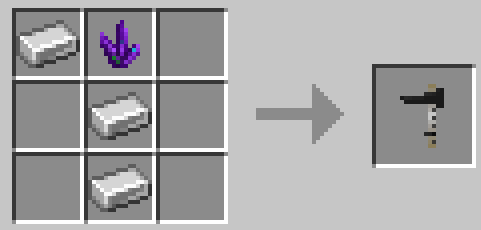
**Crafting** Measurement tools come in a single (gray/black) color.  
A Measurement Tool can be crafted with 1 Iron Ingot, 2 Iron Nuggets and 1 Dried Kelp.

![image-1684081600616.png](https://wiki.swequestrian.com/uploads/images/gallery/2023-05/scaled-1680-/image-1684081600616.png)

---

#### **Usage**

<p class="callout info">Error messages can be seen above the inventory hotbar when the Measurement Tool is used incorrectly.</p>

**Creating A Jump** Measurement tool is required to create custom jumps. Follow this step by step method to use the tool.

1. Place **any** block (ie dirt) on the ground
2. Move sideways (straight line) and place a second block exactly 5 blocks away (Block - 5B space - Block)
3. Stand in front of one block (looking at it) and right-click the block with a measurement tool in hand
4. Stand in front of the second block (looking at it) and right-click the block with a measurement tool in hand
5. This should bring up the Jump Builder GUI

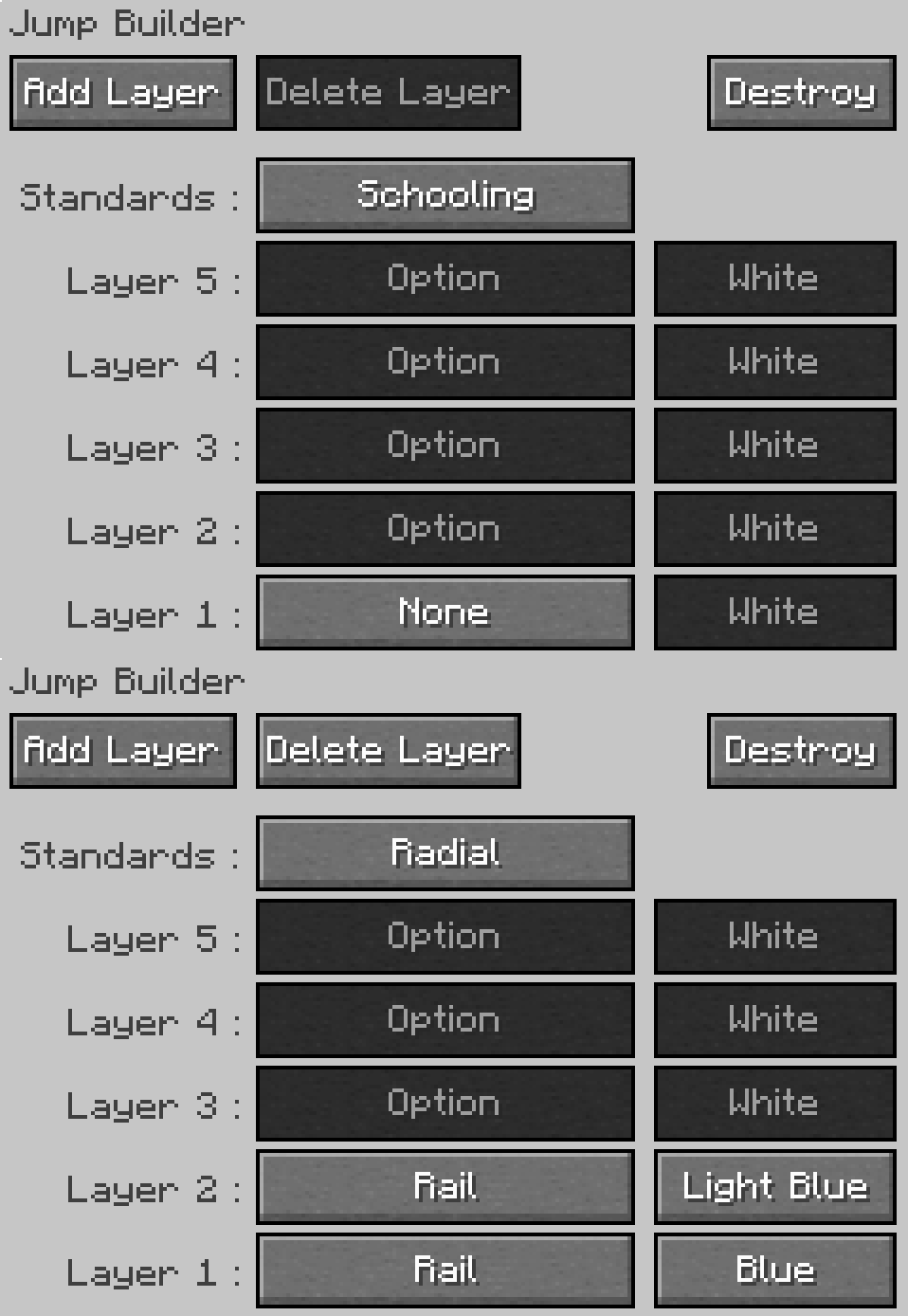
**Customizing Jumps** You need to interact with the Jump to customize it's features. The Jump Builder GUI (menu) is automatically opened when a new jump is made, and can be opened again at any time by right-clicking on a jump with a measurement tool.

<table border="1" id="bkmrk-edit-obstacle-type%3A%C2%A0" style="border-collapse: collapse; width: 100%; height: 260.538px;"><tbody><tr style="height: 29.8785px;"><td rowspan="3" style="height: 29.8785px; width: 16.0714%;">Edit Obstacle  
</td><td style="width: 83.9423%; height: 29.8785px; text-align: justify;">**Type:** Left click the **None** button next to Layer to cycle forward through obstacles, right click to go back.  
</td></tr><tr><td style="width: 83.9423%; text-align: justify;">**Color:** Left click the color button next to an obstacle to cycle through colors, right click to go back.

</td></tr><tr style="height: 35.4688px; background-color: #f8cac6;"><td style="width: 83.9423%; height: 35.4688px; text-align: justify;">Some obstacle variants do not have a color option (logs etc)

</td></tr><tr style="height: 29.8785px;"><td rowspan="2" style="height: 29.8785px; width: 16.0714%;">Edit Levels  
</td><td style="width: 83.9423%; height: 29.8785px; text-align: justify;">**Add:** Left click the '**Add Layer**' button in the top left of the GUI to add a new layer (One block higher)  
</td></tr><tr style="height: 29.8785px;"><td style="width: 83.9423%; height: 29.8785px; text-align: justify;">**Delete:** Left click the '**Delete Layer**' button in the top left of the GUI to delete a layer (One block lower)  
</td></tr><tr style="height: 29.8785px;"><td style="width: 16.0714%; height: 29.8785px;">Edit Standards</td><td style="width: 83.9423%; height: 29.8785px; text-align: justify;">**Type:** Left click the button next to '**Standards**' to cycle between jump standards (posts that support poles)  
</td></tr><tr style="height: 29.8785px;"><td rowspan="2" style="height: 29.8785px; width: 16.0714%;">Delete Jump  
</td><td style="width: 83.9423%; height: 29.8785px; text-align: justify;">If you want to get rid of the **entire** jump, left click the 'Destroy' button in the top right of the GUI.</td></tr><tr style="background-color: #f8cac6;"><td style="width: 83.9423%; text-align: justify;">Do not destroy jumps by hand or the invisible jump controls will remain!</td></tr><tr><td style="width: 16.0714%;">Exit GUI</td><td style="width: 83.9423%; text-align: justify;">Press the escape key to exit out of the Jump GUI at any time.</td></tr></tbody></table>

**Other information**

- Even if a layer is set to None (no pole/plank) there will still be an invisible barrier that cannot be passed through
- Each jump has a small, invisible jump control element that is spawned when a new jump is created
- If the jump controller intersects a block it will be removed and no block can be placed there (6B up - top right of jump)
- If the jump controller is destroyed (usually only possible with commands) the jump can no longer be edited)
- If the jump is destroyed by hand instead of the GUI, it will be impossible to remove the controller without commands

<p class="callout info">Indoor arenas should have a minimum of 11B height clearance if intended to support max-level jumps. This height is the peak point at a max level jump where a rider and horse would comfortably avoid collision with the roof.</p>

**![Jump.gif](https://wiki.swequestrian.com/uploads/images/gallery/2023-07/jump.gif)**

<span style="color: rgb(126, 140, 141);">**Shown:** Jump Builder GUI showing a new jump (blank options) and a 2B vertical jump with rails in blue colors.</span>

---

#### **Options**

<details id="bkmrk-view-options-%C2%A0-base-"><summary>View Options</summary>

<table border="1" id="bkmrk-base-elements-%28obsta" style="border-collapse: collapse; width: 100%; height: 603.079px;"><tbody><tr style="height: 31.5938px;"><td class="align-center" style="height: 31.5938px; width: 18.3562%;"> </td><td class="align-center" style="width: 70.604%; height: 31.5938px;">**Base Elements (Obstacles)** - Can be used on Layer 1 Only</td><td style="width: 11.0398%; height: 31.5938px;">  
</td></tr><tr style="height: 29.7969px;"><td class="align-right" style="width: 18.3562%; height: 29.7969px;">Log</td><td style="width: 70.604%; height: 29.7969px;">A solid oak log block (slightly thinner than a normal block) ideal for XC jumps.</td><td style="width: 11.0398%; height: 29.7969px;">None</td></tr><tr style="height: 29.7969px;"><td class="align-right" style="width: 18.3562%; height: 29.7969px;">Pole On Box (Small)</td><td style="width: 70.604%; height: 29.7969px;">A pole on a small X shaped box, ideal for training and cavaletti </td><td style="width: 11.0398%; height: 29.7969px;">16 Colors</td></tr><tr style="height: 29.7969px;"><td class="align-right" style="width: 18.3562%; height: 29.7969px;">Pole On Box (Large)</td><td style="width: 70.604%; height: 29.7969px;">A pole on a slightly higher X shaped box, ideal for training and cavaletti</td><td style="width: 11.0398%; height: 29.7969px;">16 Colors</td></tr><tr style="height: 29.7969px;"><td class="align-right" style="width: 18.3562%; height: 29.7969px;">Brush Box</td><td style="width: 70.604%; height: 29.7969px;">A small bushy plant in a whitewash planter, ideal for Show Jumping </td><td style="width: 11.0398%; height: 29.7969px;">None</td></tr><tr style="height: 29.7969px;"><td class="align-right" style="width: 18.3562%; height: 29.7969px;">Flower Box</td><td style="width: 70.604%; height: 29.7969px;">A small planter of colorful flowers, ideal for Show Jumping</td><td style="width: 11.0398%; height: 29.7969px;">16 Colors</td></tr><tr style="height: 29.7969px;"><td class="align-right" style="width: 18.3562%; height: 29.7969px;">Coop</td><td style="width: 70.604%; height: 29.7969px;">A small triangular fence obstacle, ideal for XC jumps or dressage borders</td><td style="width: 11.0398%; height: 29.7969px;">None</td></tr><tr style="height: 31.5938px;"><td class="align-right" style="width: 18.3562%; height: 31.5938px;">Roll Top</td><td style="width: 70.604%; height: 31.5938px;">A quarter-circle curved obstacle, ideal for XC jumps</td><td style="width: 11.0398%; height: 31.5938px;">16 Colors</td></tr><tr style="height: 29.7969px;"><td class="align-right" style="width: 18.3562%; height: 29.7969px;">Wall Mini</td><td style="width: 70.604%; height: 29.7969px;">A brick-wall slab</td><td style="width: 11.0398%; height: 29.7969px;">None</td></tr><tr style="height: 34.375px;"><td class="align-right" style="width: 18.3562%; height: 34.375px;">Ground Pole</td><td style="width: 70.604%; height: 34.375px;">A simple striped pole that sits directly on the ground, ideal for training and cavaletti</td><td style="width: 11.0398%; height: 34.375px;">16 Colors</td></tr><tr style="height: 29.7969px;"><td class="align-center" style="height: 29.7969px; width: 18.3562%;">  
</td><td class="align-center" style="width: 70.604%; height: 29.7969px;">**Elements (Obstacles)** - Can be used on any Layer (1-5)</td><td style="width: 11.0398%; height: 29.7969px;">  
</td></tr><tr style="height: 29.7969px;"><td class="align-right" style="width: 18.3562%; height: 29.7969px;">None</td><td style="width: 70.604%; height: 29.7969px;">No visible obstacle for that layer (will still have an invisible obstacle)</td><td style="width: 11.0398%; height: 29.7969px;">N/A</td></tr><tr style="height: 20.7969px;"><td class="align-right" style="width: 18.3562%; height: 20.7969px;">Rail</td><td style="width: 70.604%; height: 20.7969px;">A simple striped pole</td><td style="width: 11.0398%; height: 20.7969px;">16 Colors</td></tr><tr style="height: 29.7969px;"><td class="align-right" style="width: 18.3562%; height: 29.7969px;">Plank</td><td class="align-left" style="width: 70.604%; height: 29.7969px;">A striped plank</td><td style="width: 11.0398%; height: 29.7969px;">16 Colors</td></tr><tr style="height: 29.7969px;"><td class="align-right" style="width: 18.3562%; height: 29.7969px;">Plank Fancy</td><td style="width: 70.604%; height: 29.7969px;">A solid-color wavy plank</td><td style="width: 11.0398%; height: 29.7969px;">16 Colors</td></tr><tr style="height: 30.5938px;"><td style="width: 18.3562%; height: 30.5938px;">  
</td><td class="align-center" style="width: 70.604%; height: 30.5938px;">**Standards** (Support Posts on the side of a jump)</td><td style="width: 11.0398%; height: 30.5938px;">  
</td></tr><tr style="height: 31.375px;"><td class="align-right" style="width: 18.3562%; height: 31.375px;">None</td><td style="width: 70.604%; height: 31.375px;">No standards - Jumps with poles or planks may appear to float without standards</td><td style="width: 11.0398%; height: 31.375px;">N/A</td></tr><tr style="height: 29.7969px;"><td class="align-right" style="width: 18.3562%; height: 29.7969px;">Schooling</td><td style="width: 70.604%; height: 29.7969px;">A simple upright post with a small base.</td><td style="width: 11.0398%; height: 29.7969px;">N/A</td></tr><tr style="height: 32.5938px;"><td class="align-right" style="width: 18.3562%; height: 32.5938px;">Radial</td><td style="width: 70.604%; height: 32.5938px;">A wider based standard with a circular pattern (level 3+)</td><td style="width: 11.0398%; height: 32.5938px;">N/A</td></tr><tr style="height: 32.5938px;"><td class="align-right" style="width: 18.3562%; height: 32.5938px;">Vertical Slat</td><td style="width: 70.604%; height: 32.5938px;">A wider based standard with a simple wooden slat design</td><td style="width: 11.0398%; height: 32.5938px;">N/A</td></tr></tbody></table>

</details>---


#### **Troubleshooting** 

<details id="bkmrk-i-do-not-understand-"><summary>I do not understand how to use the measurement tool!</summary>

##### **Still stuck? Check out Brooke's [Video on YT!](https://www.youtube.com/watch?v=Ldvx9r1gOuo&list=PLCooe20GkTbzYxEN63VzP222XEt3mAw2M&index=3)**

**![47DCEDD3-59D1-4500-8EDC-2E436E68BC5C.png](https://wiki.swequestrian.com/uploads/images/gallery/2022-10/scaled-1680-/47dcedd3-59d1-4500-8edc-2e436e68bc5c.png)**

</details><details id="bkmrk-i-keep-getting-an-er"><summary>I keep getting an error message!</summary>

**Error Messages (Incorrect Use)** Text above the inventory hotbar can inform a user that they are using the Measurement Tool incorrectly. There are 4 error messages in total that can appear for any of the most common user-errors when making jumps.

![Distance.png](https://wiki.swequestrian.com/uploads/images/gallery/2022-12/scaled-1680-/distance.png)

**Solution:** Check that there is exactly 5 blocks **between** marker blocks. B-S-S-S-S-S-B (B = Block, S = Space/Air) Too many spaces or too few and the jump will not be created.

![Direction.png](https://wiki.swequestrian.com/uploads/images/gallery/2022-12/scaled-1680-/direction.png)

**Solution:** Face your first marker block, right click the block. Move **sideways** (do not turn!) until you are in front of the second block, right click it.

![X-Axis.png](https://wiki.swequestrian.com/uploads/images/gallery/2022-12/scaled-1680-/x-axis.png)

**Solution:** One of your blocks is not directly opposite the other marker, make sure they are on a straight line and not at an angle.

![Y-Level.png](https://wiki.swequestrian.com/uploads/images/gallery/2022-12/scaled-1680-/y-level.png)

**Solution:** One of your blocks is at a different height than the other marker, make sure both blocks are at same Y level (on level ground)

</details>---

#### **Known Issues**

If you find an issue, please report it to our bugs channel on [Discord](https://discord.com/channels/715626418893095012/898242623716855868). We ask that you look to see if your issue was reported first!

- `1.21.1` Jumps are broken pending a future rewrite. [**Bug Report**](https://discord.com/channels/715626418893095012/1480016708369514569)
- Coops and some other options may render "dark" on top. [**Bug Report**](https://discord.com/channels/715626418893095012/1454178256243921098/1455217093917147218)
- Panel Wave, Stripe and Arrow do not always show as an option for all layers. [**Bug Report (Suggestion)**](https://discord.com/channels/715626418893095012/1454178256243921098/1455217093917147218)
- Stair Drop and Cavaletti only display when standards are set to "none". [**Bug Report (Suggestion)**](https://discord.com/channels/715626418893095012/1454178256243921098/1455217093917147218)
- **\[~\]** Item "soft locks" (stop working). If no messages for incorrect use, try replacing the item entirely.

<p class="callout danger">It is strongly recommended that jumps (and other multiblock items like stall doors) are deleted prior to taking a WorldEdit selection to avoid issues. Including jumps and stall doors in WE Schematics **can potentially corrupt schematics.**</p>

---

#### **Changelog**

<details id="bkmrk-this-is-not-a-comple"><summary>View Changes</summary>

<p class="callout info">This is not a complete list of version changes / fixes. It is a changelog of relevant wiki-related version information.</p>

<table border="1" style="border-collapse: collapse; width: 100%; height: 119.188px;"><tbody><tr style="height: 29.7969px;"><td class="align-center" style="width: 13.3333%; height: 29.7969px;">**MC Version**</td><td class="align-center" style="width: 20%; height: 29.7969px;">**Release**</td><td class="align-center" style="width: 66.6667%; height: 29.7969px;">**Notes**</td></tr><tr><td class="align-center" rowspan="3" style="width: 13.3333%;">`1.20.1`  
</td><td class="align-center" rowspan="3" style="width: 20%;">`1.6.5`  
</td><td style="width: 66.6667%;">**[Bug Fix:](https://discord.com/channels/715626418893095012/1454178256243921098)** Brush Box and Flower Box are not transparent (background).

</td></tr><tr><td style="width: 66.6667%;">[**Bug Fix:**](https://discord.com/channels/715626418893095012/1454178256243921098) Stair Drop visually bugged (rotated) in all directions.

</td></tr><tr><td style="width: 66.6667%;">[**Bug Fix:**](https://discord.com/channels/715626418893095012/1454178256243921098) Cavaletti visually bugged (rotated) in all directions.

</td></tr><tr style="height: 29.7969px;"><td style="width: 13.3333%; height: 29.7969px;">1.18.2</td><td style="width: 20%; height: 29.7969px;">1.18.2-1.0.0</td><td style="width: 66.6667%; height: 29.7969px;">Measurement Tool crafting recipe changed to remove Amethyst, and require less iron (3 &gt; ~1.2)</td></tr><tr><td style="width: 13.3333%;">1.16.5</td><td style="width: 20%;">1.16.5-0.5.3.21</td><td style="width: 66.6667%;">**\[Deprecated Recipe\]**

**![image-1639873871488.png](https://wiki.swequestrian.com/uploads/images/gallery/2021-12/scaled-1680-/image-1639873871488.png)**

</td></tr></tbody></table>

</details>---

#### **Data values**

swem:measurement\_tool