# Creators' Corner [WIP]

## <span style="color: rgb(255, 255, 255);">**<span style="background-color: rgb(224, 62, 45);"> READ ME </span>**</span>

The Community Pack features are in development. Changes may not reflect newest release immediately.  
This page will be updated when possible, and information may not be correct for outdated versions!

**Please contact [Delphi](https://discord.com/channels/715626418893095012/736460598652567603/1310732774897881170) via SWEM DC with any feedback or to contribute video resources for this guide!**

---

#### Note To Content Creators

This update will support you in sharing your content to a wider audience, with or without coding experience.

- You will no longer need to create resource packs that override a limited number of default options for coat or tack.
- You can add limitless (within reason) options to expand the game without creating a separate mod (add-on).
- You can integrate your content into some existing features of the mod, such as coat cycling and breeding tags.

To properly transition towards community packs, we recommend:

- Read this page carefully to fully understand creating community packs.
- Create **simple, clear and easy to follow / enforce** Terms Of Use (TOU) if you share or sell your content.
- Upload content in a player-friendly format, such as Community Pack, Content Pack or standalone files.

<p class="callout info">You must read and follow the Content Creation Rules (below) to comply with SWEM's license and permitted use of assets.</p>

<details id="bkmrk-content-creation-rul"><summary>Content Creation Rules</summary>

**⮞ YOU <span style="text-decoration: underline;">MUST NOT</span> SELL (OR TRADE FOR PROFIT) ANY ASSETS CREATED AND OWNED BY SWEM**

`EXCEPTIONS MAY BE MADE ON AN INDIVIDUAL BASIS WITH EXPLICIT CONSENT FROM SWEM (ALAHARRANHONOR)`

- Modified versions of the horse model
- Modified versions of any blocks or items
- Modified version of **any** default coats
- Modified textures of any blocks or items
- Freely provided materials:  
    → Shading layers  
    → Rights to use standard techniques (eyes, nose, hoof etc)  
    → Template resource packs  
    → Template community packs  
    → JSON files (not in a working community pack)

**⮞ YOU <span style="text-decoration: underline;">MUST NOT</span> SELL (OR TRADE FOR PROFIT) OR REDISTRIBUTE ASSETS OF OTHER CREATORS**

`EXCEPTIONS MAY BE MADE WITH EXPLICIT CONSENT FROM THE CREATOR OR THEIR T.O.U`

- Modified textures
- Modified .json files that remove or alter credits
- Free resources  
    → Including the **Official Community Pack** (free) and any donated works from community artists

**⮞ YOU CAN PROVIDE** <span style="text-decoration: underline;">**FREE**</span> **CONTENT THAT ACCEPTS AN <span style="text-decoration: underline;">OPTIONAL</span> DONATION**

`COAT MODIFICATIONS ARE ONLY PERMITTED WITH WITH EXPLICIT CONSENT FROM SWEM (ALAHARRANHONOR)`

- Modified horse model and "breed add-ons"
- Modified .json files   
    → Altered breeding tags or coat cycling information

**⮞ YOU CAN SELL CONTENT THAT IS AT LEAST <span style="text-decoration: underline;">90%\*</span> YOUR OWN WORK**

`90% ACCOUNTS FOR THE 10% FAIRLY ACCREDITED TO SIMILAR ARTISTIC STYLE, INSPIRATION, REFERENCE OR COLOR PICKING`

- `You can sell content that is at least <strong>90%*</strong> <strong>your own work</strong>`  
    → Models for entities, blocks or items  
    → Textures for entities, including coats using the freely provided shading layer or standard features (eyes, nose, hoof etc)  
    → Textures for inventory icons of **custom content** using the default **pixel** **outline** (shape) of SWEM tack  
    → Textures for blocks or items  
    → Animations

<p class="callout warning">**Star Worm Equestrian is PG13: appropriate for users of all ages.**  
Any content or creators that modify it to be or appear otherwise do so against the terms of use for this project.</p>

**⮞ YOU <span style="text-decoration: underline;">MUST NOT</span> SELL, PROMOTE OR FEATURE SWEM IN ANY CONTENT <span style="text-decoration: underline;">OR MEDIA</span> THAT INCLUDES:**

- Extreme violence or gore
- Mature (18+) themes  
    → Including realistic gender anatomy or animations

</details><details id="bkmrk-terms-of-use-%28tou%29-y"><summary>Terms Of Use Information</summary>

##### **WARNING**

Creating a complicated or highly restrictive TOU will set you up for frustration when it is inevitably violated or misinterpreted.   
To protect your content within the **very limited legal recourse for TOUs** we encourage creators to share their creations in a similar way to mods; allow public or private use with minimal restrictions, provided the creator receives the download or support.

- If you choose to share your content publicly, it is your responsibility to clearly inform users of appropriate use.
- It is unreasonable to expect users to be remain informed of alterations to TOU **after the time of download.**
- It recommended to:  
    → Post your full TOU in a public source that can be accessed by anyone without membership or sign up/in.  
    → Include your TOU as a text file in any premade community packs.  
    → Include your TOU as a link or summary in any location your files are hosted or downloaded.

##### **RECOMMENDATIONS**

<p class="callout info">Avoid **requiring** credit for use in media; it should be encouraged but **no credits does not equal insult!**  
→ **It is not standard practice to credit every creation (ie mods)** in casual images; nice if you do, but optional!  
→ It should only be "required" to **credit where appropriate** (promotion, inspiration or reference), and **not falsely claim.**  
</p>

<p class="callout info">Avoid **prohibiting** inspiration or reference; **similarity is not proof of plagiarism!**  
→ It is possible for creators to have a similar idea, share the same reference, or take respectful inspiration!  
→ It should be expected that work(s) **clearly and** **directly** referenced or inspired by your creation is fairly credited.</p>

<p class="callout info">Avoid **restrictive** use policies that are difficult to monitor and enforce.  
→ It is an unfortunate reality that players +/- servers will violate agreements, especially if they are restrictive.  
→ There is limited legal recourse to address this; so state what you are **willing and able to action if necessary!**  
</p>

<p class="callout info">Consider providing content in a compact format with **minimal individual downloads**!  
→ Players and servers will be less likely to distribute (or more likely to use) **easily** accessible files.  
→ It is suggested to provide creator pack(s) in bundles such as 'Bays', 'Pintos', '2023 Coats'  
</p>

<p class="callout info">Avoid uploading to **unsecure file hosting sites** or encouraging users to engage in **unsafe internet habits**.  
→ It is recommended to use popular sites such as Kofi, Google Drive.</p>

---

##### **EXAMPLE TERMS OF USE <span style="color: rgb(230, 126, 35);">(NOT A LEGAL CONTRACT OR LICENSE)</span>**

- `OWNERSHIP & AGREEMENT`  
    → The creator (name) retains all rights of ownership to this content  
    → The right to use this content is granted to you (player) in accordance with this agreement
- `USE`  
    → This creation `<span style="color: rgb(45, 194, 107);">can</span>/not` be used in content (images, videos) - credits are optional but appreciated.  
    → This creation `<span style="color: rgb(45, 194, 107);">can</span>/not` be used privately in singleplayer or a small private group.  
    → This creation `<span style="color: rgb(45, 194, 107);">can</span>/not` be used publicly in multiplayer.  
    → This creation `<span style="color: rgb(45, 194, 107);">can</span>/not` be used in reasonable commercial services `with/without` consent.  
     ✅🚫 Offered as part of a service (ie random / selected coat change) requiring real money  
     ✅🚫 Offered as a prize or reward for activity or events requiring real money  
     ✅🚫 Offered as an unlock via crowdfunding or engagement (ie server cost covered -&gt; unlock)  
     **NOTE: Commercial services must abide by Minecraft's EULA**
- `DISTRIBUTION`  
    → This creation `<span style="color: rgb(45, 194, 107);">can</span>/not` be reuploaded `<span style="color: rgb(45, 194, 107);">with</span>/without` consent `<span style="color: rgb(45, 194, 107);">and</span>/or` credits `and/or` payment.  
     ✅🚫 Limited private use by friends or small groups  
     ✅🚫 Custom Community Packs (folder)   
     ✅🚫 Custom Modpacks (zip)  
     ✅🚫 Exceptions: Paid vs Free, Commissions (paid) or Gifts (prizes)  
     ✅🚫 Other: File Hosting Sites, Discord Servers etc
- `ALTERATIONS`  
    → This creation `<span style="color: rgb(45, 194, 107);">can</span>/not` be altered `with/<span style="color: rgb(45, 194, 107);">without</span>` consent and `<span style="color: rgb(45, 194, 107);">with</span>/without` credits for `<span style="color: rgb(45, 194, 107);">public/private</span>` use.  
     ✅🚫 Texture  
     ✅🚫 Information (json: name, description, color tags etc)  
     ✅🚫 Other conditions

</details>---

#### Updating A Community Pack

<p class="callout info">Official Community Pack version is updated to work with SWEM 1.5.2 - please use the Beta 5 pack found [here](https://discord.com/channels/715626418893095012/737144919717707896/1266908931423469609).</p>

If you have a custom coat community pack for 1.20.1-1.5-beta7, you must modify it to stay compatible in newest release.

1. Close Minecraft
2. Locate your community pack(s)
3. Go inside `packname > jsons > coats`
4. Open the first coat file in a text editor
5. Change `"legacy": "default:coats/legacy/coat_artist.png"` to `"legacy": "legacy/coat_artist.png"`
6. Save and close the file
7. Repeat for all coat files +/- all outdated packs

<details id="bkmrk-texture-path-files-%28"><summary>Texture Path Files (Older Versions)</summary>

**Beta 5** `"legacy": "default:coats/legacy/coat_artist.png"`

**Beta 7** `"legacy": "default:legacy/coat_artist.png"`

**1.5.x** `"legacy": "legacy/coat_artist.png"`

</details>---

#### Creating A Community Pack

<p class="callout info">You can skip step 1-3 by downloading a template community pack found on our [Discord](https://discord.com/channels/715626418893095012/748632231257440336/1266941242630209589).</p>

<p class="callout info">You can skip or delete any folder that will not be used for your content (ie tack folders if you will not add any tack).</p>

**<span style="background-color: rgb(132, 63, 161); color: rgb(255, 255, 255);"><span style="background-color: rgb(132, 63, 161); color: rgb(255, 255, 255);"> READ ME: </span></span><span style="color: rgb(255, 255, 255);"><span style="color: rgb(0, 0, 0);"> RESOURCES</span></span>**

<details id="bkmrk-%5Bexpand%5D-recommendat"><summary>\[EXPAND\] Recommendations</summary>

**⮞ REMOVE ANY UNUSED FOLDERS**

Consider removing folders that do not contain any content (ie tack folder from a coat only pack). This will not prevent the pack from working, but it will be smaller, tidier and much clearer to users on the content contained within.

**⮞ USE A STANDARD NAMING FORMAT**

This keeps your creations consistent, well organized and easy to identify as your work.  
**<span style="background-color: rgb(132, 63, 161); color: rgb(255, 255, 255);"><span style="background-color: rgb(132, 63, 161); color: rgb(255, 255, 255);"> PACKS </span></span>** `artist_packname` Example: `arishant_freecoats`**<span style="background-color: rgb(132, 63, 161); color: rgb(255, 255, 255);">  
 COATS </span>** `coatname_artist` **Example:** `maple_arishant`  
**<span style="background-color: rgb(132, 63, 161); color: rgb(255, 255, 255);"> TACK </span>** See naming format resources below.

You might notice some items recommend credits before **or** after the name, this is for a few reasons!  
**<span style="background-color: rgb(132, 63, 161); color: rgb(255, 255, 255);"><span style="background-color: rgb(132, 63, 161); color: rgb(255, 255, 255);"> PACKS </span></span>** Sorted alphabetically in folder and in-game, so packs group by artist instead of pack name  
**<span style="background-color: rgb(132, 63, 161); color: rgb(255, 255, 255);"> COATS </span>** Listed alphabetically in game once filtered by pack. **Example:** `apple_artist / banana_artist / coconut_artist`  
**<span style="background-color: rgb(132, 63, 161); color: rgb(255, 255, 255);"> TACK </span>** Listed alphabetically in game, instead of by type. **Example:** `midnight_bridle / midnight_halter / midnight_saddle`

**⮞ USE A UNIQUE NAME FOR PACKS**

Naming a pack `koficoats` will work, but if another pack shares the same name they would merge together.   
If you use `artist_packname` it significantly reduces the chance of name duplication and folder merging.

**⮞ USE A UNIQUE NAME FOR FILES**

Naming a coat `coatname` or tack item `name_type` without artist will work, but it increases the risk of file replacement.  
Pack that use the same name and coats or tack with the same name, will **replace** existing files of the same name.

If you are an artist that offers different variations of content, always use a unique name.  
**Example:** 2 files both named `coatname_artist` but one with braids and one with roached mane will replace the other if a player chooses to use both options. If you named one `coatname_braids_artist` and the other `coatname_roached_artist` the player can choose to have one or both without replacing the other.

**⮞ USE CORE PACKS AND CONTENT PACKS**

If you want to make every pack unique, that's up to you. Example: `artist_pack1` `artist_pack2` `artist_pack3`  
However, if you create a lot of content this is going to be annoying for you to keep track of, and overwhelming to players.

Instead of using many packs with just one of two creations inside, consider using a core pack and offering add-ons via content packs. **This is explained more in a section further down!**

**⮞ REMOVE (OR RENAME) OUTDATED FILES**

If you fix and issue with a pack, file or texture it is recommended to remove the original download. If you want to keep it as a legacy version, consider renaming it (ie `coatname_artist_old`). Old files using the name name may replace newer ones if accidentally downloaded, or included in an outdated pack.

</details><details id="bkmrk-%5Bexpand%5D-how-it-shou"><summary>\[EXPAND\] File Structure Example</summary>

<table border="1" id="bkmrk-%F0%9F%93%82-config-%F0%9F%93%82swem-%F0%9F%93%82comm" style="border-collapse: collapse; width: 100%; height: 112.156px;"><colgroup><col style="width: 10.0124%;"></col><col style="width: 8.89988%;"></col><col style="width: 18.2942%;"></col><col style="width: 16.9345%;"></col><col style="width: 10.6304%;"></col><col style="width: 9.88875%;"></col><col style="width: 25.3399%;"></col></colgroup><tbody><tr style="height: 29.7969px;"><td class="align-left" rowspan="24" style="height: 52.7813px;">📂 config  
</td><td class="align-left" rowspan="24" style="height: 52.7813px;">📂swem  
</td><td class="align-left" rowspan="24" style="height: 52.7813px;">📂community-packs  
</td><td class="align-left" rowspan="24" style="height: 52.7813px;">📂artist\_packname  
</td><td class="align-left" rowspan="11" style="height: 29.7969px;">📂jsons  
</td><td class="align-left" style="height: 29.7969px;">📂coats

</td><td>🗒️`artist_coat.json` files

</td></tr><tr><td rowspan="10">📂tack

</td><td>📂blanket

</td></tr><tr><td>📂breast\_collar

</td></tr><tr><td>📂bridle

</td></tr><tr><td>📂girth\_strap

</td></tr><tr><td>📂halter

</td></tr><tr><td>📂horse\_armor

</td></tr><tr><td>📂leg\_wraps

</td></tr><tr><td>📂pasture\_blanket

</td></tr><tr><td>📂saddle

</td></tr><tr><td>📂saddle\_bag

</td></tr><tr style="height: 22.9844px;"><td rowspan="12" style="height: 22.9844px;">📂textures  
</td><td style="height: 22.9844px;">📂coats</td><td>🗒️`artist_coat.png` files</td></tr><tr><td rowspan="10">📂tack  
</td><td>📂blanket

</td></tr><tr><td>📂breast\_collar

</td></tr><tr><td>📂bridle

</td></tr><tr><td>📂girth\_strap

</td></tr><tr><td>📂halter

</td></tr><tr><td>📂horse\_armor

</td></tr><tr><td>📂leg\_wraps

</td></tr><tr><td>📂pasture\_blanket

</td></tr><tr><td>📂saddle

</td></tr><tr><td>📂saddle\_bag

</td></tr><tr><td>📂tokens</td><td>🗒️`token_name.png` files</td></tr><tr><td colspan="3">🗒️ tokens.json  
</td></tr><tr style="height: 59.375px;"><td colspan="7" style="height: 59.375px;"><p class="callout info">Shown: The file structure for community packs, including correct placement inside `config > swem > community-packs`</p>

</td></tr></tbody></table>

</details>**<span style="background-color: rgb(132, 63, 161); color: rgb(255, 255, 255);"> STEP ONE: </span> CREATE THE PACK FOLDER STRUCTURE**

1. Create a new folder   
    → It can be in `config > swem > community-packs` or somewhere else (move later)
2. Name your community pack  
    → It must be in lowercase letters with no spaces  
    → It is recommended to use `artist_packname` such as `yourname_kofi` or `yourname_bays`
3. Go inside the empty folder
4. Create two new folders here  
    → `jsons` to store the information files  
    → `textures` to store the coat and tack files

**<span style="background-color: rgb(132, 63, 161); color: rgb(255, 255, 255);"> STEP TWO: </span> CREATE THE JSONS FOLDER STRUCTURE**

1. Go inside the empty `jsons` folder
2. Create two new folders here  
    → `coats` to store **.json** information files for coats  
    → `tack` to store **.json** information files for tack
3. Go inside the empty `tack` folder
4. Create 10 new folders here  
    → `blanket`  
    → `breast_collar`  
    → `bridle`  
    → `girth_strap`  
    → `halter`  
    → `horse_armor`  
    → `leg_wraps`  
    → `pasture_blanket`  
    → `saddle`  
    → `saddle_bag`

**<span style="background-color: rgb(132, 63, 161); color: rgb(255, 255, 255);"> STEP THREE: </span> CREATE THE TEXTURES FOLDER STRUCTURE**

1. Go inside the empty `textures` folder
2. Create two new folders here  
    → `coats`   
    → `tack`
3. Go inside the empty `coats` folder
4. Create one new folder here:  
    → `legacy` to store **.png** texture files for coats
5. Go inside the empty `tack` folder
6. Create 10 new folders here  
    → `blanket`  
    → `breast_collar`  
    → `bridle`  
    → `girth_strap`  
    → `halter`  
    → `horse_armor`  
    → `leg_wraps`  
    → `pasture_blanket`  
    → `saddle`  
    → `saddle_bag`

---

#### Creating A Content Pack

<p class="callout info">If you are making a pack for personal use, you can skip this. Content packs are aimed at Creators providing expansion content.</p>

A Content Pack is exactly the same as a community pack, but differs in how and why it is used.

- Content Packs use the same name as a 'core' community pack.
- Content Packs merge into any packs with the same name, or work as a standalone if one does not exist.
- Content Packs usually include less content, or content bundled by theme (ie Black Coats, Bay Coats)

<details id="bkmrk-%5Bexpand%5D-content-pac"><summary>\[EXPAND\] Content Packs Example</summary>

If you create a lot of content, you probably do not want to provide ALL of your coats in a single bundle, or maintain lots of individually named packs. This would quickly get confusing and difficult should any packs require a fix to files or textures.

Let's say you decide that your core pack will be `yourname_koficoats`. Each time you create a new coat, you will provide that coat in its own pack, using that name. You set it up like a normal community pack, and if a player downloads it it will work in-game when pasted into the community pack folder.

If you then create another new coat, you do the same thing; make a community pack named `yourname_koficoats` with just the NEW coat file and texture. If a player downloads that file and pastes it into the community pack folder, **it will merge into any pack folders that share the same name.**

This means you can offer optional content that players can pick and choose which files they want. They don't need to download any requirements, every pack will work on its own, or merge with others if they already exist.

<p class="callout warning">Unfortunately, downloads get renamed if they have the same name, ie `artist_pack [1]` and `artist_pack [2]`  
→ There is no way to avoid this without **downloading packs one at a time**, or manually renaming them to merge files.  
</p>

</details>---

#### Creating Content

If you followed the guide above, you have a basic community pack, but it needs content to work in game.

Community Packs can support custom coats, tack and animations - this can be all in one pack, or split into separate packs.

---

#### Adding Custom Coats

This guide will not cover how to create a coat, for information please read our [resources](https://discord.com/channels/715626418893095012/748632231257440336/1117996750842630194) on Discord.

**<span style="background-color: rgb(132, 63, 161); color: rgb(255, 255, 255);"> STEP ONE: </span> CREATE OR DOWNLOAD A CUSTOM COAT**

1. Save or rename the file as `artist_coatname`  
    → The file type should display as `PNG File`
2. Paste this file into your community pack `artist_packname > textures > coats > legacy > coatname_artist.png`

**<span style="background-color: rgb(132, 63, 161); color: rgb(255, 255, 255);"> STEP TWO: </span> CREATE A JSON FILE**

1. 1. Open a blank text editor file using Notepad (Windows) or TextEdit (Mac)
    2. Paste in the coat template code (below)
    3. Edit the template to your coat  
        → `credits` the name of the coat artist(s) **✅** `"credits": "Arishant",`   
        → `inspiration` optional notes on inspiration or reference **✅** `"inspiration": "Esperanza from Spirit",`   
        → `models` the texture path (location) for **legacy model** **✅** `"legacy": "legacy/esperanza_arishant_legacy.png"`  
        → `lapis_cyclable` if the coat can be cycled using lapis or redstone `true` or `false`  
        → `obtainable_by_breeding` if the coat can appear from a (bred) foal `true` or `false`  
        → `base_colors` which color tags the coat uses **✅** `["black","gray"]` **✅** `"base_colors": ["creamy"]`
    4. Save the file as a .json file by using `save as` and naming the file `artist_coatname.json`  
        → The file type should display as `JSON File`
    5. Paste this file into your community pack `artist_packname > jsons > coats > coatname_artist.json`

<details id="bkmrk-%5Bexpand%5D-coat-templa"><summary>\[EXPAND\] Coat Template</summary>

{  
 "credits": "Artist(s)",  
 "inspiration": "N/A",  
 "models": {  
 "legacy": "legacy/coatname\_artist\_legacy.png"  
 },  
 "lapis\_cyclable": true,  
 "obtainable\_by\_breeding": true,  
 "base\_colors": \["black","gray","white","creamy","brown","dark\_brown","chestnut"\]  
}

</details><details id="bkmrk-%5Bexpand%5D-info-%26-comm"><summary>\[EXPAND\] Info &amp; Common Mistakes</summary>

**⮞ LEGACY MODEL**

Legacy model is the current horse model in game, but more models are planned in future.

- Texture must use the `legacy` model texture path
- Future model types may come pre-listed listed, but do not function in game

**⮞ TEXTURE PATH** Texture path is the location of the coat file placed in `artist_packname > jsons > coats > legacy > coatname_artist.png`

- Texture path must match the exact name of the coat png file  
    → Must be a lowercase name with no spaces or symbols  
    → Can include numbers or underscores   
    → Should use the format `artist_coatname` or `artist_coatname_legacy` to indicate it uses original model  
    → Should share the same or similar name as the json file

**⮞ COAT CYCLING** Coat cycling is the function that allows a player to cycle through coat options by right clicking a horse with redstone or lapis.

- Cycling a coat will only work if:  
    → Set to `"lapis_cyclable": true,` in the json file  
    → Coat cycling is enabled in server config `allowCoatCycling = true`   
    → Coat is not blacklisted in server config `blacklistedCoatIds`  
    → Server config is per-world; enabling settings in one world does not auto-apply it to others!
- Summoning a (random) coat via command will only work if:  
    → Set to `"lapis_cyclable": true,` in the json file  
    → Coat is not blacklisted in server config `blacklistedCoatIds`

**⮞ BREEDING &amp; COLOR TAGS**

- Color tags must use at least one of 7 valid choices:   
    → `["black","gray","white","creamy","brown","dark_brown","chestnut"]`  
    → Separate multiple tags with a comma  
    → There must not be a comma between `"` and `]`
- Coats can appear from converting horses if:  
    → Coat has at least one valid color tag  
    → Coat has the same color tag as the vanilla horse (randomly chooses from coat options)  
    → Set to `"obtainable_by_breeding": true,` in the json file  
    → Converting is enabled in server config file (default) `tokensBreeding = false`  
    → Coat is not blacklisted in server config `blacklistedCoatIds`  
    → Server config is per-world; enabling settings in one world does not auto-apply it to others!
- Coats can appear from breeding if:  
    → Set to `"obtainable_by_breeding": true,` in the json file  
    → Coat is not blacklisted in server config `blacklistedCoatIds`  
    → Foals are assigned one tag from any their parents have and use one of 7 foal coats (one per tag)  
    → Foals choose from a random adult coat with the same tag when they grow up
- Color tags and breeding outcomes are **very basic** and do not support realistic genetics  
    → Setting tags you expect the horse to 'pass on' is more likely to get your coat **from** those tags.  
    → **Example:** Bay coat with "chestnut", "black", "brown" - any chestnut, black or brown foal can grow up to use it.  
    → Setting tags for any color a coat has a small amount of will result in dramatic changes from foal to adult coats.  
    → **Example:** Leopard Appaloosa with "black", "white" - a fully black foal would grow up to a mostly white coat.

<p class="callout info"> **RECOMMENDATION** → Set **one or two** tag(s) for a foal color you would expect to get the coat from **Example:** Black Foal -&gt; Black Horse </p>

</details>**<span style="background-color: rgb(132, 63, 161); color: rgb(255, 255, 255);"> STEP THREE: </span> TEST YOUR COMMUNITY PACK**

1. 1. Paste the community pack file in `config > swem > community-packs`  
        → Read [here](https://wiki.swequestrian.com/books/star-worm-equestrian/page/general-information-wip#bkmrk-community-packs) if this is your first time installing a community pack.
    2. Load the game
    3. Open a test world with cheats enabled
    4. Type `/swem summon LEGACY`  
        → Your pack should be listed in the options  
        → It may be above or below the default `swem:` options  
        → If your pack is not listed, you have made an error
    5. Select your coat and enter the command
    6. Check the coat has the expected texture.

If this worked as expected, you can repeat Step 1 + 2 to add additional coats to the pack.

<details id="bkmrk-%5Bexpand%5D-troubleshoo"><summary>\[EXPAND\] Troubleshooting Errors</summary>

**<span style="background-color: rgb(132, 63, 161); color: rgb(255, 255, 255);"> COMMUNITY PACK TROUBLESHOOTING </span>  
FOLLOW <span style="text-decoration: underline;">EACH STEP</span> CAREFULLY + NOTE ISSUES AS YOU GO. ONLY REQUEST HELP <span style="text-decoration: underline;">AFTER</span> USING THIS!**

**⮞ \[0\] CORRECT INSTALLATION**

- Check your community pack is correctly installed to work:  
    **→** Pasted in config &gt; swem &gt; community-packs folder  
    **→** Unzipped folder and **not** a .zip or .rar file  
    **→** Direct inside your community pack should be folders for `jsons` and `textures`   
    ✅ `config > swem > community-packs > yourpackname > jsons / textures`  
    **❌** `config > swem > community-packs > yourpackname > yourpackname (again) > jsons / textures`

**⮞ \[1\] MOD VERSION**

- **Double check** you are using the latest 1.20.1 Beta version.  
    **→** Even if you feel sure, go and check it. It's the most common error!  
    **→** `Curseforge App` Will not auto-install beta files, go to `mod's page > versions > install`  
    **→** `Multiplayer Servers` Check server is on latest release  
    **→** `Multiplayer Users` Check client + server use same version  
    ⚠️ **Community Packs are for 1.20.1-1.5 and above only.**

⮞ **\[2\] OFFICIAL COMMUNITY PACK VERSION**

- Skip this step if you are not using the official Community Pack.  
    **→** Check you have `swem_community_pack_beta_5` or above.  
    **→** Check this is the latest version posted - it may have a new release!  
    **→** `Multiplayer Servers` Check server has the correct pack  
    **→** `Multiplayer Users` Check clients have the same pack name + contents as server

**⮞ \[3\] COMMUNITY PACK LOADING**

- Open the game and load into a world
- Type `/swem summon LEGACY`  
    **→** Is the pack listed?   
    **→** Is **any** pack listed (excluding `swem:`)  
      
    ✅ Pack(s) are recognized  
    **❌** Pack(s) are not recognized, specific packs are invalid or have no valid files. **Go to solutions \[3\].**

**⮞ \[4\] COAT REGISTERED**

- Type `/swem summon LEGACY packname:`  
    **→** Is the coat(s) you expect to see listed? **Example** `kofi_coats:spirit_arishant_legacy`  
      
    ✅ Coat(s) have registered.  
    **❌** Coats have not registered OR specific coat(s) are invalid. **Go to solutions \[4\].**

**⮞ \[5\] JSON -&gt; TEXTURE PATH**

- Summon coat(s) from the pack  
    **→** Do coat(s) have a texture that is correct for that horse?  
      
    ✅ Coat(s) have the correct texture  
    **❌** `Black Texture` Texture path or file name is invalid or missing. **Go to solutions \[5\].  `Multiplayer` Player is missing the pack or no texture for that coat path. **Go to solutions \[5\]. ❌** `White Texture` Coat information has been changed. **Revert changes OR change coat via lapis/command.**  `Multiplayer` Player (client) pack is different to the server's files. **Update pack to match server.**  
    **❌** `Wrong Coat` Texture path or file name is incorrect. **Go to solutions \[4\]. ❌** `Looks Wrong` Texture or UV map error. **Contact Coat Artist or request help.**

**⮞ \[6\] OTHER**

- `Lapis Cycling`   
    **→** If you cannot cycle **any** coats using lapis or redstone, it is disabled in server config.  
    **→** If you can cycle coats, but some options are missing, it is disabled in the coat **.json** file.
- `White Texture`   
    **→** If a coat is white, the pack or coat .json files were removed or renamed  
    **→** If that is not the case, information in .json may have an error (invalid format) **Go to solutions \[5\].**
- `Texture Error`  
    **→** If a coat appears broken (color in wrong places, missing pixels, marker blocks) it needs a texture or UV fix.  
    **→** If you are not the coat artist, contact the original creator.
- `Error On Load / Crashing`   
    **→** Too many potential causes **→** Paste your **latest.log** file in [Tech Help](https://discord.com/channels/715626418893095012/997404105704210432) in our Discord with a description of the issue(s).
- `All files correct but some do not load`  
    **→** Invalid files prevent subsequent (loaded after them alphabetically A-Z) from being loaded.   
    **→** Note the names of coats you CAN summon or change coats of, then find the first letter you cannot.  
    **→** Sort your community pack folder by ascending name - identify the file(s) AFTER the last one that works in game.  
    **→** Check the JSON for the first coat that does not load in game. **Check solutions \[3\] and \[4\].**  
    **→** Relaunch and check - you may need to fix more than one file!

  
<span style="background-color: rgb(132, 63, 161); color: rgb(255, 255, 255);"> **SOLUTIONS &amp; SUGGESTIONS** </span>**ALWAYS SHUT DOWN THE GAME + RELOAD AFTER MAKING CHANGES**

<p class="callout warning">**It is not recommended to modify packs from a Creator <span style="text-decoration: underline;">unless</span> you intend to customize it and solve any issues.**  
✅ You should follow this troubleshooting guide to identify your likely issue first.  
✅ You should notify Creator's of potential problems with the **default pack** (might need a fix or update).  
**❌** You should NOT expect Creator's to troubleshoot an issue you might have caused by altering files!</p>

**⮞ ISSUE \[3\]**

- Check the community pack:  
    → Pack is directly in `config > swem > community-packs`   
    → Pack is a **folder** and not a zip file! **→** Pack has a valid **lowercase** name with **no spaces or symbols** ✅`artist_kofi` **❌** `Artist Kofi Coats (1)`  
    **→** Pack includes at least one `.json` and `.png` file in the **correct folder**  📁 jsons &gt; 📁 coats &gt; `JSON FILES HERE`  
     📁 textures &gt; 📁 coats &gt; 📁 legacy &gt; `PNG FILES HERE`  
      
    If this is **ALL** correct the issue is not the community pack structure. **Go back to Step \[4\] above.**

**⮞ ISSUE \[4\]**

- Identify a coat that is missing in game
- Check the **.json** file for the coat  
    → File is listed as a `JSON File` type  
    → File is directly in `community-packs > artist_packname > jsons > coats`  
    → File has a valid **lowercase** name with **no spaces** ✅`coatname_artist` **❌** `Coat - Artist`  
    → File texture path uses ✅ `"legacy": "legacy/coatname_artist.png"` **❌** `"legacy": "default:legacy/`  
      
    If this is correct, the most likely issue is formatting (invalid json).  
    → Paste the text [**here**](https://jsonlint.com/) and validate to check it has no errors.  
    → Compare your json to the template and note any missing `"` `,` or `{ }` or different indentation  
    → If unsure, delete and rewrite the .json file using a blank template  
    → Reload the game and repeat **Step \[4\]** above.  
      
    If this is **ALL** correct or changes did not work, paste your **.json** file in [Tech Help](https://discord.com/channels/715626418893095012/997404105704210432) in our Discord

**⮞ ISSUE \[5\]**

- Identify a coat with a black (missing) texture
- Check the **.json** file for the coat  
    → File uses `legacy` model line (not any for future models)  
    → File texture path uses ✅ `"legacy": "legacy/coatname_artist.png"` **❌** `"legacy": "<strong>default:</strong>legacy/`  
    → File texture path has the **exact** name used by the coat texture **.png** file
- Check the .png file for the coat  
    → File is listed as a `PNG File` type  
    → File is directly in `community-packs > artist_packname > textures > coats > legacy`  
    → File has a valid **lowercase** name with **no spaces** ✅`coatname_artist` **❌** `Coat - Artist`
- `MULTIPLAYER SERVERS`  
    → Client (player) has community pack(s) with the same name (ID) as those on the server.   
    → Client (player) has **.png** files with the same names as those in the server pack.  
      
    If you cannot check this due to permissions, you will need to contact server admins.

**⮞ \[6\] OTHER <span style="text-decoration: underline;">OR</span> NOTHING WORKED**

- Create a post in [Tech Help](https://discord.com/channels/715626418893095012/997404105704210432) in our Discord  
    → Describe your issue(s) and **what you have tried** → Upload your latest.log file to provide info that may help others assist you  
     **DO NOT UPLOAD PAID/PRIVATE PACKS WITH TEXTURES FROM CREATORS WITHOUT CONSENT**

</details>
---

#### Adding Custom Tack

This guide will not cover how to create tack, for information please read our <span style="background-color: rgb(224, 62, 45); color: rgb(255, 255, 255);"> \[RESOURCES\] </span> on Discord.

<details id="bkmrk-%5Bexpand%5D-file-naming"><summary>\[EXPAND\] Files &amp; Naming Format</summary>

<p class="callout info">This is the standard format used in the Beta pack. It is recommended to use a consistent naming format as shown here.</p>

<table border="1" style="border-collapse: collapse; width: 100%; height: 1083.63px;"><colgroup><col style="width: 11.9901%;"></col><col style="width: 33.993%;"></col><col style="width: 54.0168%;"></col></colgroup><tbody><tr style="height: 29.7969px;"><td class="align-center" style="height: 29.7969px; background-color: rgb(52, 5, 93);"><span style="color: rgb(255, 255, 255);">**Type**</span></td><td class="align-center" style="height: 29.7969px; background-color: rgb(52, 5, 93);"><span style="color: rgb(255, 255, 255);">**Texture + Name**</span></td><td class="align-center" style="height: 29.7969px; background-color: rgb(52, 5, 93);"><span style="color: rgb(255, 255, 255);">**Comment**</span></td></tr><tr style="height: 30.1094px;"><td rowspan="4" style="height: 120.438px;">**Bridle**</td><td style="height: 30.1094px;">`name_bridle_icon`  
</td><td style="height: 30.1094px;">Inventory Icon</td></tr><tr style="height: 30.1094px;"><td style="height: 30.1094px;">`name_bridle_legacy`  
</td><td style="height: 30.1094px;">Horse Texture</td></tr><tr style="height: 30.1094px;"><td style="height: 30.1094px;">`name_bridle_bit_legacy`</td><td style="height: 30.1094px;">Horse Texture </td></tr><tr style="height: 30.1094px;"><td style="height: 30.1094px;">`rack_bridle_name_blanket`  
</td><td style="height: 30.1094px;">Bridle Rack Texture</td></tr><tr style="height: 30.1094px;"><td rowspan="4" style="height: 120.438px;">**Blanket**  
</td><td style="height: 30.1094px;">`name_blanket_icon`  
</td><td style="height: 30.1094px;">Inventory Icon</td></tr><tr style="height: 30.1094px;"><td style="height: 30.1094px;">`name_blanket_legacy`  
</td><td style="height: 30.1094px;">Horse Texture</td></tr><tr style="height: 30.1094px;"><td style="height: 30.1094px;">`rack_saddle_name_blanket`  
</td><td style="height: 30.1094px;">Saddle Rack Texture</td></tr><tr style="height: 30.1094px;"><td style="height: 30.1094px;">`rack_saddle_5_name_blanket`</td><td style="height: 30.1094px;">Blanket Rack (5X) Texture</td></tr><tr style="height: 30.1094px;"><td rowspan="4" style="height: 120.438px;">**Saddle**</td><td style="height: 30.1094px;">`name_saddle_icon`  
</td><td style="height: 30.1094px;">Inventory Icon</td></tr><tr style="height: 30.1094px;"><td style="height: 30.1094px;">`name_saddle_legacy`</td><td style="height: 30.1094px;">Horse Texture</td></tr><tr style="height: 30.1094px;"><td style="height: 30.1094px;">`rack_saddle_name_saddle`</td><td style="height: 30.1094px;">Saddle Rack Texture</td></tr><tr style="height: 30.1094px;"><td style="height: 30.1094px;">`rack_horse_armor_name_saddle`  
</td><td style="height: 30.1094px;">Armor Rack Texture</td></tr><tr style="height: 30.1094px;"><td rowspan="3" style="height: 90.3282px;">**Girth Strap**</td><td style="height: 30.1094px;">`name_girth_strap_icon`  
</td><td style="height: 30.1094px;">Inventory Icon</td></tr><tr style="height: 30.1094px;"><td style="height: 30.1094px;">`name_girth_strap_legacy`  
</td><td style="height: 30.1094px;">Horse Texture</td></tr><tr style="height: 30.1094px;"><td style="height: 30.1094px;">`rack_saddle_name_girth_strap`  
</td><td style="height: 30.1094px;">Saddle Rack Texture</td></tr><tr style="height: 30.1094px;"><td rowspan="2" style="height: 60.2188px;">**Breast Collar**  
</td><td style="height: 30.1094px;">`name_breast_collar_icon`  
</td><td style="height: 30.1094px;">Inventory Icon</td></tr><tr style="height: 30.1094px;"><td style="height: 30.1094px;">`name_breast_collar_legacy`  
</td><td style="height: 30.1094px;">Horse Texture</td></tr><tr style="height: 30.1094px;"><td rowspan="3" style="height: 90.3282px;">**Leg Wraps**  
</td><td style="height: 30.1094px;">`name_leg_wraps_icon`  
</td><td style="height: 30.1094px;">Inventory Icon</td></tr><tr style="height: 30.1094px;"><td style="height: 30.1094px;">`name_leg_wraps_legacy`  
</td><td style="height: 30.1094px;">Horse Texture</td></tr><tr style="height: 30.1094px;"><td style="height: 30.1094px;">`name_leg_wraps_hoof_legacy`</td><td style="height: 30.1094px;">Horse Texture (hoof)</td></tr><tr style="height: 30.1094px;"><td rowspan="2" style="height: 60.2188px;">**Saddlebag**  
</td><td style="height: 30.1094px;">`name_saddle_bag_icon`  
</td><td style="height: 30.1094px;">Inventory Icon</td></tr><tr style="height: 30.1094px;"><td style="height: 30.1094px;">`name_saddle_bag_legacy`  
</td><td style="height: 30.1094px;">Horse Texture</td></tr><tr style="height: 30.1094px;"><td rowspan="4" style="height: 120.438px;">**Horse Armor**</td><td style="height: 30.1094px;">`name_horse_armor_icon`  
</td><td style="height: 30.1094px;">Inventory Icon</td></tr><tr style="height: 30.1094px;"><td style="height: 30.1094px;">`name_horse_armor_legacy`  
</td><td style="height: 30.1094px;">Horse Texture</td></tr><tr style="height: 30.1094px;"><td style="height: 30.1094px;">`name_horse_armor_wings_legacy`</td><td style="height: 30.1094px;">Horse Texture **Optional (Default: Amethyst Tier)**</td></tr><tr style="height: 30.1094px;"><td style="height: 30.1094px;">`rack_horse_armor_name_horse_armor`</td><td style="height: 30.1094px;">Armor Rack Texture</td></tr><tr style="height: 30.1094px;"><td rowspan="3" style="height: 90.3282px;">**Halter**</td><td style="height: 30.1094px;">`name_halter_icon`  
</td><td style="height: 30.1094px;">Inventory Icon</td></tr><tr style="height: 30.1094px;"><td style="height: 30.1094px;">`name_halter_legacy`  
</td><td style="height: 30.1094px;">Horse Texture</td></tr><tr style="height: 30.1094px;"><td style="height: 30.1094px;">`rack_halter_lead_name_halter`  
</td><td style="height: 30.1094px;">Lead Rack Texture</td></tr><tr style="height: 30.1094px;"><td rowspan="6" style="height: 180.656px;">**Pasture Blanket**  
</td><td style="height: 30.1094px;">`name_pasture_blanket_icon`</td><td style="height: 30.1094px;">Inventory Icon **Optional (One or Both)**</td></tr><tr style="height: 30.1094px;"><td style="height: 30.1094px;">`name_pasture_blanket_armored_icon`  
</td><td style="height: 30.1094px;">Inventory Icon **Optional (One or Both)**</td></tr><tr style="height: 30.1094px;"><td style="height: 30.1094px;">`name_pasture_blanket_legacy`</td><td style="height: 30.1094px;">Horse Texture **Optional (One or Both)**</td></tr><tr style="height: 30.1094px;"><td style="height: 30.1094px;">`name_pasture_blanket_armored_legacy`  
</td><td style="height: 30.1094px;">Horse Texture **Optional (One or Both)**</td></tr><tr style="height: 30.1094px;"><td style="height: 30.1094px;">`rack_pasture_blanket_3_short_name`</td><td style="height: 30.1094px;">Pasture Blanket Rack (3X) Texture</td></tr><tr style="height: 30.1094px;"><td style="height: 30.1094px;">`rack_pasture_blanket_5_long_name`</td><td style="height: 30.1094px;">Pasture Blanket Rack (5X) Texture</td></tr></tbody></table>

</details>**<span style="background-color: rgb(132, 63, 161); color: rgb(255, 255, 255);"> STEP ONE: </span> CREATE OR DOWNLOAD TACK ICONS**

This is the icon that will display in inventory slots of when held in hand. Each tack item needs ONE icon.

1. Save or rename the files as `name_type_icon`  
    → Use the recommended naming in **Files &amp; Naming Format** above.  
    → Name should relate to in-game name **✅** Midnight Saddle → `midnight_saddle_icon`  
       
    → Type should match a valid tack type **✅ `midnight_blanket_icon` `midnight_girth_strap_icon`  
    → The file type should display as `PNG File`  
    → Icons should be default 16 x 16 pixels
2. Paste this file into your community pack `artist_packname > textures > tack > [type] > name_type_icon.png`  
    → Type should use the relevant folder **Example** Midnight Saddle → `textures > tack > saddle`

**<span style="background-color: rgb(132, 63, 161); color: rgb(255, 255, 255);"> STEP TWO: </span> CREATE OR DOWNLOAD TACK TEXTURES**

This is the texture for the tack on the horse. Note, there are a few optional variations:

- Bridles need a texture for both the 2D components **and** the 3D bit.
- Leg wraps require `leg_wraps` **and** `leg_wraps_hoof` for hoof rendered textures.
- Horse armor has `horse_armor` for default tiers up to diamond and `horse_armor_wings` for default amethyst tier  
    → Custom armor can support wings **without** being amethyst tier, **or** non-winged armor at amethyst tier.
- Pasture Blanket has `pasture_blanket` (cosmetic only) and `pasture_blanket_armored` with amethyst tier armor protection.

1. Save or rename the files as `name_type_artist`   
    → Name and Type means the same as in Step One.  
    → Legacy is optional, but recommended to indicate it is for the original horse model.  
    → The file type should display as `PNG File`
2. Paste this file into your community pack `artist_packname > textures > tack > [type] > name_type_artist.png`  
    → Type means the same as in Step One.

**<span style="background-color: rgb(132, 63, 161); color: rgb(255, 255, 255);"> STEP THREE: </span> CREATE OR DOWNLOAD RACK TEXTURES**

This is the texture for the tack on compatible storage racks. Not all tack supports rack storage.

- Bridles and halters can be stored on [Bridle Racks](https://wiki.swequestrian.com/books/star-worm-equestrian/page/bridle-rack) `rack_bridle`
- Halters can be stored on [Halter &amp; Lead Racks](https://wiki.swequestrian.com/books/star-worm-equestrian/page/halter-lead-rack) `rack_halter_lead`
- Blankets (Saddle Pads) can be stored on [Blanket Racks](https://wiki.swequestrian.com/books/star-worm-equestrian/page/blanket-racks) `rack_saddle_5`
- Saddles, Blankets (Saddle Pads) and Girth Straps can be stored on [Saddle Racks](https://wiki.swequestrian.com/books/star-worm-equestrian/page/saddle-rack) `rack_saddle`
- Saddles and Horse Armor can be stored on [Armor Racks](https://wiki.swequestrian.com/books/star-worm-equestrian/page/horse-armor-rack) `rack_horse_armor`
- Pasture Blankets can be stored on [Pasture Blanket Racks](https://wiki.swequestrian.com/books/star-worm-equestrian/page/pasture-blanket-racks) `rack_pasture_blanket_3_short` `rack_pasture_blanket_5_long`
- Breast Collars, Leg Wraps and Saddle bags do not support any tack storage racks.

Rack textures are **default** for blankets (saddle pads), girth straps and pasture blanket.

- They can support a premade grayscale template with a color overlay.
- The texture template can be copied from `assets > swem > textures > block`
- The color code (RGB code) is specified in the tack `.json` file
- You can make a custom texture instead; retexture the template.
- If you create a custom texture, use \[255, 255, 255\] (white) overlay in .json to disable the overlay.
- If you create a custom grayscale texture, use the RGB color overlay as normal.

Rack textures are **custom** for bridles, halters, saddles and horse armor.

- <span style="color: rgb(255, 255, 255); background-color: rgb(224, 62, 45);"> **\[TBC\]** </span> They use a modified version of the horse tack texture.
- <span style="color: rgb(255, 255, 255); background-color: rgb(224, 62, 45);"> **\[TBC\]** </span> This can be found in...

1. Save or rename the files as `racktype_name_type`  
    → Name and Type means the same as in Step One.  
    → Rack Type means the compatible storage type (see list above)  
    → The file type should display as `PNG File`
2. Paste this file into your community pack  
     → `artist_packname > textures > tack > [type] > racktype_name_type_artist.png`  
    → Type means the same as in Step One.

**<span style="background-color: rgb(132, 63, 161); color: rgb(255, 255, 255);"> STEP FOUR: </span> CREATE JSON FILE(S)**

This is the information file that registers custom tack as an item in game, and specifies its properties.

1. Open a blank text editor file using Notepad (Windows) or TextEdit (Mac)
2. Copy the template code for your tack item (below)
3. Edit the template to your coat  
    → You only need to edit the <span style="color: rgb(132, 63, 161);">**BOLDED PURPLE**</span> text - leave the rest unless you know what you're doing!  
    → `credits` the name of the texture artist(s) **✅** `"credits": "Arishant",`   
    → `inspiration` optional notes on inspiration or reference **✅** `"inspiration": "Midnight Tack Set",`   
    → `coin` tier of coin required to purchase at EQ Shop**✅** `"coin": "iron"`  
     **<span style="background-color: rgb(132, 63, 161); color: rgb(255, 255, 255);"> Note: </span>** Valid tiers are `copper` &gt; `iron` &gt; `emerald` &gt; `gold` &gt; `diamond` &gt; `netherite` &gt; `amethyst`  
    → `amount` number of tokens required to purchase at EQ Shop **✅** `"amount": <span style="color: rgb(0, 0, 0);">2</span>`  
    → `name` item name (ID) in **lowercase** letters **✅** `"name": <span style="color: rgb(0, 0, 0);">"midnight</span><span style="color: rgb(132, 63, 161);"><span style="color: rgb(0, 0, 0);">_bridle</span></span>"`  
    → `icon` texture path for the inventory icon **✅** `"icon": "bridle/midnight<span style="color: rgb(0, 0, 0);">_bridle_icon</span>.png"`  
    → `type` the tack type and tack slot it is equipped in **✅** `"type": "bridle"`  
    → `model_type` if it is western or english tack (specific items) - input ONE type **✅** `"model_type": "western"`  
    → `color` RGB color code overlay for rack textures (specific items) **✅** `"color": [0, 51, 102],` &lt;- Dark Blue  
     **<span style="background-color: rgb(132, 63, 161); color: rgb(255, 255, 255);"> Note: </span>** Custom rack textures should use a white overlay \[255, 255, 255\] to not alter colors.   
    → `tier` tier of horse armor (inherits the [benefits](https://wiki.swequestrian.com/books/star-worm-equestrian/page/horse-armor) of all previous tiers) **✅** `"tier": "amethyst"`  
     **<span style="background-color: rgb(132, 63, 161); color: rgb(255, 255, 255);"> Note: </span>** Valid tiers are `cloth` &gt; `iron` &gt; `gold` &gt; `diamond` &gt; `amethyst`   
    → `can_wear_armor` if it supports [armor equipping](https://wiki.swequestrian.com/books/star-worm-equestrian/page/horse-armor#bkmrk-usage-16) (specific items) - set to true or false **✅** `"can_wear_armor": false`→ `textures` texture path for the horse texture **✅** `"bridle": "bridle/midnight<span style="color: rgb(132, 63, 161);"><span style="color: rgb(0, 0, 0);">_bridle<strong>_</strong>bit_legacy</span></span>.png"`  
     **<span style="background-color: rgb(132, 63, 161); color: rgb(255, 255, 255);"> Note: </span>** The path and textures required vary by tack type - only modify the template where shown!   
    → `rack` texture path for tack storage racks (specific items) **✅** `"bridle": "bridle/<span style="color: rgb(132, 63, 161);"><span style="color: rgb(0, 0, 0);">rack_bridle_</span></span>name<span style="color: rgb(132, 63, 161);"><span style="color: rgb(0, 0, 0);">_bridle</span></span>.png"`  
     **<span style="background-color: rgb(132, 63, 161); color: rgb(255, 255, 255);"> Note: </span>** The path and supported storage racks vary by tack type - only modify the template where shown!
4. Save the file as a .json file by using `save as` and naming the file `name_type.json`  
    → Use the **Files &amp; Naming Format** guide (above)  
    → The file type should display as `JSON File`
5. Paste this file into your community pack `artist_packname > jsons > tack > [type] > name_type.json`  
    → Type should use the relevant folder **Example** Midnight Bridle → `textures > tack > bridle`

<details id="bkmrk-%5Bexpand%5D-bridle-temp"><summary>\[EXPAND\] Bridle Template</summary>

{  
 "display": {  
 "name": "**<span style="color: rgb(132, 63, 161);">Name </span>**<span style="color: rgb(0, 0, 0);">Bridle</span>",  
 "credits": "**<span style="color: rgb(132, 63, 161);">Artist(s)</span>**",  
 "inspiration": "**<span style="color: rgb(132, 63, 161);">N/A</span>**"  
 },  
 "cost": {  
 "coin": "<span style="color: rgb(132, 63, 161);">**iron**</span>",  
 "amount": **<span style="color: rgb(132, 63, 161);">2</span>**  
 },  
 "meta": {  
 "name": "**<span style="color: rgb(132, 63, 161);">name</span>**<span style="color: rgb(132, 63, 161);"><span style="color: rgb(0, 0, 0);">\_bridle</span></span>",  
 "icon": "bridle/**<span style="color: rgb(132, 63, 161);">name</span>**<span style="color: rgb(0, 0, 0);">\_bridle\_icon</span>.png",  
 "type": "bridle",  
 "data": {  
 "model\_type": "**<span style="color: rgb(132, 63, 161);">western / english (select one)</span>**",  
 "can\_wear\_armor": **<span style="color: rgb(132, 63, 161);">true</span>**  
 },  
 "textures": {  
 "horse": {  
 "legacy": {  
 "bridle": "bridle/<span style="color: rgb(132, 63, 161);">**name**<span style="color: rgb(0, 0, 0);">\_bridle**\_**bit\_legacy</span></span>.png",  
 "halter": "bridle/<span style="color: rgb(132, 63, 161);">**name**<span style="color: rgb(0, 0, 0);">\_bridle\_legacy</span></span>.png"  
 }  
 },  
 "rack": {  
 "bridle": "bridle/<span style="color: rgb(132, 63, 161);"><span style="color: rgb(0, 0, 0);">rack\_bridle\_</span>**name**<span style="color: rgb(0, 0, 0);">\_bridle</span></span>.png"  
 }  
 }  
 }  
}

</details><details id="bkmrk-%5Bexpand%5D-blanket-tem"><summary>\[EXPAND\] Blanket Template (Saddle Pad)</summary>

{  
 "display": {  
 "name": "**<span style="color: rgb(132, 63, 161);">Name </span>**<span style="color: rgb(0, 0, 0);">Blanket</span>",  
 "credits": "**<span style="color: rgb(132, 63, 161);">Artist(s)</span>**",  
 "inspiration": "**<span style="color: rgb(132, 63, 161);">N/A</span>**"  
 },  
 "cost": {  
 "coin": "<span style="color: rgb(132, 63, 161);">**iron**</span>",  
 "amount": **<span style="color: rgb(132, 63, 161);">2</span>**  
 },  
 "meta": {  
 "name": "**<span style="color: rgb(132, 63, 161);">name</span>**<span style="color: rgb(0, 0, 0);">\_blanket</span>",  
 "icon": "blanket/**<span style="color: rgb(132, 63, 161);">name</span>**<span style="color: rgb(132, 63, 161);"><span style="color: rgb(0, 0, 0);">\_blanket\_icon</span></span>.png",  
 "type": "blanket",  
 "data": {  
 "color": \[**<span style="color: rgb(132, 63, 161);">255, 190, 0</span>**\],  
 "can\_wear\_armor": **<span style="color: rgb(132, 63, 161);">true</span>**  
 },  
 "textures": {  
 "horse": {  
 "legacy": {  
 "blanket": "blanket/<span style="color: rgb(132, 63, 161);">**name**<span style="color: rgb(0, 0, 0);">\_blanket\_legacy</span></span>.png"  
 }  
 },  
 "rack": {  
 "saddle": "blanket/<span style="color: rgb(132, 63, 161);"><span style="color: rgb(0, 0, 0);">rack\_saddle\_</span>**name**<span style="color: rgb(0, 0, 0);">\_blanket</span></span>.png",  
 "blanket\_5": "blanket/<span style="color: rgb(132, 63, 161);"><span style="color: rgb(0, 0, 0);">rack\_blanket\_5\_</span>**name**<span style="color: rgb(0, 0, 0);">\_blanket</span></span>.png"  
 }  
 }  
 }  
}

</details><details id="bkmrk-%5Bexpand%5D-saddle-temp"><summary>\[EXPAND\] Saddle Template</summary>

{  
 "display": {  
 "name": "**<span style="color: rgb(132, 63, 161);">Name </span>**<span style="color: rgb(0, 0, 0);">Saddle</span>",  
 "credits": "**<span style="color: rgb(132, 63, 161);">Artist(s)</span>**",  
 "inspiration": "**<span style="color: rgb(132, 63, 161);">N/A</span>**"  
 },  
 "cost": {  
 "coin": "<span style="color: rgb(132, 63, 161);">**gold**</span>",  
 "amount": **<span style="color: rgb(132, 63, 161);">4</span>**  
 },  
 "meta": {  
 "name": "<span style="color: rgb(132, 63, 161);">**name**</span>\_saddle",  
 "icon": "saddle/<span style="color: rgb(132, 63, 161);">**name**</span>\_saddle\_icon.png",  
 "type": "saddle",  
 "data": {  
 "model\_type": "**<span style="color: rgb(132, 63, 161);">western / english (select one)</span>**",  
 "can\_wear\_armor": **<span style="color: rgb(132, 63, 161);">true</span>**  
 },  
 "textures": {  
 "horse": {  
 "legacy": {  
 "saddle": "saddle/<span style="color: rgb(132, 63, 161);">**name**</span>\_saddle\_legacy.png"  
 }  
 },  
 "rack": {  
 "saddle": "saddle/rack\_saddle\_<span style="color: rgb(132, 63, 161);">**name**</span>\_saddle.png",  
 "horse\_armor": "saddle/rack\_horse\_armor\_<span style="color: rgb(132, 63, 161);">**name**</span>\_saddle.png"  
 }  
 }  
 }  
}

</details><details id="bkmrk-%5Bexpand%5D-girth-templ"><summary>\[EXPAND\] Girth Template</summary>

{  
 "display": {  
 "name": "**<span style="color: rgb(132, 63, 161);">Name</span>** Girth Strap",  
 "credits": "**<span style="color: rgb(132, 63, 161);">Artist(s)</span>**",  
 "inspiration": "**<span style="color: rgb(132, 63, 161);">N/A</span>**"  
 },  
 "cost": {  
 "coin": "<span style="color: rgb(132, 63, 161);">**copper**</span>",  
 "amount": **<span style="color: rgb(132, 63, 161);">3</span>**  
 },  
 "meta": {  
 "name": "<span style="color: rgb(132, 63, 161);">**name**</span>\_girth\_strap",  
 "icon": "girth\_strap/<span style="color: rgb(132, 63, 161);">**name**</span>\_girth\_strap\_icon.png",  
 "type": "girth\_strap",  
 "data": {  
 "color": \[**<span style="color: rgb(132, 63, 161);">255, 190, 0</span>**\],  
 "can\_wear\_armor": **<span style="color: rgb(132, 63, 161);">true</span>**  
 },  
 "textures": {  
 "horse": {  
 "legacy": {  
 "girth\_strap": "girth\_strap/<span style="color: rgb(132, 63, 161);">**name**</span>\_girth\_strap\_legacy.png"  
 }  
 },  
 "rack": {  
 "saddle": "girth\_strap/rack\_saddle\_<span style="color: rgb(132, 63, 161);">**name**</span>\_girth\_strap.png"  
 }  
 }  
 }  
}

</details><details id="bkmrk-%5Bexpand%5D-breast-coll"><summary>\[EXPAND\] Breast Collar Template</summary>

{  
 "display": {  
 "name": "<span style="color: rgb(132, 63, 161);">**Name**</span> Breast Collar",  
 "credits": "**<span style="color: rgb(132, 63, 161);">Artist(s)</span>**",  
 "inspiration": "**<span style="color: rgb(132, 63, 161);">N/A</span>**"  
 },  
 "cost": {  
 "coin": "<span style="color: rgb(132, 63, 161);">**copper**</span>",  
 "amount": **<span style="color: rgb(132, 63, 161);">5</span>**  
 },  
 "meta": {  
 "name": "**<span style="color: rgb(132, 63, 161);">name</span>**\_breast\_collar",  
 "icon": "breast\_collar/**<span style="color: rgb(132, 63, 161);">name</span>**\_breast\_collar\_icon.png",  
 "type": "breast\_collar",  
 "data": {  
 "can\_wear\_armor": true  
 },  
 "textures": {  
 "horse": {  
 "legacy": {  
 "breast\_collar": "breast\_collar/**<span style="color: rgb(132, 63, 161);">name</span>**\_breast\_collar\_legacy.png"  
 }  
 },  
 "rack": {  
 "blanket": ""  
 }  
 }  
 }  
}

</details><details id="bkmrk-%5Bexpand%5D-leg-wraps-t"><summary>\[EXPAND\] Leg Wraps Template</summary>

{  
 "display": {  
 "name": "**<span style="color: rgb(132, 63, 161);">Name</span>** Wraps",  
 "credits": "**<span style="color: rgb(132, 63, 161);">Artist(s)</span>**",  
 "inspiration": "**<span style="color: rgb(132, 63, 161);">N/A</span>**"  
 },  
 "cost": {  
 "coin": "<span style="color: rgb(132, 63, 161);">**iron**</span>",  
 "amount": **<span style="color: rgb(132, 63, 161);">1</span>**  
 },  
 "meta": {  
 "name": "**<span style="color: rgb(132, 63, 161);">name</span>**\_leg\_wraps",  
 "icon": "leg\_wraps/**<span style="color: rgb(132, 63, 161);">name</span>**\_leg\_wraps\_icon.png",  
 "type": "leg\_wraps",  
 "data": {  
 "can\_wear\_armor": **<span style="color: rgb(132, 63, 161);">true</span>**  
 },  
 "textures": {  
 "horse": {  
 "legacy": {  
 "leg\_wraps": "leg\_wraps/**<span style="color: rgb(132, 63, 161);">name</span>**\_leg\_wraps\_legacy.png",  
 "hoof": "leg\_wraps/**<span style="color: rgb(132, 63, 161);">name</span>**\_leg\_wraps\_hoof\_legacy.png"  
 }  
 },  
 "rack": {  
 "blanket": ""  
 }  
 }  
 }  
}

</details><details id="bkmrk-%5Bexpand%5D-saddle-bag-"><summary>\[EXPAND\] Saddle Bag Template</summary>

{  
 "display": {  
 "name": "**<span style="color: rgb(132, 63, 161);">Name</span>** Saddle Bag",  
 "credits": "**<span style="color: rgb(132, 63, 161);">Artist(s)</span>**",  
 "inspiration": "**<span style="color: rgb(132, 63, 161);">N/A</span>**"  
 },  
 "cost": {  
 "coin": "<span style="color: rgb(132, 63, 161);">**gold**</span>",  
 "amount": **<span style="color: rgb(132, 63, 161);">1</span>**  
 },  
 "meta": {  
 "name": "**<span style="color: rgb(132, 63, 161);">name</span>**\_saddle\_bag",  
 "icon": "saddle\_bag/**<span style="color: rgb(132, 63, 161);">name</span>**\_saddle\_bag\_icon.png",  
 "type": "saddle\_bag",  
 "data": {  
 "color": \[**<span style="color: rgb(132, 63, 161);">255, 190, 0</span>**\]  
 },  
 "textures": {  
 "horse": {  
 "legacy": {  
 "saddle\_bag": "saddle\_bag/**<span style="color: rgb(132, 63, 161);">name</span>**\_saddle\_bag\_legacy.png"  
 }  
 },  
 "rack": {

 }  
 }  
 }  
}

</details><details id="bkmrk-%5Bexpand%5D-horse-armor"><summary>\[EXPAND\] Horse Armor Template</summary>

{  
 "display": {  
 "name": "**<span style="color: rgb(132, 63, 161);">Name</span>** Horse Armor",  
 "credits": "**<span style="color: rgb(132, 63, 161);">Artist(s)</span>**",  
 "inspiration": "**<span style="color: rgb(132, 63, 161);">N/A</span>**"  
 },  
 "cost": {  
 "coin": "<span style="color: rgb(132, 63, 161);">**amethyst**</span>",  
 "amount": **<span style="color: rgb(132, 63, 161);">4</span>**  
 },  
 "meta": {  
 "name": "**<span style="color: rgb(132, 63, 161);">name</span>**\_horse\_armor",  
 "icon": "horse\_armor/**<span style="color: rgb(132, 63, 161);">name</span>**\_horse\_armor\_icon.png",  
 "type": "horse\_armor",  
 "data": {  
 "tier": "**<span style="color: rgb(132, 63, 161);">amethyst</span>**"  
 },  
 "textures": {  
 "horse": {  
 "legacy": {  
 "armor": "horse\_armor/**<span style="color: rgb(132, 63, 161);">name</span>**\_horse\_armor\_legacy.png",  
 "wings": "horse\_armor/**<span style="color: rgb(132, 63, 161);">name</span>**\_horse\_armor\_wings\_legacy.png"  
 }  
 },  
 "rack": {  
 "horse\_armor": "horse\_armor/rack\_horse\_armor\_**<span style="color: rgb(132, 63, 161);">name</span>**\_horse\_armor.png"  
 }  
 }  
 }  
}

</details><details id="bkmrk-%5Bexpand%5D-halter-temp"><summary>\[EXPAND\] Halter Template</summary>

{  
 "display": {  
 "name": "**<span style="color: rgb(132, 63, 161);">Name</span>** Halter",  
 "credits": "**<span style="color: rgb(132, 63, 161);">Artist(s)</span>**",  
 "inspiration": "**<span style="color: rgb(132, 63, 161);">N/A</span>**"  
 },  
 "cost": {  
 "coin": "<span style="color: rgb(132, 63, 161);">**emerald**</span>",  
 "amount": **<span style="color: rgb(132, 63, 161);">4</span>**  
 },  
 "meta": {  
 "name": "**<span style="color: rgb(132, 63, 161);">name</span>**\_halter",  
 "icon": "halter/**<span style="color: rgb(132, 63, 161);">name</span>**\_halter\_icon.png",  
 "type": "halter",  
 "data": {  
 "color": \[<span style="color: rgb(132, 63, 161);">**255, 190, 0**</span>\],  
 "can\_wear\_armor": <span style="color: rgb(132, 63, 161);">**true**</span>  
 },  
 "textures": {  
 "horse": {  
 "legacy": {  
 "halter": "halter/**<span style="color: rgb(132, 63, 161);">name</span>**\_halter\_legacy.png"  
 }  
 },  
 "rack": {  
 "halter\_lead": "halter/rack\_halter\_lead\_**<span style="color: rgb(132, 63, 161);">name</span>**\_halter.png"  
 }  
 }  
 }  
}

</details><details id="bkmrk-%5Bexpand%5D-pasture-bla"><summary>\[EXPAND\] Pasture Blanket Template</summary>

{  
 "display": {  
 "name": "**<span style="color: rgb(132, 63, 161);">Name</span>** Pasture Blanket",  
 "credits": "**<span style="color: rgb(132, 63, 161);">Artist(s)</span>**",  
 "inspiration": "**<span style="color: rgb(132, 63, 161);">N/A</span>**"  
 },  
 "cost": {  
 "coin": "<span style="color: rgb(132, 63, 161);">**emerald**</span>",  
 "amount": **<span style="color: rgb(132, 63, 161);">4</span>**  
 },  
 "meta": {  
 "name": "**<span style="color: rgb(132, 63, 161);">name</span>**\_pasture\_blanket",  
 "icon": "pasture\_blanket/**<span style="color: rgb(132, 63, 161);">name</span>**\_pasture\_blanket\_icon.png",  
 "type": "pasture\_blanket",  
 "data": {  
 "color": \[**<span style="color: rgb(132, 63, 161);">255, 190, 0</span>**\]  
 },  
 "textures": {  
 "horse": {  
 "legacy": {  
 "pasture\_blanket": "pasture\_blanket/**<span style="color: rgb(132, 63, 161);">name</span>**\_pasture\_blanket\_legacy.png"  
 }  
 },  
 "rack": {  
 "pasture\_blanket\_long\_5": "pasture\_blanket/rack\_pasture\_blanket\_5\_long\_**<span style="color: rgb(132, 63, 161);">name</span>**.png",  
 "pasture\_blanket\_short\_3": "pasture\_blanket/rack\_pasture\_blanket\_3\_short\_**<span style="color: rgb(132, 63, 161);">name</span>**.png"  
 }  
 }  
 }  
}

</details><details id="bkmrk-%5Bexpand%5D-armored-pas"><summary>\[EXPAND\] Armored Pasture Blanket Template</summary>

{  
 "display": {  
 "name": "Armored **<span style="color: rgb(132, 63, 161);">Name</span>** Pasture Blanket",  
 "credits": "**<span style="color: rgb(132, 63, 161);">Artist(s)</span>**",  
 "inspiration": "**<span style="color: rgb(132, 63, 161);">N/A</span>**"  
 },  
 "cost": {  
 "coin": "<span style="color: rgb(132, 63, 161);">**diamond**</span>",  
 "amount": **<span style="color: rgb(132, 63, 161);">2</span>**  
 },  
 "meta": {  
 "name": "**<span style="color: rgb(132, 63, 161);">name</span>**\_pasture\_blanket\_armored",  
 "icon": "pasture\_blanket/**<span style="color: rgb(132, 63, 161);">name</span>**\_pasture\_blanket\_armored\_icon.png",  
 "type": "pasture\_blanket",  
 "data": {  
 "color": \[**<span style="color: rgb(132, 63, 161);">255, 190, 0</span>**\],  
 "is\_armored": **<span style="color: rgb(132, 63, 161);">true</span>**  
 },  
 "textures": {  
 "horse": {  
 "legacy": {  
 "pasture\_blanket": "pasture\_blanket/**<span style="color: rgb(132, 63, 161);">name</span>**\_pasture\_blanket\_armored\_legacy.png"  
 }  
 },  
 "rack": {  
 "pasture\_blanket\_long\_5": "pasture\_blanket/rack\_pasture\_blanket\_5\_long\_**<span style="color: rgb(132, 63, 161);">name</span>**.png",  
 "pasture\_blanket\_short\_3": "pasture\_blanket/rack\_pasture\_blanket\_3\_short\_**<span style="color: rgb(132, 63, 161);">name</span>**.png"  
 }  
 }  
 }  
}

</details>**<span style="background-color: rgb(132, 63, 161); color: rgb(255, 255, 255);"> STEP FIVE: </span> TEST YOUR COMMUNITY PACK**

It is recommended to check your pack early after doing just one or two items to ensure you have followed instructions correctly.

1. 1. Paste the community pack file in `config > swem > community-packs`  
        → Read [here](https://wiki.swequestrian.com/books/star-worm-equestrian/page/general-information-wip#bkmrk-community-packs) if this is your first time installing a community pack.
    2. Load the game
    3. Open a test world with cheats enabled
    4. Place an EQ Shop Block
    5. Give yourself some tokens   
        → Choose a type that is a valid currency for your tack (as specified in .json)
    6. Place the tokens into the input slot
    7. Check your tack items display and can be purchased
    8. Check the tack item has the correct inventory icon
    9. Check the tack can be equipped and:  
        → The tack has the expected texture  
        → The tack has the expected features (ie supports armor if it should, armor tier, wings etc)
    10. Check the tack can be placed on supported racks (if relevant) and displays the correct texture

<details id="bkmrk-%5Bexpand%5D-troubleshoo-1"><summary>\[EXPAND\] Troubleshooting Errors</summary>

**<span style="background-color: rgb(132, 63, 161); color: rgb(255, 255, 255);"> COMMUNITY PACK TROUBLESHOOTING </span>  
FOLLOW <span style="text-decoration: underline;">EACH STEP</span> CAREFULLY + NOTE ISSUES AS YOU GO. ONLY REQUEST HELP <span style="text-decoration: underline;">AFTER</span> USING THIS!**

**⮞ \[1\] MOD VERSION**

- **Double check** you are using the latest 1.20.1 Beta version.  
    **→** Even if you feel sure, go and check it. It's the most common error!  
    **→** `Curseforge App` Will not auto-install beta files, go to `mod's page > versions > install`  
    **→** `Multiplayer Servers` Check server is on latest release  
    **→** `Multiplayer Users` Check client + server use same version  
    ⚠️ **Community Packs are for 1.20.1-1.5 and above only.**

**⮞ \[2\] COMMUNITY PACK LOADING**

- Open the game and load into a world
- Type `/give @p <id:>` Example `/give @p artist_packname:`  
    **→** Is the command valid? (displays autofill options)  
      
    ✅ Pack is recognized  
    **❌** Pack is not recognized or has failed to register at least one item. **Go to solutions \[2\].**

 **⮞ \[3\] ITEM REGISTERED**

- Type `/give @p <id:>` Example `/give @p artist_packname:`  
    **→** Is every item you expect to see registered listed?  
      
    ✅ Items are registered  
    **❌** Item(s) have invalid or missing files. **Go to solutions \[3\].**

**⮞ \[4\] JSON -&gt; TEXTURE PATH**

- Give yourself an item from the pack  
    **→** Does it have the correct inventory texture?  
    **→** Does it have the correct horse texture (when equipped)?  
    **→** Does it apply to the required parts of the horse or tack model (ie Bridle bit)?  
    **→** Does it have the correct rack texture (if supported)?  
      
    ✅ Item texture paths are correct  
    **❌** `Missing Texture` Texture path or file name is invalid or missing. **Go to solutions \[4\].  `Multiplayer` Player is missing the pack or no texture for that coat path. **Go to solutions \[4\].**  
    **❌** `Wrong Texture` Texture path or file name is incorrect. **Go to solutions \[4\]. ❌** `Looks Wrong` Texture or UV map error. **Contact Coat Artist or request help. ❌** `Wrong Perks / Protection / Features` JSON information is incorrect.

 **⮞ \[5\] OTHER**

- `Texture Error`  
    **→** If a texture appears broken (color in wrong places, missing pixels, marker blocks) it needs a texture or UV fix.  
    **→** If you are not the texture artist, contact the original creator.
- `Error On Load / Crashing`   
    **→** Too many potential causes  
    → Check you have no duplicate JSON files  
    **→** Check no JSON information uses the same item name as another item in the pack (ie midnight\_saddle x 2) **→** Paste your **latest.log** file in [Tech Help](https://discord.com/channels/715626418893095012/997404105704210432) in our Discord with a description of the issue(s).
- `Pasture Blanket Rack Textures (Black or Wrong Texture)`  
    **→** Check the rack texture path uses `5_long` or `3_short` and not `long_5` or `short_3`
- `All Text Appears as ▯ in Minecraft` Potentially caused by invalid packs.

  
<span style="background-color: rgb(132, 63, 161); color: rgb(255, 255, 255);"> **SOLUTIONS &amp; SUGGESTIONS** </span>**ALWAYS SHUT DOWN THE GAME + RELOAD AFTER MAKING CHANGES**

<p class="callout warning">**It is not recommended to modify packs from a Creator <span style="text-decoration: underline;">unless</span> you intend to customize it and solve any issues.**  
✅ You should follow this troubleshooting guide to identify your likely issue first.  
✅ You should notify Creator's of potential problems with the **default pack** (might need a fix or update).  
**❌** You should NOT expect Creator's to troubleshoot an issue you might have caused by altering files!</p>

**⮞ ISSUE \[2\]**

- Check the community pack:  
    → Pack is directly in `config > swem > community-packs`   
    → Pack is a **folder** and not a zip file! **→** Pack has a valid **lowercase** name with **no spaces** ✅`artist_tackpack` **❌** `Artist: Tack Pack!`  
    **→** Pack includes at least one `.json` and `.png` file in the **correct folder**  📁 jsons &gt; 📁 tack &gt; 📁 \[type\] &gt; `JSON FILES HERE`  
     📁 textures &gt; 📁 tack &gt; 📁 \[type\] &gt; `PNG FILES HERE`  
      
    If this is **ALL** correct the issue is not the community pack structure. **Go back to Step \[3\] above.**

**⮞ ISSUE \[3\]**

- Identify an item that is missing in game
- Check the **.json** file for the tack item  
    → File is listed as a `JSON File` type  
    → File is directly in `community-packs > artist_packname > jsons > tack > [type]` &lt;- Correct folder for the tack type  
    → File has a valid **lowercase** name with **no spaces** ✅`name_type` **❌** `Itemname - Type`  
    → File information uses the correct template for the tack type  
    → Folder contains **.json** files only - **no .pngs or any other file type**  
      
    If this is correct, the most likely issue is formatting (invalid json).  
    → Paste the text [**here**](https://jsonlint.com/) and validate to check it has no errors.  
    → Compare your **.json** to the template and note any missing `"` `,` or `{ }` or different indentation  
    → If unsure, delete and repaste the .json file text from a valid template for the specific tack type  
    → Reload the game and repeat **Step \[3\]** above.  
      
    <span style="color: rgb(255, 255, 255);">**<span style="background-color: rgb(224, 62, 45);"> KNOWN ISSUE </span>**</span> Opening or modifying a pack on a Mac creates a .DS\_store file. Should be fixed in 1.5.x.  
    → This is usually invisible to Mac users and prevents the pack from working. [**Discord: Bug Report**](https://discord.com/channels/715626418893095012/1312075496640610325/1312075496640610325)  
      
    If this is **ALL** correct or changes did not work, paste your **.json** file in [Tech Help](https://discord.com/channels/715626418893095012/997404105704210432) in our Discord

**⮞ ISSUE \[4\]**

- Identify an item with a missing or incorrect texture
- Check the **.json** file for the coat  
    → File uses the correct path:  
     `"icon":` for inventory textures  
     `(horse > legacy >) "type":` for horse textures   
     **<span style="background-color: rgb(132, 63, 161); color: rgb(255, 255, 255);"> Note: </span>** Specific items have more than one texture, such as bridles (bit = halter + bridle) and leg wraps (wraps + hoof)  
    → File texture path has the **exact** name used by the coat texture **.png** file
- Check the .png file for the coat  
    → File is listed as a `PNG File` type  
    → File is directly in `community-packs > artist_packname > textures > tack > [type]`  
    → File has a valid **lowercase** name with **no spaces** ✅`name_type` **❌** `Item Name - Tack Type`  
    → File uses the correct naming format (see **Files &amp; Naming Format**)
- `MULTIPLAYER SERVERS`  
    → Client (player) has community pack(s) with the same name (ID) as those on the server.   
    → Client (player) has **.png** files with the same names as those in the server pack.  
      
    If you cannot check this due to permissions, you will need to contact server admins.

**⮞ \[5\] OTHER <span style="text-decoration: underline;">OR</span> NOTHING WORKED**

- Create a post in [Tech Help](https://discord.com/channels/715626418893095012/997404105704210432) in our Discord  
    → Describe your issue(s) and **what you have tried** → Upload your latest.log file to provide info that may help others assist you  
     **DO NOT UPLOAD PAID/PRIVATE PACKS WITH TEXTURES FROM CREATORS WITHOUT CONSENT**

</details><details id="bkmrk-%5Bexpand%5D-checking-js"><summary>\[EXPAND\] Checking JSON Validity</summary>

It is easy to make small errors when creating or editing JSON files. Even a simple missing `{` can make your pack invalid.  
There is a simple way to check if your JSON files have any formatting errors, using an online validator.

1. Open an online validator like [THIS](https://jsonlint.com/)
2. Paste in the contents of your JSON file
3. Click `Validate JSON` to check the file
4. View the output below

[![image.png](https://wiki.swequestrian.com/uploads/images/gallery/2024-12/scaled-1680-/image.png)](https://wiki.swequestrian.com/uploads/images/gallery/2024-12/image.png)

<p class="callout info">This is a valid JSON File with no formatting errors!  
→ Packs can still fail to register or work if the files and folders are incorrect or duplicated.  
→ Packs can still fail to register if other files have format errors, or files have invalid or missing data.  
</p>

[![image.png](https://wiki.swequestrian.com/uploads/images/gallery/2024-12/scaled-1680-/QYdimage.png)](https://wiki.swequestrian.com/uploads/images/gallery/2024-12/QYdimage.png)

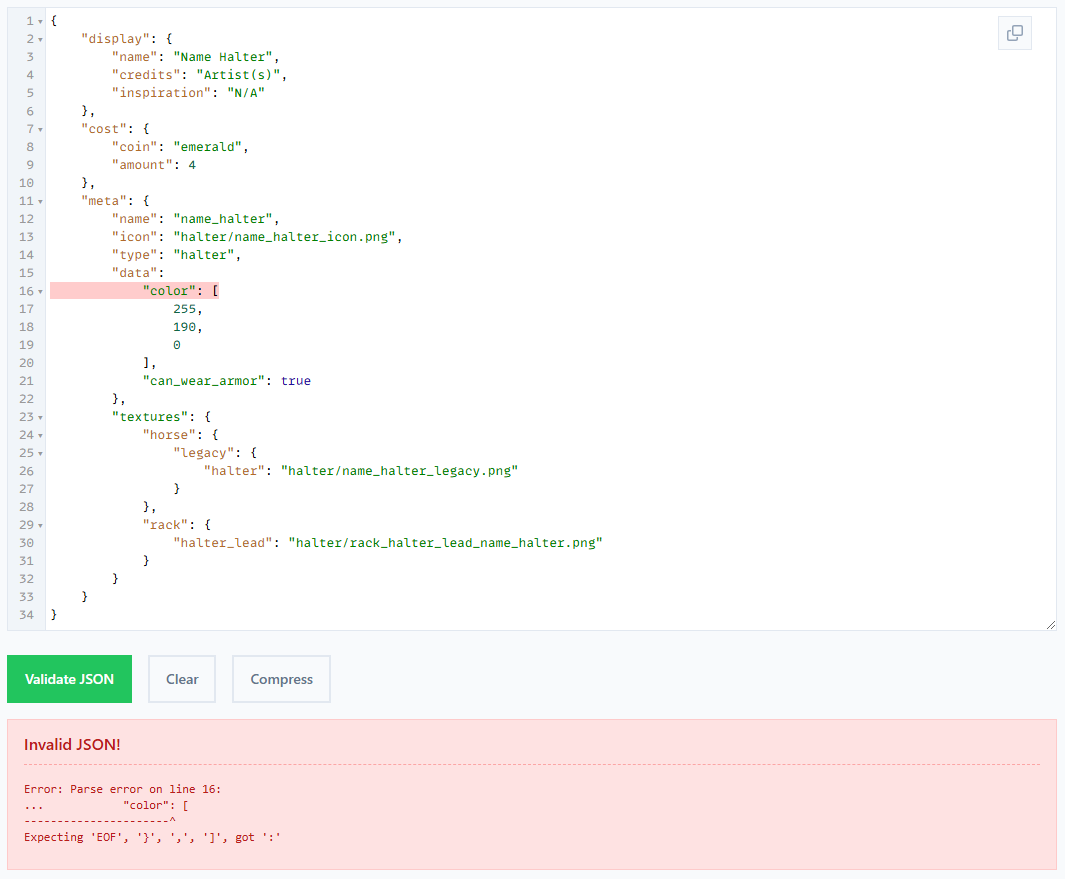
<p class="callout info">This is an invalid JSON where the `{` is missing after `"data":` making `"color":` invalid  
→ You may not necessarily understand what it is telling you, but you can use this section to compare to examples.  
→ If you cannot resolve your issue, sharing a screenshot of this output may assist helpers in tech help to find your issue.  
</p>

</details>---

#### Adding Custom Animations

<p class="callout info">It is recommended to provide a command list with Animation Packs, as they will not auto-fill in game.</p>

This guide will not cover how to create animations, for information please read our <span style="background-color: rgb(224, 62, 45); color: rgb(255, 255, 255);"> \[RESOURCES\] </span> on Discord.

1. Create your custom animation(s) in blockbench
2. Create an animation resource pack  
    → Replace `assets > swem > animations > swem_horse.json` with a custom animation file  
    → This must include all the existing animations **and** any new animations
3. Install the resource pack in the `resourcepack` folder
4. Use `/swem rrp anim <Animation Name>` to trigger the animation

Additional information:

- Animations cannot be triggered via keys (like gaits) but must use a command.  
    → Default animations can still be replaced if you want to override gaits
- Animations will loop until the command is re-run to stop it.
- All clients (players) must install the resource pack to view triggered animations
- **<span style="background-color: rgb(224, 62, 45); color: rgb(255, 255, 255);"> TBC </span><span style="color: rgb(255, 255, 255);"> </span>**<span style="color: rgb(0, 0, 0);">Multiplayer Servers</span>

---

#### Resources

<details id="bkmrk-creating-tack-textur"><summary>Creating Tack Textures \[WIP\]</summary>

<p class="callout info">**Credits:** Jenny</p>

<span style="background-color: rgb(132, 63, 161); color: rgb(255, 255, 255);"> **HORSE TACK TEXTURES** </span>

1. Download a copy of the latest SWEM .jar (mod file)
2. Unzip the .jar file to access the SWEM files
3. Download / Open Blockbench
4. File &gt; Open Model  
    → Open Horse Model: `assets > swem > geo > entity > horse > swem_horse`
5. View the blocks menu on the bottom right
6. Toggle all blocks to Off using the eye icon  
    → This is to prevent accidental texturing of the wrong element  
    → Each tack type renders specific blocks - ie painting neck for leg wraps will not show!
7. Toggle on only relevant elements for your chosen tack type  
    → This might include multiple blocks - see chart below
8. **<span style="background-color: rgb(224, 62, 45); color: rgb(255, 255, 255);"> TBC </span><span style="color: rgb(255, 255, 255);"> </span>**Create a new texture that is 512 x 512 pixels (16x)  
    → Alternatively, import a base texture to use as a template  
     **<span style="background-color: rgb(132, 63, 161); color: rgb(255, 255, 255);"> Note: </span>** These are found in `assets > swem > textures > entity > horse > [type]`
9. Switch to the paint tab and texture
10. Right click the completed texture in the texture menu &gt; `save as`
11. Save the file as `name_type` or `name_type_descriptor` **✅** `midnight_blanket` `midnight_blanket_blue`  
    → Using a descriptor is useful for multiple variant sets **✅** `blanket_blue` `blanket_red`

<table border="1" style="border-collapse: collapse; width: 100%; height: 2740.46px;"><colgroup><col style="width: 15.0803%;"></col><col style="width: 58.9617%;"></col><col style="width: 25.958%;"></col></colgroup><tbody><tr style="height: 53.7969px;"><td colspan="3" style="height: 53.7969px;"><p class="callout info">Blockbench has a search function (magnifying glass) in the outliner (blocks) menu to search by name or keyword.</p>

</td></tr><tr style="height: 29.7969px;"><td class="align-center" style="height: 29.7969px; background-color: rgb(52, 5, 93);"><span style="color: rgb(255, 255, 255);">**Tack Type**</span></td><td class="align-center" style="height: 29.7969px; background-color: rgb(52, 5, 93);"><span style="color: rgb(255, 255, 255);">**Group**</span></td><td class="align-center" style="height: 29.7969px; background-color: rgb(52, 5, 93);"><span style="color: rgb(255, 255, 255);">**Element(s)**</span></td></tr><tr style="height: 47.2188px;"><td style="height: 47.2188px;">Bridle (Western)</td><td style="height: 47.2188px;">`Front > Neck > NeckJoint1 > Head > WesternBridle > WesternBridleLeftBit`

</td><td style="height: 47.2188px;">WesternBridleLeftBit (5X)</td></tr><tr style="height: 47.2188px;"><td style="height: 47.2188px;">  
</td><td style="height: 47.2188px;">`Front > Neck > NeckJoint1 > Head > WesternBridle > WesternBridleLeftRein`

</td><td style="height: 47.2188px;">WesternBridleLeftRein</td></tr><tr style="height: 47.2188px;"><td style="height: 47.2188px;">  
</td><td style="height: 47.2188px;">`Front > Neck > NeckJoint1 > Head > WesternBridle > WesternBridleLeftRein1`

</td><td style="height: 47.2188px;">WesternBridleLeftRein1</td></tr><tr style="height: 47.2188px;"><td style="height: 47.2188px;">  
</td><td style="height: 47.2188px;">`Front > Neck > NeckJoint1 > Head > WesternBridle > WesternBridleLeftRein2`

</td><td style="height: 47.2188px;">WesternBridleLeftRein2</td></tr><tr style="height: 47.2188px;"><td style="height: 47.2188px;">  
</td><td style="height: 47.2188px;">`Front > Neck > NeckJoint1 > Head > WesternBridle > WesternBridleRightBit`

</td><td style="height: 47.2188px;">WesternBridleRightBit (5X)</td></tr><tr style="height: 47.2188px;"><td style="height: 47.2188px;">  
</td><td style="height: 47.2188px;">`Front > Neck > NeckJoint1 > Head > WesternBridle > WesternBridleRightRein`

</td><td style="height: 47.2188px;">WesternBridleRightRein</td></tr><tr style="height: 47.2188px;"><td style="height: 47.2188px;">  
</td><td style="height: 47.2188px;">`Front > Neck > NeckJoint1 > Head > WesternBridle > WesternBridleRightRein1`

</td><td style="height: 47.2188px;">WesternBridleRightRein1</td></tr><tr style="height: 47.2188px;"><td style="height: 47.2188px;">  
</td><td style="height: 47.2188px;">`Front > Neck > NeckJoint1 > Head > WesternBridle > WesternBridleRightRein2`

</td><td style="height: 47.2188px;">WesternBridleRightRein2</td></tr><tr style="height: 29.7969px;"><td style="height: 29.7969px;">  
</td><td style="height: 29.7969px;">**<span style="background-color: rgb(224, 62, 45); color: rgb(255, 255, 255);"> TBC: HEADPIECE </span>**

</td><td style="height: 29.7969px;">  
</td></tr><tr style="height: 29.7969px;"><td style="height: 29.7969px;">Bridle (English)</td><td style="height: 29.7969px;">  
</td><td style="height: 29.7969px;">  
</td></tr><tr style="height: 29.7969px;"><td style="height: 29.7969px;">  
</td><td style="height: 29.7969px;">  
</td></tr><tr style="height: 29.7969px;"><td style="height: 29.7969px;">  
</td><td style="height: 29.7969px;">  
</td></tr><tr style="height: 29.7969px;"><td style="height: 29.7969px;">  
</td><td style="height: 29.7969px;">  
</td></tr><tr style="height: 29.7969px;"><td style="height: 29.7969px;">  
</td><td style="height: 29.7969px;">  
</td></tr><tr style="height: 29.7969px;"><td style="height: 29.7969px;">  
</td><td style="height: 29.7969px;">  
</td></tr><tr style="height: 29.7969px;"><td style="height: 29.7969px;">Bridle (Adv)</td><td style="height: 29.7969px;">  
</td><td style="height: 29.7969px;">  
</td></tr><tr style="height: 30.1094px;"><td style="height: 30.1094px;">  
</td><td style="height: 30.1094px;"> </td><td style="height: 30.1094px;"> </td></tr><tr style="height: 30.1094px;"><td style="height: 30.1094px;">  
</td><td style="height: 30.1094px;"> </td><td style="height: 30.1094px;"> </td></tr><tr style="height: 30.1094px;"><td style="height: 30.1094px;">Blanket</td><td style="height: 30.1094px;">`Middle > BlanketMiddle`</td><td style="height: 30.1094px;">Blanket Middle (2X)</td></tr><tr style="height: 30.1094px;"><td rowspan="4" style="height: 120.438px;">Saddle (Western)  
</td><td style="height: 30.1094px;">`Middle > WesternSaddle`</td><td style="height: 30.1094px;">WesternSaddle</td></tr><tr style="height: 30.1094px;"><td style="height: 30.1094px;">`Middle > WesternSaddle > WesternSaddleMiddle`</td><td style="height: 30.1094px;">WesternSaddleMiddle (10X)</td></tr><tr style="height: 30.1094px;"><td style="height: 30.1094px;">`Middle > WesternSaddle > WesternSaddleLeftSide`</td><td style="height: 30.1094px;">WesternSaddleLeftSide (3X)</td></tr><tr style="height: 30.1094px;"><td style="height: 30.1094px;">`Middle > WesternSaddle > WesternSaddleRightSide`</td><td style="height: 30.1094px;">WesternSaddleRightSide (3X)</td></tr><tr style="height: 30.1094px;"><td rowspan="3" style="height: 90.3282px;">Saddle (English)  
</td><td style="height: 30.1094px;">`Middle > EnglishSaddle > EnglishSaddleMiddle`</td><td style="height: 30.1094px;">EnglishSaddleMiddle (3X)</td></tr><tr style="height: 30.1094px;"><td style="height: 30.1094px;">`Middle > EnglishSaddle > EnglishSaddleRightSide`</td><td style="height: 30.1094px;">EnglishSaddleRightSide (4X)</td></tr><tr style="height: 30.1094px;"><td style="height: 30.1094px;">`Middle > EnglishSaddle > EnglishSaddleLeftSide`</td><td style="height: 30.1094px;">EnglishSaddleLeftSide (4X)</td></tr><tr style="height: 30.1094px;"><td rowspan="4" style="height: 120.438px;">Saddle (Adv)</td><td style="height: 30.1094px;">`Middle > AdventureSaddle`</td><td style="height: 30.1094px;">AdventureSaddle</td></tr><tr style="height: 30.1094px;"><td style="height: 30.1094px;">`Middle > AdventureSaddle > AdventureSaddleMiddle`</td><td style="height: 30.1094px;">AdventureSaddleMiddle (6X)</td></tr><tr style="height: 30.1094px;"><td style="height: 30.1094px;">`Middle > AdventureSaddle > AdventureSaddleLeftSide`</td><td style="height: 30.1094px;">AdventureSaddleLeftSide (3X)</td></tr><tr style="height: 30.1094px;"><td style="height: 30.1094px;">`Middle > AdventureSaddle > AdventureSaddleRightSide`</td><td style="height: 30.1094px;">AdventureSaddleRightSide (3X)</td></tr><tr style="height: 30.1094px;"><td rowspan="2" style="height: 60.2188px;">Girth Strap  
</td><td style="height: 30.1094px;">`Middle > Belly > GirthStrapBelly`</td><td style="height: 30.1094px;">GirthStrapBelly (2X)</td></tr><tr style="height: 30.1094px;"><td style="height: 30.1094px;">`Middle > GirthStrapMiddle`</td><td style="height: 30.1094px;">GirthStrapMiddle (2X)</td></tr><tr style="height: 30.1094px;"><td rowspan="7" style="height: 210.766px;">Breast Collar  
</td><td style="height: 30.1094px;">`Front > BaseFront > BreastCollarBase`</td><td style="height: 30.1094px;">BreastCollarBase (2X)</td></tr><tr style="height: 30.1094px;"><td style="height: 30.1094px;">`Front > BaseFront > BreastRight > BreastCollarBreastRight`</td><td style="height: 30.1094px;">BreastCollarBreastRight</td></tr><tr style="height: 30.1094px;"><td style="height: 30.1094px;">`Front > BaseFront > BreastLeft > BreastCollarBreastLeft`</td><td style="height: 30.1094px;">BreastCollarBreastLeft</td></tr><tr style="height: 30.1094px;"><td style="height: 30.1094px;">`Front > BaseFront > FrontLeft > BreastCollarFrontLeft`</td><td style="height: 30.1094px;">BreastCollarFrontLeft (3X)</td></tr><tr style="height: 30.1094px;"><td style="height: 30.1094px;">`Front > BaseFront > FrontRight > BreastCollarFrontRight`</td><td style="height: 30.1094px;">BreastCollarFrontRight (3X)</td></tr><tr style="height: 30.1094px;"><td style="height: 30.1094px;">`Middle > BreastCollarBelly`</td><td style="height: 30.1094px;">BreastCollarBelly</td></tr><tr style="height: 30.1094px;"><td style="height: 30.1094px;">`Middle > BreastCollarMiddle`</td><td style="height: 30.1094px;">BreastCollarMiddle</td></tr><tr style="height: 29.7969px;"><td rowspan="10" style="height: 299.844px;">Leg Wraps  
</td><td style="height: 29.7969px;">Front &gt; FrontLeft &gt; FrontLeftLeg &gt; .. &gt; .. &gt; LegWrapsFrontLeftHoof</td><td style="height: 29.7969px;">LegWrapsFrontLeftHoof</td></tr><tr style="height: 29.7969px;"><td style="height: 29.7969px;">Front &gt; FrontLeft &gt; FrontLeftLeg &gt; .. &gt; .. &gt; LegWrapsFrontLeft</td><td style="height: 29.7969px;">LegWrapsFrontLeft</td></tr><tr style="height: 29.7969px;"><td style="height: 29.7969px;">Front &gt; FrontRight &gt; FrontRightLeg &gt; .. &gt; .. &gt; LegWrapsFrontRightHoof</td><td style="height: 29.7969px;">LegWrapsFrontRightHoof</td></tr><tr style="height: 29.7969px;"><td style="height: 29.7969px;">Front &gt; FrontRight &gt; FrontRightLeg &gt; .. &gt; .. &gt; LegWrapsFrontRight</td><td style="height: 29.7969px;">LegWrapsFrontRight</td></tr><tr style="height: 30.1094px;"><td style="height: 30.1094px;">`Back > BackLeft > .. > .. > .. > .. > LegWrapsBackLeftHoof`</td><td style="height: 30.1094px;">LegWrapsBackLeftHoof</td></tr><tr style="height: 30.1094px;"><td style="height: 30.1094px;">`Back > BackLeft > Bone4 > KneeLeft > Bone6 > LegWrapsBackLeft`</td><td style="height: 30.1094px;">LegWrapsBackLeft</td></tr><tr style="height: 30.1094px;"><td style="height: 30.1094px;">`Back > BackRight > .. > .. > .. > .. > LegWrapsBackRightHoof`  
</td><td style="height: 30.1094px;">LegWrapsBackRightHoof</td></tr><tr style="height: 30.1094px;"><td style="height: 30.1094px;">`Back > BackRight > Bone7 > KneeRight > .. > LegWrapsBackRight`</td><td style="height: 30.1094px;">LegWrapsBackRight</td></tr><tr style="height: 30.1094px;"><td style="height: 30.1094px;">`Front > Neck > NeckJoint1 > Head > Skull > LegWrapsSkull`</td><td style="height: 30.1094px;">LegWrapsSkull</td></tr><tr style="height: 30.1094px;"><td style="height: 30.1094px;">`Front > . > . > . > Skull > BridgeOfNose > LegWrapsBridgeOfNose`</td><td style="height: 30.1094px;">LegWrapsBridgeOfNose</td></tr><tr style="height: 30.1094px;"><td style="height: 30.1094px;">Saddle Bag</td><td style="height: 30.1094px;">`Back > Base > SaddleBag > SaddleBagLeft`</td><td style="height: 30.1094px;">SaddleBagLeft</td></tr><tr style="height: 30.1094px;"><td style="height: 30.1094px;">  
</td><td style="height: 30.1094px;">`Back > Base > SaddleBag > SaddleBagRight`</td><td style="height: 30.1094px;">SaddleBagRight</td></tr><tr style="height: 30.1094px;"><td style="height: 30.1094px;">  
</td><td style="height: 30.1094px;">`Back > Base > BedRoll`</td><td style="height: 30.1094px;">BedRoll (7X)</td></tr><tr style="height: 30.1094px;"><td rowspan="7" style="height: 210.766px;">Horse Armor  
</td><td style="height: 30.1094px;">`Front > FrontLeft > ArmorLeftShoulder`</td><td style="height: 30.1094px;">ArmorLeftShoulder (4X)</td></tr><tr style="height: 30.1094px;"><td style="height: 30.1094px;">`Front > FrontRight > ArmorRightShoulder`</td><td style="height: 30.1094px;">ArmorRightShoulder (4X)</td></tr><tr style="height: 30.1094px;"><td style="height: 30.1094px;">`Front > Neck > NeckJoint1> MainNeck1 > ArmorNeck > ArmorNeck1`</td><td style="height: 30.1094px;">ArmorNeck1 (3X)</td></tr><tr style="height: 30.1094px;"><td style="height: 30.1094px;">`Front > Neck > NeckJoint1 > Head > ArmorHead > ArmorHead1`</td><td style="height: 30.1094px;">ArmorHead1 (8X)</td></tr><tr style="height: 30.1094px;"><td style="height: 30.1094px;">`Middle > ArmorCloth > ArmorClothLeft`</td><td style="height: 30.1094px;">ArmorClothLeft</td></tr><tr style="height: 30.1094px;"><td style="height: 30.1094px;">`Middle > ArmorCloth > ArmorClothRight`  
</td><td style="height: 30.1094px;">ArmorClothRight</td></tr><tr style="height: 30.1094px;"><td style="height: 30.1094px;">`Back > Base > ArmorButt > 10X`</td><td style="height: 30.1094px;">ArmorButt (10X)</td></tr><tr style="height: 47.2188px;"><td rowspan="10" style="height: 472.188px;">Wings  
</td><td style="height: 47.2188px;">`Front > BaseFront > WingsScapular > LeftGROUP > WingsScapularLeft`  
</td><td style="height: 47.2188px;">WingsScapularLeft</td></tr><tr style="height: 47.2188px;"><td style="height: 47.2188px;">`Front > BaseFront > WingsScapular > LeftGROUP > WingsMarginalLeft`  
</td><td style="height: 47.2188px;">WingsMarginalLeft</td></tr><tr style="height: 47.2188px;"><td style="height: 47.2188px;">`Front > BaseFront > WingsScapular > LeftGROUP > WingsMarginalLeft2`  
</td><td style="height: 47.2188px;">WingsMarginalLeft2</td></tr><tr style="height: 47.2188px;"><td style="height: 47.2188px;">`Front > BaseFront > WingsScapular > LeftGROUP > WingsMarginalLeft2 > WingsAlulaLeft`  
</td><td style="height: 47.2188px;">WingsAlulaLeft</td></tr><tr style="height: 47.2188px;"><td style="height: 47.2188px;">`Front > BaseFront > WingsScapular > LeftGROUP > WingsMarginalLeft2 > WingsAlulaLeft > WingsFlightFeathersLeft`  
</td><td style="height: 47.2188px;">WingsFlightFeathersLeft</td></tr><tr style="height: 47.2188px;"><td style="height: 47.2188px;">`Front > BaseFront > WingsScapular > RightGROUP > WingsScapularRight`  
</td><td style="height: 47.2188px;">WingsScapularRight</td></tr><tr style="height: 47.2188px;"><td style="height: 47.2188px;">`Front > BaseFront > WingsScapular > RightGROUP > WingsMarginalRight`  
</td><td style="height: 47.2188px;">WingsMarginalRight</td></tr><tr style="height: 47.2188px;"><td style="height: 47.2188px;">`Front > BaseFront > WingsScapular > RightGROUP > WingsMarginalRight2`  
</td><td style="height: 47.2188px;">WingsMarginalRight2</td></tr><tr style="height: 47.2188px;"><td style="height: 47.2188px;">`Front > BaseFront > WingsScapular > RightGROUP > WingsMarginalRight2 > WingsAlulaRight`  
</td><td style="height: 47.2188px;">WingsAlulaRight</td></tr><tr style="height: 47.2188px;"><td style="height: 47.2188px;">`Front > BaseFront > WingsScapular > RightGROUP > WingsMarginalRight2 > WingsAlulaRight > WingsFlightFeathersRight`</td><td style="height: 47.2188px;">WingsFlightFeathersRight</td></tr><tr style="height: 30.1094px;"><td style="height: 30.1094px;">Halter</td><td style="height: 30.1094px;">`Front > Neck > NeckJoint1 > Head > Skull > HalterSkull`  
</td><td style="height: 30.1094px;">HalterSkull</td></tr><tr style="height: 47.2188px;"><td style="height: 47.2188px;">  
</td><td style="height: 47.2188px;">`Front > Neck > NeckJoint1 > Head > Skull > BridgeOfNose > HalterBridgeOfNose`  
</td><td style="height: 47.2188px;">HalterBridgeOfNose</td></tr><tr style="height: 47.2188px;"><td style="height: 47.2188px;">  
</td><td style="height: 47.2188px;">`Front > Neck > NeckJoint1 > Head > Skull > Cheeks > HalterCheeks`  
</td><td style="height: 47.2188px;">HalterCheeks</td></tr><tr style="height: 30.1094px;"><td style="height: 30.1094px;">  
</td><td style="height: 30.1094px;">`Front > Neck > NeckJoint1 > Head > Mouth > HalterMouth`</td><td style="height: 30.1094px;">HalterMouth</td></tr><tr style="height: 30.1094px;"><td style="height: 30.1094px;">Pasture Blanket</td><td style="height: 30.1094px;">`Front > FrontLeft > PBFrontLeft`  
</td><td style="height: 30.1094px;">PBFrontLeft (4X)</td></tr><tr style="height: 30.1094px;"><td style="height: 30.1094px;">  
</td><td style="height: 30.1094px;">`Front > FrontRight > PBFrontRight`  
</td><td style="height: 30.1094px;">PBFrontRight (4X)</td></tr><tr style="height: 30.1094px;"><td style="height: 30.1094px;">  
</td><td style="height: 30.1094px;">`Middle > PBMiddle`  
</td><td style="height: 30.1094px;">PBMiddle (5X)</td></tr><tr style="height: 30.1094px;"><td style="height: 30.1094px;">  
</td><td style="height: 30.1094px;">`Back > Base > PBBack`</td><td style="height: 30.1094px;">PBBack (6X)</td></tr></tbody></table>

<span style="background-color: rgb(132, 63, 161); color: rgb(255, 255, 255);"> **TACK RACK TEXTURES** </span>

<span style="background-color: rgb(132, 63, 161); color: rgb(255, 255, 255);"> **TACK ICON TEXTURES** </span>

1. Download / Open Blockbench
2. File &gt; New &gt; Image  
    → Set name as `name_type_icon` **✅** `midnight_blanket_icon`  
    → Set resolution as default 16x16 pixels
3. Confirm
4. Create an icon to represent your tack in inventory slots  
    → Alternatively, drag a default icon texture to use as a template  
    → Select `Add Image` from options  
     **<span style="background-color: rgb(132, 63, 161); color: rgb(255, 255, 255);"> Note: </span>** These are found in `assets > swem > textures > item [item_name]`
5. **<span style="background-color: rgb(224, 62, 45); color: rgb(255, 255, 255);"> TBC </span><span style="color: rgb(255, 255, 255);"> </span>**Saving

</details>**<span style="background-color: rgb(224, 62, 45); color: rgb(255, 255, 255);"> COMING SOON </span>**

---

#### Known Issues

---

#### Credits

Special thanks to the following contributors:

- Quarris for feature documentation, example pack and wiki information support
- Jenny for creator resources, testing and documentation
- Neehra for creator resources, testing and Mac information
- Legend for recommending JSON validation resources