# Introduction

# Behind the Scenes

#### **Why the Mod Started**

> SWEM started because of a stubborn, green, beautiful horse named Lucy. When family troubles meant I couldn't afford to be with her anymore, all of my love had to go somewhere. I started pouring it into work and games with horses. After crying to my roommate a few too many times about needing to reset the backups because 'Lucy' was blown up by a creeper for the 10th time, I decided to make a mod to make destriers out of Minecraft horses. I wanted to upgrade their model, animations, and enchant their armor. I did some research to see if other people have made a horse mod or if others would even want the mod I wanted to make. Turns out that there were thousands of people begging for a full-fledged, updated horse mod. After the initial additions - I started adding little things to the list like saddles, saddle/bridle racks, feeders, separators, stall doors, plans for expansions, a dimension, and a clean community on top of all that, etc. Soon the mod turned into a crusade. Here we are now, 2.5 years later with a release date and name to live up to. Star Worm Equestrian Mod.
> 
> **For horses. For equestrians.** ***For Lucy.*** [![image-1640926596125.png](https://wiki.swequestrian.com/uploads/images/gallery/2021-12/scaled-1680-/image-1640926596125.png)](https://wiki.swequestrian.com/uploads/images/gallery/2021-12/image-1640926596125.png)

  ~ **AlaharranHonor (*Hannah*)**

#### **Our Pillars for Design**

We have pillars for our goals as well as some themes for keeping the mod within one version.

Pillars are known in design as the three MAIN ideals for an addition to the project. If something doesn't have all three pillars supporting it, it won't get added in.   
  
**SWEM Phase 1 (V1)**   
**//** With love for the equine   
**//** For all ages and all disciplines   
**//** Necessary and core function for future  
  
Other mantras we have for develop are used throughout, from devving to building to texture art.  
**//** Everything must be made with love. If you're not doing it with love, come back later when you can or let someone else do it.  
**//** Always care for details. You never know when something might break and the users see something they shouldn't.  
**//** Everything must make sense, even details the player might not see or even think of. We must train ourselves to think critically. Every brain comes prepacked with information. Not making sense = uncanny valley = brain unhappy = unhappy player. The player doesn't even notice it, but their brains do, especially when you show them something better. *Be better.*

#### **Our Belief on "Magic" in the Mod**

We use "magic" as the sense of wonder to the mod, fill in the little gaps of logic, and to open up an entire world of development for us to make. Our magic does have rules, however.  
  
**Cloth** - Like bandages and wraps, the magic of healing.  **Iron** - Magic protection. Resilient and protecting our warriors from evil magicks.  
**Gold** - Gold holds water magic. Given that its weak and malleable, its not very good for defense but just a little goes a long way!  
**Diamond** - Fire Magic! Or more so, protection from it.  
**Amethyst** - The power of flight. How does it feel to float? What is it like to fly?  
**Netherite** - *No magic power yet.*  
**Emerald** - *No magic power yet.*  
**Copper** - *No magic power yet.*

#### **Trivia**

- SWE/M started as a lighting mod (SWLM 1.12.2) because I was sick of ruining my castle aesthetic with 1000 torches.
- SWEM is technically SWLM continued.
- SWEM started in 1.15.2 and didn't release till 1.19 was already out. That's a long time to develop!
- SWEM had amethyst in it long before we knew vanilla was adding it. It looks like we skipped netherite and users are confused, but when I planned it all out, neither existed yet.

# How To Help

<div aria-describedby="" aria-labelledby="message-username-900540589882363925 uid_1 message-content-900540600271634482 uid_2 message-timestamp-900540600271634482" aria-roledescription="Message" aria-setsize="-1" data-list-item-id="chat-messages___chat-messages-900540600271634482" id="bkmrk-many-people-ask-us-h"></div>### **Volunteering**

<p class="callout info">September 2023: SWEM is no longer seeking volunteers and is only maintaining the project. Check [Discord](https://discord.gg/swem) for updates.</p>

<div id="bkmrk-it-takes-talented-pe">It takes talented people to keep everything working smoothly, and while every one of our volunteers are exceptional, we can always use more people to help lighten the load. More volunteers means getting content to you faster [![image-1640926596125.png](https://wiki.swequestrian.com/uploads/images/gallery/2021-12/scaled-1680-/image-1640926596125.png)](https://wiki.swequestrian.com/uploads/images/gallery/2021-12/image-1640926596125.png)   

  
</div><div id="bkmrk-to-volunteer%2C-fill-o">To volunteer, fill out the volunteer application form **[here](https://drive.google.com/file/d/11eM-jPM3GzFusXRUu1Nrd36TfvSb8h4_/view?usp=sharing)** which will be reviewed by the Admin Team. If you have questions regarding the application or experience issues in submitting via the link above, please contact an Admin via [Discord](https://discord.gg/swem).</div>---

### **Social Media**

Following and sharing helps spread the word about SWE/M. The more people we can reach, the more people in our community and the more community to help us in return!

##### <span style="color: #333399;">**[![image-1640963444193.webp](https://wiki.swequestrian.com/uploads/images/gallery/2021-12/scaled-1680-/image-1640963444193.webp) ](https://www.youtube.com/channel/UCoSngjgpxkFDW9DZ57VZwEA)[ ![image-1640963637704.png](https://wiki.swequestrian.com/uploads/images/gallery/2021-12/scaled-1680-/image-1640963637704.png) ](https://www.instagram.com/starwormequestrian/?hl=en)[ ![image-1640963758250.png](https://wiki.swequestrian.com/uploads/images/gallery/2021-12/scaled-1680-/image-1640963758250.png) ](https://www.tiktok.com/@starwormequestrian)[![image-1640963863908.png](https://wiki.swequestrian.com/uploads/images/gallery/2021-12/scaled-1680-/image-1640963863908.png)](https://discord.gg/QEeD68c)**</span>



*Pssst. You can click those...*

---

### **BisectHosting Discount**

<p class="callout info">Promo codes can be applied on checkout prior to payment. Enter FORLUCY and validate the code to receive the discount.</p>

Creating your own server? BisectHosting kindly offers SWEM support via the partner program which helps us run our Beta and VIP servers. We have an affiliate link and promo code to pass savings on to our users - you can get 25% discount on your first month of hosting. This helps the project with a little bonus for each person that uses our code: **FORLUCY**

[![image-1640966726693.png](https://wiki.swequestrian.com/uploads/images/gallery/2021-12/scaled-1680-/image-1640966726693.png)](https://bisecthosting.com/FORLUCY)

---

### **Donations**

<p class="callout info">September 2023: Donations post-shutdown will go towards maintaining and bug fix dev days. No perks can be offered.</p>

As much as we want the mod to run off of nothing but our passion and love alone ... It can't. We have to be able to pay for server hosting, art, marketing, and our ultimate goal, to be able to work on the mod full-time as a team. To do all of that and then more, we need help from our community through donations. Every bit helps and gets us closer and closer to our goal. For long term support we have a Ko-Fi linked below.

[ ](https://www.patreon.com/SWEM)[![image-1654184675247.png](https://wiki.swequestrian.com/uploads/images/gallery/2022-06/scaled-1680-/image-1654184675247.png)](https://ko-fi.com/swem "Ko-Fi SWEM Creator Page")

*If you would like to help support the Owner directly, AlaharranHonor, directly for things like rent, soda, and stress food - please donate via PayPal to paypal.me/hannturpinswem*.

---

### **Reporting Bugs**

<p class="callout info">Our GitHub is currently closed to the public. If you find an issue, please report it to our bugs channel on [Discord](https://discord.com/channels/715626418893095012/1123695058496000240).</p>

[![image-1640965562307.com-github-png-9558163-min.png](https://wiki.swequestrian.com/uploads/images/gallery/2021-12/scaled-1680-/image-1640965562307-com-github-png-9558163-min.png)](https://github.com/alaharranhonor/SWEquestrianM)

# How To Get Help

### **Discord**

A lot of the things you would need help with can be found in this Wiki but if you need to ask specific questions, we are most active on Discord, link below.

[![image-1640965663080.png](https://wiki.swequestrian.com/uploads/images/gallery/2021-12/scaled-1680-/image-1640965663080.png)](https://discord.gg/swem)

---

### **Website**

<p class="callout danger">The website is no longer being maintained and is outdated. Use the wiki for the most up to date information.</p>

The website holds a lot of general information that would be helpful for answering questions or linking to wear you'd like to go!  
[https://www.swequestrian.com/](https://www.swequestrian.com/)

---

### **Github**

<p class="callout info">Our GitHub is currently closed to the public. If you find an issue, please report it to our bugs channel on [Discord](https://discord.com/channels/715626418893095012/1123695058496000240).</p>

Found a bug? You can submit an issue on Github. You help us find a bug, we help you by fixing the bug!

[![image-1640965562307.com-github-png-9558163-min.png](https://wiki.swequestrian.com/uploads/images/gallery/2021-12/scaled-1680-/image-1640965562307-com-github-png-9558163-min.png)](https://github.com/alaharranhonor/SWEquestrianM)

---

<p class="callout warning">*Any questions or issues posted to our socials (YT etc) or Curseforge comments will not be seen and will receive no support.*</p>

# Volunteers

*SWEM is made possible by a large group of volunteers spanning the frame of several years. If you believe your name should be on this list, please contact an Admin on Discord and let us know something is amiss. [![image-1641175000554.png](https://wiki.swequestrian.com/uploads/images/gallery/2022-01/scaled-1680-/image-1641175000554.png)](https://wiki.swequestrian.com/uploads/images/gallery/2022-01/image-1641175000554.png)*

## **Version 1.16.5 Volunteers**

#### **Owner and Production Lead**

<span style="color: #843fa1;">AlaharranHonor <span style="color: #000000;">- *AKA, Hannah*</span></span>

<details id="bkmrk-mod-development-prim"><summary>Programming</summary>

<table border="1" style="border-collapse: collapse; width: 100%; height: 65.1875px;"><tbody><tr style="height: 35.3906px;"><td class="align-center" style="width: 33.3761%; height: 35.3906px;">**Primary**</td><td class="align-center" style="width: 33.3761%; height: 35.3906px;">**Secondary**</td><td class="align-center" style="width: 33.3761%; height: 35.3906px;">**Tertiary**</td></tr><tr style="height: 29.7969px;"><td class="align-center" style="width: 33.3761%; height: 29.7969px;">Legenden</td><td class="align-center" style="width: 33.3761%; height: 29.7969px;">  
</td><td class="align-center" style="width: 33.3761%; height: 29.7969px;">  
</td></tr><tr><td style="width: 33.3761%;">  
</td><td class="align-center" style="width: 33.3761%;">**Mentions**  
</td><td style="width: 33.3761%;">  
</td></tr><tr><td class="align-center" style="width: 33.3761%;">Silverwolf</td><td class="align-center" style="width: 33.3761%;">Mothfet</td><td class="align-center" style="width: 33.3761%;">Dronade</td></tr><tr><td class="align-center" style="width: 33.3761%;">TheJYT</td><td class="align-center" style="width: 33.3761%;">  
</td><td class="align-center" style="width: 33.3761%;">  
</td></tr></tbody></table>

</details><details id="bkmrk-plugin-development-p"><summary>SysAdmin</summary>

<table border="1" style="border-collapse: collapse; width: 100%; height: 65.1875px;"><tbody><tr style="height: 35.3906px;"><td class="align-center" style="width: 33.3761%; height: 35.3906px;">**Primary**</td><td class="align-center" style="width: 33.3761%; height: 35.3906px;">**Secondary**</td><td class="align-center" style="width: 33.3761%; height: 35.3906px;">**Tertiary**</td></tr><tr style="height: 29.7969px;"><td class="align-center" style="width: 33.3761%; height: 29.7969px;">GrizzyBurr</td><td class="align-center" style="width: 33.3761%; height: 29.7969px;">  
</td><td class="align-center" style="width: 33.3761%; height: 29.7969px;">Legenden</td></tr><tr><td style="width: 33.3761%;">  
</td><td class="align-center" style="width: 33.3761%;">**Mentions**  
</td><td style="width: 33.3761%;">  
</td></tr><tr><td class="align-center" style="width: 33.3761%;">RileyCasper</td><td class="align-center" style="width: 33.3761%;">  
</td><td style="width: 33.3761%;">  
</td></tr></tbody></table>

</details><details id="bkmrk-sysadmin-primary-sec"><summary>Animation</summary>

<table border="1" style="border-collapse: collapse; width: 100%; height: 65.1875px;"><tbody><tr style="height: 35.3906px;"><td class="align-center" style="width: 33.3761%; height: 35.3906px;">**Primary**</td><td class="align-center" style="width: 33.3761%; height: 35.3906px;">**Secondary**</td><td class="align-center" style="width: 33.3761%; height: 35.3906px;">**Tertiary**</td></tr><tr style="height: 29.7969px;"><td class="align-center" style="width: 33.3761%; height: 29.7969px;">Eric</td><td class="align-center" style="width: 33.3761%; height: 29.7969px;">Brooke</td><td class="align-center" style="width: 33.3761%; height: 29.7969px;">Raven</td></tr><tr><td style="width: 33.3761%;">  
</td><td class="align-center" style="width: 33.3761%;">**Mentions**  
</td><td style="width: 33.3761%;">  
</td></tr><tr><td class="align-center" style="width: 33.3761%;">lilCatSilly</td><td style="width: 33.3761%;">  
</td><td style="width: 33.3761%;">  
</td></tr></tbody></table>

</details><details id="bkmrk-animator-primary-sec"><summary>Texture Artists</summary>

<table border="1" style="border-collapse: collapse; width: 100%; height: 65.1875px;"><tbody><tr style="height: 35.3906px;"><td class="align-center" style="width: 33.3761%; height: 35.3906px;">**Primary**</td><td class="align-center" style="width: 33.3761%; height: 35.3906px;">**Secondary**</td><td class="align-center" style="width: 33.3761%; height: 35.3906px;">**Tertiary**</td></tr><tr style="height: 29.7969px;"><td class="align-center" style="width: 33.3761%; height: 29.7969px;">Cytris</td><td class="align-center" style="width: 33.3761%; height: 29.7969px;">Eric</td><td class="align-center" style="width: 33.3761%; height: 29.7969px;">Mothfet</td></tr><tr><td style="width: 33.3761%;">  
</td><td class="align-center" style="width: 33.3761%;">**Mentions**  
</td><td style="width: 33.3761%;">  
</td></tr><tr><td class="align-center" style="width: 33.3761%;">Shelly</td><td class="align-center" style="width: 33.3761%;">Golden</td><td class="align-center" style="width: 33.3761%;">Calileo</td></tr></tbody></table>

</details><details id="bkmrk-texture-artists-prim"><summary>Coats</summary>

<table border="1" style="border-collapse: collapse; width: 100%; height: 65.1875px;"><tbody><tr style="height: 35.3906px;"><td class="align-center" style="width: 33.3761%; height: 35.3906px;">**Primary**</td><td class="align-center" style="width: 33.3761%; height: 35.3906px;">**Secondary**</td><td class="align-center" style="width: 33.3761%; height: 35.3906px;">**Tertiary**</td></tr><tr style="height: 29.7969px;"><td class="align-center" style="width: 33.3761%; height: 29.7969px;">Arishant</td><td class="align-center" style="width: 33.3761%; height: 29.7969px;">Stardust</td><td class="align-center" style="width: 33.3761%; height: 29.7969px;">MachoMustang</td></tr><tr><td style="width: 33.3761%;">  
</td><td class="align-center" style="width: 33.3761%;">**Mentions**  
</td><td style="width: 33.3761%;">  
</td></tr><tr><td class="align-center" style="width: 33.3761%;">Hauket</td><td class="align-center" style="width: 33.3761%;">Cytris</td><td class="align-center" style="width: 33.3761%;">Everyuki</td></tr><tr><td class="align-center" style="width: 33.3761%;">Eric</td><td class="align-center" style="width: 33.3761%;">  
</td><td class="align-center" style="width: 33.3761%;">  
</td></tr></tbody></table>

</details><details id="bkmrk-coats-primary-second"><summary>Model Artists</summary>

<table border="1" style="border-collapse: collapse; width: 100%; height: 65.1875px;"><tbody><tr style="height: 35.3906px;"><td class="align-center" style="width: 33.3761%; height: 35.3906px;">**Primary**</td><td class="align-center" style="width: 33.3761%; height: 35.3906px;">**Secondary**</td><td class="align-center" style="width: 33.3761%; height: 35.3906px;">**Tertiary**</td></tr><tr style="height: 29.7969px;"><td class="align-center" style="width: 33.3761%; height: 29.7969px;">AlaharranHonor</td><td class="align-center" style="width: 33.3761%; height: 29.7969px;">  
</td><td class="align-center" style="width: 33.3761%; height: 29.7969px;">  
</td></tr><tr><td style="width: 33.3761%;">  
</td><td class="align-center" style="width: 33.3761%;">**Mentions**  
</td><td style="width: 33.3761%;">  
</td></tr><tr><td style="width: 33.3761%;">  
</td><td style="width: 33.3761%;">  
</td></tr></tbody></table>

</details><details id="bkmrk-model-artists-primar"><summary>Marketing</summary>

<table border="1" style="border-collapse: collapse; width: 100%; height: 119.766px;"><tbody><tr style="height: 35.375px;"><td class="align-center" style="width: 33.3761%; height: 35.375px;">**Primary**</td><td class="align-center" style="width: 33.3761%; height: 35.375px;">**Secondary**</td><td class="align-center" style="width: 33.3761%; height: 35.375px;">**Tertiary**</td></tr><tr style="height: 29.7969px;"><td class="align-center" style="width: 33.3761%; height: 29.7969px;">Peachy</td><td class="align-center" style="width: 33.3761%; height: 29.7969px;">Jenny</td><td class="align-center" style="width: 33.3761%; height: 29.7969px;">Redzeal</td></tr><tr style="height: 29.7969px;"><td style="width: 33.3761%; height: 29.7969px;">  
</td><td class="align-center" style="width: 33.3761%; height: 29.7969px;">**Mentions**  
</td><td style="width: 33.3761%; height: 29.7969px;">  
</td></tr><tr style="height: 24.7969px;"><td class="align-center" style="width: 33.3761%; height: 24.7969px;">Rrrose</td><td class="align-center" style="width: 33.3761%; height: 24.7969px;">Anonyma</td><td class="align-center" style="width: 33.3761%; height: 24.7969px;">  
</td></tr></tbody></table>

</details><details id="bkmrk-marketing-primary-se"><summary>Administration</summary>

<table border="1" style="border-collapse: collapse; width: 100%; height: 65.1875px;"><tbody><tr style="height: 35.3906px;"><td class="align-center" style="width: 33.3761%; height: 35.3906px;">**Primary**</td><td class="align-center" style="width: 33.3761%; height: 35.3906px;">**Secondary**</td><td class="align-center" style="width: 33.3761%; height: 35.3906px;">**Tertiary**</td></tr><tr style="height: 29.7969px;"><td class="align-center" style="width: 33.3761%; height: 29.7969px;">Delphi</td><td class="align-center" style="width: 33.3761%; height: 29.7969px;">  
</td><td class="align-center" style="width: 33.3761%; height: 29.7969px;">RileyCasper</td></tr><tr><td style="width: 33.3761%;">  
</td><td class="align-center" style="width: 33.3761%;">**Mentions**  
</td><td style="width: 33.3761%;">  
</td></tr><tr><td style="width: 33.3761%;">  
</td><td style="width: 33.3761%;">  
</td></tr></tbody></table>

</details><details id="bkmrk-administration-prima"><summary>Common Work</summary>

<table border="1" style="border-collapse: collapse; width: 100%; height: 124.766px;"><tbody><tr style="height: 35.375px;"><td class="align-center" style="width: 33.3761%; height: 35.375px;">**Primary**</td><td class="align-center" style="width: 33.3761%; height: 35.375px;">**Secondary**</td><td class="align-center" style="width: 33.3761%; height: 35.375px;">**Tertiary**</td></tr><tr style="height: 29.7969px;"><td class="align-center" style="width: 33.3761%; height: 29.7969px;">Delphi</td><td class="align-center" style="width: 33.3761%; height: 29.7969px;">Brooke</td><td class="align-center" style="width: 33.3761%; height: 29.7969px;">Lace</td></tr><tr style="height: 29.7969px;"><td style="width: 33.3761%; height: 29.7969px;">  
</td><td class="align-center" style="width: 33.3761%; height: 29.7969px;">**Mentions**  
</td><td style="width: 33.3761%; height: 29.7969px;">  
</td></tr><tr style="height: 29.7969px;"><td class="align-center" style="width: 33.3761%; height: 29.7969px;">Evie</td><td class="align-center" style="width: 33.3761%; height: 29.7969px;">Everyuki</td><td class="align-center" style="width: 33.3761%; height: 29.7969px;">  
</td></tr></tbody></table>

</details><details id="bkmrk-data-processing-prim"><summary>Data Processing</summary>

<table border="1" style="border-collapse: collapse; width: 100%; height: 65.1875px;"><tbody><tr style="height: 35.3906px;"><td class="align-center" style="width: 33.3761%; height: 35.3906px;">**Primary**</td><td class="align-center" style="width: 33.3761%; height: 35.3906px;">**Secondary**</td><td class="align-center" style="width: 33.3761%; height: 35.3906px;">**Tertiary**</td></tr><tr style="height: 29.7969px;"><td class="align-center" style="width: 33.3761%; height: 29.7969px;">Delphi</td><td class="align-center" style="width: 33.3761%; height: 29.7969px;">  
</td><td class="align-center" style="width: 33.3761%; height: 29.7969px;">RileyCasper</td></tr><tr><td style="width: 33.3761%;">  
</td><td class="align-center" style="width: 33.3761%;">**Mentions**  
</td><td style="width: 33.3761%;">  
</td></tr><tr><td style="width: 33.3761%;">  
</td><td style="width: 33.3761%;">  
</td></tr></tbody></table>

</details><details id="bkmrk-research-and-develop"><summary>Research and Development</summary>

<table border="1" style="border-collapse: collapse; width: 100%; height: 125.766px;"><tbody><tr style="height: 35.375px;"><td class="align-center" style="width: 33.3761%; height: 35.375px;">**Primary**</td><td class="align-center" style="width: 33.3761%; height: 35.375px;">**Secondary**</td><td class="align-center" style="width: 33.3761%; height: 35.375px;">**Tertiary**</td></tr><tr style="height: 30.7969px;"><td class="align-center" style="width: 33.3761%; height: 30.7969px;">Delphi</td><td class="align-center" style="width: 33.3761%; height: 30.7969px;">Lace</td><td class="align-center" style="width: 33.3761%; height: 30.7969px;">Boatyboatman</td></tr><tr style="height: 29.7969px;"><td style="width: 33.3761%; height: 29.7969px;">  
</td><td class="align-center" style="width: 33.3761%; height: 29.7969px;">**Mentions**  
</td><td style="width: 33.3761%; height: 29.7969px;">  
</td></tr><tr style="height: 29.7969px;"><td class="align-center" style="width: 33.3761%; height: 29.7969px;">Vera</td><td style="width: 33.3761%; height: 29.7969px;">  
</td><td style="width: 33.3761%; height: 29.7969px;">  
</td></tr></tbody></table>

</details><details id="bkmrk-additional-mentions-"><summary>Additional Mentions</summary>

<table border="1" style="border-collapse: collapse; width: 100%; height: 164.188px;"><tbody><tr style="height: 44.7969px;"><td class="align-center" style="width: 33.3761%; height: 44.7969px;">Rhea</td><td class="align-center" style="width: 33.3761%; height: 44.7969px;">Whitewolf</td><td class="align-center" style="width: 33.3761%; height: 44.7969px;">Ffensie</td></tr><tr style="height: 44.7969px;"><td class="align-center" style="width: 33.3761%; height: 44.7969px;">Blue Moon</td><td class="align-center" style="width: 33.3761%; height: 44.7969px;">Eliot</td><td class="align-center" style="width: 33.3761%; height: 44.7969px;">Caroline</td></tr><tr style="height: 44.7969px;"><td class="align-center" style="width: 33.3761%; height: 44.7969px;">CholitoBuritto</td><td class="align-center" style="width: 33.3761%; height: 44.7969px;">  
</td><td class="align-center" style="width: 33.3761%; height: 44.7969px;">  
</td></tr></tbody></table>

</details><details id="bkmrk-super-beta-spotlight"><summary>Super Beta Spotlight</summary>

<table border="1" style="border-collapse: collapse; width: 100%; height: 131.094px;"><tbody><tr style="height: 35.3711px;"><td class="align-center" style="width: 33.3761%; height: 35.3711px;">Crystal0314</td><td class="align-center" style="width: 33.3761%; height: 35.3711px;">Keroa</td><td class="align-center" style="width: 33.3761%; height: 35.3711px;">Trsom</td></tr><tr style="height: 30.0391px;"><td class="align-center" style="width: 33.3761%; height: 30.0391px;">Zaliexx</td><td class="align-center" style="width: 33.3761%; height: 30.0391px;">TheSilentHawke</td><td class="align-center" style="width: 33.3761%; height: 30.0391px;">Wolfzy\_King</td></tr><tr style="height: 35.6445px;"><td style="width: 33.3761%; height: 35.6445px;">Toastybeans

</td><td class="align-center" style="width: 33.3761%; height: 35.6445px;">Wild\_Horses</td><td class="align-center" style="width: 33.3761%; height: 35.6445px;">HaileeByrd</td></tr><tr style="height: 30.0391px;"><td class="align-center" style="width: 33.3761%; height: 30.0391px;">  
</td><td class="align-center" style="width: 33.3761%; height: 30.0391px;">TwerkyCupcake</td><td class="align-center" style="width: 33.3761%; height: 30.0391px;">  
</td></tr></tbody></table>

</details><details id="bkmrk-barn-cat-spotlight-e"><summary>Barn Cat Spotlight</summary>

<table border="1" style="border-collapse: collapse; width: 100%; height: 65.1875px;"><tbody><tr style="height: 35.3906px;"><td class="align-center" style="width: 33.3761%; height: 35.3906px;">Emsnotfound</td><td class="align-center" style="width: 33.3761%; height: 35.3906px;">404\_Unknown(Seven)</td><td class="align-center" style="width: 33.3761%; height: 35.3906px;">SweetIRL</td></tr><tr style="height: 29.7969px;"><td class="align-center" style="width: 33.3761%; height: 29.7969px;">PancakeDuhBird</td><td class="align-center" style="width: 33.3761%; height: 29.7969px;">Lizardden</td><td class="align-center" style="width: 33.3761%; height: 29.7969px;">Noah (2by2)</td></tr></tbody></table>

</details>Additional thank you to those who we couldn't put in Super-Beta spotlight or Barn-Cat spotlight because they were so dedicated to the project that they became staff.

<details id="bkmrk-donation-list-%C2%A0-%24500"><summary>Donation List</summary>

<table border="1" style="border-collapse: collapse; width: 100%; height: 333.344px;"><tbody><tr style="height: 35.375px;"><td class="align-center" style="width: 33.3761%; height: 35.375px;">  
</td><td class="align-center" style="width: 33.3761%; height: 35.375px;">**$500+ Donators**</td><td class="align-center" style="width: 33.3761%; height: 35.375px;">  
</td></tr><tr style="height: 29.7969px;"><td class="align-center" style="width: 33.3761%; height: 29.7969px;">NightShadeLily</td><td class="align-center" style="width: 33.3761%; height: 29.7969px;">Ryaroar</td><td class="align-center" style="width: 33.3761%; height: 29.7969px;">IBPixelmaur</td></tr><tr style="height: 29.7969px;"><td class="align-center" style="width: 33.3761%; height: 29.7969px;">  
</td><td class="align-center" style="width: 33.3761%; height: 29.7969px;">**$300+ Donators**  
</td><td class="align-center" style="width: 33.3761%; height: 29.7969px;">  
</td></tr><tr style="height: 29.7969px;"><td class="align-center" style="width: 33.3761%; height: 29.7969px;">XxMistSniperxX</td><td class="align-center" style="width: 33.3761%; height: 29.7969px;">AbbyRhea</td><td class="align-center" style="width: 33.3761%; height: 29.7969px;">MixedOpinions</td></tr><tr style="height: 29.7969px;"><td class="align-center" style="width: 33.3761%; height: 29.7969px;">AlmoudMilky</td><td class="align-center" style="width: 33.3761%; height: 29.7969px;">  
</td><td class="align-center" style="width: 33.3761%; height: 29.7969px;">  
</td></tr><tr style="height: 29.7969px;"><td class="align-center" style="width: 33.3761%; height: 29.7969px;">  
</td><td class="align-center" style="width: 33.3761%; height: 29.7969px;">**$200+ Donators**</td><td class="align-center" style="width: 33.3761%; height: 29.7969px;">  
</td></tr><tr style="height: 29.7969px;"><td class="align-center" style="width: 33.3761%; height: 29.7969px;">Moo Moo</td><td class="align-center" style="width: 33.3761%; height: 29.7969px;">OnyxButNot</td><td class="align-center" style="width: 33.3761%; height: 29.7969px;">WorldofEmber</td></tr><tr style="height: 29.7969px;"><td class="align-center" style="width: 33.3761%; height: 29.7969px;">Abigail Pinehaven</td><td class="align-center" style="width: 33.3761%; height: 29.7969px;">barrelracing</td><td class="align-center" style="width: 33.3761%; height: 29.7969px;">Novalux</td></tr><tr style="height: 29.7969px;"><td class="align-center" style="width: 33.3761%; height: 29.7969px;">SarahLuigi</td><td class="align-center" style="width: 33.3761%; height: 29.7969px;">  
</td><td class="align-center" style="width: 33.3761%; height: 29.7969px;">  
</td></tr><tr style="height: 29.7969px;"><td class="align-center" style="width: 33.3761%; height: 29.7969px;">  
</td><td class="align-center" style="width: 33.3761%; height: 29.7969px;">**"Ritzy and a Half" Donators**</td><td class="align-center" style="width: 33.3761%; height: 29.7969px;">  
</td></tr><tr style="height: 29.7969px;"><td class="align-center" style="width: 33.3761%; height: 29.7969px;">BlueMaggot</td><td class="align-center" style="width: 33.3761%; height: 29.7969px;">IRISLightning23</td><td class="align-center" style="width: 33.3761%; height: 29.7969px;">KarmenKimmei</td></tr></tbody></table>

</details>---

### **User Contributions**

#### **Translations**

*All of our translations are done by our community members! So they need some credit for helping us out.*

<table border="5" cellpadding="2" id="bkmrk-language-credit-dani" style="height: 681.735px; width: 100%; border-collapse: collapse;"><tbody><tr style="height: 29.7969px;"><td style="width: 50%; height: 29.7969px;">**Language**</td><td style="width: 50%; height: 29.7969px;">**Credit**</td></tr><tr style="height: 46.5938px;"><td style="width: 50%; height: 46.5938px;">**<span style="color: #333399;">Danish *(100%)*</span>**</td><td style="width: 50%; height: 46.5938px;">*legenden, SilverHornz, IceAura, RoedSmiley, Gloomwolf145, Kryds*</td></tr><tr style="height: 29.7969px;"><td style="width: 50%; height: 29.7969px;"><span style="color: #333399;">**Dutch *(100%)***</span></td><td style="width: 50%; height: 29.7969px;">*MeLikeToast, error 404, Lisa7780, TABEE, RynxHatake*</td></tr><tr style="height: 29.7969px;"><td style="width: 50%; height: 29.7969px;"><span style="color: #333399;">**Swedish *(100%)***</span></td><td style="width: 50%; height: 29.7969px;">*Rationality, emsnotfound, LordEstil*</td></tr><tr style="height: 29.7969px;"><td style="width: 50%; height: 29.7969px;"><span style="color: #333399;">**French *(100%)***</span></td><td style="width: 50%; height: 29.7969px;">*Ortoxie, El kien, bitjes, Shado*</td></tr><tr style="height: 57.7969px;"><td style="width: 50%; height: 57.7969px;"><span style="color: #333399;">**Polish *(100%)***</span></td><td style="width: 50%; height: 57.7969px;">*Penny, Kokomi, LeafHere, waikikamoocaw, czumulu, Aksiosa, Hanaxq, sc4ry\_dreams, Etile*

</td></tr><tr style="height: 29.7969px;"><td style="width: 50%; height: 29.7969px;"><span style="color: #333399;">**German *(100%)***</span></td><td style="width: 50%; height: 29.7969px;">*Johanna, Jenny, Malli, Lea, Katrin, Emilie, Josefine*</td></tr><tr style="height: 29.7969px;"><td style="width: 50%; height: 29.7969px;"><span style="color: #333399;">**Romanian *(100%)***</span></td><td style="width: 50%; height: 29.7969px;">*Julie, Ale*</td></tr><tr style="height: 29.7969px;"><td style="width: 50%; height: 29.7969px;"><span style="color: #333399;">**Portuguese (BR) *(100%)***</span></td><td style="width: 50%; height: 29.7969px;">*Kris, Sopa, Txavierzin, Ksalo, Catto*</td></tr><tr style="height: 29.7969px;"><td style="width: 50%; height: 29.7969px;"><span style="color: #333399;">**Portuguese (PT) *(100%)***</span></td><td style="width: 50%; height: 29.7969px;">*Sofikit, Ashiko*</td></tr><tr style="height: 29.7969px;"><td style="width: 50%; height: 29.7969px;"><span style="color: #333399;">**Italian *(85%)***</span></td><td style="width: 50%; height: 29.7969px;">*Miry, Myra, Yureky, vividlyindigo, bobbywolf*</td></tr><tr style="height: 29.7969px;"><td style="width: 50%; height: 29.7969px;"><span style="color: #333399;">**Finnish *(100%)***</span></td><td style="width: 50%; height: 29.7969px;">*Paahtis, Moonlintu, Nincrex, Chinsuzilla, Sagarr, RoseV*</td></tr><tr style="height: 29.7969px;"><td style="width: 50%; height: 29.7969px;"><span style="color: #333399;">**Russian *(100%)***</span></td><td style="width: 50%; height: 29.7969px;">*Sarutoshi, SelenaTyan, Shans, Anna*</td></tr><tr style="height: 29.7969px;"><td style="width: 50%; height: 29.7969px;"><span style="color: #333399;">**Spanish *(100%)***</span></td><td style="width: 50%; height: 29.7969px;">*Blixx, bitjes, TetsuTetsu, LxvelyMxcha, XiuSiaa, Naexi, Mario, Alice*</td></tr><tr style="height: 29.7969px;"><td style="width: 50%; height: 29.7969px;"><span style="color: #333399;">**Japanese *(100%)***</span></td><td style="width: 50%; height: 29.7969px;">*Shadowweaver105, vividlyindigo*</td></tr><tr style="height: 29.7969px;"><td style="width: 50%; height: 29.7969px;"><span style="color: #333399;">**Slovak *(61%)***</span></td><td style="width: 50%; height: 29.7969px;">*Minecrap, Amália, Bella*</td></tr><tr style="height: 35.3984px;"><td style="width: 50%; height: 35.3984px;"><span style="color: #333399;">**Czech *(100%)***</span></td><td style="width: 50%; height: 35.3984px;">*eli.slav, Fishnana*

</td></tr><tr style="height: 29.7969px;"><td style="width: 50%; height: 29.7969px;"><span style="color: #333399;">**Hungarian *(66%)***</span></td><td style="width: 50%; height: 29.7969px;">*Hikory\_chan, Imci, Duckling*</td></tr><tr style="height: 29.7969px;"><td style="width: 50%; height: 29.7969px;"><span style="color: #333399;">**Norwegian *(44%)***</span></td><td style="width: 50%; height: 29.7969px;">*Bella Fishcobbler, Carmen, Klaudyna*</td></tr><tr style="height: 35.3984px;"><td style="width: 50%; height: 35.3984px;"><span style="color: #333399;">**Irish *(48%)***</span></td><td style="width: 50%; height: 35.3984px;">*x.Rebecc.x*

</td></tr><tr style="height: 29.7969px;"><td style="width: 50%; height: 29.7969px;"><span style="color: #333399;">**Estonian *(80%)***</span></td><td style="width: 50%; height: 29.7969px;">*Anna &lt;3*</td></tr><tr><td style="width: 50%;"><span style="color: #333399;">**Chinese (39%)**</span></td><td style="width: 50%;">*unblockabl*

</td></tr><tr><td style="width: 50%;"><span style="color: #333399;">**Lithuania (62%)**</span></td><td style="width: 50%;">*Vilté, Phlyxia*</td></tr><tr><td style="width: 50%;"><span style="color: #333399;">**Turkish (58%)**</span></td><td style="width: 50%;">*bella, DogofWar, bananaa*</td></tr><tr><td style="width: 50%;"><span style="color: #333399;">**Korean (50%)**</span></td><td style="width: 50%;">*Daejung*</td></tr><tr><td style="width: 50%;"><span style="color: #333399;">**African (50%)**</span></td><td style="width: 50%;">*LynnAbrWyrda*</td></tr><tr><td style="width: 50%;"><span style="color: #333399;">**Serbian (46%)**</span></td><td style="width: 50%;">*slayjiafei*</td></tr></tbody></table>

<p class="callout info">*Is this list missing your native language? Fear no more, you can make it happen! All translations are welcome, even if the language is on the list, it's always good to have an extra pair of eyes validating everything. The translations can be found **[here](https://docs.google.com/spreadsheets/d/1nIuoznNlkud57_eE_piMSLIQAsQ9XRIiyzTBtwDC2kg/edit#gid=0 "SWEM Translation sheet")**.*</p>

---

# Installing Mods

### **Introduction**

Installing mods can be complicated for new and experienced users alike, so we have provided as much guidance as possible. As such, there is a lot of information here that might feel overwhelming. Use the page navigation bar to jump to sections or launcher guides - this is on the right of PC browsers, or under the info tab if viewing on mobile.

**About Mods**

- Mods are .jar files and should not be extracted
- Mods go **directly** in the 'mods' folder - they will not work in sub-folders
- Mods will not load without the correct modding API (ie Forge)
- They are not the same as texture or shader packs and will not function in resourcepack/datapcks or shader folders!

<p class="callout info">We cannot guarantee support for mod setup or non-SWEM issues in our [Discord](https://discord.gg/swem). **Please** **seek solutions to common issues using ample resources available online.** </p>

---

### **SWEM Requirements**

Select the dropdown for your chosen version to see requirements and download links!

<p class="callout danger">**Jar files are <span style="text-decoration: underline;">usually</span> safe when sourced from trusted sites like CurseForge or Modrinth. You should never download jar (or any) files from untrusted or unknown sources - doing so can introduce malware to your PC or devices!**</p>

<details id="bkmrk-5.3.21-%28latest-versi"><summary>SWEM for Minecraft 1.20.1</summary>

##### **LATEST RELEASE**

<table border="1" style="border-collapse: collapse; width: 100%; height: 284.953px;"><tbody><tr style="background-color: rgb(52, 5, 93); height: 29.7969px;"><td class="align-center" style="width: 17.715%; height: 29.7969px;"><span style="color: #ffffff;">**Requirement**</span></td><td class="align-center" style="width: 82.285%; height: 29.7969px;"><span style="color: #ffffff;">**Version Required**</span></td></tr><tr style="height: 29.7969px;"><td class="align-right" style="width: 17.715%; height: 29.7969px;">Minecraft Version</td><td style="width: 82.285%; height: 29.7969px;">**1.20.1**</td></tr><tr style="height: 29.7969px;"><td class="align-right" style="width: 17.715%; height: 29.7969px;">Forge</td><td style="width: 82.285%; height: 29.7969px;">47.2.0 or higher</td></tr><tr style="height: 29.7969px;"><td class="align-right" style="width: 17.715%; height: 29.7969px;">Java</td><td style="width: 82.285%; height: 29.7969px;">Java 17</td></tr><tr style="height: 29.7969px;"><td class="align-right" style="width: 17.715%; height: 29.7969px;">RAM (Memory)</td><td style="width: 82.285%; height: 29.7969px;">2.5-4GB+ **minimum** allocated to Minecraft. 5-6GB is recommended **if** your PC has at least 8GB+. </td></tr><tr style="background-color: rgb(52, 5, 93); height: 29.7969px;"><td class="align-center" colspan="2" style="width: 100%; height: 29.7969px;"><span style="color: #ffffff;">**Mod Requirements**</span></td></tr><tr style="height: 35.3906px;"><td class="align-right" style="width: 17.715%; height: 35.3906px;">SWEM</td><td style="width: 82.285%; height: 35.3906px;">[1.20.1-1.5.3](https://www.curseforge.com/minecraft/mc-mods/swem/files/6054461)</td></tr><tr style="height: 35.3906px;"><td class="align-right" style="width: 17.715%; height: 35.3906px;">Geckolib</td><td style="width: 82.285%; height: 35.3906px;">[1-4.2.3](https://www.curseforge.com/minecraft/mc-mods/geckolib/files/4756691) or higher</td></tr><tr style="height: 35.3906px;"><td class="align-right" style="width: 17.715%; height: 35.3906px;">Player Animator</td><td style="width: 82.285%; height: 35.3906px;">[1.0.2-rc1+1.20](https://www.curseforge.com/minecraft/mc-mods/playeranimator/files/4587214) </td></tr></tbody></table>

<p class="callout info">Animations should be fixed for 1.20 SWEM when using shaders thanks for fixes included in Geckolib 4 (1.19+)</p>

</details><details id="bkmrk-swem-for-minecraft-1"><summary>SWEM for Minecraft 1.18.2</summary>

##### **LATEST RELEASE**

<table border="1" style="border-collapse: collapse; width: 100%;"><tbody><tr style="background-color: #34055d;"><td class="align-center" style="width: 17.715%;"><span style="color: #ffffff;">**Requirement**</span></td><td class="align-center" style="width: 82.285%;"><span style="color: #ffffff;">**Version Required**</span></td></tr><tr><td class="align-right" style="width: 17.715%;">Minecraft Version</td><td style="width: 82.285%;">**1.18.2**</td></tr><tr><td class="align-right" style="width: 17.715%;">Forge</td><td style="width: 82.285%;">40.2.0 or higher</td></tr><tr><td class="align-right" style="width: 17.715%;">Java</td><td style="width: 82.285%;">Java 17</td></tr><tr><td class="align-right" style="width: 17.715%;">RAM (Memory)</td><td style="width: 82.285%;">2.5-4GB+ **minimum** allocated to Minecraft. 5-6GB is recommended **if** your PC has at least 8GB+. </td></tr><tr style="background-color: #34055d;"><td class="align-center" colspan="2" style="width: 100%;"><span style="color: #ffffff;">**Mod Requirements**</span></td></tr><tr><td class="align-right" style="width: 17.715%;">SWEM</td><td style="width: 82.285%;">[1.18.2-1.4.6](https://www.curseforge.com/minecraft/mc-mods/swem/files/4870246)

<p class="callout warning">1.4.6 has some noted issues with [Horse Data files](https://discord.com/channels/715626418893095012/1174690674281545848/1174690674281545848) + [Food Pathing](https://discord.com/channels/715626418893095012/997404105704210432/1196931061112901652). Read more via links.</p>

</td></tr><tr><td class="align-right" style="width: 17.715%;">Geckolib</td><td style="width: 82.285%;">[1.18-3.0.57](https://www.curseforge.com/minecraft/mc-mods/geckolib/files/4181370) or higher</td></tr><tr><td class="align-right" style="width: 17.715%;">Player Animator</td><td style="width: 82.285%;">[0.4.0+1.18](https://www.curseforge.com/minecraft/mc-mods/playeranimator/files/4111518) or higher</td></tr></tbody></table>

<p class="callout info">If using shaders, this version will likely have some animation render issues unless you **disable entity shadows.** Credits go to DC user Hichi for the shader setting suggestion/solution. This will NOT resolve the jump animation desync sometimes seen on MP servers. That is an entirely different issue.</p>

---

##### **SHADER 'STABLE' VERSION**

There is no 'shader stable' version (a version that does not require disabling shader entity shadows) for 1.18 at present.

</details><details id="bkmrk-swem-for-minecraft-1-1"><summary>SWEM for Minecraft 1.16.5</summary>

##### **LATEST RELEASE**

<table border="1" style="border-collapse: collapse; width: 100%;"><tbody><tr style="background-color: #34055d;"><td class="align-center" style="width: 17.715%;"><span style="color: #ffffff;">**Requirement**</span></td><td class="align-center" style="width: 82.285%;"><span style="color: #ffffff;">**Version Required**</span></td></tr><tr><td class="align-right" style="width: 17.715%;">Minecraft Version</td><td style="width: 82.285%;">1.16.5</td></tr><tr><td class="align-right" style="width: 17.715%;">Forge</td><td style="width: 82.285%;">36.2.34 or higher</td></tr><tr><td class="align-right" style="width: 17.715%;">Java</td><td style="width: 82.285%;">[Java 8](https://www.java.com/download/ie_manual.jsp)</td></tr><tr><td class="align-right" style="width: 17.715%;">RAM (Memory)</td><td style="width: 82.285%;">2.5-4GB+ This may increase with larger mods / modpacks or shaders!</td></tr><tr style="background-color: #34055d;"><td class="align-center" colspan="2" style="width: 100%;"><span style="color: #ffffff;">**Mod Requirements**</span></td></tr><tr><td class="align-right" style="width: 17.715%;">SWEM</td><td style="width: 82.285%;">[5.3.21](https://www.curseforge.com/minecraft/mc-mods/swem/files/4337236)</td></tr><tr><td class="align-right" style="width: 17.715%;">Geckolib</td><td style="width: 82.285%;">[3.0.99](https://www.curseforge.com/minecraft/mc-mods/geckolib/files/4050712) or higher</td></tr><tr><td class="align-right" style="width: 17.715%;">Player Animator</td><td style="width: 82.285%;">[0.3.5+1.16.5](https://www.curseforge.com/minecraft/mc-mods/playeranimator/files/3955873) **ONLY** to avoid known issues. </td></tr></tbody></table>

<p class="callout info">If using shaders, this version will likely have some animation render issues unless you **disable entity shadows.** Credits go to DC user Hichi for the shader setting suggestion/solution. See below for alternate recommendations.  
</p>

---

##### **SHADER 'STABLE' VERSION**

To use SWEM and shaders without disabling Entity Shadows you will need to downgrade versions. Some users have been able to use Complementary or BSL shaders on low-medium settings with newer versions of SWEM without experiencing any issues, though this has not been a reliable solution for many. The recommended 'shader safe' (little to no animation desync) version are listed here.

<table border="1" style="border-collapse: collapse; width: 100%; height: 290.547px;"><tbody><tr style="background-color: #34055d; height: 29.7969px;"><td class="align-center" style="width: 17.715%; height: 29.7969px;"><span style="color: #ffffff;">**Requirement**</span></td><td class="align-center" style="width: 82.285%; height: 29.7969px;"><span style="color: #ffffff;">**Version Required**</span></td></tr><tr style="height: 29.7969px;"><td class="align-right" style="width: 17.715%; height: 29.7969px;">Minecraft Version</td><td style="width: 82.285%; height: 29.7969px;">1.16.5</td></tr><tr style="height: 29.7969px;"><td class="align-right" style="width: 17.715%; height: 29.7969px;">Forge</td><td style="width: 82.285%; height: 29.7969px;">36.2.34 or higher</td></tr><tr style="height: 35.3906px;"><td class="align-right" style="width: 17.715%; height: 35.3906px;">Java</td><td style="width: 82.285%; height: 35.3906px;">[Java 8](https://www.java.com/download/ie_manual.jsp)</td></tr><tr style="height: 29.7969px;"><td class="align-right" style="width: 17.715%; height: 29.7969px;">RAM (Memory)</td><td style="width: 82.285%; height: 29.7969px;">2.5-4GB+ This may increase with larger mods / modpacks or shaders! </td></tr><tr style="background-color: #34055d; height: 29.7969px;"><td class="align-center" colspan="2" style="width: 100%; height: 29.7969px;"><span style="color: #ffffff;">**Mod Requirements**</span></td></tr><tr style="height: 35.3906px;"><td class="align-right" style="width: 17.715%; height: 35.3906px;">SWEM</td><td style="width: 82.285%; height: 35.3906px;">[5.3.0](https://www.curseforge.com/minecraft/mc-mods/swem/files/4030658)</td></tr><tr style="height: 35.3906px;"><td class="align-right" style="width: 17.715%; height: 35.3906px;">Geckolib</td><td style="width: 82.285%; height: 35.3906px;">[3.0.97](https://www.curseforge.com/minecraft/mc-mods/geckolib/files/4036059) </td></tr><tr style="height: 35.3906px;"><td class="align-right" style="width: 17.715%; height: 35.3906px;">Player Animator</td><td style="width: 82.285%; height: 35.3906px;">[0.3.5+1.16.5](https://www.curseforge.com/minecraft/mc-mods/playeranimator/files/3955873) **ONLY** to avoid known issues. </td></tr></tbody></table>

<p class="callout info">This will NOT resolve the animation desync (jumps) sometimes seen on MP servers. That is an entirely different issue.</p>

</details>---

### **Requirements Explained**

<details data-id="details-1663704007952" id="bkmrk-java-vanilla-can-fin"><summary>Java Requirement</summary>

**What is Java?**

Java is the coding language for Minecraft Java Edition. Your vanilla Minecraft game comes with a version of Java 8 installed, but sometimes modded launchers like Curseforge and MultiMC cannot automatically locate it so you may need to download this yourself. In recent years, newer versions of MC Java need updated Java versions - you can check which version is required and download below!

<table border="1" style="border-collapse: collapse; width: 100%;"><tbody><tr style="background-color: #34055d;"><td class="align-center" style="width: 18.1001%;"><span style="color: #ffffff;">**Minecraft Version**</span></td><td class="align-center" style="width: 16.0462%;"><span style="color: #ffffff;">**Java Version**</span></td><td class="align-center" colspan="2" style="width: 65.982%;"><span style="color: #ffffff;">**Downloads (Select your PC system)**</span>  
</td></tr><tr><td style="width: 18.1001%;">1.16.5 (or older)</td><td style="width: 16.0462%;">Java 8</td><td style="width: 32.991%;">[Download Java 8 for Windows](https://www.java.com/download/ie_manual.jsp)</td><td style="width: 32.991%;">[Download Java 8 for MAC](https://javadl.oracle.com/webapps/download/AutoDL?BundleId=248234_ce59cff5c23f4e2eaf4e778a117d4c5b)</td></tr><tr style="background-color: #bfaecd;"><td style="width: 18.1001%;">1.18.2+</td><td style="width: 16.0462%;">Java 17</td><td style="width: 32.991%;">[Download Java 17 for Windows](https://download.oracle.com/java/17/archive/jdk-17.0.6_windows-x64_bin.exe)</td><td style="width: 32.991%;">[Download Java 17 for MAC](https://download.oracle.com/java/17/archive/jdk-17.0.6_macos-x64_bin.dmg)</td></tr><tr><td colspan="4" style="width: 100.128%;">**Note:** You do not need to remove Java 8 to use Java 17 for 1.18+. You will still need Java 8 to play older versions!</td></tr></tbody></table>

**How to install**

1. Download the file, run it and follow the normal installation procedure for your system.
2. Install it somewhere you can easily locate it again if required!
3. Note the chosen location incase you have to manually select the file in your modded launcher.

You will likely need to go into your modlauncher to locate and specify the version you want to use.

**Troubleshooting** Certain browsers might download the wrong version (x32bit) of Java - which will not work properly. Unfortunately, it is not always obvious if this is the case, or help to resolve it if it is not clear. Here are a few suggestions:

- Use Chrome or Firefox browsers that are most likely to recognize the correct specifications of your system.
- **Window:** Open Command Prompt via the start menu, type **java -version** and press enter.
- **Mac:** Open the Terminal app via finder, type **java -version** and press enter.

[![image-1683969962415.png](https://wiki.swequestrian.com/uploads/images/gallery/2023-05/scaled-1680-/image-1683969962415.png)](https://wiki.swequestrian.com/uploads/images/gallery/2023-05/image-1683969962415.png)  

The responding text should specify 64-Bit and the correct version (ie 17 or 8 depending on what you have installed). If it states 32-Bit, you should uninstall Java and try again!

</details><details id="bkmrk-extracting-files-som"><summary>Extracting Files</summary>

**Overview** Some files may come in .ZIP or .RAR format - this is usually to compress the file size so it is easier to send many files at once. Understanding what to do with these files may not seem straightforward, but we are here to give some tips on what to do and when!

**MODPACKS** If you are playing a server that provides a zipped modpack, or a friend sends you a zip of their mods, they will need to be unzipped **directly into the mods folder** to work.

**WORLD FILES** World files that come zipped will need to be unzipped and placed in the save folder as an unzipped folder.

**SHADERS &amp; TEXTUREPACKS** Shaders and TXPs come in zip format and these should NOT be unzipped. Just put them in their respective folders and leave them be unless you're confident in editing files (for TXPs more specifically, you should not ever need to unzip your shaders).

<table border="1" style="border-collapse: collapse; width: 100%;"><tbody><tr style="background-color: #34055d;"><td class="align-center" style="width: 13.3504%;"><span style="color: #ffffff;">**File Type**</span></td><td class="align-center" style="width: 86.6496%;"><span style="color: #ffffff;">**Instructions on Extracting (IF required)**</span></td></tr><tr><td class="align-right" style="width: 13.3504%;">.ZIP</td><td style="width: 86.6496%;">**Windows:** Right click file &gt; 'Extract All' **OR** right click file &gt; 'Extract Here' if you have WinRar installed.

**Mac:** Double click a compressed ZIP file.

</td></tr><tr><td class="align-right" style="width: 13.3504%;">.RAR</td><td style="width: 86.6496%;">**Windows:** Install WinRar &gt; Right click file &gt; Extract here

**Mac:**

</td></tr><tr><td class="align-right" style="width: 13.3504%;">.JAR</td><td style="width: 86.6496%;">Do NOT extract mod JAR files or they will no longer work. Place directly in your mods folder as they are.

</td></tr><tr><td colspan="2" style="width: 100%;"><p class="callout info">WinRar is a free trialware program for Windows that allows you to extract many file types. There are plenty of tutorials online on how to download use this or similar programs. Only use SAFE AND REPUTABLE download sites.</p>

</td></tr></tbody></table>

</details>---

### **Option 1: MultiMC**

We highly recommend using the MultiMC app - which is a popular choice amongst the staff team!

<details id="bkmrk-download-%26-informati"><summary>Download &amp; Information</summary>

- Simple straight-forward design, open source project and no annoying ads!
- No need to do a forge installation via external sites, select the version you want when creating instances.
- Create multiple instances, sort in groups, give instances icons, add and remove mods easily.
- Custom installation settings - default Java and RAM settings OR designate them custom to each installation!
- Import a complete instance from ZIP files
- Create instances with popular modpacks from Modrinth, ATLauncher, FTBAppImport, FTBLegacy and Technic!
- **[Download MultiMC](https://multimc.org/#Download)**

</details>**Installing**

Go to the link above and download the file specific to your **PC type** (Windows, Mac, Linux)  
1\. Once downloaded, extract the file to access the Application files.  
2\. You can move the folder to wherever you want it, and suggest making a shortcut or pin-to-start the MultiMC.exe application.  
3\. Launch the **MultiMC.exe** file to open MultiMC.   
4\. On first launch, you will need to follow the in-app setup process, including locating your Java and Minecraft.  
5\. In the top right corner, drop down to **Manage Accounts** and log into your Minecraft account as instructed!

**Creating A New Instance**

 On the MultiMC App, select **Add Instance** on the top menu bar, which will open a new interface to select your preferences.

![image-1663368837085.png](https://wiki.swequestrian.com/uploads/images/gallery/2022-09/scaled-1680-/image-1663368837085.png)

1\. Give your instance a **Name** (such as SWEM V1)  
2\. Choose your preferred setup:  
**\[★\] Vanilla:** Select a Minecraft version to create a vanilla instance. You can add a forge installation in afterwards to play with mods.  
**Import from zip:** Import a copy of a user's or preset instance in ZIP format which easily installs with all the settings and mods.  
**Modrinth | ATLauncher | FTB | Technic:** Browse popular preset modpacks for and install them automatically with ease.

![image-1663368985093.png](https://wiki.swequestrian.com/uploads/images/gallery/2022-09/scaled-1680-/image-1663368985093.png)

<p class="callout info">If you import from ZIP or a preset modpack, you should be ready to play once it is setup. Vanilla installations need a few extra steps!</p>

**Install Forge**

To use mods, your new installation will require a forge installation (Forge Modding API).

1\. Right click your instance icon &gt; **Edit Instance** OR click the icon and select **Edit Instance** on the right side of the app.  
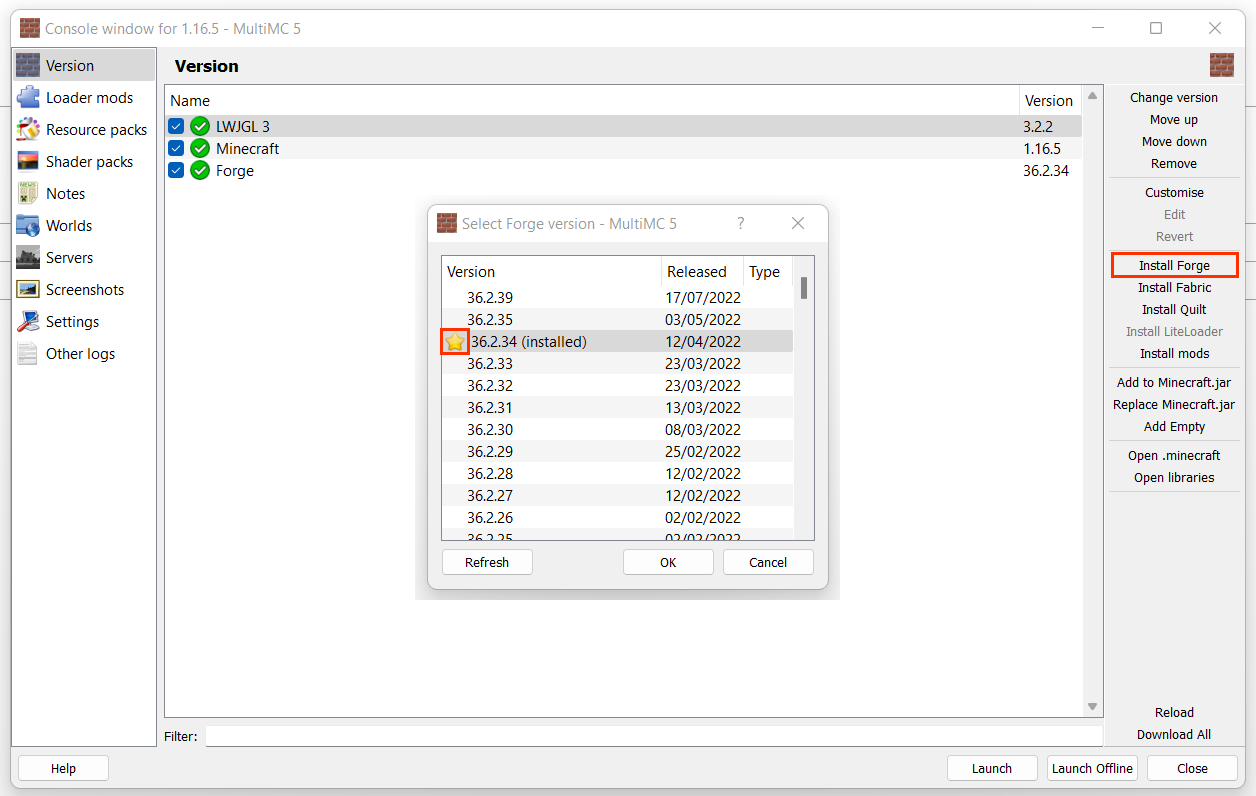
2\. Under **Version** select **Install Forge** on the right side of the menu.  
3\. Select the version of Forge to be installed. The starred version indicates the recommended stable release.
![image-1663370157353.png](https://wiki.swequestrian.com/uploads/images/gallery/2022-09/scaled-1680-/image-1663370157353.png)

<p class="callout info">Using an incorrect version of Forge will cause loading errors - check which one your version SWEM needs (top of page)!</p>

**Install Mods**

To install new mods, or manage existing mods:

1\. Right click your instance icon &gt; **View Mods** OR click the icon and select **View Mods** on the right side of the app.  
2\. You can do multiple things from the view mods menu:  
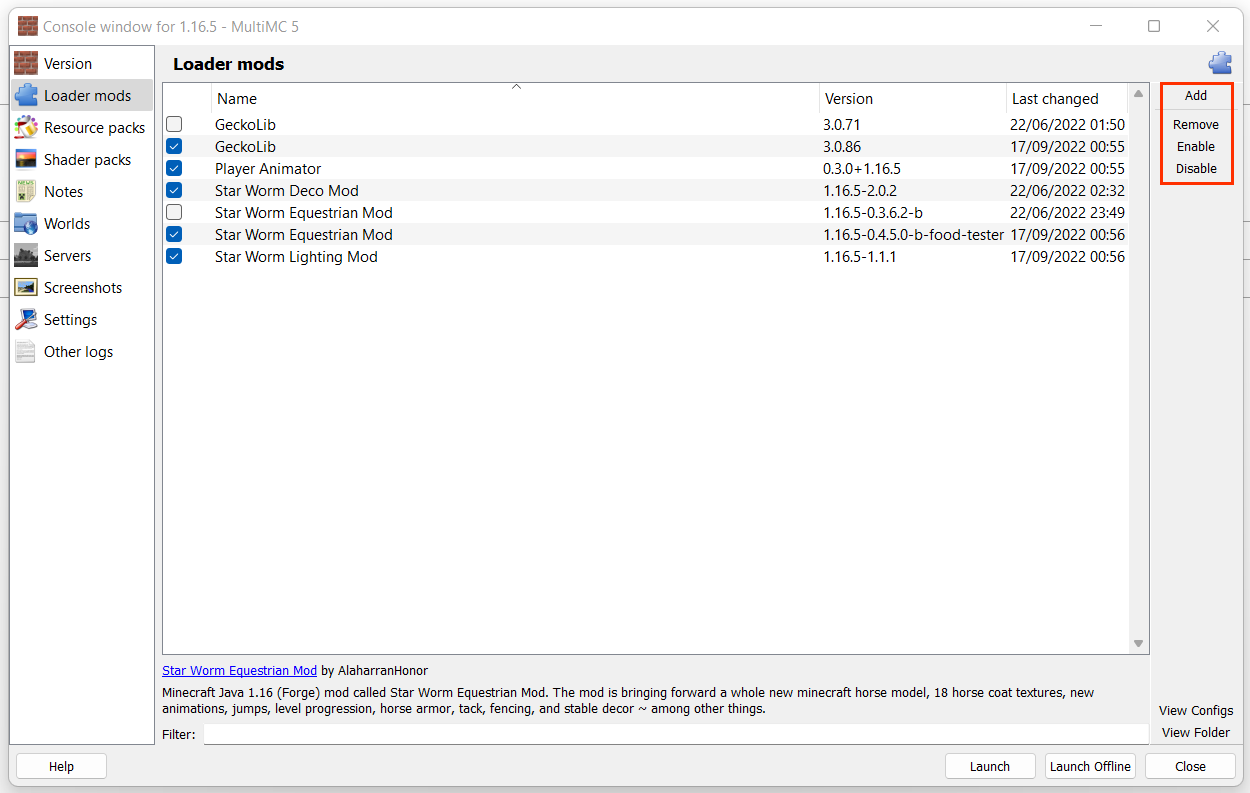
**Add:** Browse and add new mods to your instance. Mods **must** be .jar files **Remove:** Permanently remove a mod from your instance. Removing a mod deletes it from the mod folder. **Enable:** Enable a previously disabled (see below) mod. When enabled, a mod will be active when MC is launched.  **Disable:** Disable an installed mod. When disabled, mods will **not** load when MC is launched.   
`You can also check or uncheck the checkbox to enable/disable. Unchecked mods will not load (disabled).`

<p class="callout warning">Disabling mods that your world actively uses (ie SWDM) can alter builds, structures, remove items and entities or even corrupt the world on load if there is no newer version enabled.</p>

![image-1663372754846.png](https://wiki.swequestrian.com/uploads/images/gallery/2022-09/scaled-1680-/image-1663372754846.png)

**Other Guides** Click the dropdown to see more information on our other guides for **MultiMC**!

<details id="bkmrk-multimc%3A-allocating-"><summary>MultiMC: Allocating RAM</summary>

Minecraft uses RAM (memory) to load and run the game and its assets. To a point, more RAM means you can load faster and process quicker - though that is also dependent on other elements of your PC. A few notes:

- Vanilla default is 2GB but requirement increases with HD texture packs, shader uses and **mods.**
- It is generally recommended that modded Minecraft requires 3-4GB or more, depending on what you are running.
- Excessive RAM does not guarantee better performance, only allocate what you **NEED.**

1\. On the MultiMC App, select **Settings** on the top menu bar, which will open a new interface.  
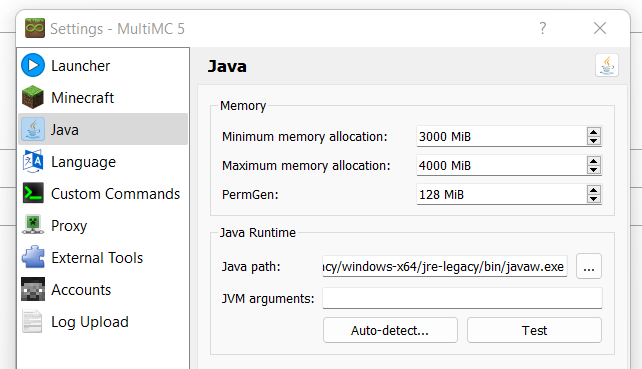
2\. Under the **Java** tab you can see current memory (RAM) allocation.  
3\. Set your required amount for minimum and maximum values. PermGen should be left at what it is by default.  
`MultiMC uses megabytes (MiB) over gigabytes (GB) - 1024MB is equal to 1GB.`[![image-1663373304829.png](https://wiki.swequestrian.com/uploads/images/gallery/2022-09/scaled-1680-/image-1663373304829.png)](https://wiki.swequestrian.com/uploads/images/gallery/2022-09/image-1663373304829.png)
<p class="callout warning">Your PC has a set amount of RAM built-in (installed) and requires several GB of that to run background apps, etc!</p>

</details><details id="bkmrk-multimc%3A-java-versio"><summary>MultiMC: Java Versions</summary>

MultiMC allows users to setup Java per Instance - which is great for players who play on multiple MC versions which need different Java.

**Default Java** When installing MultiMC the user will have been prompted to select their Java version. This becomes the default of all new instances created. To set or check the default Java version:

1. Select **Settings** on the top menu bar.
2. A pop up menu will open, select **Java** on the left-hand list of options.
3. Clicking **Auto-detect** will search for Java installed on the PC that can be used, displaying it's version etc.
4. Select the desired version and press okay to save it.
5. If your version does not show up, you will need to manually locate it in your files. Once you have found the Java folder, select the version you want, open the **bin** folder and select javaw or javaw.exe ONLY. These should be an application file type.

**Installation-specific Java** Setting an installation specific Java is useful for playing those newer (or older) releases that need a different Java version to your default - for example, wanting to play 1.18 (Java 17) though you usually play 1.16 (Java 8).

1. Right click your instance icon &gt; **Edit Instance**
2. Under **Settings** check the tickbox next to **Java** to override default
3. Follow the same steps (2-5) as above to locate your desired Java version.

</details><details id="bkmrk-multimc%3A-accessing-t"><summary>MultiMC: Accessing the .Minecraft Folder</summary>

Accessing the .Minecraft folder can be useful for finding your mods, shaders, resource packs and save and config folders.

1. Right click your instance icon &gt; **Edit Instance** OR click the icon and select **Edit Instance** on the right side of the app.  
    2. Under **Version** select **Open .Minecraft** on the right side of the menu.

**Folders Explained Config:** Some mods offer tweakable values that can be adjusted, enabled or disabled via txt files.   
**Crash reports:** Logs of crashes, useful when requesting support for a crashing issue.  
**Logs:** Similar to the above, logs provide a record of your client console logs. Latest.log is particularly useful for tech support.  
**Mods:** Stores all mods for your instance - you can add and remove mods from here too if necessary.  
**Resourcepacks:** The folder for your texture pack files.  
**Saves:** The location where all your world files are stored. You can copy world folders from here to backup or move them.  
**Screenshots:** Find all your in-game photos.  
**Shaderpacks:** The folder for your shader files *if you have Optifine (or similar) installed.*   
You might also have other files depending on your installed mods, and several that were not listed due to being defunct.

</details><details id="bkmrk-multimc-features-you"><summary>MultiMC: Features Explained</summary>

You can manage your instance under **Edit Instance** to use:  
**Resource Packs:** Add or remove texture packs (ZIP file)  
**Shader Packs:** Add or remove shaders (ZIP file)  
**Notes:** Make notes on anything you want for planning or future reference!  
**Worlds:** View your worlds - add, rename, copy, remove, use MCEdit (if installed), reset icon and copy seed.  
**Servers:** View, add or remove saved servers.  
**Screenshots:** View screenshots.  
**Settings:** Edit your (instance specific) RAM allocation and java version.  
**Other Logs:** Find your latest crash logs.  
  
You can access other features by right clicking an instance to use:  
**Change Icon:** Select from preset Minecraft themed icons, or upload your own icon.  
**Rename:** Edit the (in-app) instance name.  
**Group:** Assign an instance to custom groups (ie by version, themes) **Minecraft Folder:** View the Minecraft folder, which contains mods, saves, logs, config folders etc.  
**Config Folder:** Open the config folder to view configs of any installed mods.  
**Export:** Export your entire instance (settings, mods, saves, servers) to share with others or transfer to another PC.  
**Delete:** Delete the instance. Deleting the instance will remove all mods, saves and settings.

</details>---

### **Option 2: CurseForge App**

CurseForge is a popular mod launcher and, if MultiMC is not for you, we would recommend using a launcher like CF. CurseForge is **not** the same thing as Forge installation (below), and the app is **not** the same thing as the website.

<details id="bkmrk-download-%26-informati-0"><summary>Download &amp; Information</summary>

- Easy to use and great for first-time mod users.
- No need to do a forge installation via external sites, select the version you want when creating instances.
- Create multiple instances on multiple versions of Minecraft.
- Create instances with popular mods and Modpacks **direct** from CurseForge within the app!
- **[Download CurseForge](https://download.curseforge.com/)**

</details>**Installation**

Go to the link above and download the file specific to your **PC type** (Windows, Mac, Linux)  
1\. Once downloaded, run the file by double clicking the installer.  
2\. Follow the installation instructions.  
3\. On first launch, you will need to follow the in-app setup process, including detecting your Java and Minecraft.  
4\. CurseForge uses the vanilla launcher when loading the game - you may need to log into your Minecraft account.

**Creating A New Instance**

 On the CurseForge App, select **Create Custom Profile** on the top bar to open a preferences menu.

[![image-1663388600693.png](https://wiki.swequestrian.com/uploads/images/gallery/2022-09/scaled-1680-/image-1663388600693.png)](https://wiki.swequestrian.com/uploads/images/gallery/2022-09/image-1663388600693.png)

1\. Give your instance (profile) a **Name** (such as SWEM V1)  
2\. Choose your preferred settings:  
**Minecraft Version:** The version of Minecraft your profile will use.  
**Game Type: \[★\]** Forge | Fabric | Vanilla.   
**Modloader Version:** Forge version  
3\. **Create** once you have input your preferences.  
4\. CurseForge will take up to a few minutes to create an instance and install updates.

![image-1663390095136.png](https://wiki.swequestrian.com/uploads/images/gallery/2022-09/scaled-1680-/image-1663390095136.png)

<p class="callout info">Using an incorrect version of Forge will cause loading errors - check which one your version SWEM needs (top of page)!</p>

<p class="callout warning">Worlds are saved to the instance they were created with, meaning you **cannot** play on worlds in one instance if the world was created while using another instance without moving the save file manually.</p>

**Install Mods**

---

To install new mods, or manage existing mods:

1\. Click on the Instance (Profile) image to view and edit - pressing 'Play' will launch the instance instead!  
2\. You can add mods two ways:  
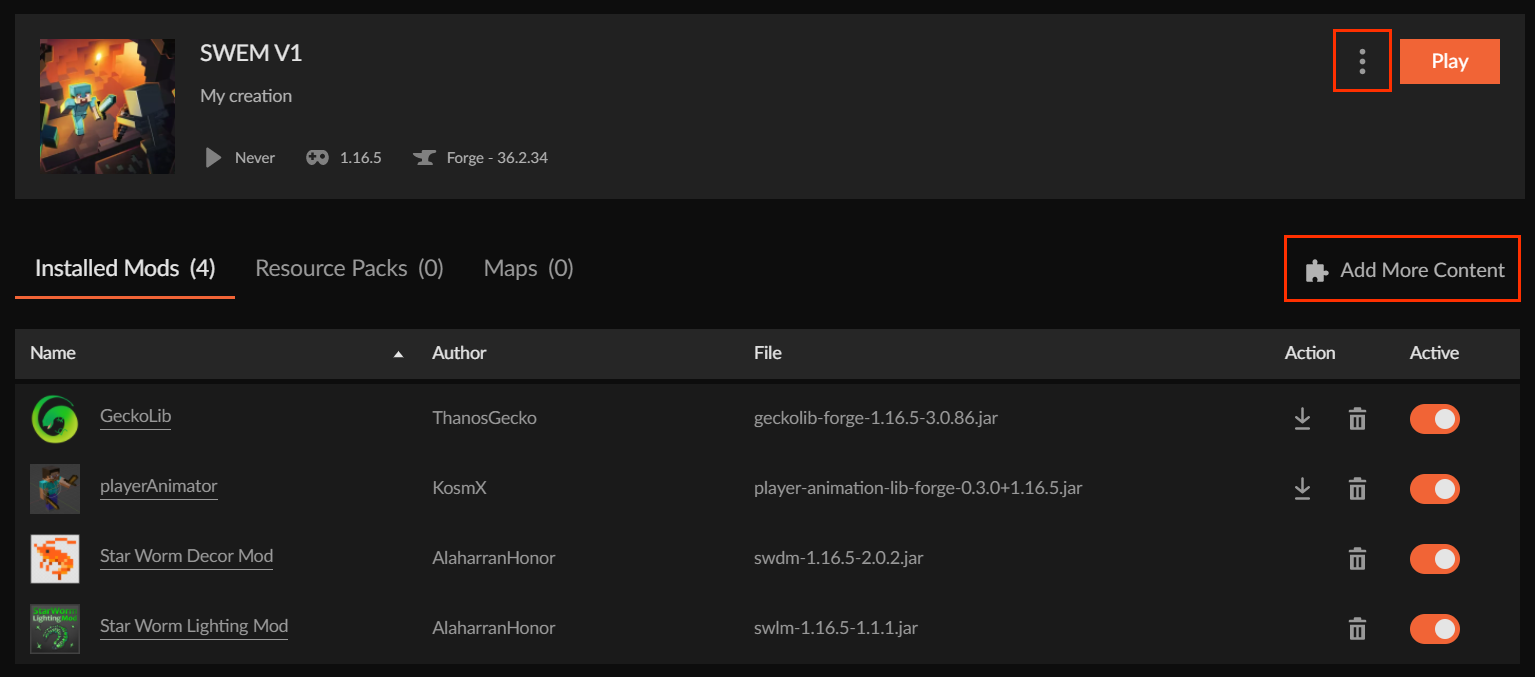
**Search CurseForge:** Select **Add More Content** to browse for mods on CurseForge via the app.  
**Add via Mod Folder:** Select **...** next to Play and choose **Open Folder.** Drag or paste any mods into the mod folder.
![image-1663397184743.png](https://wiki.swequestrian.com/uploads/images/gallery/2022-09/scaled-1680-/image-1663397184743.png)

**Other Guides** Click the dropdown to see more information on our other guides for **CurseForge**!

<details id="bkmrk-curseforge%3A-allocati"><summary>CurseForge: Allocating RAM</summary>

Minecraft uses RAM (memory) to load and run the game and its assets. To a point, more RAM means you can load faster and process quicker - though that is also dependent on other elements of your PC. A few notes:

- Vanilla default is 2GB but requirement increases with HD texture packs, shader uses and **mods.**
- It is generally recommended that modded Minecraft requires 3-4GB or more, depending on what you are running.
- Excessive RAM does not guarantee better performance, only allocate what you **NEED.**

1. Open the CurseForge app and click the **Settings** icon (gear) in the bottom left corner.
2. Select **Minecraft** under the "Game Specific" section
3. Scroll down to **Java Settings** and edit the value as required.

`CurseForge uses megabytes (MiB) over gigabytes (GB) - 1024MB is equal to 1GB.`

</details><details id="bkmrk-curseforge%3A-access-t"><summary>CurseForge: Access the .Minecraft Folder</summary>

Accessing the .Minecraft folder can be useful for finding your mods, shaders, resource packs and save and config folders.

1. Open the profile of the installation you want to access files for.
2. Click the **...** next to **Play** and select 'Open Folder'
3. Your .Minecraft folder will be opened, from here you can select whichever sub-folder you want.

**Folders Explained Config:** Some mods offer tweakable values that can be adjusted, enabled or disabled via txt files.   
**Crash reports:** Logs of crashes, useful when requesting support for a crashing issue.  
**Logs:** Similar to the above, logs provide a record of your client console logs. Latest.log is particularly useful for tech support.  
**Mods:** Stores all mods for your instance - you can add and remove mods from here too if necessary.  
**Resourcepacks:** The folder for your texture pack files.  
**Saves:** The location where all your world files are stored. You can copy world folders from here to backup or move them.  
**Screenshots:** Find all your in-game photos.  
**Shaderpacks:** The folder for your shader files *if you have Optifine (or similar) installed.*   
You might also have other files depending on your installed mods, and several that were not listed due to being defunct.

</details><details id="bkmrk-curseforge-features-"><summary>CurseForge: Features Explained</summary>

**Profile Options:** Click the **...** next to **Play** to open Profile Options and change name, forge version and RAM etc. **Export Profile:** Export your entire instance (settings, mods, saves, servers) to share with others or transfer to another PC. **Delete Profile:** Delete the instance. Deleting the instance will remove all mods, saves and settings. **Update:** Clicking the downward arrow to the right of an installed mod will update it to the newest release. **Delete:** Clicking the trash can icon to the right of an installed mod will delete the mod. **Active:** Toggling the **Active** button next to **Installed Mods** will enable or disable loading a mod on launch.

</details><p class="callout warning">Disabling mods that your world actively uses (ie SWDM) can alter builds, structures, remove items and entities or even corrupt the world on load if there is no newer version enabled.</p>

---

### **Option 3: Minecraft Launcher + Forge**

We do not encourage the use of a Forge Installation to first-time modders, while simple it also:

<details id="bkmrk-download-%26-informati-1"><summary>Download &amp; Information</summary>

- Directs users to download via an advert site that is not discerning with its advertisements and seems sketchy.
- Forge installation allows for only **one** active modpack - mods must be manually added in and out for different packs.
- Forge installation increases the chance of accidentally loading a save with the wrong/missing mods, corrupting it.
- **[Download the Minecraft Launcher](https://www.minecraft.net/en-us/download)**

</details>**Installing**

Go to the link above and download the file specific to your **PC type** (Windows, Mac, Linux)  
1\. Once downloaded, run the downloaded file **MinecraftInstaller** and follow the installation steps.  
2\. Find and open the newly downloaded application called **Minecraft Launcher**.  
3\. On the first launch, you will need to sign in with your Microsoft account, by clicking the **Microsoft Login** button.

**Installing Forge**

1\. Navigate to the [Minecraft Forge downloads](https://files.minecraftforge.net/net/minecraftforge/forge/index_1.16.5.html) and download either the **latest** or **recommended** installer.

[![image-1663690758382.png](https://wiki.swequestrian.com/uploads/images/gallery/2022-09/scaled-1680-/image-1663690758382.png)](https://wiki.swequestrian.com/uploads/images/gallery/2022-09/image-1663690758382.png)

2\. Open the downloaded file, and select **Install Client.**  
3\. If the file path at the bottom is not pointing to your minecraft, click the three **...** and point it to your minecraft installation. *[Default installation paths](https://minecraft.fandom.com/wiki/.minecraft)*  
4\. Click **install**  
5\. Relaunch your **Minecraft Launcher** and if you click **installations** it should now contain a forge installation.  
6\. Click the green **Play** button, to setup the instance.

[![image-1663691117451.png](https://wiki.swequestrian.com/uploads/images/gallery/2022-09/scaled-1680-/image-1663691117451.png)](https://wiki.swequestrian.com/uploads/images/gallery/2022-09/image-1663691117451.png)  
  
**Install Mods**

To install mods for the minecraft launcher, you need to open the .minecraft folder.  
*An easy way to do that is clicking the folder icon on hovering one of the installations:*

[![image-1663691219611.png](https://wiki.swequestrian.com/uploads/images/gallery/2022-09/scaled-1680-/image-1663691219611.png)](https://wiki.swequestrian.com/uploads/images/gallery/2022-09/image-1663691219611.png)

When the file explorer has been opened, go back one folder so you are standing in the minecraft folder.  
1\. Open the folder named **mods** if that folder is not present, you can create it.  
2\. Open the folder **mods** and make sure it's empty of any files.  
3\. Drag all your downloaded mod files into this folder. (If you downloaded a zipped modpack, you need to unzip it and drag ONLY .jar files in here.

**Other Guides** Click the dropdown to see more information on our other guides for **Forge Installations**!

<details id="bkmrk-minecraft-uses-ram-%28"><summary>Forge Installation: Allocating RAM</summary>

Minecraft uses RAM (memory) to load and run the game and its assets. To a point, more RAM means you can load faster and process quicker - though that is also dependent on other elements of your PC. A few notes:

- Vanilla default is 2GB but requirement increases with HD texture packs, shader uses and **mods.**
- It is generally recommended that modded Minecraft requires 3-4GB or more, depending on what you are running.
- Excessive RAM does not guarantee better performance, only allocate what you **NEED.**

1. On the Minecraft Launcher, select **Installations** on the top menu bar.
2. Click the proper forge installation. (1.16.5 and 36.2.34 or above)
3. Click the **More Options** <span style="text-align: justify;">at the bottom right.</span>
4. In the field JVM Arguments you should see **-Xmx2G** <span style="text-align: justify;">(2 being the amount of GB allocated)</span>
5. Change that number to the required amount.

[![image-1663692444036.png](https://wiki.swequestrian.com/uploads/images/gallery/2022-09/scaled-1680-/image-1663692444036.png)](https://wiki.swequestrian.com/uploads/images/gallery/2022-09/image-1663692444036.png)
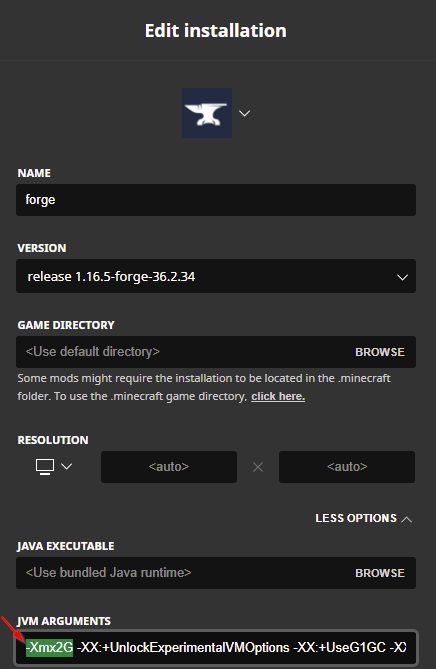
</details>---

### **Updating Your World**

With the release of 1.18.2, some users may be interested in porting forward their existing SWEM worlds. Please carefully read the information here if you are unfamiliar with porting forward modded instances!

**Important Notes**

- Porting forward can corrupt worlds in some (rare) instances. <span style="color: #ba372a;">**Always take a backup of your valued saves!**</span>
- Porting forward without original mods will result in missing items, blocks or entities at best, and corruption at worst. For that reason, it is not recommended to port forward any worlds that has mods which never updated to 1.18.2+
- Ported worlds will NOT have newer terrain generation in any **explored** chunks - newly generated chunks should be fine.
- Ported worlds will have config files reset to default - make sure to tweak these as required.

<p class="callout warning">SWEM Horses (and many other modded entities) will not be carried over to the new 1.18 version. Read more on [Discord](https://discord.com/channels/715626418893095012/730138920146305075/1106668588347179048).</p>

<p class="callout warning">Optifine H6 or H7 crashes 1.18 unless using outdated Forge. Optifine H9 pre2 or above is recommended for Forge 40.2.0!</p>

**How to Update** It is recommended that you start a **NEW** instance / profile and copy your world file over. It may be possible to update instances / profiles with some launchers, but this is not advisable as you cannot reverse any corruption or issues that might occur - and will not be able to go back to play your old world if you later want to do so.

1. Download and install Java 17 if you do not already have it.
2. Follow the instructions above for your chosen launcher type to setup a new instance / profile / forge installation. 
    1. **MultiMC / Curseforge:** Select the recommended forge version.
    2. **MultiMC / Curseforge:** Allocate sufficient RAM - this may not be carried over between instances.
    3. **MultiMC:** Check you are using the right Java version, or setup your required version if necessary.
    4. **Curseforge:** You do not necessarily need to do anything with Java, provided you have it installed.
3. Download or install ALL essential mods from your original world in 1.18.2 versions.
4. Open the .Minecraft folder of your original world, go to saves and copy the folder with your world(s) name.
5. Paste it into the saves folder for your new 1.18 instance / profile / forge installation.

---

### **Troubleshooting**

Okay... so something has gone wrong and you are stuck, or things are not doing what they ought to do. It is frustrating and it happens often, so here is a brief overview of the most common issues and how to solve them.

**Read First** Most issue that occurs on Minecraft has been noted, asked and resolved many hundreds of times over. Often the answer is a quick google search away, or has a handful of very informative videos available on how to fix it. When you run into trouble, we ask that you first try to seek your own answer rather than defaulting to SWEM's help channels on Discord, doing so for easily resolved issues means there are fewer resources and less time to help those with more complex problems or take away from those who have consciously tried to find their own solutions. Our support for general MC modding is entirely voluntary!

**Types of Issues**

<details id="bkmrk-game-crashing-your-g"><summary>Game Crashing</summary>

Your game crashing can be one of the hardest things to solve for those who are not technically minded. However, here's a few tips:

- If you receive an error number or text - google it first. It is most likely one someone else has had before.
- If you cannot find a solution, find your latest.log file (in the .minecraft &gt; logs folder) and request someone able to interpret logs takes a look at it in our Discord or another modding community.

<p class="callout warning">For crashing help, you must upload your logs or as much error info as possible, otherwise there is nothing to go on.</p>

</details><details id="bkmrk-loading-errors-if-mi"><summary>Loading Errors</summary>

If Minecraft will not load, or spends a long time or even gets stuck loading, it can be due to MANY factors:

- You have the wrong mods for your version, or are missing dependencies (mods that other mods need to function). In this case, read the information MC provides you carefully, and fix the mods it is telling you are wrong. Common issues here are using fabric mods with forge, or using older/newer versions of MC mods on another MC version.
- If you are stuck loading for a long time or endlessly, chances are you do not have enough RAM. Check the guides above for allocating RAM (specific to your mod launcher or method).

<p class="callout warning">If seeking help, you must upload your logs or as much error info as possible, otherwise there is nothing to go on.</p>

</details><details id="bkmrk-lag-if-your-game-is-"><summary>Lag</summary>

If your game is lagging, these are the most common causes:

- You have too many mods for your PC to handle, or you are asking it to do too much (render or graphics too high)
- One or several mods are poorly optimised and are causing your PC or Minecraft to struggle
- Running shaders or HD texturepacks
- Too many entities

What **most** of this boils down to is the RAM you have available or allocated. To a point, more RAM means you can load faster and process quicker - though that is also dependent on other elements of your PC. Allocating RAM should be a bigger consideration than just 'giving it more' though, and here's why:

- Excessive RAM does not always equate to better performance, too high and it can actually make it worse so you should stick to what you NEED.
- **PCs do not have limitless RAM**, in fact many low-end PCs do not have much. Your PC requires an absolute minimum of 1-2GB free at all times to run background processes and essential functions. Since modded MC often needs 3-4GB to itself, if you have a 4GB RAM PC, you might find running even small modpacks a real challenge! So check what you actually have, work out what you can realistically afford to give and evaluate if a modpack is right for your PC.

 Tips for Potato PCs that cannot allocate extra RAM:

- Keep your settings as low as possible to tolerate for render, simulation, graphics ETC.
- Close down background processes that you do not need; Discord and browsers etc are very greedy!
- Avoid shaders and HD Texturepacks if you can even run them at all.
- Avoid having or being near too many entities in game (ie keep that cow herd small!)
- You might get better performance on a server (depending on their modpack or settings), as SP actually requires the player to run both (solo) server + game.
- Use performance optimising mods such as [ferritecore](https://www.curseforge.com/minecraft/mc-mods/ferritecore/files) +/- cut out optional mods (client sides).

</details>