Star Worm Equestrian Lite
Learn more about Star Worm Equestrian Mod Lite (SWEM/L).
- Introduction
- Configs, Commands & Files
- Horse
- Horse Equipment (Tack)
- Items
- Brush
- Flight Feather
- Horse Whistle
- Gender Potions
- Skill Potions
- Glistening Melon
- Health Booster
- Horse Heal Potion
- Sugar Cube
- Galaxy Offerings
- Rainbow Feeds
- Mineral Bonemeal
- Blocks
- Cone
- Block O' Water
- Spigot
- Ring Hitch
- Hitching Post
- Pasture Gates
- Fences
- Friendly Bars
- Metal Grate
- Alaharran Banner
- Player Armor
- Player Equipment
- Amethyst Shield
- Amethyst Bow
- Amethyst Sword
- Amethyst Scythe
- Amethyst Pickaxe
- Amethyst Axe
- Amethyst Shovel
- Crafting Items
Introduction
About Star Worm Equestrian Lite
Getting Started
Information targets the latest supported release. For legacy (older) versions and bug fixes, read the changelogs.
Introduction
This is a guide for players new to Star Worm Equestrian (Lite). If you need a mod installation guide, check out this instead.
Basics - Horses
Embedded links will take you to relevant sections mentioned in this basics guide if you want to learn more!
- Find horses naturally spawning in many biomes (if enabled) or summon one via COMMANDS .
- Tame horses just like you would any Minecraft horse or donkey, but watch out for bucking!
- Craft and equip a bridle and saddle to steer the horse when riding.
- Use
Hto increase your gait (speed), andGto decrease. - Craft and equip horse armor to unlock special perks and protections for adventures.
- Ride and jump your horse to increase skills for better stats and less refusals.
- Heal your horse using Horse Heal Potion.
Differences To Star Worm Equestrian ("Full" Mod)
This is not a complete list, but includes the most notable differences:
ConvertingHorses ("vanilla") cannot be converted via Cantazarite potion or any other means.TackFewer items, or "bundled" (saddle, blanket, girth + breast collar in one slot)CareNo hunger, thirst, pee or poo features.BreedingNo gestation (pregnancy delay), foal limits, configurable cooldowns or simple lineage.DecorLess stable decor and "function" blocks removed (troughs, feeders etc).Ore GenCantazarite and the Cantazarite anvil does not exist, so armor repair uses shining amethyst shards.ConfigsSimplified configs with fewer customization options.
| Star Worm Equestrian Mod | Star Worm Equestrian Mod LITE |
|
|
|


More Information: Features Still Included
These features are still included:
- Full 100+ coat selection and support for COMMUNITY PACK custom coats
- Full range of animations in riding and RRP COMMANDS .
- Skills (+ configurable experience)
- Gaits (5 speeds)
- Flight
- Genders and Breeding (simplified)
- Horse Armor and Combat Controls
- Player Armor and Amethyst Tools
- Health Booster & Fly Spray (Horse Heal Potion)
- Immortality (God Mode)
Support
You can post any mod questions in our Discord tech-help or gameplay-questions community support channels!
Reporting Issues (Bugs)
You can report any mod issues to our bugs forum on Discord.
Configs, Commands & Files
Includes: How to adjust configuration files and information on custom content (Community Packs).
Client Config
Information targets the latest supported release. For legacy (older) versions and bug fixes, read the changelogs.
Introduction
Client configs are set for the individual player and are not overriden by any server settings.
Client configuration files tweak settings that apply ALL worlds created for the current mod pack and any servers joined.
Important
Configuration files have a specific format, and allow you to change limited values. Inputting invalid information or adjusting the file format can result in issues such as invalid configuration loading or crashing.
It is important to read the file carefully and only change values that are supported.
#is a comment to provide information on the feature and valid range or optionsRangemeans values must be within a set limitExample:0-100Defaultis the setting used when the file is first generated and may be noted for reference
If you suspect a config file is corrupted or invalid, delete it and reload Minecraft to regenerate a default file.
Default Configuration
This is the default configuration file, containing five adjustable settings.
# || =========== [Wings Transparency] =========== ||
[wings_tansparency]
# || Set how visible the horse wings should be! 0 = off, 1 = 25%, 2 = 50%, 3 = 75%, 4 = 100%
#Range: 0 ~ 4
wingsTransparency = 2
# || =========== [Gait HUD] =========== ||
[hud]
# || Should the gait HUD be enabled?
gaitHudEnabled = true
# || How much would you like to offset the current X position? (A negative value moves the text up and a positive value down.)
#Range: > -2147483648
gaitHudX = 0
# || How much would you like to offset the current Y position? (A negative value moves the text up and a positive value down.)
#Range: > -2147483648
gaitHudY = 0
# || What color should the gait HUD be?
#Range: > -2147483648
gaitHudColor = 16777215Adjustable Values
Set the transparency for wings on Amethyst Tier Horse Armor.
# || Set how visible the horse wings should be! 0 = off, 1 = 25%, 2 = 50%, 3 = 75%, 4 = 100%
#Range: 0 ~ 4
wingsTransparency = 2This accepts whole numbers from 0-4. Default is 2 where wings are partially transparent (50%).
Enable or disable the gait HUD overlay which displays the currently active gait while riding a horse.
# || Should the gait HUD be enabled?
gaitHudEnabled = trueThis accepts boolean values of true or false. Default is true (enabled).
Set the horizontal position for the gait HUD overlay.
# || How much would you like to offset the current X position? (A negative value moves the text up and a positive value down.)
#Range: > -2147483648
gaitHudX = 0This accepts whole numbers greater than -2147483648. Default is 0 to the right of the hotbar.
Set the vertical position for the gait HUD overlay.
# || How much would you like to offset the current Y position? (A negative value moves the text up and a positive value down.)
#Range: > -2147483648
gaitHudY = 0This accepts whole numbers greater than -2147483648. Default is 0 at the height of the hotbar.
Set the decimal value of the gait HUD overlay to change the text color.
# || What color should the gait HUD be?
#Range: > -2147483648
gaitHudColor = 16777215This accepts whole numbers greater than -2147483648. Default is 16777215 (white).
Additional
Configuration file updates are uncommon and usually harmless, but you may need to regenerate files or reapply custom settings.
Known Issues
You can report any mod issues to our bugs forum on Discord - please check for duplicate reports first!
Changelog
View Changes
This is not a complete list of changes or features. It is a log of wiki-related version information and may be outdated.
| MC Version | Release | Notes |
1.20.1 |
1.1.1 |
Page established - Information prior to 1.1.1 is not specifically included but is likely the same. |
Common Config
Information targets the latest supported release. For legacy (older) versions and bug fixes, read the changelogs.
Introduction
Multiplayer: Configuration files on servers override any "client-side" (player) or pack settings while connected.
Client configuration files tweak settings that apply to ALL worlds created for the current mod pack.
Important
Configuration files have a specific format, and allow you to change limited values. Inputting invalid information or adjusting the file format can result in issues such as invalid configuration loading or crashing.
It is important to read the file carefully and only change supported values.
#is a comment to provide information on the feature and valid range or optionsRangemeans values must be within a set limitExample:0-100Defaultis the setting used when the file is first generated and may be noted for reference
If you suspect a config file is corrupted or invalid, delete it and reload Minecraft to regenerate a default file.
Default Configuration
This is the default configuration file, containing two adjustable settings.
# || =========== [Block o Water] =========== ||
[block_o_water]
# || Does the spigot require a Block O Water?
needBlockOWater = true
# || =========== [Shining Amethyst] =========== ||
[amethyst]
# || What is the spawn chance (%) for Shining Amethyst?
#Range: 0 ~ 100
amethystSpawnChance = 25
Adjustable Values
Enable or disable the spigot requiring a block o' water.
# || Does the spigot require a Block O Water?
needBlockOWater = trueThis accepts boolean values of true or false. Default is true - spigots require a block o' water to function.
Set the chance of amethyst clusters becoming shining amethyst when fully grown.
# || What is the spawn chance (%) for Shining Amethyst?
#Range: 0 ~ 100
amethystSpawnChance = 25This accepts whole numbers from 0-100. Default is 25 (%).
Additional
Configuration file updates are uncommon and usually harmless, but you may need to regenerate files or reapply custom settings.
Multiplayer: Check or reset configuration files each time you update mods to ensure important settings are unaffected!
Known Issues
You can report any mod issues to our bugs forum on Discord - please check for duplicate reports first!
Changelog
View Changes
This is not a complete list of changes or features. It is a log of wiki-related version information and may be outdated.
| MC Version | Release | Notes |
1.20.1 |
1.1.1 |
Page established - Information prior to 1.1.1 is not specifically included but is likely the same. |
Server Config
Information targets the latest supported release. For legacy (older) versions and bug fixes, read the changelogs.
Introduction
Multiplayer: Configuration files on servers override any "client-side" (player) or pack settings while you play on that server.
Server configuration files tweak settings that apply to ALL worlds created for the current mod pack.
Prior to 1.21.1 server config files are located under saves → worldname → serverconfig → swem-server.toml
World Override 1.21+
It is possible to set custom configuration for specific worlds (override default file).
Paste a copy of the swem-server file into saves → worldname → serverconfig. Edit. Save. Relaunch.
Important
Configuration files have a specific format, and allow you to change limited values. Inputting invalid information or adjusting the file format can invalidate configuration file loading, world loading or result in game crashes.
It is important to read the file carefully and only change supported values.
#is a comment to provide information on the feature and valid range or optionsRangemeans values must be within a set limitExample:0-100Defaultis the setting used when the file is first generated and may be noted for reference
If you suspect your config file is corrupted or invalid, delete it and reload the game to regenerate the file.
Default Configuration
This is the default configuration file, containing 12 adjustable settings.
Default - 1.21.1-1.1.1
#|| How much to heal the player wearing Netherite+ Riding Boots as a percentage of damage dealt.
# Default: 0.05
# Range: 0.01 ~ 1.0
lifesteal = 0.05
# || =========== [Horse Care] =========== ||
[horse_care]
# || Specify how many minutes the Health Booster lasts for?
# || We recommend '600' ~(30mc days) for singleplayer, and '10,000' ~(504mc days / 7irl days) for multiplayer.
# Default: 600
# Range: > 1
healthBoosterTime = 600
# || =========== [Horse Experience Levels] =========== ||
[horse_experience_levels]
# || Amount of XP required to max a horse's Speed stat.
# || We recommend '13500' for singleplayer, and '100000' for multiplayer.
# Default: 13500
# Range: > 1
maxSpeedXP = 13500
# || Amount of XP required to max a horse's Jump stat.
# || We recommend '13500' for singleplayer, and '100000' for multiplayer.
# Default: 13500
# Range: > 1
maxJumpXP = 13500
# || Amount of XP required to max a horse's Health stat.
# || We recommend '13500' for singleplayer, and '100000' for multiplayer.
# Default: 13500
# Range: > 1
maxHealthXP = 13500
# || Amount of XP required to max a horse's Affinity stat.
# || We recommend '17000' for singleplayer, and '50000' for multiplayer.
# Default: 17000
# Range: > 1
maxAffinityXP = 17000
# || =========== [Server Admin] =========== ||
[server_admin]
# || Enable Coat Cycling (via lapis lazuli and redstone)?
# || Do not enable if the server is multiplayer and has an economy.
allowCoatCycling = true
# || Can Secret Coats be obtained via Secret Items? (Default = True = Yes)
# || Do not enable if the server is multiplayer and has an economy.
allowSecretCoats = true
# || Should the perks provided by the Amethyst Armor (excluding Amethyst Riding Boots) be disabled?
disableAmethystPerks = false
# || Should the rider be teleported with the horse if the horse should fall into the void whilst the horse is wearing Amethyst Tier Armor.
voidTP = true
# || Enable SWEM's built-in permission node system for controlling player use of commands.
# || This is recommended for servers ONLY.
enableKeyPermission = false
# || What horses should spawn? Vanilla horses only, SWEM horses only, or Both?
#Allowed Values: VANILLA_ONLY, SWEM_ONLY, BOTH
horseSpawn = "BOTH"
# || Should winged horse fly without requirement of Amethyst Horse Armor?
wingedHorseFly = true
Adjustable Values
Lifesteal
lifesteal = 0.05This accepts decimal numbers from 0.01-1.0. Default is 0.05 - 5% damage is healed by Netherite+ riding boots. 1.0 = 100%
Health Booster
healthBoosterTime = 600This accepts whole numbers over 1. Default is 600 - health boosters lasts 600 mins (approx. 30MC days) while loaded.
Skill Experience
maxSpeedXP = 13500 maxJumpXP = 13500 maxHealthXP = 13500 maxAffinityXP = 17000This accepts whole numbers (integers) over 1. Default is 13500 experience for max. skill level, or 17000 for affinity.
Multiplayer: Values are aimed at Singleplayer and it is common for Equestrian servers to set 50-100,000+
Coat Cycling
allowCoatCycling = trueThis accepts true or false. Default is true and permits coat cycling (change) owned horses using lapis and redstone.
Secret Coats
allowSecretCoats = trueThis accepts true or false. Default is true and allows players to obtain special coats in survival.
Void TP
voidTP = trueThis accepts true or false. Default is true - teleport horse/rider to spawn if falling into the void with Amethyst horse armor.
Key Permissions (Multiplayer)
enableKeyPermission = falseThis accepts true or false. Default is false - commands are not restricted to players with "key" permissions. TBC
Spawning
horseSpawn = "BOTH"This accepts BOTH or VANILLA_ONLY or SWEM_ONLY. Default is BOTH - lite and vanilla horses naturally spawn.
Winged Flight
wingedHorseFly = trueThis accepts true or false. Default is true - default and custom pegasus (set in JSON file) can fly without armor.
Additional
Configuration file updates are uncommon and usually harmless, but you may need to regenerate files or reapply custom settings.
Multiplayer: Check or reset configuration files each time you update mods to ensure important settings are unaffected!
Known Issues
You can report any mod issues to our bugs forum on Discord - please check for duplicate reports first!
Changelog
View Changes
This is not a complete list of changes or features. It is a log of wiki-related version information and may be outdated.
| MC Version | Release | Notes |
1.20.1 |
1.1.1 |
Page established - Information prior to 1.1.1 is not specifically included but is likely the same. |
Horse
Horse Overview
Information targets the latest supported release. For legacy (older) versions and bug fixes, read the changelogs.
Introduction
Lite horses are Minecraft "re-imagined" equestrian mods. Bigger, tougher and more realistic with moderately expanded functionality.
| Details | |
| Health Points | 20-40 10-20 |
| Behavior | Passive |
| Height (B) |
Withers: 2 |
|
Ears: 3 |
|
| Width (B) | 1.2 |
| Length (B) | 2.7 |
Obtaining
Lite does not support converting horses via cantazerite potions!
Horses can be obtained from:
Natural Spawns
Natural spawns for lite and vanilla horses is enabled by default in the server config.
- Herds of up to 5 horses may spawn in overworld biomes.
- Herds use a single "color tag" out of 7 options to spawn "similar" coat types.
- Naturally spawning horses are wild until tamed by a player.
Spawn Eggs
Spawn eggs are a creative menu or command only item. It spawns one horse with a random coat variant and gender.
Summon Command
Lite does not support randomization via commands. If you require a random coat, use a spawn egg.
Commands can summon an adult horse with a specific coat, and gender (optional). For foals, see here.
More Information: Summon Commands
Permissions
Use of summon commands require cheats enabled, and the relevant user permissions in Multiplayer.
Basics
- Commands must use a valid namespace ID like
swem: - Commands must use a valid coat ID
- If
MALEorFEMALEis not set the gender will be random.
Default Coats
It is easy to view all coat options included in lite.
/swemlite summon swem:
Press ↑ or ↓ to scroll the list, and Tab to select the highlighted option. Add MALE or FEMALE to specify gender.
| EXAMPLES |
|
/swemlite summon swem:helios_arishant |
Summons the Helios coat with a random gender. |
/swemlite summon swem:helios_arishant FEMALE |
Summons the Helios coat as a female horse. |
Community Pack (Custom) Coats
Community pack file names set the "ID" used in game, so if you have a pack called my_coats the ID in game is my_coats:
/swemlite summon pack_name:
Press ↑ or ↓ to scroll the list, and Tab to select the highlighted option. Add MALE or FEMALE to specify gender.
| EXAMPLES | |
/swemlite summon custom_coats:arishant_bob |
Summons the Bob coat by Arishant with a random gender. |
/swemlite summon custom_coats:arishant_bob MALE |
Summons the Bob coat by Arishant as a male horse. |
|
The above examples use an EXAMPLE community pack called |
|
Troubleshooting
Appearance
Lite does not include any complex coat genetics, breeds or model variants (custom models excluded).
Horses use one of 100+ default adult coats.
Custom Coats
Community packs do not support foal coats. All foal coats (14) can be replaced using a resource pack.
- You can add custom coats directly into the game using a community pack.
- You can override (replace) the default coats using a resource pack.
Gender
There are no visual or functional gender differences besides the icon displayed with named Horses.
More Information: "Breeds"
Breeds
Lite does NOT include breeds, or breed-specific models, excluding custom community-made model replacements (overrides).
Behavior
Idle
Horses will idle wander, and occasionally trigger shake, scratch or tail swish idle animations.
Sleep
Horses lay down to sleep every night between 9PM-6AM, unless equipped with a bridle.
Aggression
Horses are passive-neutral and do not "aggro" towards entities or players.
- They can retaliate by bucking if harmed or ridden when untamed.
- Bucking deals TBC damage to entities and players in a TBC radius.
Fatal "buck offs" can occur if one horse kicks another, who kicks back etc. It's not an "intentional" risk but it can happen!
Horse Inventory
The horse inventory overviews information on ownership, skills, status and equipment. It is available for all tamed horses.Shift + Right Click the horse with an empty hand, or press E while riding.

Known Issues
You can report any mod issues to our bugs forum on Discord - please check for duplicate reports first!
Changelog
View Changes
This is not a complete list of changes or features. It is a log of wiki-related version information and may be outdated.
| MC Version | Release | Notes |
1.21.1 |
1.1.1 |
Bug Fix: Community packs not cross-compatible with full mod. Discord: Guide for 1.0.0 Packs. |
1.20.1 |
1.1.1 |
Bug Fix: Community packs not cross-compatible with full mod. Discord: Guide for 1.0.0 Packs. |
1.20.1 |
1.1.1 |
Page established - Information prior to 1.1.1 is not specifically included but is likely the same. |
Riding
Information targets the latest supported release. For legacy (older) versions and bug fixes, read the changelogs.
Introduction
Horses can be tamed, equipped with a range of cosmetics and ridden with expanded functionality.
Taming
Fatal "buck offs" can occur if one horse kicks another, who kicks back etc. It's not an "intentional" risk but it can happen!
It is recommended to tame horses in safely enclosed area, away from other players, pets or animals.
Right Click any untamed horse with an empty hand to mount it.
- Taming attempts will prompt the horse to buck or rear.
- Horses will dismount the rider and emit gray particles if unsuccessful.
- Horses may harm nearby entities and players with bucks - back up quickly to avoid taking damage!
- Every attempt reduces the (random) "temper" variable until it reaches 0.
Successful taming is indicated by heart particles and this time the rider remains mounted.
Tacking
Shift + Right Click a tamed horse with an empty hand to access the horse inventory.

Tack can be equipped in any order by dropping a compatible item into the slot. If an item is already equipped, it can be removed from the slot in the same menu, or "hot swapped" using Shift + Right Click on the horse while holding a replacement tack item.
Riding
Keybinds can conflict with other functions or mods. If you experience issues controlling a horse, check your controls.
Horses require both bridle and saddle to control direction and speed. There are two control types - standard or tank controls.
Standard (Default)
W to move forward and mouse controls direction. A/D keys control lateral left and right movement without affecting camera angle. S resets the gait to walk.
Tank Controls N TO TOGGLE
W to move forward, and A/D to turn smoothly left or right. If held, the horse will make a perfect circle movement - the size depends on the current gait (faster gait, wider circle). Camera angle can be freely controlled using the mouse without affecting horse movement. Tank controls are great for precision riding with dressage or coordinated group routines.
Enabling tank controls notifies the player over the hotbar, and highlights a small tank symbol in the horse inventory menu.
Gait (Speed)
Horse speed is determined by their current "gait" and their speed skill. Use G to decrease (slower), and H to increase (faster).
- Walk
- Trot
- Canter
- Extended Canter
- Gallop
Current gait displays next to hotbar if gaitHudEnabled = true in configs. Gait resets to walk if S is used, or W released.
Jumping
Horse jump height is determined by jump skill, and the jump "charge". Hold space to charge the meter, and release it to jump.
Flight
Horses must be equipped with a bridle, saddle and amethyst tier armor (any with wings) to allow flight.
| Default Key | Action | Description |
J |
Launch | Initiate flight and launch horse 7B into the air. |
| Glide | Default state with no controls active - slow forward and downward motion towards the ground. | |
W |
Accelerate | Increases speed (up to max) without increasing altitude. |
A |
Bank Left | Rotates the horse in a gradual left turn - altitude is decreased unless moving forward W |
D |
Bank Right | Rotates the horse in a gradual right turn - altitude is decreased unless moving forward W |
Space |
Elevate | Increases the altitude without forward movement. |
Space + W |
Rise | Increases the altitude while moving forward. |
LShift |
Flutter | Decreases the altitude without moving forward - useful for precise landings. |
LShift + W |
Dive | Decreases the altitude while moving forward. |
S |
Float | Decreases speed to a stop and holds position without losing altitude (hover). |
| Land | Landing occurs when a horse touches a block. This includes collision with blocks (terrain). | |
|
Summary: |
||
Combat Commands
Horses equipped with Adventure saddle and bridle can use special combat moves if their affinity skill is high enough.
| Default Key | Action | Affinity Level | Description | Area Of Effect | Damage |
| TBC | Bite | Affinity VII | Horse bites out in front of them | TBC | 2  |
X |
Kick | Affinity VIII | Horse kicks out behind them | TBC | 4 |
C |
Stomp | Affinity IX | Horse rears up and stomps with front legs | TBC | 1 |
|
|
|||||
Known Issues
You can report any mod issues to our bugs forum on Discord - please check for duplicate reports first!
- Pressing
Saccidentally will bring the horse to a sudden stop from any gait.
Changelog
View Changes
This is not a complete list of changes or features. It is a log of wiki-related version information and may be outdated.
| MC Version | Release | Notes |
1.21.1 |
1.1.3 |
Bug Fix: Crash on collision with any blocks in flight. |
1.20.1 |
1.1.1 |
Page established - Information prior to 1.1.1 is not specifically included but is likely the same. |
Care
Information targets the latest supported release. For legacy (older) versions and bug fixes, read the changelogs.
Introduction
Lite Horses are intended to be low maintenance adventure mounts, but they may need a little care to stay healthy!
Needs
Lite does not include any hunger, thirst, pee or poo functions.
Health
Horse health is default 20 HP 10 and can be increased by leveling the health skill.
Damage Sources
- Falling 9+ blocks
- Potion of Harming
- Dragons Breath
- Fire, Lava & Magma Blocks
- Cactus, Sweet Berry Bushes & Wither Roses
- Blast damage from TNT, Withers or Creepers
- Hostile Mobs
- Bucking horses
More Information
Pathfinding
Horses naturally seek to avoid (while wandering) harmful blocks such as lava, magma, cactus and sweet berry bushes etc.
Hostile Mobs
Horses are not a target of most hostile mobs, unless indirectly while ridden by a player (ie shot by a skeleton). They can be direct targets of Zoglins and Withers, and any hostile entities from other mods that use a similar hostility logic.
Fall Damage
Horses take fall damage from any drop greater than 9 blocks. This limit increases to 11 with GOLD TIER HORSE ARMOR
| 9B | 13B | 17B | 21B | 25B | 29B | 31B | 33B | 35B | 37B | ++ | |
| No Horse Armor | 0.5 |
1.5 |
2.5 |
3.0 |
4.0 |
5.0 |
5.5 |
6.5 |
7.0 |
7.0 |
7.0 |
| Gold Tier Armor | 0.0 |
1.0 |
1.5 |
1.5 |
2.0 |
3.0 |
3.5 |
3.5 |
3.5 |
4.0 |
4.0 |
|
TBC Fall damage was thoroughly tested but the exact formula is non-linear and has not been verified from code. |
|||||||||||
Horses cannot die to fall damage unless their health is below the maximum damage cap of 7.0 , or 4.0 with gold+ horse armor, or they sustain damage from another source shortly after taking a dangerous fall.
Dragons Breath
Horses may not avoid Dragon's Breath if left unsupervised or idle wandering in the End dimension.
Dragon's Breath is extremely hazardous and can result in a buck and rearing loop that makes it very hard to escape!
| Damage | Health I 10 |
Health II 11 |
Health III 13 |
Health IV 16 |
Health V 20 |
|
| No Horse Armor | 3.0 |
3.3s | 3.6s | 4.3s | 5.3s | 6.6s |
| Cloth Tier Armor | 1.5 |
6.6s | 7.3s | 8.6s | 10.6s | 13.3s |
| Armor + Booster | 0.5-1.0 |
20-40s + |
21-42s + |
23-46s + |
26-52s + |
30-60s + |
|
Damage (per second) and approx. seconds this amount of damage can be sustained (by health level) until fatal. |
||||||
The following are recommended before going to the End with a horse (if Dragon is not defeated):
- Horse Armor of any tier except leather reduces damage per second by half.
- Horse Armor of Amethyst tier (flight) reduces dangers of ground-based combat.
- Health Boosters increase maximum health to extend time they can sustain damage.
- Healing supplies such as Horse Heal Potion to quickly treat low health.
Healing
- Natural Regeneration
- Splash Potion of Healing
- Horse Heal Potion
- Health Booster
- Command
/swemlite set health #(1-5)
Booster Shot
Health Boosters fully heal missing hearts and temporarily increase maximum health by a 20 HP 10 .
Immunity
Horse Armor significantly reduces or negates damage from various sources, effects stack per tier.
Immortality "God Mode"
Immortality is a command-only function and prevents further skill gain while active.
Horses can receive immunity to ALL damage using /swemlite horse immortal to toggle "immortality" on or off.
Additional
- Horses use a "sad" animation when their health is low to visually communicate the need for care.
- Horses may "flee" from or after taking damage, but this is usually very brief and ineffective.
- Horses can kick or buck when taking damage, this can harm nearby entities and players.
Known Issues
You can report any mod issues to our bugs forum on Discord - please check for duplicate reports first!
1.0.0Horse health icons do not show above the hotbar when in creative.1.0.0Horses occasionally engage in fatal "kick-offs" when harmed.
Changelog
View Changes
This is not a complete list of changes or features. It is a log of wiki-related version information and may be outdated.
| MC Version | Release | Notes |
1.20.1 |
1.1.1 |
Page established - Information prior to 1.1.1 is not specifically included but is likely the same. |
Skills
Information targets the latest supported release. For legacy (older) versions and bug fixes, read the changelogs.
Introduction
Lite Horses can upgrade four skills to unlock increased "perks" for horse and riders.
Overview

Jump
Jump increases the maximum height a horse can reach when their jump bar (space) is fully charged.
Jump skill is increased by:
- Jumping
- Using Jump or All skill potions
- Reaching Affinity III (Tolerant) automatically unlocks Jump II
- Commands
/swemlite set level JUMP #
| Jump I (1) | Jump II (2) | Jump III (3) | Jump IV (4) | Jump V (5) | |
| Experience | --- | 1350 | 3038 | 4050 | 5063 |
| Height (Blocks) | 1.75B | 2.75B | 3.75B | 4.75B | 5.75B |
|
Experience listed shows default values. Requirements may differ on servers or worlds with custom configuration values. |
|||||
More Information
Jump Phases
Jump is charged by holding space and the amount of charge determines how high they jump. This is not a straight launch into the air, the launch phase (straight after releasing space) has a natural arc where height steadily increases, then declines before they land. Contact with the ground (landing) automatically ends the jump animation.
Jump Height
Maximum jump height refers to the highest point of the jump arc. This means the rider must correctly judge their approach, charge and release (space) to gain the height necessary to make it over an obstacle. As jump skill increases, it becomes easier to clear lower level jumps with less preparation, but easier to "over jump". Outside of multiplayer server events that score players based on appropriate skill (using a jump height that matches the jump itself), this has no real significance to horse or rider.
Jump Distance
Jumping without pressing W plays a jump animation on the spot. It is holding W that gives the jump forward motion, and this is further affected by speed. Jumping in a higher gait (speed) covers more distance the faster you go, and this scales further depending on the gait used and the speed skill. Certain gaits - specifically walk, trot and canter - are fixed speeds and are unaffected by skill level, so a horse with level 1 and another with level 5 will not cover more distance while jumping at canter. At maximum speed and jump, it is possible to jump over gaps up to 11 blocks wide with good timing.
Jump Spacing
Jump spacing is important in planned courses - riders need enough time to approach the jump, charge, release and reach the appropriate height to clear an obstacle. The distance required between jumps depends on how tall they are and what speed the rider is expected to use. Read more here (Discord).
Jump Refusals
Jump refusals are very common in low level horses, but are not influenced by the jump skill or successful vs unsuccessful jumps.
Only affinity impacts refusal, so it is easier to begin training jump after increased bonding and training in other skills.
Jump Collisions
There is no system in lite to identify jump collision ("faults") and obstacles are not knocked over if contact occurs.
FUN FACT
The most challenging jump is a 5B tall and 5B wide ascending triple bar.

It is only possible at a gallop and requires perfect timing to clear all bars and cover the entire jump distance without collision.
Speed
Speed increases the maximum speed (in blocks per second) a horse can move in certain gaits.
Speed skill is increased by:
- Riding or flying
- Using Speed or All skill potions
- Commands
/swemlite set level SPEED #
| Speed I (1) | Speed II (2) | Speed III (3) | Speed IV (4) | Speed V (5) | |
| Experience | --- | 1350 | 3038 | 4050 | 5063 |
| Walk | 3bps | 3bps | 3bps | 3bps | 3bps |
| Trot | 5bps | 5bps | 5bps | 5bps | 5bps |
| Canter | 11bps | 11bps | 11bps | 11bps | 11bps |
| Extended Canter | 11bps | 13bps | 15bps | 17bps | 19bps |
| Gallop | 13bps | 15bps | 18bps | 20bps | 22bps |
|
Experience listed shows default values. Requirements may differ on servers or worlds with custom configuration values. |
|||||
More Information
Universal Speeds
Walk, trot and canter use "universal" speeds, which means they are unaffected by speed skill. This was added for the convenience of multiplayer worlds to allow players to ride at a uniform speed in trail riding together or group routines, and engage in competitions where variable speed skill need not be factored in for time-based trials.
Experience
Experience gain from riding is calculated based on blocks covered (distance). Riding at a higher gait increases skill gain simply because it covers more ground and therefore gains more experience.
Affinity
Affinity increases tolerance to rider commands, which decreases the rate of jump and gait command refusals. It also unlocks access to special mounted combat moves.
Affinity skill is increased by:
- Riding or flying
- Brushing
- Treats
- Using Affinity or All skill potions
- Commands
/swemlite set level AFFINITY #
| Level | Level Name | Experience | Refusal (Jump) | Refusal (Gait) | Notes |
| 1 | Affinity | 100 | TBC | TBC | Previously: Unwilling |
| 2 | Affinity I | 850 | TBC | TBC | Previously: Reluctant |
| 3 | Affinity II | 2000 | TBC | TBC | Previously: Tolerant |
| 4 | Affinity III | 3000 | TBC | TBC | Previously: Indifferent |
| 5 | Affinity IV | 4000 | TBC | TBC | Previously: Accepting |
| 6 | Affinity V | 6000 | TBC | TBC | Previously: Willing |
| 7 | Affinity VI | 9000 | TBC | TBC | Previously: Committed |
| 8 | Affinity VII | 11000 | TBC | TBC | Previously: Trusted |
| 9 | Affinity VIII | 14000 | TBC | TBC | Previously: Friends |
|
10 |
Affinity IX | 15000 | TBC | TBC | Previously: Best Friends |
| 11 | Affinity X | 16000 | TBC | TBC | Previously: Bonded |
|
Experience listed shows default values. Requirements may differ on servers or worlds with custom configuration values. |
|||||
More Information: Treats, Skill Loss
Treats
Horses can be fed a number of food items to increase affinity, including "regular" or "special" kinds.
| Type | Limit (Time) | Limit (Amount) | Food Item | Affinity (Experience) | Total |
|
Regular |
Daily TBC |
3 |
Apples |
3 |
|
5 |
Carrots | 2 | |||
7 |
Melon | 1 | |||
|
Special |
Lifetime |
10 |
Golden Carrot | 100 |
1000 |
10 |
Golden Apple | 200 |
2000 |
||
1 |
Enchanted Golden Apple | 5000 |
5000 |
||
|
Lifetime: This treat can be given a limited number of times, once reached no more treats of that type will be accepted. |
|||||
Providing a horse the maximum number of special treats is a good approach to boost to Affinity IV (4)+ and reduce refusals.
High value treats may put the horse over the required skill experience. Riding the horse will trigger the level up to occur.
Skill Loss
Affinity is the only skill that can be decreased without commands. Points are decreased if the horse takes damage.
The exact point calculation is unknown, as the deduction seems to vary by source.
- Hit from a player with an empty hand deducts 5 points ( 0.5 )
- Hit from a fully-charged unenchanted bow deducts 30 points ( 4 )
- Damage from cactus deducts 20+ points ( 0.5 )

Levels can decrease if the skill points decrease beyond 0. For example, Affinity III becomes Affinity II. If the horse already has the lowest affinity, points remain at 0. The horse will automatically level up again once their points reach the experience threshold for the next level.
Other
- Affinity is not a bond to specific riders, only an indication of it's receptiveness to rider commands.
- Affinity is not a trait, it starts at 0 for all, gains at the same rate and every horse can reach max level (Affinity X).
Health
Health increases the maximum heart or health points a horse has while in good condition (full health).
Health skill is increased by:
- Glistening Melon
- Using Health or All skill potions
- Commands
/swemlite set level HEALTH #
| Health I (1) | Level 2 | Level 3 | Level 4 | Level 5 | |
| Experience | --- | 1350 | 3037.5 | 4050 | 5062.5 |
| Health Points | 20 | 22 | 26 | 32 | 40 |
| Hearts |
|
11 |
13 |
16 |
20 |
|
Experience listed shows default values. Requirements may differ on servers or worlds with custom configuration values. |
|||||
Known Issues
You can report any mod issues to our bugs forum on Discord - please check for duplicate reports first!
1.0.0Skill values are sometimes rounded down, such as1k/1kinstead of1000/1350.
Changelog
View Changes
This is not a complete list of changes or features. It is a log of wiki-related version information and may be outdated.
| MC Version | Release | Notes |
1.20.1 |
1.1.1 |
Page established - Information prior to 1.1.1 is not specifically included but is likely the same. |
Gender
Information targets the latest supported release. For legacy (older) versions and bug fixes, read the changelogs.
Introduction
Gender is a data value assigned to all horses, even if untamed. It is part of a simple breeding feature.
Identifying Gender
Gender is shown as an icon in the horse inventory for all tamed horses, and an icon next to any name tagged horse.


Gender Potions
Lite does not include infertility potions for geldings (or infertile mares).
Gender can be changed at any time using gender potions.
Gameplay
There are no gender-specific differences in appearance, behavior or functions. Gender is only relevant to breeding.
Additional
Gender data can be revealed via command if the player has access./data get entity @e[type=swem:swem_horse,sort=nearest,limit=1] Behaviors[9].Female
Output will show the gender icon of the horse, and the value 1b for female, or 0b for male.

Changelog
View Changes
This is not a complete list of changes or features. It is a log of wiki-related version information and may be outdated.
| MC Version | Release | Notes |
1.20.1 |
1.1.1 |
Page established - Information prior to 1.1.1 is not specifically included but is likely the same. |
1.20.1 |
1.1.0 |
Bug Fix: All horses spawn male. |
Breeding
Information targets the latest supported release. For legacy (older) versions and bug fixes, read the changelogs.
Introduction
Breeding is the process of pairing a male and female horse to produce a foal.
Readiness
Breeding requires two horses of opposite genders who are "ready", as indicated by the small icon in the horse inventory.


Love Mode
Love mode is a vanilla Minecraft feature that makes entities search for a compatible partner to breed with.
- Love mode lasts for 120 seconds (2 minutes).
- Horses require a sugar cube to activate love mode.
- Horses emit heart particles when love mode is activated successfully.
- Horses will seek out opposite genders also in love mode to breed.
- Successful breeding produces a foal immediately.
Cooldown
Horses have a cooldown period of 300 seconds (5 minutes) after breeding, during which they are "unready" to breed.
Hover over the gender icon in the horse inventory to see a tooltip for cooldown duration (seconds).
Foals
Appearance
- Adult horses have at least one of seven coat "tags" that apply to their coat texture.
- Foals inherit one tag at random from either of their parents.
- Foals can use one of two coat textures for their color tag.
- Foals roll for a random coat that uses their tag when growing up.
Foal Coat Options
| Tag | Variant | Coat |
| Creamy |
swem:foal_creamy_0_arishant |
|
swem:foal_creamy_1_arishant |
|
|
swem:foal_creamy_2_arishant |
|
|
| Chestnut |
swem:foal_chestnut_0_arishant |
|
swem:foal_chestnut_1_arishant |
|
|
swem:foal_chestnut_2_arishant |
|
|
| Brown |
swem:foal_brown_0_arishant |
|
swem:foal_brown_1_arishant |
|
|
swem:foal_brown_2_arishant |
|
|
| Dark Brown |
swem:foal_dark_brown_0_arishant |
|
swem:foal_dark_brown_1_arishant |
|
|
swem:foal_dark_brown_2_arishant |
|
|
| Black |
swem:foal_black_0_arishant |
|
swem:foal_black_1_arishant |
|
|
swem:foal_black_2_arishant |
|
|
| Gray |
swem:foal_gray_0_arishant |
|
swem:foal_gray_1_arishant |
|
|
swem:foal_gray_2_arishant |
|
|
| White |
swem:foal_white_0_arishant |
|
swem:foal_white_1_arishant |
|
|
swem:foal_white_2_arishant |
|


Behavior
Foals will follow any adult horse, and may idle wander in a small radius. If no adult is around, they will stand or wander.
Interaction
TBC Foals can be led by their owner, this is automatically set to the player who owns the mare (mother).
Foals do not have an accessible inventory menu so cannot be equipped with any tack items.
Growth
Foals grow up after 20 minutes, equivalent to 24000 ticks. Growth can be accelerated with sugar cubes.
More Information: Age (Foal Growth), Summon Commands
Age
Lite does not offer any configs for foal growth time. However, this can be set for individual foals in-game using commands.
/data modify entity @e[type=swem:swem_horse,sort=nearest,limit=1] Age set value -#
Change # to the number of ticks until age up. 6000 is equal to 5 minutes. Use -999999999 for "permanent" foals.
Summon
You can summon foals with specific coats and growth durations using commands.
/summon swem:swem_horse ~ ~ ~ {Age: -#, Behaviors: [{Id: "swem:coat", Coat: "swem:foal_TYPE"}]}
Change # as above and add a valid coat entry for swem:foal_TYPE. See Foal Coat Options (dropdown) above.
Transfer
You can transfer ownership of foals using commands.
/data modify entity @e[type=swem:swem_horse,sort=nearest,limit=1] Owner set value PLAYERSFULLUUIDHERE
Change PLAYERSFULLUUID to that of a valid player using MCUUID.
This does not automatically update the ownerName value, which is displayed in the horse inventory (adult horses).
Owner name gets set automatically when horses are tamed or transferred using mod commands, but not with the above option.
/data modify entity @e[type=swem:swem_horse,sort=nearest,limit=1] ownerName set value PLAYERNAME
Change PLAYERNAME to that of a player. It should not cause any issues if invalid, but aim to use valid names anyway.
Additional
- Breeding has a very small chance (1/1000) of a twin birth.
Known Issues
You can report any mod issues to our bugs forum on Discord - please check for duplicate reports first!
- Foals cannot be summoned using
/swemlite summon <id:coat>- shows adult coat with broken foal texture. - Foal variant
black_2is potentially invalid (unable to be obtained).
Changelog
View Changes
This is not a complete list of changes or features. It is a log of wiki-related version information and may be outdated.
| MC Version | Release | Notes |
1.21.1 |
1.1.3 |
Bug Fix: Breeding fails to produce a foal in some cases. |
|
Bug Fix: Breeding does not trigger a cooldown for stallions. |
||
1.20.1 |
1.1.1 |
Page established - Information prior to 1.1.1 is not specifically included but is likely the same. |
Horse Equipment (Tack)
Tack
Information targets the latest supported release. For legacy (older) versions and bug fixes, read the changelogs.
Introduction
Tack is equipment used in horse inventory slots to control a ridden horse, add protective armor and provide inventory storage.
Options
Lite includes a reduced selection of tack options and tack slots compared to the "full" Star Worm Equestrian Mod.
Known Issues
You can report any mod issues to our bugs forum on Discord - please check for duplicate reports first!
Changelog
View Changes
This is not a complete list of changes or features. It is a log of wiki-related version information and may be outdated.
| MC Version | Release | Notes |
1.21.1 |
1.1.3 |
Bug Fix: Tack items disappear (visual only) on reload and void TP. |
1.20.1 |
1.1.1 |
Page established - Information prior to 1.1.1 is not specifically included but is likely the same. |
Bridles
Information targets the latest supported release. For legacy (older) versions and bug fixes, read the changelogs.
Introduction
Bridles are required to control a mounted horse, and are equipped in the horse inventory bridle slot.
Crafting
Bridles have one "Western" variant with 16 dyed colors, and an "Adventure" variant with one.


Recoloring

Usage
Lite does not require tack to be equipped in any specific order, but it can only be equipped on a tamed horse.
Bridles are required alongside a saddle to control a horse. Bridles can be equipped several ways:
- Place a bridle in the horse inventory bridle slot (#1).
Right Clicka tamed horse with a bridle in hand.Shift+Right Clickwith a bridle in hand to hot swap bridles.
Adventure Tack
Bite, kick and stomp are special combat moves only available to high affinity horses using Adventure tack.
Lead Function
Shift + Left Click a horse to turn the reins into a lead rope. Right Click any fence, hitching post, ring hitch, or any or block surface to use the GROUND TIE / RING HITCH feature.
Sleeping
Horses will not sleep at night when equipped with a bridle - handy if you need to make a quick getaway!
Gallery

Known Issues
You can report any mod issues to our bugs forum on Discord - please check for duplicate reports first!
Changelog
View Changes
This is not a complete list of changes or features. It is a log of wiki-related version information and may be outdated.
| MC Version | Release | Notes |
1.21.1 |
1.1.3 |
Bug Fix: Tack items disappear (visual only) on reload and void TP. |
1.20.1 |
1.1.1 |
Page established - Information prior to 1.1.1 is not specifically included but is likely the same. |
Saddles
Information targets the latest supported release. For legacy (older) versions and bug fixes, read the changelogs.
Introduction
Saddles are required to control a mounted horse, and are equipped in the horse inventory saddle slot.
Crafting
Saddles have one "Western" variant with 16 dyed colors, and an "Adventure" variant with 5 unique textures.


Recoloring

Usage
Lite does not require tack to be equipped in any specific order, but it can only be equipped on a tamed horse.
Saddles are required alongside a bridle to control a horse. Saddles can be equipped several ways:
- Place a saddle in the horse inventory saddle slot (#2).
Right Clicka tamed horse with a saddle in hand.Shift+Right Clickwith a saddle in hand to hot swap saddles.
Accessories
Saddles include a girth and breast collar. Adventure saddles include an armor element (cosmetic) over the back.
Adventure Tack
Bite, kick and stomp are special combat moves only available to high affinity horses using Adventure tack.
Known Issues
You can report any mod issues to our bugs forum on Discord - please check for duplicate reports first!
Changelog
View Changes
This is not a complete list of changes or features. It is a log of wiki-related version information and may be outdated.
| MC Version | Release | Notes |
1.21.1 |
1.1.3 |
Bug Fix: Tack items disappear (visual only) on reload and void TP. |
1.20.1 |
1.1.1 |
Page established - Information prior to 1.1.1 is not specifically included but is likely the same. |
Horse Armor
Information targets the latest supported release. For legacy (older) versions and bug fixes, read the changelogs.
Introduction
Horse Armor provides resistance to various forms of damage, or other perks to keep horse and riders safe on an adventure.
Crafting


Special Variants
Amethyst Horse Armor has four special cosmetic variants, each with a matching saddle.


Usage
Lite does not require tack to be equipped in any specific order, but it can only be equipped on a tamed horse.
Horse Armor is an optional item to increase healing and resistance to damage sources. Armor can be equipped several ways:
- Place armor in the horse inventory armor slot (#3).
Right Clicka tamed horse with armor in hand.Shift+Right Clickwith armor in hand to hot swap armor.
Void Teleport
Amethyst tier armor will teleport the Horse to world spawn if they fall into the void. Includes rider if voidTP = true in configs.
Wings
Toggle opacity for armor wings using . (default) as an in-game alternative to using the client config file.
More Information
Appearance
Armor has a difference appearance depending on the tier or variant. Tiers generally "build" on those below, adding a new accessory or texture detail as you upgrade.
| Tier | Description |
Leather |
TBC |
|
|
Adds a draped cloth over the horse's mid-section. |
Copper |
TBC |
Iron |
Adds iron plating to the horse's face, chest and back-end. |
Gold |
TBC |
Diamond |
TBC |
Netherite |
TBC |
Amethyst |
TBC |
Special variants to not add anything, but instead change the texture and wing type of the armor.
| Type | Description |
USA |
Default wing type with USA stripes and stars motifs on both wings and plating. |
|
|
"Dragonfly" wings with ornate copper filigree and bejewelled sandstone-colored plating. |
Elven |
"Hummingbird" wings with colorful gold-flecked plumage and gilded drapery. |
Withered |
"Dragon" or "Bat" wings with deep purple-black netherite plating. |
Gallery
MISSING IMAGE
Known Issues
You can report any mod issues to our bugs forum on Discord - please check for duplicate reports first!
- Horses may fall into water or lava when chunkloading (or moving fast) if frost/magma walk lags.
Changelog
View Changes
This is not a complete list of changes or features. It is a log of wiki-related version information and may be outdated.
| MC Version | Release | Notes |
1.21.1 |
1.3.2 |
Bug Fix: Lava and frost walk lags while chunkloading (possible fix, or reduced occurrence). |
| Bug Fix: Netherite Horse Armor missing crafting recipe. | ||
1.3.0 |
Bug Fix: Horse Armor leather instead of Refined Leather (or both). | |
1.1.3 |
Bug Fix: Tack items disappear (visual only) on reload and void TP. |
|
1.20.1 |
1.1.1 |
Page established - Information prior to 1.1.1 is not specifically included but is likely the same. |
Saddle Bags
Information targets the latest supported release. For legacy (older) versions and bug fixes, read the changelogs.
Introduction
Saddle Bags add a storage space you can access while riding, and are equipped in the horse inventory saddle bag slot.
Crafting
Saddle bags have 16 dyed color options.

Recoloring

Usage
Lite does not require tack to be equipped in any specific order, but it can only be equipped on a tamed horse.
Saddle bags cannot be hot-swapped using Shift + Right Click to minimize exploit risk.
Saddle Bags can be equipped several ways:
- Place a saddle bag in the horse inventory saddle bag slot (#4).
Right Clicka tamed horse with a saddle bag in hand.
Inventory
The saddle bag must be equipped to open it, using K while mounted, or with the horse inventory saddlebag button.
- Slots are filtered to specific items, or tags (ie logs = any logs, bow = modded or "vanilla").
- Slots allow a full stack of any items that support it.
- Bed Roll contains 4 slots for camping supplies.
- Saddlebag contains 27 slots for general adventure supplies.
- Hover over the slot to view a tooltip (info label).

Known Issues
You can report any mod issues to our bugs forum on Discord - please check for duplicate reports first!
Changelog
View Changes
This is not a complete list of changes or features. It is a log of wiki-related version information and may be outdated.
| MC Version | Release | Notes |
1.21.1 |
1.3.3 |
Bug Fix: Crash with community pack saddlebags. Unknown status (assume applied) on Lite. |
| Bug Fix: Compatibility not present for SW plus medical items (bandages etc). | ||
| Bug Fix: Saddlebag GUI shows torch icon for food slot (and vice versa). | ||
1.21.1 |
1.3.0 |
Bug Fix: Saddle bags filter slots to items that cannot be obtained (do not exist) in lite. |
1.1.3 |
Bug Fix: Tack items disappear (visual only) on reload and void TP. |
|
1.20.1 |
1.1.4 |
Bug Fix: Saddle bags filter slots to items that cannot be obtained (do not exist) in lite. |
1.1.1 |
Page established - Information prior to 1.1.1 is not specifically included but is likely the same. |
Items
Brush
Information targets the latest supported release. For legacy (older) versions and bug fixes, read the changelogs.
Introduction
Brushes are a tool to increase affinity experience when used daily.
Crafting

Usage
Right Click a tamed horse with a brush in hand to groom them.
- Horses can be groomed 7 times per Minecraft day - all at once or spread out.
- Experience gains diminish, each groom yields less experience for that day.
- Brushing a horse after 7 uses has no negative effects, despite the angry particles.
| 1 | 2 | 3 | 4 | 5 | 6 | 7 | 8 | TOTAL | |
| Affinity | +9 | +8 | +7 | +6 | +5 | +4 | +3 | 0 | +42 |
|
Particles |
|
 |
|
|
 |
|
 |
|
|
|
"Woot" |
"Yay" | "Meh" |
"Bad" | ||||||

Known Issues
You can report any mod issues to our bugs forum on Discord - please check for duplicate reports first!
Changelog
View Changes
This is not a complete list of changes or features. It is a log of wiki-related version information and may be outdated.
| MC Version | Release | Notes |
1.21.1 |
1.3.0 |
Bug Fix: Missing crafting recipe(s). |
1.20.1 |
1.1.1 |
Page established - Information prior to 1.1.1 is not specifically included but is likely the same. |
Flight Feather
Information targets the latest supported release. For legacy (older) versions and bug fixes, read the changelogs.
Introduction
Flight feather gives a burst of vertical propulsion to the user.
Crafting
Horse Armor is not consumed, but each item can only be sheared once for a flight feather.

Usage
Flight feathers are intended to be used alongside Amethyst Riding Boots to negate fall damage!
Right Click with a flight feather in hand to be launched up 11 blocks into the air.
Cooldown
Flight Feathers can be used every 15 seconds with cooldown shown as an icon overlay.
Durability
Feathers have 120 total uses (default). At 0 the item is destroyed.
More Information: Benefits (Uses)
Benefits (Uses)
- Climb difficult terrain such as sheer cliff faces or mountains.
- Escape from large holes in terrain or caves.
- Explore multi-level structures like Mineshafts.
- Quickly escape hostile mobs by leaping over or on to obstacles.
Flight Feather can be used in water and lava, but to a lesser effect (less than 11B).
Enchanting
Flight Feathers cannot be enchanted in an enchanting table, but can be combined in an anvil with mending or unbreaking.
Repair
Flight Feathers can be repaired using:
Known Issues
You can report any mod issues to our bugs forum on Discord - please check for duplicate reports first!
Changelog
View Changes
This is not a complete list of changes or features. It is a log of wiki-related version information and may be outdated.
| MC Version | Release | Notes |
1.20.1 |
1.1.1 |
Page established - Information prior to 1.1.1 is not specifically included but is likely the same. |
Horse Whistle
Information targets the latest supported release. For legacy (older) versions and bug fixes, read the changelogs.
Introduction
Horse whistles can call a horse to the player from a distance.
Crafting
Horse whistles have a single variant.

Usage
Binding
Horse whistles can be bound to a single tamed horse.
Shift+Right Clicka horse with the whistle in hand to bind it to them.Shift+Right Clickon another horse to re-bind it - displays a confirmation notice.
Summon
Whistles do not replace Callable Horses and cannot call horses that are not in render distance (visible).
Horse whistles can be "charged" like a bow to increase the gait (speed) a horse uses to reach the player.
Right Clickto call them in a trot.- Hold
Right Clickand release to call them in a canter.
Following
Horses can be made to "follow" the player over longer distances without a lead, if the player keeps moving at a reasonable pace.
More Information: Benefits (Uses), Pathfinding Limitations
Benefits (Uses)
- Call horses to "follow" the player over long distances where leads may be inconvenient (ie forested areas).
- Call horses (one or more) to "follow" the player naturally on a trail ride or during an adventure.
- Call horses to the player if they wander away when dismounted.
- Call horses to a food source that is outside their search radius.
- Call horses in from a large pasture.
Pathfinding Limitations
Horses will choose the most direct route to the player as possible, which can result in invalid routes.Example Running to the player in a straight line (blocked by a fence), versus going around the fence.
Horses attempt to avoid most danger sources such as harmful plants, blocks or holes.
Blocked (Stuck)
Horses may get "stuck" on the goal of reaching the player until they get within range if:
- Blocked by terrain or barriers such as fences or walls.
- Blocked by damage sources.
Known Issues
You can report any mod issues to our bugs forum on Discord - please check for duplicate reports first!
1.0.0Horses turn (change directions) erratically in canter, but are more "steady" in trot.1.0.0Horses may occasionally stop to play idle animations while pathfinding to the player.
Changelog
View Changes
This is not a complete list of changes or features. It is a log of wiki-related version information and may be outdated.
| MC Version | Release | Notes |
1.21.1 |
1.3.0 |
Bug Fix: Missing crafting recipe(s). |
1.20.1 |
1.1.1 |
Page established - Information prior to 1.1.1 is not specifically included but is likely the same. |
Gender Potions
Information targets the latest supported release. For legacy (older) versions and bug fixes, read the changelogs.
Introduction
Gender potions change the gender of a horse.
Brewing


Usage
Right Click a horse with the potion in hand to apply it. This consumes the item (single use).
- If the horse is the same gender as the potion, it will not work (mounts the horse if tamed).
- If the horse is the opposite gender, it will confirm
[Name] was changed from a mare/stallion to a mare/stallion.
Known Issues
You can report any mod issues to our bugs forum on Discord - please check for duplicate reports first!
Changelog
View Changes
This is not a complete list of changes or features. It is a log of wiki-related version information and may be outdated.
| MC Version | Release | Notes |
1.20.1 |
1.1.1 |
Page established - Information prior to 1.1.1 is not specifically included but is likely the same. |
1.20.1 |
1.1.0 |
Bug Fix: Missing crafting (brewing) recipe. |
Skill Potions
Information targets the latest supported release. For legacy (older) versions and bug fixes, read the changelogs.
Introduction
Skill potions give players a boost to their skill experience.
Obtaining
Skill potions can only be obtained in creative, or found in LOOT containers of various types.
|
Jump |
Speed |
Health |
Affinity |
All |
 |
 |
 |
 |
 |
Usage
Right Click a horse with any potion in hand to apply it. This consumes the item (single use).
- Jump XP Potion
+750 XP - Speed XP Potion
+750 XP - Affinity XP Potion
+750 XP - Health XP Potion
+650 XPTBC - All XP Potion
+750 XP / +650 XP for AffinityTBC
More Information
- Potions can be used on maxed horses, consuming it with no effect.
- Potions can be used on near maxed horses, any excess experience is voided.
- Potions cannot be used on untamed horses. TBC
Known Issues
You can report any mod issues to our bugs forum on Discord - please check for duplicate reports first!
Changelog
View Changes
This is not a complete list of changes or features. It is a log of wiki-related version information and may be outdated.
| MC Version | Release | Notes |
1.20.1 |
1.1.1 |
Page established - Information prior to 1.1.1 is not specifically included but is likely the same. |
Glistening Melon
Information targets the latest supported release. For legacy (older) versions and bug fixes, read the changelogs.
Introduction
Glistening Melon is a healing item and potion ingredient in Horse Heal Potions.
Obtaining

Usage
Healing Item
Right Click an injured horse to instantly heal 5 and increase health skill experience by 75pts.
Brewing

Known Issues
If you find an issue, please report it to our bugs channel on Discord. We ask that you look to see if your issue was reported first!
Changelog
View Changes
This is not a complete list of changes or features. It is a log of wiki-related version information and may be outdated.
| MC Version | Release | Notes |
1.21.1 |
1.3.0 |
Bug Fix: Missing crafting recipe(s). |
1.20.1 |
1.1.1 |
Page established - Information prior to 1.1.1 is not specifically included but is likely the same. |
Health Booster
Information targets the latest supported release. For legacy (older) versions and bug fixes, read the changelogs.
Introduction
Health Booster is a medical item that gives horse a temporary increase to maximum health.
Brewing

Usage
Right Click a horse with the booster in hand to apply it. This consumes the item (single use).
Effect
Boosters heal any missing hearts and increase maximum health by 10 using a Health Boost V potion effect.
Duration
Duration is set in the server config - changes will only apply to horses given a new booster after reload.
Boosters last 600 minutes (30 MC days) by default, duration only decreases while the horse is loaded.
Response
Horses may rear or buck if they have the fussy trait. To minimize damage, use away from other horses, pets or players!
More Information: Maximum Health, Fussy Trait, Duration (MP)
Maximum Health
Boosters make the maximum possible health 30 for Health V horses - 20 + Bonus 10
Fussy
Fussy is a randomly assigned trait in all horses.
- It only affects booster response (currently).
- It is not identifiable without commands, or administering a booster shot.
/data get entity @e[type=swem:swem_horse,limit=1,sort=nearest] Behaviors[8]
Output will show the value 1b for fussy, or 0b for not fussy.

Multiplayer Duration
600 seconds is 10 continuous hours of health boosting for a very reasonable price. In multiplayer situations where horses are constantly in loaded chunks or near popular areas like world spawn hubs, consider using 5000 to 10000 minutes, equivalent to a half/week of continuous loading.
Trivia
Booster shots (health boosters) were added for multiplayer servers, originally official SWE. Servers often increase horse care and leveling requirements, and the loss of many hours or sentimental attachment is very demoralizing. Boosters make horses more robust on adventures against hostile mobs, terrain challenges and block suffocation (now disabled).
Known Issues
You can report any mod issues to our bugs forum on Discord - please check for duplicate reports first!
Changelog
View Changes
This is not a complete list of changes or features. It is a log of wiki-related version information and may be outdated.
| MC Version | Release | Notes |
1.20.1 |
1.1.1 |
Page established - Information prior to 1.1.1 is not specifically included but is likely the same. |
Horse Heal Potion
Information targets the latest supported release. For legacy (older) versions and bug fixes, read the changelogs.
Introduction
Horse heal potion is a healing item with a regeneration effect.
Brewing
Usage
Right Click a horse with the potion in hand to increase healing from 0.2 to 0.4 per second.
Duration
Potions last for 15 seconds. Multiple applications only resets the duration, and does not extend it (stack).
Uses
Potions have 8 total uses, every use reduces this by 1. At 0 the item is destroyed.
More Information
Additional
- Potions can be used on tamed or untamed horses.
- Potions can be used, even if the horse is uninjured.
- Potions do not offer benefits to health skill or experience.
- Potions cannot be used on any other entities.
Known Issues
You can report any mod issues to our bugs forum on Discord - please check for duplicate reports first!
Changelog
View Changes
This is not a complete list of changes or features. It is a log of wiki-related version information and may be outdated.
| MC Version | Release | Notes |
1.20.1 |
1.1.1 |
Page established - Information prior to 1.1.1 is not specifically included but is likely the same. |
Sugar Cube
Information targets the latest supported release. For legacy (older) versions and bug fixes, read the changelogs.
Introduction
Sugar Cubes are a treat item used for breeding and leading horses.
Crafting

Usage
Leading
Hold a sugar cube in hand to have nearby horses follow you.
Breeding
TBC Activating love mode is limited to the owner, and any trusted players, of the horse.
Right Click a tamed horse with a sugar cube in hand to activate love mode.
Known Issues
You can report any mod issues to our bugs forum on Discord - please check for duplicate reports first!
Changelog
View Changes
This is not a complete list of changes or features. It is a log of wiki-related version information and may be outdated.
| MC Version | Release | Notes |
1.21.1 |
1.3.0 |
Bug Fix: Missing crafting recipe(s). |
1.20.1 |
1.1.1 |
Page established - Information prior to 1.1.1 is not specifically included but is likely the same. |
Galaxy Offerings
Information targets the latest supported release. For legacy (older) versions and bug fixes, read the changelogs.
Introduction
Galaxy Offerings are a multi-part crafting process to obtain one of the secret coats.
No Spoilers
This contains clues with optional spoilers for solutions per step.
Hints
Disclaimer: These are "fan made" clues to help those that do not want direct spoilers.
Galaxy offerings do not require any modded items, including lite, unless it was made as part of this process!
First Step
Craft the elemental offerings.
Clue 1
There are five elemental offerings:
- Earth
- Life
- Nova
- Vibrant
- Ocean
Clue 2
Each offering contains four items or blocks, placed in a specific order and using specific slots (shown below).

Clue 3
These clues narrow in on the items used by each of the offering.
Earth
The Earth offering includes two stone-type blocks, and two other blocks.
- One is found the world over, from mountain sides to mines.
- One falls through your fingers, or on you from above.
- One hides beneath the trees, and eludes your starter tools.
- One is pale and speckled, often cast aside and unwanted.
Spoiler: Solution

Life
The Life offering includes four items of a plant nature.
- One is one of four, and a blend of two.
- One grows where dark cats roam.
- One is common in growth of old.
- One in time forms a dark and dangerous place.
Spoiler: Solution

Nova
The Nova offering includes four items found underground.
- One sparks up a thousand ideas.
- One arcane summons divine powers.
- One gleams where flames never die.
- One is rare in mountains tall, and in abundance loved by all.
Spoiler: Solution

Vibrant
The Vibrant offering includes four blocks. Each is the same, but bring a unique glow to your world and builds.
- One is a fire of warmth and danger.
- One is the glow of sea and sky.
- One is the darkness of the abyss and the infinite void.
- One is the comfort of sun and sand.
Spoiler: Solution

Ocean
The Ocean offering includes one creature, one block and two items.
- One you do not seek, but it seeks you.
- One grows in vast numbers where waters are warm.
- One is found on shallow shores of rivers small.
- One sways softly, ever reaching for the sun.
Spoiler: Solution

Second Step
Craft the second-tier offering.
Clue 1
Combine all elemental offerings, with the galaxy at its core.
Clue 2
Spectrum blazes high, with nature as equals above the darkest depths. At the heart, the stars align.
Spoiler: Solution

Third Step
Craft the third-tier offering.
Clue 1
Gallaxorium offerings require a touch of magic to come alive.
Spoiler: Solution
Fourth Step
Craft the fourth-tier offering.
Clue 1
Find a place where air turns cold and the land fades away.
Clue 2
Seek to join the stars with this offering at hand, beyond the dreams and limits of the oldest worlds.
Spoiler: Solution
Take the Gallaxium offering up high and hold it in your hand until it converts to Gallaxia at y250+.
Final Step
What now?
Spoiler: Solution
Right Click a horse with Galaxia to instantly convert it to a Galaxy coat.
Galaxy coats have no special perks or genetics. Converting does not affect custom names, skills or any other data.
Multiplayer + Modpacks
Secret coats can be enabled or disabled in the Server Config file.
If allowSecretCoats = false:
- TBC Secret coat items cannot be crafted.
- Horses cannot be converted to secret coats.
- Horses can only use secret coats via commands (set or summon coat).
- Horses using secret coats are not deleted or changed automatically if disabled later.
- Players cannot override server-side config settings, which will only affect your own world(s).
By default, secret coats are enabled unless changed by you, or others when installing custom mod packs!
Spoilers
This contains the full process with no information concealed.
Solution
Galaxy Offerings are a multi-step recipe. The final product allows a player to convert a horse to the secret Galaxy coat.
First Step
Second Step
Third Step
Converted to Gallaxium after it is removed from the enchanting table with the enchantment.
Fourth Step
The last part of the crafting process is to take the Gallaxium offering up high, until it converts to Gallaxia at y250.
Final Step
Right Click a horse with Galaxia to instantly convert it to a Galaxy coat.
Galaxy coats have no special perks or genetics. Converting does not affect custom names, skills or any other data.
Multiplayer + Modpacks
Secret coats can be enabled or disabled in the Server Config file.
If allowSecretCoats = false:
- TBC Secret coat items cannot be crafted.
- Horses cannot be converted to secret coats.
- Horses can only use secret coats via commands (set or summon coat).
- Horses using secret coats are not deleted or changed automatically if disabled later.
- Players cannot override server-side config settings, which will only affect your own world(s).
By default, secret coats are enabled unless changed by you, or others when installing custom mod packs!
Trivia
More Information
Secret coat have been in game since late alpha, but remained closely guarded throughout beta so everyone would have a chance to discover them after the public release. Concealing their process was a lot more successful than their existence and appearances; they had other ideas about about staying out of sight. Several incidents occurred where secret coats reappeared in coat cycling, shifted coat variant IDs, amidst other unexpected bugs.
Galaxy is one of only two secret horses with complex multi-step processes, as well as being one of only 18 original coats.
Known Issues
You can report any mod issues to our bugs forum on Discord - please check for duplicate reports first!
1.21.1-1.1.3Missing crafting recipe. Bug Report
Changelog
View Changes
This is not a complete list of changes or features. It is a log of wiki-related version information and may be outdated.
| MC Version | Release | Notes |
1.20.1 |
1.1.1 |
Page established - Information prior to 1.1.1 is not specifically included but is likely the same. |
Rainbow Feeds
Information targets the latest supported release. For legacy (older) versions and bug fixes, read the changelogs.
Introduction
Rainbow Feeds are a multi-part crafting process to obtain one of the secret coats.
No Spoilers
This contains clues with optional spoilers for solutions per step.
Hints
Disclaimer: These are "fan made" clues to help those that do not want direct spoilers.
First Step
Craft the first items (3).
Clue 1
There are three craftable eggs:
- Warmer Egg
- Cooler Egg
- Rainbow Egg
Clue 2
Two of the eggs are crafted using an egg with eight blocks of the same type with specific color tones.
All recipes are shapeless and can be put in the crafting grid in any order.
Clue 3
The block is obtained from an animal, and comes in 16 colors.
Clue 4
The 16 options can be split into warm tone (8) and cool tone (8) colors.
Spoiler: Solutions


Clue 5
The last egg is obtained from the other two.
Spoiler: Solution
Combine both Warmer and Cooler eggs together in a crafting grid.
Second Step
Craft the second-tier item.
Clue 1
The Rainbow Egg must be made into a special elixir known as "Rainbow Chic".
Clue 2
Rainbow Chic cannot be crafted, but it does have a recipe of sorts.
Clue 3
Rainbow Chic may require you to go to a dangerous place in search of a special powder to create this elixir.
Clue 4
Dissolve the Rainbow Egg into an easily obtained liquid to create the concentrated Rainbow Chic elixir.
Spoiler: Solution

Third Step
Craft the third-tier item.
Clue 1
This process will convert Rainbow Chic to a more concentrated, dehydrated form of Rainbow essence.
Clue 2
It does not require a crafting grid or a brewing stand, and it needs only the Rainbow Chic and one other item.
Spoiler: Solution

Fourth Step
Craft the fourth-tier item.
Clue 1
Combine the Dehydrated Rainbow with one item to create a Rainbow Sweet Feed.
Clue 2
This item is used to create the sweet taste of Rainbow Sweet Feed.
Clue 3
The item is commonly found near water, and requires a simple process to convert from one form to another.
Spoilers: Solution

Fifth Step
Craft the fifth-tier item.
Clue 1
Combine the Rainbow Sweet Feed with one item to create a Rainbow Heavy Feed.
Clue 2
This item is used to bulk the volume and nutrition of Rainbow Heavy Feed.
Clue 3
This item can be obtained in loot, growing in locations near and far in the overworld, or found in seed form.
Spoilers: Solution

Sixth Step
Craft the sixth-tier item.
Clue 1
Combine the Rainbow Heavy Feed with one item to create a Rainbow Dry Feed.
Clue 2
This item does not add nutrition to the feed (and cannot be eaten), but it does hold the feed while it dries out.
Clue 3
This item can be crafted from materials found underground, or found in loot.
Clue 4
This item is more commonly used for hydrating than it is for dehydrating.
Spoilers: Solution

Seventh Step
Obtain the final-tier item.
Clue 1
Find a place where Rainbows can thrive.
Clue 2
Seek out the kind of weather that might allow a Rainbow appear.
Spoiler: Solution
Stand in the rain with Rainbow Dry Feed in your hand to re-hydrate it into Rainbow Din-Din.
Final Step
What now?
Spoiler: Solution
Right Click a horse with Rainbow Din-Din to instantly convert it to a Solitaire (Rainbow) coat.
Solitaire has no special perks or genetics. Converting does not affect custom names, skills or any other data.
Multiplayer + Modpacks
Secret coats can be enabled or disabled in the Server Config file.
If allowSecretCoats = false:
- TBC Secret coat items cannot be crafted.
- Horses cannot be converted to secret coats.
- Horses can only use secret coats via commands (set or summon coat).
- Horses using secret coats are not deleted or changed automatically if disabled later.
- Players cannot override server-side config settings, which will only affect your own world(s).
By default, secret coats are enabled unless changed by you, or others when installing custom mod packs!
Spoilers
This contains the full process with no information concealed.
Solution
Rainbow Feeds are a multi-step recipe. The final product allows a player to convert a horse to the secret Solitaire (Rainbow) coat.
First Step

Second Step
Third Step
Fourth Step
Fifth Step
Sixth Step
Final Step
Right Click a horse with Rainbow Din-Din to instantly convert it to a Solitaire (Rainbow) coat.
Solitaire has no special perks or genetics. Converting does not affect custom names, skills or any other data.
Multiplayer + Modpacks
Secret coats can be enabled or disabled in the Server Config file.
If allowSecretCoats = false:
- TBC Secret coat items cannot be crafted.
- Horses cannot be converted to secret coats.
- Horses can only use secret coats via commands (set or summon coat).
- Horses using secret coats are not deleted or changed automatically if disabled later.
- Players cannot override server-side config settings, which will only affect your own world(s).
By default, secret coats are enabled unless changed by you, or others when installing custom mod packs!
Trivia
More Information
Secret coat have been in game since late alpha, but remained closely guarded throughout beta so everyone would have a chance to discover them after the public release. Concealing their process was a lot more successful than their existence and appearances; they had other ideas about about staying out of sight. Several incidents occurred where secret coats reappeared in coat cycling, shifted coat variant IDs, amidst other unexpected bugs.
Solitaire is one of only two secret horses with complex multi-step processes, as well as being one of only 18 original coats.
Known Issues
You can report any mod issues to our bugs forum on Discord - please check for duplicate reports first!
Changelog
View Changes
This is not a complete list of changes or features. It is a log of wiki-related version information and may be outdated.
| MC Version | Release | Notes |
1.21.1 |
1.3.2 |
Tweak: Reduced excessive appearance in loot tables. |
1.3.1 |
Bug Fix: Missing crafting recipe. |
|
1.20.1 |
1.1.1 |
Page established - Information prior to 1.1.1 is not specifically included but is likely the same. |
Mineral Bonemeal
Information targets the latest supported release. For legacy (older) versions and bug fixes, read the changelogs.
Introduction
Mineral Bonemeal boosts the growth of Amethyst and Shining Amethst.
Crafting

Usage
Mineral Bonemeal can be used on Budding Amethyst or Amethyst Clusters.
Budding Amethyst
Right Click a Budding Amethyst block with mineral bonemeal in hand.
- If cluster(s) exists, one or more clusters may progress one growth cycle.
- If no cluster exists, one may appear on any available face.
It is possible for no clusters to grow or progress!
Clusters
Right Click an Amethyst Cluster with Mineral Bonemeal to progress the cluster by one growth cycle.
Known Issues
You can report any mod issues to our bugs forum on Discord - please check for duplicate reports first!
Changelog
View Changes
This is not a complete list of changes or features. It is a log of wiki-related version information and may be outdated.
| MC Version | Release | Notes |
1.21.1 |
1.3.0 |
Bug Fix: Mineral bonemeal is not consumed on use. |
1.20.1 |
1.1.4 |
Bug Fix: Mineral bonemeal is not consumed on use. |
1.1.1 |
Page established - Information prior to 1.1.1 is not specifically included but is likely the same. |
Blocks
Cone
Information targets the latest supported release. For legacy (older) versions and bug fixes, read the changelogs.
Introduction
Cones are a decorative and cosmetic item.
Crafting

Usage
Right Click the ground with a cone in hand to place it. Cones occupy one surface block, and are two blocks tall.
Cosmetic
Cones can be equipped in the helmet slot as an accessory.
Known Issues
You can report any mod issues to our bugs forum on Discord - please check for duplicate reports first!
Changelog
View Changes
This is not a complete list of changes or features. It is a log of wiki-related version information and may be outdated.
| MC Version | Release | Notes |
1.21.1 |
1.3.0 |
Bug Fix: Item does not drop when block is broken. |
1.20.1 |
1.1.1 |
Page established - Information prior to 1.1.1 is not specifically included but is likely the same. |
Block O' Water
Information targets the latest supported release. For legacy (older) versions and bug fixes, read the changelogs.
Introduction
Block O' Water provides water to nearby spigots.
Crafting

Usage
Right Click with a block o' water in hand to place it.
Area Of Effect
Block O' Water will supply water to spigots within a 15 block radius. It has no limit on how many can be "connected".
Known Issues
You can report any mod issues to our bugs forum on Discord - please check for duplicate reports first!
Changelog
View Changes
This is not a complete list of changes or features. It is a log of wiki-related version information and may be outdated.
| MC Version | Release | Notes |
1.21.1 |
1.3.2 |
Tweak: Updated hotbar message to "within X blocks" if a B.o.W is not in range. |
1.3.0 |
Bug Fix: Missing crafting recipe(s). | |
| Bug Fix: Item does not drop when block is broken. | ||
1.20.1 |
1.1.1 |
Page established - Information prior to 1.1.1 is not specifically included but is likely the same. |
Spigot
Information targets the latest supported release. For legacy (older) versions and bug fixes, read the changelogs.
Introduction
Spigots are a water source block and decorative item.
Crafting

Usage
If enabled in configs, Spigots require a Block O' Water within 15 blocks (any direction) to function.
Right Click with a spigot in hand to place it. Spigots can be placed on horizontal or vertical block surfaces.
- Horizontal placed spigots show as a wall-mounted faucet (tap).
- Vertical placed spigots show as a freestanding "pitcher pump".
Water Source
Right Click a spigot with any of the following items:
- Bucket → Water Bucket
- Treated Leather → Refined Leather
- Star Worm Goop → Paint Filler
Right Click a spigot to fill any (empty) cauldrons placed directly in front, or below if wall-mounted.
Known Issues
You can report any mod issues to our bugs forum on Discord - please check for duplicate reports first!
Changelog
View Changes
This is not a complete list of changes or features. It is a log of wiki-related version information and may be outdated.
| MC Version | Release | Notes |
1.21.1 |
1.3.2 |
Tweak: Tooltip (item hover text) displays information about Block o' Water. |
| Tweak: Updated hotbar message to "within X blocks" if a B.o.W is not in range. | ||
1.3.0 |
Bug Fix: Missing crafting recipe(s). | |
| Bug Fix: Item does not drop when block is broken. | ||
1.20.1 |
1.1.1 |
Page established - Information prior to 1.1.1 is not specifically included but is likely the same. |
1.20.1 |
1.1.0 |
Bug Fix: Missing model and texture. |
Ring Hitch
Information targets the latest supported release. For legacy (older) versions and bug fixes, read the changelogs.
Introduction
Ring hitch is a connection point for leads.
Crafting

Usage
Ring hitch is a permanent version of the hitch used when right clicking any block with a lead (attached entity).
Right Click with a ring hitch in hand to place it on the side, surface or underside of an solid block.
Right Click with a lead (attached to an entity) in hand to tether it.
More Information: Advanced Uses
World Edit
Ring hitches can be mounted on to almost anything with World Edit (mod) for expanded designs.
CROSS TIES HANGING
CROSS TIES WALL/FENCE MOUNTED
Known Issues
You can report any mod issues to our bugs forum on Discord - please check for duplicate reports first!
Changelog
View Changes
This is not a complete list of changes or features. It is a log of wiki-related version information and may be outdated.
| MC Version | Release | Notes |
1.21.1 |
1.1.3 |
Bug Fix: Lead connections disconnect (snap) after a few seconds. |
1.20.1 |
1.1.1 |
Page established - Information prior to 1.1.1 is not specifically included but is likely the same. |
Hitching Post
Information targets the latest supported release. For legacy (older) versions and bug fixes, read the changelogs.
Introduction
Hitching posts are a connection point for leads.
Crafting

Usage
Right Click with a hitching post in hand to place it.
Right Click with a lead (attached to an entity) in hand to tether it.
Known Issues
You can report any mod issues to our bugs forum on Discord - please check for duplicate reports first!
Changelog
View Changes
This is not a complete list of changes or features. It is a log of wiki-related version information and may be outdated.
| MC Version | Release | Notes |
1.21.1 |
1.3.0 |
Bug Fix: Missing crafting recipe(s). |
| Bug Fix: Item does not drop when block is broken. | ||
1.1.3 |
Bug Fix: Lead connections disconnect (snap) after a few seconds. | |
1.20.1 |
1.1.1 |
Page established - Information prior to 1.1.1 is not specifically included but is likely the same. |
Pasture Gates
Information targets the latest supported release. For legacy (older) versions and bug fixes, read the changelogs.
Introduction
Pasture Gates are functional multi-block doors.
Crafting


Usage
Right Click with a pasture gate in hand to place it.
- "Care" needs
3bwidth. - "Horse" needs
2bwidth. - Both variants need 2 blocks height.
Right Click a pasture gate to open it.
More Information: Placement (Hinge, Swing)
Hinge Placement
The easiest way to get gate placement perfect every time is to build it off the side of another block (connection point).
If you need to place off the ground:
- Choose the block at the far edge of the door space, where you want the hinge to be.
- Click on the far edge of that block.
Example: If a door should swing to the left, click the far left edge of the left-most block.
Swing Direction
Face the direction you want the gate to swing away from.
Known Issues
You can report any mod issues to our bugs forum on Discord - please check for duplicate reports first!
- Gates may not render properly on (some) servers. Install Connectivity to fix "ghost block" issues.
- Gates may fail to place in "clear" space - fill the area with blocks, mine (remove) them and retry.
It is not recommended to include multiblock elements in World Edit actions or schematics. If you do, save and backup!
Changelog
View Changes
This is not a complete list of changes or features. It is a log of wiki-related version information and may be outdated.
| MC Version | Release | Notes |
1.21.1 |
1.3.0 |
Bug Fix: Item does not drop when block is broken. |
1.20.1 |
1.1.1 |
Page established - Information prior to 1.1.1 is not specifically included but is likely the same. |
Fences
Information targets the latest supported release. For legacy (older) versions and bug fixes, read the changelogs.
Introduction
Fences are modified models of normal fences.
Crafting
Mangrove, Cherry, Warped, Crimson and Bamboo options are not available yet.


Usage
Right Click with a fence in hand to place it.
Right Click with a lead (attached to an entity) in hand to tether it.
Known Issues
You can report any mod issues to our bugs forum on Discord - please check for duplicate reports first!
Changelog
View Changes
This is not a complete list of changes or features. It is a log of wiki-related version information and may be outdated.
| MC Version | Release | Notes |
1.21.1 |
1.3.0 |
Bug Fix: Item does not drop when block is broken. |
1.20.1 |
1.1.1 |
Page established - Information prior to 1.1.1 is not specifically included but is likely the same. |
Friendly Bars
Information targets the latest supported release. For legacy (older) versions and bug fixes, read the changelogs.
Introduction
Friendly Bars are modified textures of normal iron bars.
Crafting


Usage
Right Click with a bar in hand to place it.
Known Issues
You can report any mod issues to our bugs forum on Discord - please check for duplicate reports first!
Changelog
View Changes
This is not a complete list of changes or features. It is a log of wiki-related version information and may be outdated.
| MC Version | Release | Notes |
1.21.1 |
1.3.0 |
Bug Fix: Missing crafting recipe(s). |
| Bug Fix: Item does not drop when block is broken. | ||
1.20.1 |
1.1.1 |
Page established - Information prior to 1.1.1 is not specifically included but is likely the same. |
Metal Grate
Information targets the latest supported release. For legacy (older) versions and bug fixes, read the changelogs.
Introduction
Metal Grate is a decorative trapdoor.
Crafting

Usage
Right Click with a bar in hand to place it.
Known Issues
You can report any mod issues to our bugs forum on Discord - please check for duplicate reports first!
Changelog
View Changes
This is not a complete list of changes or features. It is a log of wiki-related version information and may be outdated.
| MC Version | Release | Notes |
1.21.1 |
1.3.0 |
Bug Fix: Missing crafting recipe(s). |
| Bug Fix: Item does not drop when block is broken. | ||
1.20.1 |
1.1.1 |
Page established - Information prior to 1.1.1 is not specifically included but is likely the same. |
Alaharran Banner
Information targets the latest supported release. For legacy (older) versions and bug fixes, read the changelogs.
Introduction
Alaharran Banner is a decorative item.
Crafting
Usage
Right Click to place the banner on a surface or wall.
Known Issues
You can report any mod issues to our bugs forum on Discord - please check for duplicate reports first!
Changelog
View Changes
This is not a complete list of changes or features. It is a log of wiki-related version information and may be outdated.
| MC Version | Release | Notes |
1.21.1 |
1.3.0 |
Bug Fix: Missing crafting recipe(s). |
1.20.1 |
1.1.1 |
Page established - Information prior to 1.1.1 is not specifically included but is likely the same. |
Player Armor
Armor
Information targets the latest supported release. For legacy (older) versions and bug fixes, read the changelogs.
Introduction
Lite includes one set of wearable armor that offers players superior protection and perks in adventure or survival gameplay.
Overview
Amethyst Armor is a tiered crafting process, requiring crafting for every material tier (7) to obtain the final product.
- Leather
- Copper
- Iron
- Gold
- Diamond
- Netherite
- Amethyst
This was done to balance the expense and effort against the powerful perks of the armor. Final tier Amethyst Armor is stronger than any armor option in Minecraft and many other mods.
Every tier excluding Amethyst is a crafting component and cannot be worn in game!
Server Owners: If this armor is something you don't want for whatever reason, skip to the end of this page.
Obtaining
Loot chests can include armor crafting components. This will never contain the completed product, but it is not uncommon to find items at gold tier or above to bypass some of the crafting process.
Crafting recipes are listed on the following pages:
Disabling Armor
The benefits of this armor set are aimed at adventure packs and harder survival experiences, and may not always align with the goals or balance required for servers and specific mod packs. There is no way to directly disable or "nerf" the armor entirely, but there are options to remove it (almost) entirely, or adjust how it is obtained (if at all) using other mods or custom files.
- Item Obliterator - Set the item(s) as functionally unobtainable or hidden. Read the mod page for more information.
- Craft Tweaker - Change recipe(s), and other features.
- Custom Datapacks - This can adjust many things:
Override crafting recipes with a blank template to invalidate it
Override crafting recipes to better integrate it into vanilla crafting items
Override or replace loot files to remove items from the loot table
Amethyst Helmet
Information targets the latest supported release. For legacy (older) versions and bug fixes, read the changelogs.
Introduction
Amethyst helmets grant the Water Breathing III effect. This buff constantly resets, making it impossible to drown while equipped.
| Amethyst Helmet | |
| Armor | +5 |
| Armor Toughness | +2 |
| Durability | 671 |
| Stackable | No |
Crafting
Only Amethyst tier can be equipped in game. Other options are non-wearable crafting components!


Enchanting
Amethyst helmets can be enchanted in an enchanting table, or combined in an anvil with helmet enchantments.
Repair
Amethyst helmets can be repaired using:
Known Issues
You can report any mod issues to our bugs forum on Discord - please check for duplicate reports first!
Changelog
View Changes
This is not a complete list of changes or features. It is a log of wiki-related version information and may be outdated.
| MC Version | Release | Notes |
1.21.1 |
1.3.0 |
Bug Fix: Amethyst items cannot be enchanted. |
|
Bug Fix: Amethyst items do not lose durability. |
||
1.1.3 |
Bug Fix: Amethyst tier recipes require Minecraft armor instead of lite armor items. | |
1.20.1 |
1.1.4 |
Bug Fix: Amethyst items cannot be enchanted. |
|
Bug Fix: Amethyst items do not lose durability. |
||
1.1.3 |
Bug Fix: Amethyst tier recipes require Minecraft armor instead of lite armor items. | |
1.1.1 |
Page established - Information prior to 1.1.1 is not specifically included but is likely the same. |
Amethyst Chestplate
Information targets the latest supported release. For legacy (older) versions and bug fixes, read the changelogs.
Introduction
Amethyst chestplates grant Knockback Resistance. The player is immune to all forms of knockback while equipped.
| Amethyst Chestplate | |
| Armor | +14 |
| Armor Toughness | +2 |
| Durability | 915 |
| Stackable | No |
Crafting
Only Amethyst tier can be equipped in game. Other options are non-wearable crafting components!


Enchanting
Amethyst chestplates can be enchanted in an enchanting table, or combined in an anvil with chestplate enchantments.
Repair
Amethyst chestplates can be repaired using:
Known Issues
You can report any mod issues to our bugs forum on Discord - please check for duplicate reports first!
Changelog
View Changes
This is not a complete list of changes or features. It is a log of wiki-related version information and may be outdated.
| MC Version | Release | Notes |
1.21.1 |
1.3.0 |
Bug Fix: Amethyst items cannot be enchanted. |
|
Bug Fix: Amethyst items do not lose durability. |
||
1.1.3 |
Bug Fix: Amethyst tier recipes require Minecraft armor instead of lite armor items. | |
1.20.1 |
1.1.3 |
Bug Fix: Amethyst items cannot be enchanted. |
|
Bug Fix: Amethyst items do not lose durability. |
||
1.1.3 |
Bug Fix: Amethyst tier recipes require Minecraft armor instead of lite armor items. | |
1.1.1 |
Page established - Information prior to 1.1.1 is not specifically included but is likely the same. |
Amethyst Leggings
Information targets the latest supported release. For legacy (older) versions and bug fixes, read the changelogs.
Introduction
Amethyst leggings grant Last Stand. This is a custom effect that exchanges experience points for a second chance at survival.
Last Stand exchanges 40 experience (if available) per fatal damage point to give the player 3 of bonus health. TBC
| Amethyst Leggings | |
| Armor | +8 |
| Armor Toughness | +2 |
| Durability | 976 |
| Stackable | No |
Crafting
Only Amethyst tier can be equipped in game. Other options are non-wearable crafting components!


Enchanting
Amethyst leggings can be enchanted in an enchanting table, or combined in an anvil with legging enchantments.
Repair
Amethyst leggings can be repaired using:
Known Issues
You can report any mod issues to our bugs forum on Discord - please check for duplicate reports first!
Changelog
View Changes
This is not a complete list of changes or features. It is a log of wiki-related version information and may be outdated.
| MC Version | Release | Notes |
1.21.1 |
1.3.0 |
Bug Fix: Amethyst items cannot be enchanted. |
|
Bug Fix: Amethyst items do not lose durability. |
||
1.1.3 |
Bug Fix: Amethyst tier recipes require Minecraft armor instead of lite armor items. | |
1.20.1 |
1.1.4 |
Bug Fix: Amethyst items cannot be enchanted. |
|
Bug Fix: Amethyst items do not lose durability. |
||
1.1.3 |
Bug Fix: Amethyst tier recipes require Minecraft armor instead of lite armor items. | |
1.1.1 |
Page established - Information prior to 1.1.1 is not specifically included but is likely the same. |
Amethyst Riding Boots
Information targets the latest supported release. For legacy (older) versions and bug fixes, read the changelogs.
Introduction
Riding Boots can be worn at any tier. All items have a unique "buff" plus the benefits of all previous tier(s).
| Riding Boots | ||||||||
| Leather | Glow | Copper | Iron | Gold | Diamond | Netherite | Amethyst | |
| Armor | +2 | +2 | +2 | +2 | +2 | +2 | +2 | +8 |
| Toughness | 0 | 0 | 0 | 0 | 0 | 0 | +1 | +2 |
| Durability | 104 | 104 | 156 | 299 | 351 | 494 | 585 | 793 |
| Stackable |
No |
|||||||
Crafting


Enchanting
Riding boots can be enchanted in an enchanting table, or combined in an anvil with boot enchantments.
Repair
Amethyst leggings can be repaired using:
Additional
TBC Gold Tier or above boots prevent Piglins from becoming aggressive towards the player.
Known Issues
You can report any mod issues to our bugs forum on Discord - please check for duplicate reports first!
1.0.0Fire overlay effect shows even if protected by fire resistant diamond tier+ boots.1.0.0Crop trampling effect of diamond boots not functional (if it ever was).
Changelog
View Changes
This is not a complete list of changes or features. It is a log of wiki-related version information and may be outdated.
| MC Version | Release | Notes |
1.21.1 |
1.6.12 |
Bug Fix: Riding boots (all tiers) missing armor or toughness values. |
1.3.2 |
Bug Fix: Glow riding boots uses incorrect icon (copper tier). |
|
1.3.0 |
Bug Fix: Riding Boots lose enchantments on upgrade (tier). |
|
|
Bug Fix: Amethyst items cannot be enchanted. |
||
|
Bug Fix: Amethyst items do not lose durability. |
||
1.1.3 |
Bug Fix: Crafting recipes use Minecraft ingots/gems instead of rivets and plates. | |
1.20.1 |
1.1.4 |
Bug Fix: Riding Boots lose enchantments on upgrade (tier). |
|
Bug Fix: Amethyst items cannot be enchanted. |
||
|
Bug Fix: Amethyst items do not lose durability. |
||
1.1.3 |
Bug Fix: Crafting recipes use Minecraft ingots/gems instead of rivets and plates. | |
1.1.1 |
Page established - Information prior to 1.1.1 is not specifically included but is likely the same. |
Cowboy Hat
Information targets the latest supported release. For legacy (older) versions and bug fixes, read the changelogs.
Introduction
Cowboy helmets are a helmet slot accessory that can be dyed.
| Amethyst Helmet | |
| Armor | +1 |
| Armor Toughness | 0 |
| Durability | 88 |
| Stackable | No |
Crafting

Customization
Cowboy hats can be dyed to create a huge range of color options.
- Hats have two color "layers" that can be dyed separately.
- Hats can support both single dye colors (16) or an infinite range.
- Dyes can be combined (at once, or modified later) to achieve the desired color and tone.


Usage
Cowboy hats offer a minimal amount of armor protection and can be equipped in the helmet slot.
Shift + Right Click any of the following to place the hat:
- Armor Stands
- Horizontal Blocks ("Surfaces")
- Vertical Blocks ("Walls")
Left Click to retrieve a placed hat, or Right Click for armor stands.
Placed hats retain any custom data, including color, name and durability!
Enchanting
Cowboy hats can be enchanted in an enchanting table, or combined in an anvil with helmet enchantments.
Repair
Cowboy hats can be repaired using:
- Mending Enchantment
- Combine two cowboy hats in an anvil
Known Issues
You can report any mod issues to our bugs forum on Discord - please check for duplicate reports first!
Changelog
View Changes
This is not a complete list of changes or features. It is a log of wiki-related version information and may be outdated.
| MC Version | Release | Notes |
1.20.1 |
1.1.1 |
Page established - Information prior to 1.1.1 is not specifically included but is likely the same. |
Player Equipment
Amethyst Shield
Information targets the latest supported release. For legacy (older) versions and bug fixes, read the changelogs.
Introduction
Amethyst shields grant an additional 10 to the player when held in either hand.
| Amethyst Shield | |
| Durability | 506 |
| Stackable | No |
Crafting
Only Amethyst tier can be used in game. Other options are non-functional crafting components!
Crafting components up to gold tier can be found in LOOT containers around the world.


Usage
Equip the shield into the main (active hotbar slot) or off-hand (recommended) to activate the bonus hearts.
- The additional
10capacity will be added immediately, but grayed out. - The player regenerates ~
0.5every 10-15 seconds at the cost of saturation (food). - Regeneration can be significantly boosted using healing potions.
Right Click to actively shield against attacks and deflect incoming projectiles (arrows etc).
Bonus hearts are lost instantly if unequipped. Minecraft views loss of any hearts as damage, so the player appears to be "hurt".
Enchanting
Amethyst shields can be enchanted in an enchanting table, or combined in an anvil with mending or unbreaking.
Repair
Amethyst items can be repaired using:
Known Issues
You can report any mod issues to our bugs forum on Discord - please check for duplicate reports first!
1.1.3Cannot be enchanted in an enchanting table (no compatible enchantments). Bug Report1.0.0Shields have no clear indicator for when the item is held "active".
Changelog
View Changes
This is not a complete list of changes or features. It is a log of wiki-related version information and may be outdated.
| MC Version | Release | Notes |
1.21.1 |
1.1.3 |
Bug Report: Missing valid shield enchantments in enchanting table and JEI. |
1.20.1 |
1.1.1 |
Page established - Information prior to 1.1.1 is not specifically included but is likely the same. |
Amethyst Bow
Information targets the latest supported release. For legacy (older) versions and bug fixes, read the changelogs.
Introduction
Amethyst bows are ranged weapons with unlimited arrows.
| Amethyst Bow | |
| Durability | 2432 |
| Stackable | No |
Crafting
Only Amethyst tier can be used in game. Other options are non-functional crafting components!
Crafting components up to netherite tier can be found in LOOT containers around the world.


Usage
Equip the item in the main or off-hand. Hold Right Click to charge and release to shoot.
"Infinity" Perk
Amethyst bows do not require an arrow in the player's inventory, and cannot be used with special potion effect arrows either.
Damage
At full draw with no enchantments, bows deal approx. 6-9HP 3-4.5 damage. Power and Flame enchantments increase damage.
Enchanting
Amethyst bows can be enchanted in an enchanting table, or combined in an anvil with bow enchantments.
Repair
Amethyst items can be repaired using:
Known Issues
You can report any mod issues to our bugs forum on Discord - please check for duplicate reports first!
Changelog
View Changes
This is not a complete list of changes or features. It is a log of wiki-related version information and may be outdated.
| MC Version | Release | Notes |
1.21.1 |
1.1.3 |
Bug Fix: Amethyst bows cannot be repaired in an anvil using shards. |
1.20.1 |
1.1.3 |
Bug Fix: Amethyst bows cannot be repaired in an anvil using shards. |
1.20.1 |
1.1.1 |
Page established - Information prior to 1.1.1 is not specifically included but is likely the same. |
Amethyst Sword
Information targets the latest supported release. For legacy (older) versions and bug fixes, read the changelogs.
Introduction
Amethyst swords are melee weapons.
| Amethyst Sword | |
| Attack Damage | 23 |
| Attack Speed | 3 |
| Durability | 2437 |
| Stackable | No |
Crafting
Only Amethyst tier can be used in game. Other options are non-functional crafting components!
Crafting components up to gold tier can be found in LOOT containers around the world.


Usage
Equip the item in the main or off-hand. Left Click to attack.
More Information
Damage
Amethyst swords deal a lot of damage, and are able to take down many enemies in 1-2 hits.
| Enchantment | Damage (HP) | Damage ( ) |
| None | 23 | 11.5 |
| Sharpness I | 24 | 12 |
| Sharpness II | 24.5 | 12.25 |
| Sharpness III | 25 | 12.5 |
| Sharpness IV | 25.5 | 12.75 |
| Sharpness V | 26 | 13 |
Balance
Amethyst armor and weapons may not be suited to the balance of every server or modpack - How To Remove Items
Enchanting
Amethyst swords can be enchanted in an enchanting table, or combined in an anvil with sword enchantments.
Repair
Amethyst items can be repaired using:
Known Issues
You can report any mod issues to our bugs forum on Discord - please check for duplicate reports first!
Changelog
View Changes
This is not a complete list of changes or features. It is a log of wiki-related version information and may be outdated.
| MC Version | Release | Notes |
1.21.1 |
|
Bug Fix: Amethyst swords cause the game to freeze or crash when equipped on horseback. |
1.20.1 |
1.1.1 |
Page established - Information prior to 1.1.1 is not specifically included but is likely the same. |
Amethyst Scythe
Information targets the latest supported release. For legacy (older) versions and bug fixes, read the changelogs.
Introduction
Amethyst scythes are melee weapons.
| Amethyst Scythe | |
| Attack Damage | 14 |
| Attack Speed | 2.3 |
| Durability | 2437 |
| Stackable | No |
Crafting
Only Amethyst tier can be used in game. Other options are non-functional crafting components!


Usage
Equip the item in the main or off-hand. Left Click to attack.
Enchanting
Amethyst scythe can be enchanted in an enchanting table, or combined in an anvil with pickaxe enchantments. TBC
Repair
Amethyst items can be repaired using:
Known Issues
You can report any mod issues to our bugs forum on Discord - please check for duplicate reports first!
1.0.0Costs the same as an Amethyst sword, but with half the damage stats.1.0.0Displays pickaxe enchantments instead of sword (weapon) options.
Changelog
View Changes
This is not a complete list of changes or features. It is a log of wiki-related version information and may be outdated.
| MC Version | Release | Notes |
1.20.1 |
1.1.1 |
Page established - Information prior to 1.1.1 is not specifically included but is likely the same. |
Amethyst Pickaxe
Information targets the latest supported release. For legacy (older) versions and bug fixes, read the changelogs.
Introduction
Amethyst pickaxes are a functional mining tool and a melee weapon.
| Amethyst Pickaxe | |
| Attack Damage | 8 |
| Attack Speed | 2 |
| Durability | 2437 |
| Stackable | No |
Crafting
Only Amethyst tier can be used in game. Other options are non-functional crafting components!


Usage
Equip the item into the main (active hotbar slot) or off-hand. Left Click to attack, hold Left Click to mine.
Perks
Amethyst tools have Efficiency II integrated. Further enchantments will stack with this initial bonus. TBC
More Information: Balance
Balance
Amethyst armor and weapons may not be suited to the balance of every server or modpack - How To Remove Items
Functional Amethyst tools require a lengthy and costly crafting process that includes ores of every tier, including netherite.
Enchanting
Amethyst pickaxes can be enchanted in an enchanting table, or combined in an anvil with pickaxe enchantments. TBC
Repair
Amethyst items can be repaired using:
Known Issues
You can report any mod issues to our bugs forum on Discord - please check for duplicate reports first!
Changelog
View Changes
This is not a complete list of changes or features. It is a log of wiki-related version information and may be outdated.
| MC Version | Release | Notes |
1.20.1 |
1.1.1 |
Page established - Information prior to 1.1.1 is not specifically included but is likely the same. |
Amethyst Axe
Information targets the latest supported release. For legacy (older) versions and bug fixes, read the changelogs.
Introduction
Amethyst axes are a functional wood chopping tool and a melee weapon.
| Amethyst Pickaxe | |
| Attack Damage | 31 |
| Attack Speed | 1.5 |
| Durability | 2437 |
| Stackable | No |
Crafting
Only Amethyst tier can be used in game. Other options are non-functional crafting components!


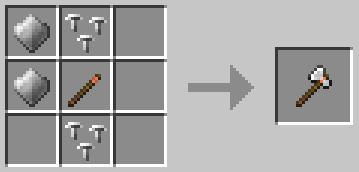


Usage
Equip the item into the main (active hotbar slot) or off-hand. Left Click to attack, hold Left Click to chop.
Perks
Amethyst tools have Efficiency II integrated. Further enchantments will stack with this initial bonus. TBC
More Information: Balance
Balance
Amethyst armor and weapons may not be suited to the balance of every server or modpack - How To Remove Items
Functional Amethyst tools require a lengthy and costly crafting process that includes ores of every tier, including netherite.
Enchanting
Amethyst axes can be enchanted in an enchanting table, or combined in an anvil with axe enchantments.
Repair
Amethyst items can be repaired using:
Known Issues
You can report any mod issues to our bugs forum on Discord - please check for duplicate reports first!
Changelog
View Changes
This is not a complete list of changes or features. It is a log of wiki-related version information and may be outdated.
| MC Version | Release | Notes |
1.20.1 |
1.1.1 |
Page established - Information prior to 1.1.1 is not specifically included but is likely the same. |
Amethyst Shovel
Information targets the latest supported release. For legacy (older) versions and bug fixes, read the changelogs.
Introduction
Amethyst shovels are a functional excavation tool and a melee weapon.
| Amethyst Shovel | |
| Attack Damage | 8 |
| Attack Speed | 2 |
| Durability | 2437 |
| Stackable | No |
Crafting
Only Amethyst tier can be used in game. Other options are non-functional crafting components!


Usage
Equip the item into the main (active hotbar slot) or off-hand. Left Click to attack, hold Left Click to dig.
Perks
Amethyst tools have Efficiency II integrated. Further enchantments will stack with this initial bonus. TBC
More Information: Balance
Balance
Amethyst armor and weapons may not be suited to the balance of every server or modpack - How To Remove Items
Functional Amethyst tools require a lengthy and costly crafting process that includes ores of every tier, including netherite.
Enchanting
Amethyst axes can be enchanted in an enchanting table, or combined in an anvil with axe enchantments.
Repair
Amethyst items can be repaired using:
Known Issues
You can report any mod issues to our bugs forum on Discord - please check for duplicate reports first!
Changelog
View Changes
This is not a complete list of changes or features. It is a log of wiki-related version information and may be outdated.
| MC Version | Release | Notes |
1.20.1 |
1.1.1 |
Page established - Information prior to 1.1.1 is not specifically included but is likely the same. |
Crafting Items
Paint Filler
Information targets the latest supported release. For legacy (older) versions and bug fixes, read the changelogs.
Introduction
Paint filler is a crafting ingredient to duplicate dye.
Crafting

Usage
Combine paint with any dye to "duplicate" one item in to four.

Known Issues
You can report any mod issues to our bugs forum on Discord - please check for duplicate reports first!
1.21.1-1.1.3Missing crafting recipe (Star Worm Goop). Bug Report
Changelog
View Changes
This is not a complete list of changes or features. It is a log of wiki-related version information and may be outdated.
| MC Version | Release | Notes |
1.20.1 |
1.1.1 |
Page established - Information prior to 1.1.1 is not specifically included but is likely the same. |
Mortar & Pestle
Information targets the latest supported release. For legacy (older) versions and bug fixes, read the changelogs.
Introduction
Mortar & Pestle is a crafting item in Star Worm Goop.
Crafting

Usage
Mortar & Pestle does not have durability and will not be consumed on use - you only need one!

Known Issues
You can report any mod issues to our bugs forum on Discord - please check for duplicate reports first!
Changelog
View Changes
This is not a complete list of changes or features. It is a log of wiki-related version information and may be outdated.
| MC Version | Release | Notes |
1.21.1 |
1.3.0 |
Bug Fix: Missing crafting recipe(s). |
1.20.1 |
1.1.1 |
Page established - Information prior to 1.1.1 is not specifically included but is likely the same. |
Star Worm
Information targets the latest supported release. For legacy (older) versions and bug fixes, read the changelogs.
Introduction
Star Worm is a crafting item in Glow Riding Boots and Mineral Bonemeal.
Crafting

Usage

Known Issues
You can report any mod issues to our bugs forum on Discord - please check for duplicate reports first!
1.21.1-1.1.3Missing crafting recipe (Star Worm Goop + Mortar & Pestle). Bug Report
Changelog
View Changes
This is not a complete list of changes or features. It is a log of wiki-related version information and may be outdated.
| MC Version | Release | Notes |
1.20.1 |
1.1.1 |
Page established - Information prior to 1.1.1 is not specifically included but is likely the same. |
Star Worm Goop
Information targets the latest supported release. For legacy (older) versions and bug fixes, read the changelogs.
Introduction
Star Worm Goop is a crafting item in paint filler.
Crafting
Usage
Known Issues
You can report any mod issues to our bugs forum on Discord - please check for duplicate reports first!
Changelog
View Changes
This is not a complete list of changes or features. It is a log of wiki-related version information and may be outdated.
| MC Version | Release | Notes |
1.21.1 |
1.3.0 |
Bug Fix: Missing crafting recipe(s). |
1.20.1 |
1.1.1 |
Page established - Information prior to 1.1.1 is not specifically included but is likely the same. |
Treated Leather
Information targets the latest supported release. For legacy (older) versions and bug fixes, read the changelogs.
Introduction
Treated Leather is a crafting item in Refined Leather.
Crafting
Usage
Spigots require a Block O' Water nearby unless disabled in configs.
Combine with a water bucket, or Right Click a Spigots to obtain Refined Leather.


Known Issues
You can report any mod issues to our bugs forum on Discord - please check for duplicate reports first!
Changelog
View Changes
This is not a complete list of changes or features. It is a log of wiki-related version information and may be outdated.
| MC Version | Release | Notes |
1.20.1 |
1.1.1 |
Page established - Information prior to 1.1.1 is not specifically included but is likely the same. |
Refined Leather
Information targets the latest supported release. For legacy (older) versions and bug fixes, read the changelogs.
Introduction
Refined Leather is a crafting item in tack, horse and player armor, and tools.
Crafting
Usage
Recipes using this item can be viewed below or found in the following sections:
Horse Tack
Player Armor
Player Tools
Known Issues
You can report any mod issues to our bugs forum on Discord - please check for duplicate reports first!
1.0.0Horse Armor leather instead of Refined Leather. Bug Report
Changelog
View Changes
This is not a complete list of changes or features. It is a log of wiki-related version information and may be outdated.
| MC Version | Release | Notes |
1.20.1 |
1.1.1 |
Page established - Information prior to 1.1.1 is not specifically included but is likely the same. |
Shining Amethyst Shard
Information targets the latest supported release. For legacy (older) versions and bug fixes, read the changelogs.
Introduction
Shining Amethyst Shard is a crafting and repair item for horse armor, player armor and tools.
Obtaining
Natural Generation
Shining Amethyst Shards can be obtained from clusters that occur naturally in Amethyst Geodes.
- Clusters grow on Budding Amethyst blocks, and only become "shining" on full growth.
- Clusters have 25% chance to be shining and 75% default Amethyst.
- Shining Amethyst clusters have a subtle blue coloring.
Chances of Shining Amethyst spawns can be modified in the common config file.
Mineral Bonemeal
Right Click a Budding Amethyst or Amethyst Cluster with Mineral Bonemeal to increase spawns and growth.
Regrowth
Budding Amethyst will slowly regenerate new clusters when players are nearby to load the chunks.

Shown: Shining Amethyst Shards (Left) next to a normal Amethyst Cluster.
Mining
Shining Amethyst Clusters drop a number of shards, depending on the tool used.
|
|
Pickaxe | Axe | Shovel | Other |
| Shards | 4 |
2 |
2 |
2 |
|
Shining Amethyst drops are affected by fortune. Fortune III can yield 4-12+ shards from a cluster. |
||||
Usage
Repair
Shining Amethyst Shards can be used in an anvil to repair Amethyst equipment, including any tier of Riding Boots.
Repairing mends items by TBC per shard and TBC does not require any player experience.
Crafting
Recipes using this item can be viewed below or found in the following sections:
- Horse Armor
- Player Armor
- Player Tools
- Glistening Melon
Horse Armor
Player Armor
Player Tools
Glistening Melon
Known Issues
You can report any mod issues to our bugs forum on Discord - please check for duplicate reports first!
Changelog
View Changes
This is not a complete list of changes or features. It is a log of wiki-related version information and may be outdated.
| MC Version | Release | Notes |
1.20.1 |
1.1.1 |
Page established - Information prior to 1.1.1 is not specifically included but is likely the same. |
Rivets
Information targets the latest supported release. For legacy (older) versions and bug fixes, read the changelogs.
Introduction
Rivets are a crafting item in horse armor, player armor and tools.
Crafting

Usage
Recipes using this item can be found in the following sections:
Known Issues
You can report any mod issues to our bugs forum on Discord - please check for duplicate reports first!
Changelog
View Changes
This is not a complete list of changes or features. It is a log of wiki-related version information and may be outdated.
| MC Version | Release | Notes |
1.21.1 |
1.3.2 |
Tweak: Removed most rivets from loot tables. |
1.20.1 |
1.1.1 |
Page established - Information prior to 1.1.1 is not specifically included but is likely the same. |
Plates
Information targets the latest supported release. For legacy (older) versions and bug fixes, read the changelogs.
Introduction
Plates are a crafting item in horse armor, player armor and tools.
Crafting

Usage
Recipes using this item can be found in the following sections:
Known Issues
You can report any mod issues to our bugs forum on Discord - please check for duplicate reports first!
1.0.0Copper, Gold and Netherite tier plates have no in-game use. Bug Report
Changelog
View Changes
This is not a complete list of changes or features. It is a log of wiki-related version information and may be outdated.
| MC Version | Release | Notes |
1.21.1 |
1.3.2 |
Tweak: Removed most plates from loot tables. |
1.20.1 |
1.1.1 |
Page established - Information prior to 1.1.1 is not specifically included but is likely the same. |