Star Worm Economy
Learn more about Star Worm Economy Mod (SWEconM).
Getting Started
About SWEconM
Why the Mod Started
SWE/M has a host of mods, aiming to open a public server for our players. We wanted to have economy on the server and knew we would likely have to make our own mod for maintenance reasons, matching currency, and preferred features.
What does SWEcoM Include?
- A physical money system - money the player can hold, trade, store and accumulate.
- 7 currency values - small to large value currency coins from 1-500.
- Wallets and wristlets to store and withdraw physical money
- Deposit bags to store up to one million Thyms for safe deposit in a player vault.
- Protected player-specific storage vaults that cannot be destroyed by others.
- Player markets (shops) for a player ran and upkept economy.
- Admin-centric commands to for balancing, control, and preventing/fixing/catching player misconduct.
Common Config
The SWEconM common config adds configurable settings for economy features - it can be safely configured on existing or new worlds.
MultiMC: Instance > Config Folder (Right Sidebar) > swecom-common.toml
CurseForge: Profile > ... (next to play) > Open Folder > config > swecom-common.toml
Forge (Windows): [user]/AppData/Roaming/.minecraft/config/swecom-common.toml
Forge (Mac): [user]/AppData/Roaming/.minecraft/config/swecom-common.toml
If the config file is not visible in the config file, try restarting Minecraft to generate it. If that does not work, copy and paste the full default config (drop down menu below) into a .txt file, edit the values as needed and name it swecom-common.toml. Place it in the config folder to be read upon next start-up.
Configs Explained
General
Config: Short for configuration, which means to change something to your preference.
Default: Means the one that is preset. If at any time you need to reset, the default config is always okay to return to.
Lines: Configs are read by the computer in lines, like programming code. The lines staying the way they are is very important.
#: Means everything in that line of the config will not be read by the computer. Changes made here will effect nothing.
Remember the primary rule for configs: Do not change ANY text that is not clearly written as a change like true/false, numbers, and lists. These changeable things will be clearly defined and look like test questions.
Income
# || Starting balance for players.
# Default: 250
# Range: 0 ~ 10000
starting_balance = 250
This says: How many Thyms new players receiving on their first join. Must be a solid number from 0-10,000. Default is 250.
Setting the value to 0 means new players will receive no funds on joining. Changing this value will not deduct funds already given.
Servers with an economy should set this config to a value in-line with their economy needs. If your server deals in larger denominations (example: T10,000+ for a horse) or 'real life' prices this may need to be increased.
# || Amount of Thyms players will receive daily.
# Default: 10
# Range: 0 ~ 10000
daily_income = 10
This says: How many Thyms players receive every 24hrs if they login. Must be a solid number from 0-10,000. Default is 250.
Setting the value to 0 means new players will receive no funds from the server on a daily basis. This not not recommended unless the server offers an alternate source of income via stores (example: players sell resources to the server) and not just between players.
Servers with an economy should set this config to a value in-line with their economy needs. If your server deals in larger denominations (example: T10,000+ for a horse) or 'real life' prices this may need to be increased.
Player Versus Player (PVP)
# || Highest possible percentage able to be stolen upon killing a player.
# || The percentage stolen is random up to the amount configured per kill
# || The money is taken from the target's account.
# || Set to 0 to disable.
# Default: 15
# Range: 0 ~ 100
steal_percentage = 15
This says: How much of a player's fund can be stolen on a player's death. Must be a solid number from 0-100. Default is 15 (15%).
Setting the value to 0 means there is no chance of funds being stolen on a player's death (if killed in PVP). At default settings, up to 15% of the player's total funds in their wallet can be taken on death and given to the player that killed them. Any funds stored outside the wallet (in deposit bags or vaults) will be safe, excluding player inventory unless keepInventory is set to true.
Servers with an economy that deals in larger denominations might want to reduce the percentage that can be stolen unless they want to encourage players to only carry essential funds and store the remaining in their vault.
The actual amount stolen will be a random amount up to the maximum percentage of their total value. Example: If a player has T1,000, they could have anywhere from T10 (1%) to T150 (15%) on default settings.
# || The minimum amount of Thyms the target requires to have for steal to take effect.
# Default: 100
# Range: 1 ~ 100000
minimum_thyms_to_steal = 100
This says: How much money a player must have to be stolen from. Must be a solid number from 0-100,000. Default is 100.
The value set determines how wealthy a player needs to be to be stolen from and considers only the value currently in their wallet. The amount actually stolen will depend on the percentage set (above).
Giftbags
# || List of item ids that are allowed to be converted into gift bags
giftbag_whitelist = []
This says: Which items can be used as a giftbag. Must be listed in a very specific way to work in game
The giftbag command can only be used on whitelisted items.
| Format | Example | |
| Single | ["mod:item_name"] | ["swem:ribbon_two_white"] |
| Multiple | ["mod:item_name", "mod:item_name"] | ["swem:ribbon_two_white", "swem:ribbon_two_red"] |
Markets
# || Cap the amount of active blocks a player can have at once.
# || Prevent players from making tons of stores.
# Default: 25
# Range: 1 ~ 1000
market_cap = 25
This says: The amount of Markets (Shops) that any one player can have at one time. They can add, delete, and give away as many shops as they like - as long as their numbers of owned Markets (Shops) is less than or equal to the specified number 1-1000.
# || Cap the amount of active trustees a market can have at once.
# Default: 5
# Range: 1 ~ 100
trustee_cap = 5
This says: The amount of players a Market (Shop) can be trusted to at any given time. Trusted players are able to open, edit, and withdraw from Markets (Shops) without having to own it. This feature is to support team-play and in-game 'employees' whether functional or RRP.
Full (Default) Config(s)
Full Default Config 1.18.2
#Starting balance for players.
#Range: 0 ~ 10000
starting_balance = 250
#Amount of Thyms players will receive daily.
#Range: 0 ~ 10000
daily_income = 10
#Highest possible percentage able to be stolen upon killing a player.
#The percentage stolen is random up to the amount configured per kill
#The money is taken from the target's account.
#Set to 0 to disable.
#Range: 0 ~ 100
steal_percentage = 15
#The minimum amount of Thyms the target requires to have for steal to take effect.
#Range: 1 ~ 100000
minimum_thyms_to_steal = 100
#List of item ids that are allowed to be converted into gift bags
giftbag_whitelist = []
Full Default Config 1.20.1
Meep
Full Default Config 1.21.1
If you notice changes you don't like but don't know how to undo the changes you made to the Config, shut down the server and replace the config with this default one and the config will be reset.
[Player] Commands
Player Commands
Some commands must be run by the Market (Shop) owner or a Trustee to said Market (Shop).
Balance
/sweconm balance
Action: This command will display your current balance of Thyms in your wallet/wristlet.
Note: This only accounts for wallet/wristlet balances. All Thyms stored in different locations like chests, ender chests, deposit bags, and vaults are not counted in this total.
/sweconm balance list
Action: Lists a leaderboard of the players with the most Thyms.
Note: This leaderboard only accounts for wallet/wristlet balances. All Thyms stored in different locations like chests, ender chests, deposit bags, and vaults are not counted in this total.
/sweconm balance transfer <player> <amount> [memo]
Action: Transfer an amount of Thyms from yourself to another player. The memo, or message, is optional and appears as a chat message to the receiving player.
Example: Transferring 200 Thyms from me to Quarris for the service of them building a town hall.
/sweconm transfer Quarris 200 Donation to build a town hall!Note: N/A
Giftbag
/sweconm giftbag <name>
Action: Creates a giftbag out of the currently held item and renames the item to the given name.
Note: Please see Giftbags for a complete explanation.
Market
/sweconm market trust list <market_id>
Action: Lists all trustees of the given Market.
Example: Lists all the Trustees of the Market with the ID #10.
/sweconm market trust list 10Note: This is only available to the owner of the Market (Shop) or a Trustee of the Market (Shop).
/sweconm market trust add/remove <player> all/<market_id>
Action: Adds/Removes a player from the trust list of the given Market (Shop).
Example: Adds the player Quarris to be a Trustee to the Market (Shop) with ID #10.
/sweconm market trust add Quarris 10Example: Removes the player Quarris from being a Trustee to the Market (Shop) with IDs #10, #12, #15.
/sweconm market trust remove Quarris 10,12,15Example: Adds the player Quarris to be a Trustee to all the Markets (Shops) that one owns.
/sweconm market trust add Quarris allNote: This is only available to the owner of the Market (Shop) or a Trustee of the Market (Shop).
/sweconm market transfer <player> all/<market_id>
Action: Transfers a given Market (Shop) into the ownership of another player.
Example: Transfers the Market (Shop) with ID #10 to the player Quarris.
/sweconm market transfer Quarris 10Example: Transfers the Markets (Shops) with ID #10, #12, and #15 to the player Quarris.
/sweconm market transfer Quarris 10,12,15Example: Transfers all the Markets (Shops) the player owns to the player Quarris.
/sweconm market transfer Quarris allNote: This is only available to the owner of the Market (Shop).
/sweconm market locate <market_id>
Action: Sends a message in the (client side) chat with the coordinates of the Market (Shop).
Example: Locates the Market (Shop) with the ID #10.
/sweconm market locate 10Note: For this command to work, you must both own the Market (Shop) and the Market (Shop) must be placed in the world. These requirements are designed to prevent location exploits.
/sweconm market reassign <market_id>
Action: If you are holding a shop in your hand, it reassigns the Market (Shop) in hand to the ID # specified.
Example: Assigned the shop in hand the Market (Shop) # 10.
/sweconm market reassign 10Note: A Market (Shop) that is placed can not have its ID # reassigned. If your Market (Shop) is lost but not despawned, use the Locate command instead.
Note: One must already own the Market (Shop) ID # to be able to reassign it.
Note: This command is to replace any Market (Shop) that had been reduced to an item and despawned because Markets (Shops) have given IDs and configs limit the number of Markets (Shops) a player can own.
/sweconm
Action: N/A
Example: N/A
/sweconmNote: N/A
[Admin] Commands
Admin OP
Admin level players have access to all commands including remotely affecting other player's balances, vaults, markets, ownerships, and abilities to interact with the SWEconM mod.
/sweconm admin op add/remove <player> || MUST BE RAN IN SERVER CONSOLE ||
Action: The only way to receive Admin permission levels are to first go to console and run the above command.
Example: Adds the player Quarris to the list of Admins.
/sweconm admin op add QuarrisNote: This is restricted to console access for the absolute level of security considering a medium/large multiplayer economy.
This command can only be ran in the server console!
/sweconm admin op list
Action: Lists all the players that have Admin permissions of the SWEconM mod.
Note: N/A
Admins have every ability to access player balances/Markets and remotely affect said balances/Markets. This access is designed to allow for moderation, error corrections, giving, and collections. This level of access should be highly limited.
Admin Balance
/sweconm admin balance wallet <player_name>
Action: Views the UI and allows editing of the Wallet/Wristlet balance of the given player.
Example: Opens the UI for Quarris's Wallet/Wristlet balance (the same as if Quarris had opened it via their own Wallet/Wristlet).
/sweconm admin balance wallet QuarrisNote: Once open, the UI can be edited as if the owner, including adding/removing funds and Market (Shop) income.
/sweconm admin balance transfer <from> <to> <amount> [memo]
Action: Transfer an amount of Thyms from one player to another player. The memo, or message, is optional and appears as a chat message to the receiving player.
Example: Transferring 200 Thyms from AlaharranHonor to Quarris because they accidentally sent Thyms to the wrong person.
/sweconm admin transfer AlaharranHonor Quarris 200 WhoopsNote: As an Admin, the ability to transfer from @all, @online, @void, and @state is made available.
- @all are all accounts. This includes offline players who will receive their amount upon log in.
- @online includes only online players.
- @void means to transfer to/from nowhere, AKA bottomless pit to give to or pull from.
- @state is to transfer to the State balance, AKA the server's retained funds.
Admin Vault
/sweconm admin vault id
Action: Lists the IDs of the Vaults of the given player.
Note: N/A
/sweconm admin vault <player> <vault_id> view
Action: Views the UI and allows editing of a Vault of the given player.
Example: Opens the UI for Quarris's Vault with the ID # of 88a88a88a88 (the same as if Quarris had opened it themselves).
/sweconm admin vault Quarris 88a88a88a88 viewNote: Once open, the UI can be edited as if the owner, including adding/removing Thyms and items.
/sweconm admin vault <player> <vault_id> remove [true]
Action: N/A
Example: This removes the vault data of Vault ID# 88a88a88a88 owned by Quarris.
/sweconm admin vault Quarris 88a88a88a88 remove trueNote: If the TRUE is not added to the command, the chat box will ask if you're sure of your decision to erase the Vault's data.
Admin Market
/sweconm admin market view <market_id>
Action: Views the UI and allows editing of the Market (Shop) balance of the given ID #.
Example: Opens the UI for the Market (Shop) ID #10 (the same as if the owner had opened it themselves).
/sweconm admin market view 10Note: Once open, the UI can be edited as if the owner, including adding/removing funds and Market (Shop) withdrawals.
/sweconm admin market assign <market_id>
Action: Assigns the given Market (Shop) a specific ID #.
Note: It can be recommended to pre-assign Market (Shop) ID #s like 69, 420, and 58008. Or leave them and watch those Markets (Shops) sell for millions of in-game currency.
/sweconm admin market remove <market_id>
Action: Removes the given Market (Shop) ID # from circulation to be automatically assigned next time a Market (Shop) is placed.
Note: It's not possible to remove a Market (Shop) ID # if the Market (Shop) is currently placed in the world.
/sweconm admin market transfer <from_player> <to_player> all/<market_id>
Action: Transfers the ownership of a Market (Shop) of a specific ID # from one player to another.
Example: Transfers the ownership of Market (Shop) with ID #10 from the player AlaharranHonor to the player Quarris.
/sweconm admin market transfer AlaharranHonor Quarris 10Example: Transfers the ownership of all Markets (Shops) that AlaharranHonor owns to the player Quarris.
/sweconm admin market transfer AlaharranHonor Quarris allNote: As an Admin, the ability to transfer from or to the @state is made available.
/sweconm admin market check <market_id>/<player_name>
Action: Checks the NBT data associated with a particular Market (Shop) or player's Markets (Shops).
Example: Sends a client side chat message with the data specifically for Market (Shop) #10, showing what its selling, stock, price, and owner.
/sweconm admin market check 10Example: Sends a client side chat message with the data for all Markets (Shops) owned by Quarris, including all Market ID #s and their coordinates.
/sweconm admin market check QuarrisNote: N/A
/sweconm admin market ban from_trust / from_transfer / from_all add/remove <player_name>
Action: Bans a player from certain or all actions considering Markets (Shops).
Example: Adds Quarris to the list of players banned from being trusted to any other player's Markets (Shops). This command auto-removes any current trusts.
/sweconm admin market ban from_trust add QuarrisExample: Adds Quarris to the list of players banned from having any Market's (Shops) transferred to or from themselves.
/sweconm admin market ban from_transfer add QuarrisExample: Adds Quarris to the list of players banned from both being trusted to any other player's Markets (Shops) and having any Market's (Shops) transferred to or from themselves.
/sweconm admin market ban from_all add QuarrisNote: These commands are for limiting troublesome players, especially players who attempt to take advantage of new players who don't yet understand the weight of trusting/transferring of their Markets (Shops).
Note: These functions being a command potentially makes it easier for auto-limiting new players to Market (Shop) functions whether for their own security, quest locking, and/or moderation-based time outs.
/sweconm admin market ban from_trust / from_transfer / from_all add/remove list
Action: Lists all players that are currently banned from using Markets (Shops).
Example: In a client side chat message, lists all players that are currently banned from being trusted to Markets (Shops).
/sweconm admin market ban from_trust listExample: In a client side chat message, lists all players that are currently banned from being transferring Markets (Shops) or having Markets (Shops) being transferred to them.
/sweconm admin market ban from_transfer listExample: In a client side chat message, lists all players that are currently banned from any actions considering Markets (Shops) except for owning, buying, and selling.
/sweconm admin market ban from_all listNote: N/A
Banning a player from any trust or transfer (or both) automatically removes their access from any trusted Market (Shops).
When an Admin runs the command to transfer, the command does not check if the player is banned. Therefore, an Admin could transfer Markets (Shops) to/from a banned player as needed.
An Admin who is banned from SWEconM can still run Admin commands as long as they have the Admin Key. If one bans an Admin from SWEconM, they must also remove their Keys.
Admin State Deputy
/sweconm admin state_deputy
Action: Toggles the State Deputy mode to TRUE for the one who ran the command. Please see State Deputy Mode for more detail.
Note: This mode resets to FALSE once logging out.
/sweconm
Action: N/A
Example: N/A
/sweconmNote: N/A
Credits
Credits for development on SWEconM are listed below!
Version - 1.18.2-1.21.1
Owner and Production Lead - AlaharranHonor
Programming
Primary: Quarris
Texture Art
Primary: Cytris
Wiki
XDelphii
Items
Thyms
Description: Thyms (pronounced as 'time') are the currency of the Star Worm Economy Mod (SWEconM). The physical currency comes in 7 values from 1 to 500 Thym coins.
Details:
| Rarity color: | Common |
| Stackable: | Yes (64) |
| Durability: | None |
Value
Thym coins increase in value according to the rarity or value of the material.
| Coin | Material | Value |
|
|
Copper | 1 |
|
|
Iron | 5 |
|
|
Emerald | 10 |
|
|
Gold | 20 |
|
|
Diamond | 50 |
|
|
Netherite | 100 |
|
|
Amethyst | 500 |


Obtaining
Thyms cannot be crafted, but can be creatively obtained via creative menu and commands. In SMPs, Thyms can be obtained by players from an initial income on joining and daily income - the values of which can be configured. By default, new players receive 250 Thyms and 10 Thyms per daily login.
Trivia
Thyms were named as word play, based on 'thym' from Amethyst (the original coin) and 'time' spent playing on the server.
The original money system planned was based around a single coin, the Amethyst Thyme. It wasn't till a year later when the mod was being created, it was decided that multiple coins of different worths would be more useful long-term in a larger economy.
Wallets & Wristlets
Description: Wallets and Wristlets are a means of carrying money and withdrawing Thym coins of specific values.
Details:
| Rarity color: | Common |
| Renewable: | Yes |
| Stackable: | Yes (64) |
| Durability: | None |
Obtaining
Crafting
Wallets come in two leather variations; brown and black.
1 Wallet can be crafted with 1 Refined Leather and Brown or Black Dye.


Wristlets come in all 16 minecraft colors.
1 Wristlet can be crafted with 2 Refined Leather and 1 Dye of a corresponding color.

Usage
Wallet funds are specific to the player and can be accessed with any wallet or wristlet (including borrowing a friends). There is no risk associated with dropping or losing your wallet, however wallet funds may be subject to stealing via PVP.
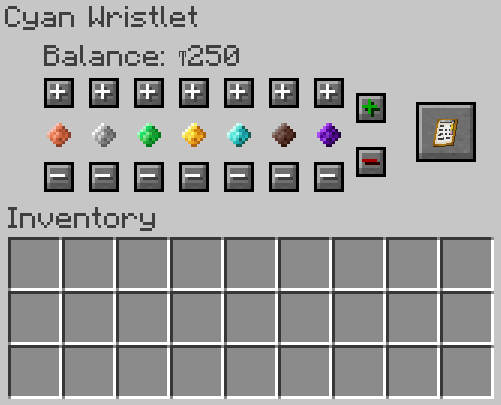
Right-click with a wallet or wristlet in hand to open the GUI.
- View the balance in the wallet - maximum value that can be withdrawn
- Add or remove specific value coins
[+] Add a single coin of the selected value into the wallet
[-] Remove a single coin of the selected value back into the player's inventory
[Shift +] Add up to 64 (full stack) of that value coin into the wallet
[Shift - ] Move up to 64 (full stack) of that value coin into into the player's inventory
- Add or remove all balance
[+] Adding will move all coins in the player's inventory into the wallet, increasing the balance
[-] Removing will withdraw all funds into the players inventory as possible, reducing the balance
This will be withdrawn in the largest coins possible to reduce the number of individual Thyms
- Withdraw from all Markets (Shops)
[Click] Withdraws from all Markets (Shops) owned by the player.
[Click] Withdraws into the player's open inventory slots. If there is no space, it will not withdraw. The player must clear inventory slots and click the deposit button again until there is nothing left to deposit.
Additional
Unlike deposit bags, wallet funds are linked to the player. In this way, wallet funds are specific to the individual using a wallet and the item can be safely dropped, lost or shared. However:
- Wallet funds can be stolen if the server permits PVP and has setup configs
- Wallet funds can be stolen even if the player does not have a wallet on them (see below)
- Wallet funds must have the minimum wealth value (default T100) to be stolen from
Deposit Bag
Description: A money sleeve that accepts up to one million Thyms for compact storage of many Thyms, such as in a player vault or enderchest.
Details:
| Rarity color: | Common |
| Renewable: | Yes |
| Stackable: | Yes (64) |
| Durability: | None |
Obtaining
Deposit bags come in a single Green color variant.
1 deposit bag can be crafted with 2 Dried Kelp and 1 Iron Nugget.

Usage
A maximum of 1,000,000 Thyms can be held within the deposit bag. The player can craft as many deposit bags as needed.
Right-click with a wallet or wristlet in hand to open the GUI.
- View the balance in the wallet - maximum value that can be withdrawn
- Add or remove all balance
[+] Adding will move all coins in the player's inventory into the deposit bag, increasing the balance
[-] Removing will withdraw all funds into the players inventory as possible, reducing the balance
This will be withdrawn in the largest coins possible to reduce the number of individual Thyms
- Add or remove specific value coins
[+] Add a single coin of the selected value into the deposit bag
[-] Remove a single coin of the selected value back into the player's inventory
[Shift +] Add up to 64 (full stack) of that value coin into the deposit bag
[Shift - ] Move up to 64 (full stack) of that value coin into into the player's inventory

Additional
Unlike wallets or wristlets, funds stored in a deposit bag are not linked to the player. In this way, storing funds in deposit bags can be a safe means of avoiding having money stolen if a player dies in PVP on multiplayer servers, as funds not associated with the wallet+ are not subject to config values. However:
- Deposit bags can be dropped on death if keepInventory is not enabled
- Deposit bags can be accidentally dropped and picked up by other players
- Deposit bags can be accessed by anyone; players can withdraw the full value or continue to use it to store their funds
- Deposit bags are never completely secure unless stored in a player vault, ender chest or on secure landclaim with no shared permissions.
Refined Leather
Description: A crafting material, converting leather into a more efficient version (increased volume).
Details:
| Rarity color: | Common |
| Renewable: | Yes |
| Stackable: | Yes (64) |
| Durability: | None |
Obtaining
Refined leather comes in a single color variant.
3 refined leather can be crafted with 1 Leather, 1 Bucket of Water and 1 Dried Kelp.

Usage
Refined leather is a crafting ingredient for wristlets and wallets.


Additional
- SWECom refined leather is not interchangeable with SWEM's refined leather. As they share a conflicting recipe, a mod like Polymorph would be recommended if both SWEM + SWECom are used together.
Clipboard
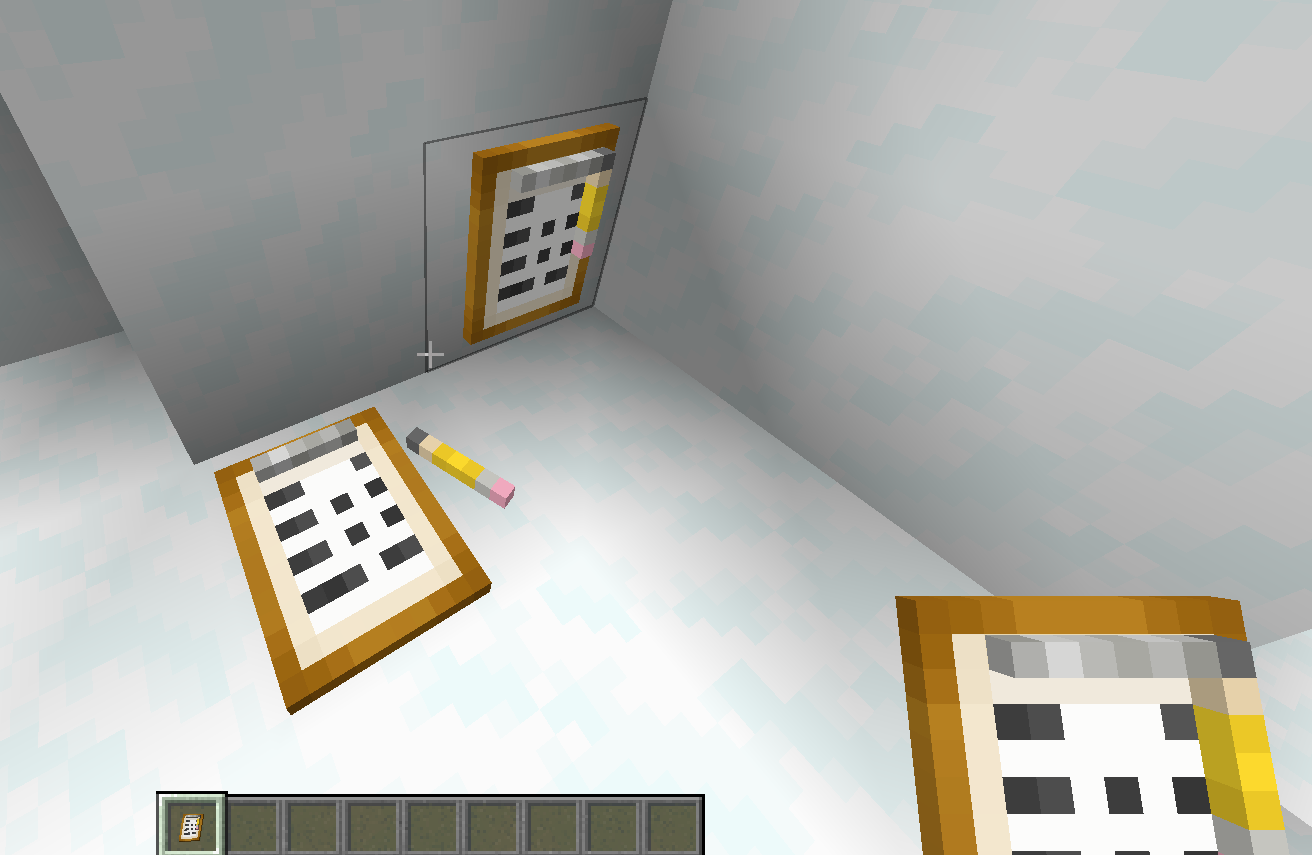
Description: Clipboard is a functional item that can both be placed in the world for decoration and also open the GUI of the Markets (Shops).
Details:
| Rarity color: | N/A |
| Renewable: | N/A |
| Stackable: | 64 |
| Durability: | N/A |
Obtaining
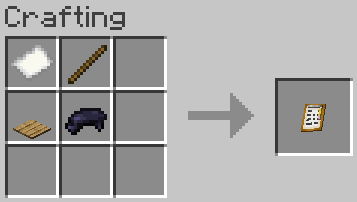
Crafting
Usage
Right click a Market Block to open its Inventory GUI!
Trivia
The clipboard was made to match the economy aesthetic in the way of using a clipboard to check the inventory of all of your stock!
Known Issues
If you find an issue, please report it to our bugs channel on Discord. We ask that you look to see if your issue was reported first!
Changelog
View Changes
This is not a complete list of version changes / fixes. It is a changelog of relevant wiki-related version information.
| MC Version | Release | Notes |
| 1.18.2 | ||
| 1.16.5 |
Data Values
Blocks
Player Vault
Description: A player vault is a safe, player-specific locked inventory for storage of valuables like deposit bags etc.
Details:
| Renewable: | Yes |
|
Stackable: |
No |
| Tool: | No |
| Blast Resistance: | Yes |
| Hardness: | N/A |
| Luminant: | No |
| Transparent: | No |
| Flammable: | No |
| Flammable (Lava): | No |
Obtaining
Player Vaults come in a single dark gray color.
1 player vault can be crafted with 4 Iron Blocks, 4 Iron Ingots and 1 Chest.

Usage
When placed, a vault is bound to the player. Only they may open it, and it cannot be broken by other players. Vaults are intended for the safe storage of valuable personal belongings, especially deposit bags or loose Thyms.

Additional
A vault can be seen, located, and adjusted remotely via command but only with Admin permission levels. Please see the commands listed here.
Markets (Shops)
Details
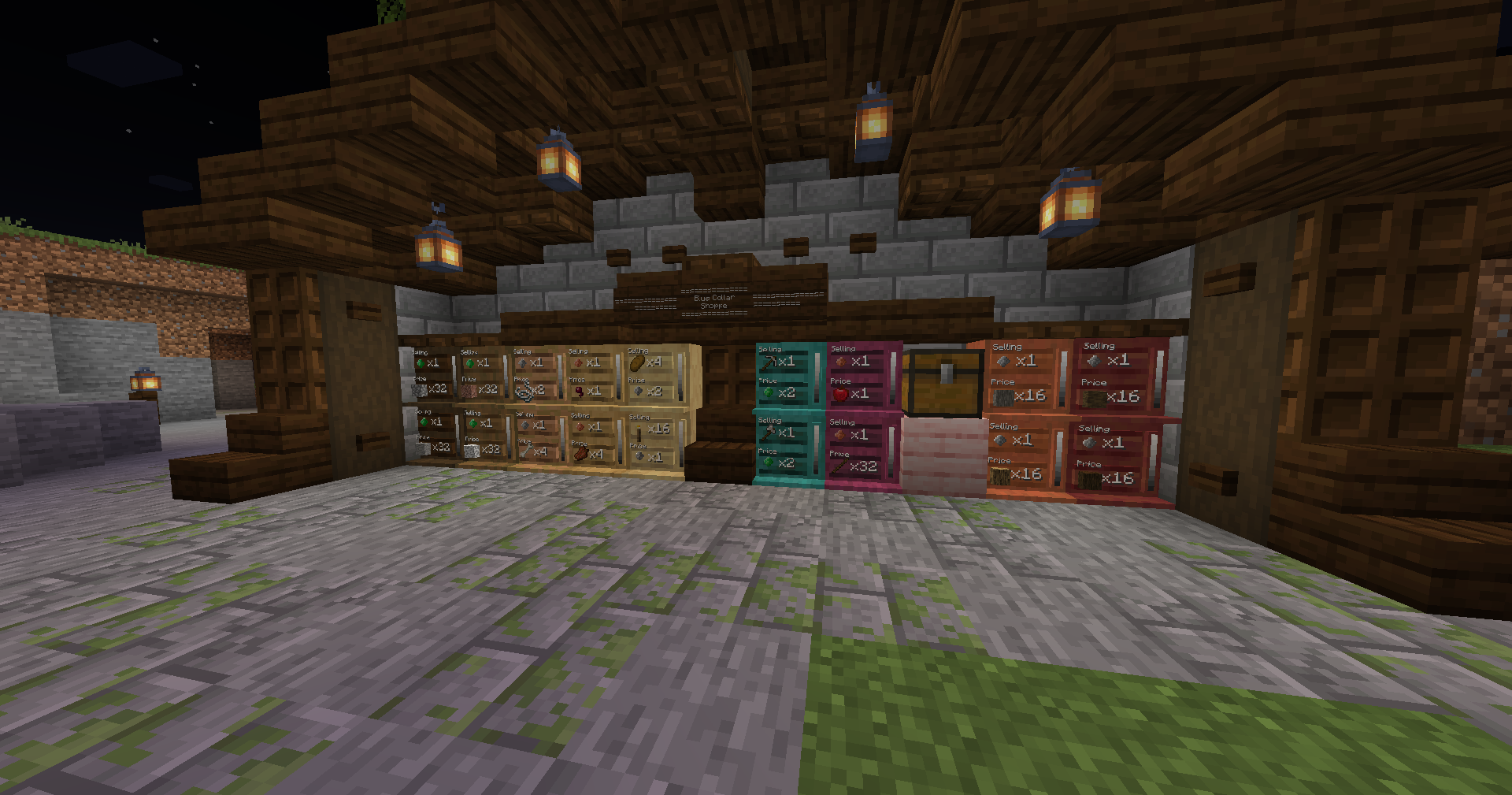
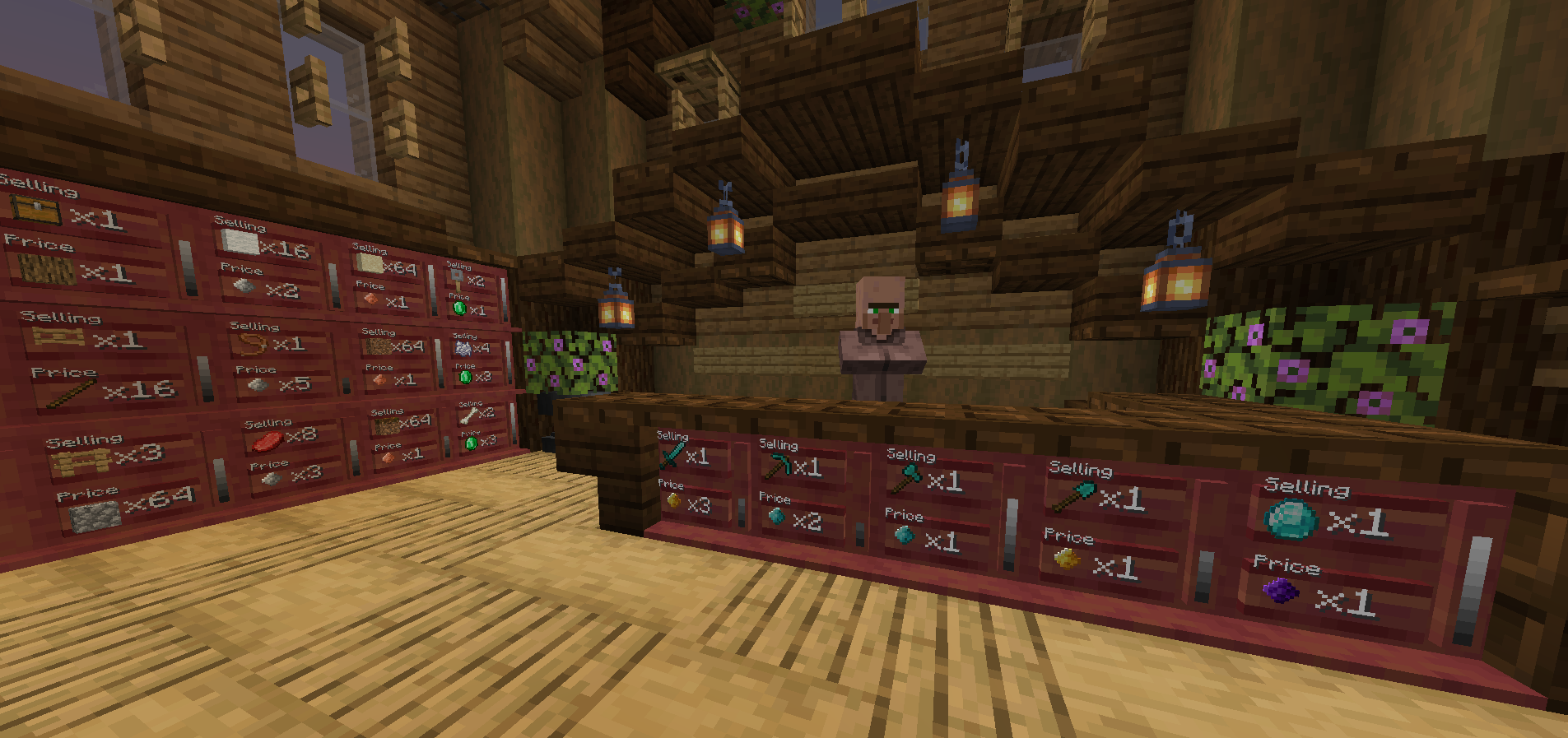
Filled shops of all different wood tones, showcasing the usability of items, Thyms, and the stock bars.
| Renewable: | Yes |
|
Stackable: |
Yes (64) |
| Tool: | Hand |
| Blast Resistance: | N/A |
| Hardness: | N/A |
| Luminant: | No |
| Transparent: | No |
| Flammable: | No |
| Flammable (Lava): | No |
Obtaining
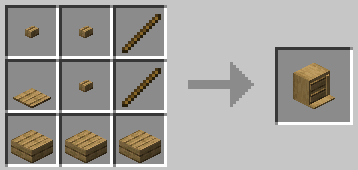
Crafting
Markets (Shops) comes in all vanilla Minecraft wood tones (including oak, spruce, dark oak, birch, jungle, acacia, warped, crimson, mangrove, and cherry).
Usage
Hand Triggered
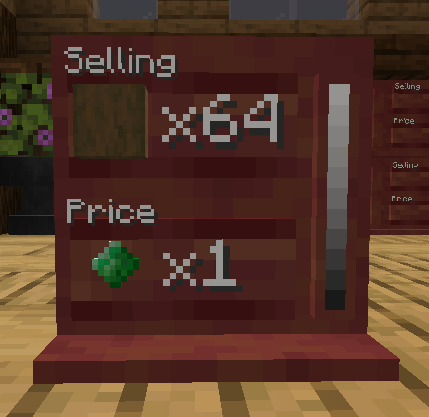
As a buyer ...
[-] BUY - With payment in hand, right click the Market (Shop).
[-] BUY IN BULK (x4) - With payment in hand, shift to view and shift right click to buy.
As an owner/trustee ...
[-] SET SELLING - With item and correct amount in hand, right click the Selling Board (highlights separately).
[-] SET PRICE - With item and correct amount in hand, right click the Price Board (highlights separately).
[-] RE/STOCK - With Selling item in hand, right click the Market (Shop). Repeat till fully stocked.
[-] REMOVE STOCK - With empty hand, shift right click the Selling Board.
[-] REMOVE SELLING - With empty hand, shift right click the Selling Board AGAIN (after removing stock) to clear.
[-] REMOVE PRICE - With empty hand, right click the Price Board (removes current).
[-] WITHDRAW - Open wallet/wristlet and click the Withdraw button OR right click the Market (Shop) with the Clipboard to open the Inventory GUI and click on the withdraw button.
[-] BREAK - Only the owner or an Admin can destroy a Market (Shop). Upon breaking, it will drop its stock.
Clipboard (GUI) Functionality
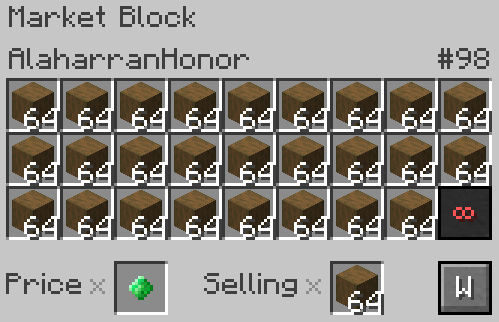
[-] Owner name is listed in the top left corner.
[-] Market (Shop) ID # is listed in the top right corner.
[-] All Inventory slots are for Market (Shop) stock.
[-] (With Admin Access) Infinity button permits infinite stock to sell. (It will use up all legit stock first, then become infinite).
[-] Price and Selling are shown in their respective slots. They can not be edited in this screen.
[-] Withdraw button withdraws all income (Thyms, items, and blocks) gained through sales.
Any item or block (vanilla or modded) can be used in either Selling or Price, permitting stack size and not blacklisted.
Additional Information
[-] A Market (Shop) will not clear its Selling or Price upon selling out all its stock. It will remain until changed/cleared.
[-] A Market (Shop) can ONLY be mined by the owner, trustee, or Admin.
[-] A Market (Shop) can ONLY change what its selling if both its stock and withdraw are empty. Withdraw to empty the income!
[-] Withdraw is ONLY deposited into one's open inventory slots. Please clear your inventory and withdraw again.
[-] Commands assist in other needs one might have with their shops. Please see the Commands page.
Known Issues
If you find an issue, please report it to our bugs channel on Discord. We ask that you look to see if your issue was reported first!
Changelog
View Changes
This is not a complete list of version changes / fixes. It is a changelog of relevant wiki-related version information.
| MC Version | Release | Notes |
| 1.18.2 | ||
| 1.16.5 |
Data Values
Functions
Giftbags
Description: Creating a giftbag is a function that permits players to 'bundle' things into the inventory of a item. Meaning you can have a simple item that when opened gifts all the other things stored within it.
Obtaining
Giftbags cannot be crafted, but are acquired via commands only.
The /swecom giftbag [name] command can only be used on whitelisted items via the common config.
Creating a Giftbag
Hold a whitelisted (config) item in hand and use the command /sweconm giftbag namehere
"Successfully turned [name] into a giftbag."
Once converted into a giftbag, right-click the giftbag in hand to open the giftbag GUI. There are 27 slots (3 rows) which can be used to store gifts to give to another player.
The giftbag GUI can be closed at any time by pressing escape and items will remain stored within. Pressing Seal in the top right corner will seal the items within. While in this state, the item/block cannot be used in any way other than opening it and any attempts to do so will yield the items within.

Shown: A giftbag GUI for a SWEM ribbon stuffed with goodies. Note - the layout will not be seen by the recipient!
"This item cannot be used as a giftbag"
The item you are trying to use is not whitelisted as a giftbag item in configs.
"This item can no longer be used as a giftbag."
The item you are trying to use has already been used as a giftbag 2 times and cannot be used again.
"Cannot convert multiple items at once. Please hold only 1 item in a stack."
You must be holding a single item only in-hand to create a giftbag.
"This item is already a giftbag"
The item you are trying to use already contains items (is a giftbag) - open it, or leave it as a bundled giftbag.
Usage
Right-clicking a sealed giftbag will eject all items into the player's inventory. If their inventory is full, the items will be dropped. Once opened, the item can be used without issue, such as placing ribbons or rosettes on a wall, or in an item frame. The item will keep the giftbag name.
The giftbag is designed as a pleasantry for player-run events but it can function as a backpack-like exploit. To help prevent this, only whitelisted items can be used as giftbags and any whitelisted item can only be used twice. If no items are whitelisted, then no item can be used as a giftbag.
Known Issues
- [-] There is no way to reliably see if an item is a gift-bag without right-clicking it (yielding any items within and reducing it's number of re-uses). While creating a giftbag does give the item a name, this can easily be done via anvil, making it an unreliable means of determining whether an item is a giftbag or not. You can re-run the giftbag command, if it is already one you will be notified, but this will be limited to players who have access to this command.
Changelog
PVP
Description: If enabled via configs, players can have money stolen from their wallet during PVP.
Stealing Money
This information is based on the default values of SWEConM, these values can be configured in common configs!
Money can be stolen from a player when killed in combat on servers that permit PVP. This money will be given to the victor of the combat. If PVP is disabled, this function will not have any effect.
Amount
The amount stolen depends on the config specified value - by default this is 15%. This means upon a player's death in PVP combat, up to 15% of their total funds can be stolen.
Wealth
The amount stolen, or whether any funds can be stolen at all, also depends on the config specified value for wealth. By default a player must have a minimum of 100 Thyms in their wallet or wristlet to be stolen from. If they have less than 100, there is 0% chance they will lose any money following a PVP related death.
Protecting Funds
A player's money is only at risk if:
- The server permits PVP and the config has a greater than 0% chance of funds being stolen
- They have higher than the minimum wealth for PVP stealing in their wallet / wristlet
- They are carrying a deposit bag with money (and keepInventory is disabled) which can be dropped upon death
Wallet funds are associated with you as a player - the wallet or wristlet lets you access it but you can be stolen from with or without one. Keep the wallet value below the stealing wealth, or withdraw your funds to keep safely in a vault.
Players can protect their money by:
- Storing it securely in a SWEConM vault (coins / coins in a deposit bag)
- Storing it securely in an Ender Chest
- Storing is securely on a property with landclaim that does not permit other player's access to their valuables
State Deputy Mode
State Deputy Mode is for Admins to use to function on behalf of the server (AKA the State).
Toggle
This function is toggled on/off with the command of /sweconm admin state_deputy. If affects on the player who toggles it and only if that player has Admin Access. This automatically toggles itself off upon log out.
@State
Admins are able to transfer to/from State balance, transfer to/from State Market (Shop) ownerships, refill/withdraw Markets (Shops), and allow an Admin to toggle the Market (Shop) to infinite stock.
Purpose
An Admin functioning on behalf of the State allows for them to place Markets (Shops) without it affecting their own personal Market (Shop) Cap because its placing them under the ownership of the State.
Additional purposes include:
- Making a "Starter Market" for free/cheap items for new players
- Encouraging server cleanliness by the State buying unwanted items
- "Donate Thyms to Build" drives AKA player chosen builds
- Holding funds and Markets (Shops) for temporary safe keeping
- Giving or collecting from @all, @online, and @void (Also known as "Merry Christmas! Everyone online gets a free T500!)